
1. Introduction
This manual provides essential information for the safe and efficient operation of your POWLAND 6000W 48V Hybrid Pure Sine Wave Inverter, model SMR-6KW. This device integrates a 6000W pure sine wave inverter, a 120A MPPT solar charge controller, and a battery charger into one compact unit. It is designed to provide uninterrupted power to various loads, supporting multiple charging and output modes for flexible energy management.
Please read this manual thoroughly before installation and operation to ensure proper use and to prevent damage to the unit or injury to personnel. Keep this manual for future reference.
2. Safety Information
WARNING: This section contains important safety instructions that must be followed during installation and operation of the inverter. Failure to follow these instructions may result in electric shock, fire, serious injury, or death.
- Installation must be performed by qualified personnel in accordance with all local electrical codes and regulations.
- Before installing or using the inverter, read all instructions and cautionary markings on the unit, batteries, and all appropriate sections of this manual.
- Do not disassemble the inverter. If service is required, contact POWLAND customer support. Incorrect reassembly may result in electric shock or fire.
- To reduce the risk of electric shock, disconnect all wiring before attempting any maintenance or cleaning. Turning off controls will not reduce this risk.
- Never connect the inverter to AC utility power if the unit or wiring is damaged.
- Ensure proper ventilation. The inverter generates heat during operation.
- Do not expose the inverter to rain, snow, spray, or any liquids.
- Use only recommended accessories. The use of non-recommended accessories may result in fire, electric shock, or injury.
- This inverter is designed for indoor use.
3. Setup
3.1 Unpacking and Inspection
Upon receiving the inverter, carefully unpack it and inspect for any shipping damage. Ensure all components listed in the packing list are present. If any damage or missing parts are found, contact your dealer immediately.
3.2 Mounting the Unit
The inverter should be mounted vertically on a wall or other sturdy surface. Choose a location that is:
- Protected from direct sunlight, heat, and moisture.
- Well-ventilated to allow for proper heat dissipation.
- Accessible for wiring and maintenance.
- Away from flammable materials.
Ensure there is sufficient clearance around the unit for airflow, especially above and below the ventilation openings.
3.3 Electrical Connections
All electrical connections must be made in the correct sequence to prevent damage. Refer to the connection diagram below.

- Battery Connection: Connect the 48V battery bank (lead-acid or lithium) to the inverter's battery terminals. Ensure correct polarity. The inverter supports batteryless mode, but for hybrid operation, batteries are required.
- PV Array Connection: Connect the solar panels to the PV input terminals. Ensure the maximum PV input power (6000W), maximum PV input current (18A), and maximum PV open circuit voltage (500Vdc) are not exceeded. The PV array MPPT voltage range is 60-450Vdc.
- AC Input Connection: Connect the AC utility grid or a generator to the AC input terminals. The inverter supports 240V AC input.
- AC Output Connection: Connect your home loads to the AC output terminals. The inverter provides 6000W AC output.
3.4 Initial Power-Up
- Verify all connections are secure and correct.
- Turn on the battery breaker.
- Turn on the PV array breaker (if applicable).
- Turn on the AC input breaker (if applicable).
- Turn on the inverter's power switch.
- Observe the LCD display and LED indicators for system status.
4. Operating Instructions
4.1 LCD Display and LED Indicators
The inverter features an LCD HD display and three LED indicators to provide real-time system data and status monitoring. The LCD allows for viewing various parameters and setting multiple operational modes.

4.2 Charging Modes
The SMR-6KW inverter offers four distinct charging modes to optimize energy usage:
- Hybrid Charge: Utilizes both solar and utility power to charge the battery.
- Grid Priority Charge: Prioritizes utility power for charging, using solar only when grid power is unavailable or insufficient.
- Solar Priority Charge: Prioritizes solar power for charging, using utility power only when solar power is insufficient.
- Only Solar Charge: Charges batteries exclusively from solar power.
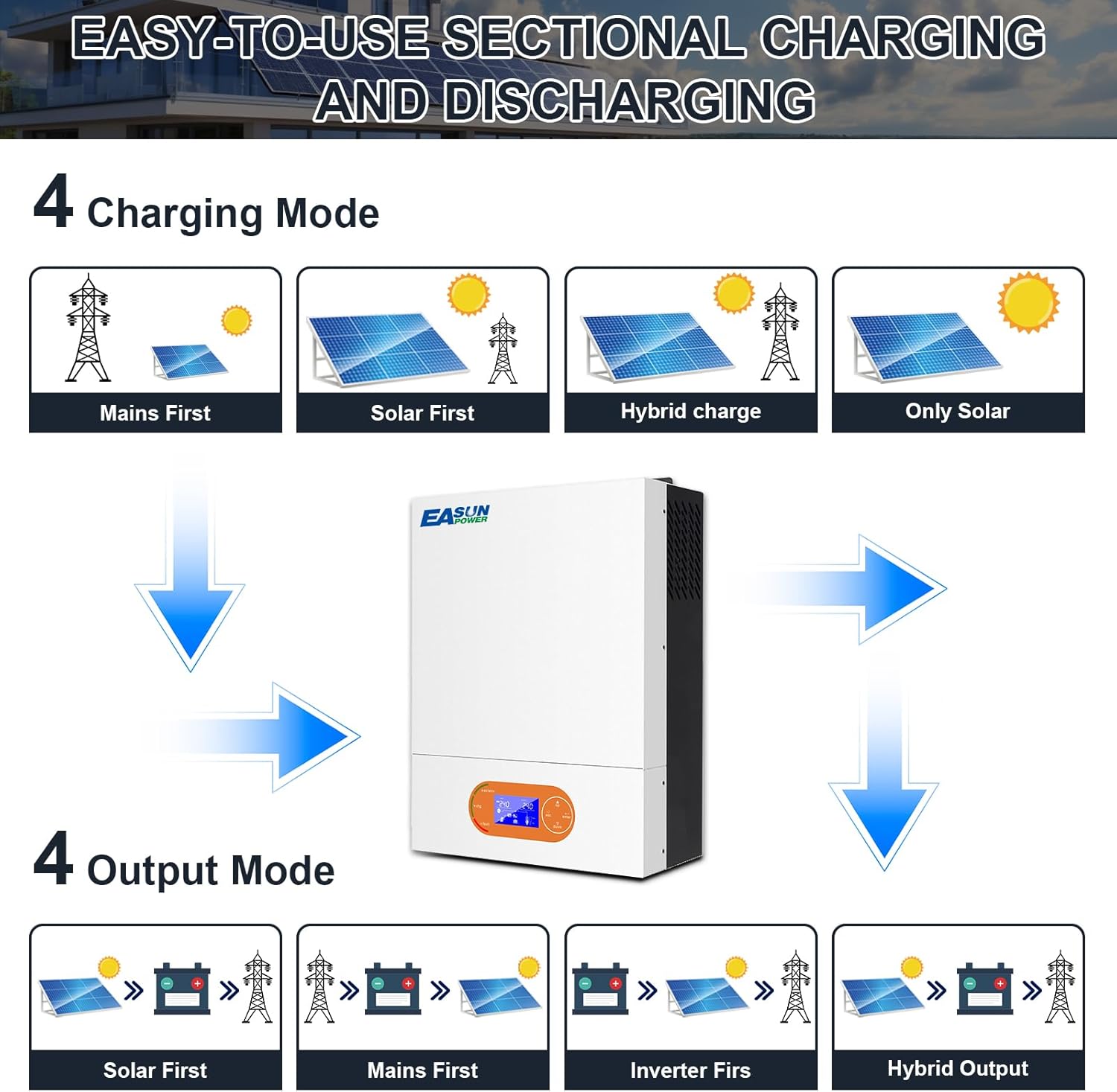
4.3 Output Modes
The inverter also provides four output modes to manage power delivery to your loads:
- Grid Priority Output: Prioritizes utility power for loads, using inverter power (from solar/battery) only when grid power is unavailable.
- Solar and Hybrid Grid Output: Uses solar power first, then battery power, and finally utility grid power to supply loads.
- Solar Priority Output: Prioritizes solar power for loads, then battery power, and finally utility power.
- Inverter Priority Output: Prioritizes inverter power (from battery/solar) for loads, using utility power only when inverter power is insufficient or battery is low.
4.4 Programmable Charge and Discharge
The POWLAND SMR-6KW series features programmable charge and discharge functions. Users can set specific charge and discharge periods to optimize energy usage based on local peak and off-peak electricity rates. This ensures efficient utilization of both grid and photovoltaic energy.
4.5 Battery Compatibility and Activation
The inverter is compatible with a wide range of 48V battery types, including AGM, Gel, lead-acid, lithium-ion, and LiFePO4. It also supports operation without batteries. A dual activation function can reactivate dormant lithium-ion batteries.

4.6 WiFi Monitoring
The inverter includes built-in WiFi for remote monitoring and management. Refer to the separate WiFi module manual or application instructions for setup and usage details.
5. Maintenance
Regular maintenance ensures the longevity and optimal performance of your inverter.
5.1 Cleaning
- Periodically clean the exterior of the inverter with a dry, soft cloth.
- Ensure ventilation openings are free from dust and debris.
- Do not use liquid cleaners or solvents.
5.2 Inspection
- Regularly inspect all wiring connections for tightness and signs of corrosion or damage.
- Check for any unusual noises or smells coming from the unit.
- Monitor the LCD display for any error codes or abnormal readings.
5.3 Fan Maintenance
The inverter is equipped with intelligent variable speed cooling fans. These fans help dissipate heat efficiently. Ensure the fan vents are not obstructed. If the fans become excessively noisy or stop working, contact customer support.
6. Troubleshooting
This section provides guidance for common issues. For problems not listed here, or if issues persist, contact POWLAND customer support.
| Problem | Possible Cause | Solution |
|---|---|---|
| Inverter does not power on | Battery not connected or low voltage; Power switch off; Blown fuse/breaker | Check battery connections and voltage; Turn on power switch; Check and reset breakers/fuses. |
| No AC output | Overload; Short circuit; Inverter fault; AC output breaker tripped | Reduce load; Check for short circuits; Reset AC output breaker; If fault persists, contact support. |
| Battery not charging from solar | PV panels not connected; Insufficient sunlight; PV voltage too low/high; MPPT controller fault | Check PV connections; Ensure adequate sunlight; Verify PV array voltage is within range; Contact support. |
| Error Code 09 (as reported by a user) | Specific internal fault, possibly related to communication or hardware. | This error code indicates a specific internal issue. Power cycle the unit. If the error persists, contact POWLAND customer support for diagnosis and repair. |
| Over-temperature warning | Insufficient ventilation; Ambient temperature too high; Fan malfunction | Ensure proper airflow around the unit; Reduce ambient temperature; Check fans for obstruction or malfunction. |
7. Specifications
The following table details the technical specifications of the POWLAND SMR-6KW Hybrid Pure Sine Wave Inverter.
| Feature | Specification |
|---|---|
| Model | SMR-6KW |
| Rated Power | 6000W |
| Battery Voltage | 48V |
| AC Input Voltage | 240V |
| AC Output Voltage | 240V |
| Max. PV Input Power | 6000W |
| Max. PV Input Current | 18A |
| Max. PV Open Circuit Voltage | 500Vdc |
| MPPT Voltage Range | 60-450Vdc |
| MPPT Controller Current | 120A |
| Product Dimensions | 30.2 x 12.6 x 40 cm |
| Product Weight | 10 kg |
| Display Type | Digital Display |
| Battery Capacity (Recommended) | 200 Ah |
| Manufacturer | EASUN POWER |
8. Warranty and Support
POWLAND products are designed for reliability and performance. For warranty information, please refer to the warranty card included with your product or visit the official POWLAND website. Keep your purchase receipt as proof of purchase.
For technical support, troubleshooting assistance, or service inquiries, please contact POWLAND customer service through the following channels:
- Website: www.powland.com (Hypothetical link, please replace with actual if available)
- Email: support@powland.com (Hypothetical email, please replace with actual if available)
- Phone: Refer to your regional support contact information.
When contacting support, please have your product model (SMR-6KW) and serial number ready.

