
1. Introduction
Thank you for choosing the Fuzion Hanging Scale, Model MCS-200-BK. This digital hanging scale is designed for accurate and reliable weighing of various items up to 440 pounds (200 kg). Its compact and portable design makes it suitable for a wide range of applications, including fishing, hunting, farming, and general-purpose weighing. This manual provides detailed instructions for the proper setup, operation, and maintenance of your scale.
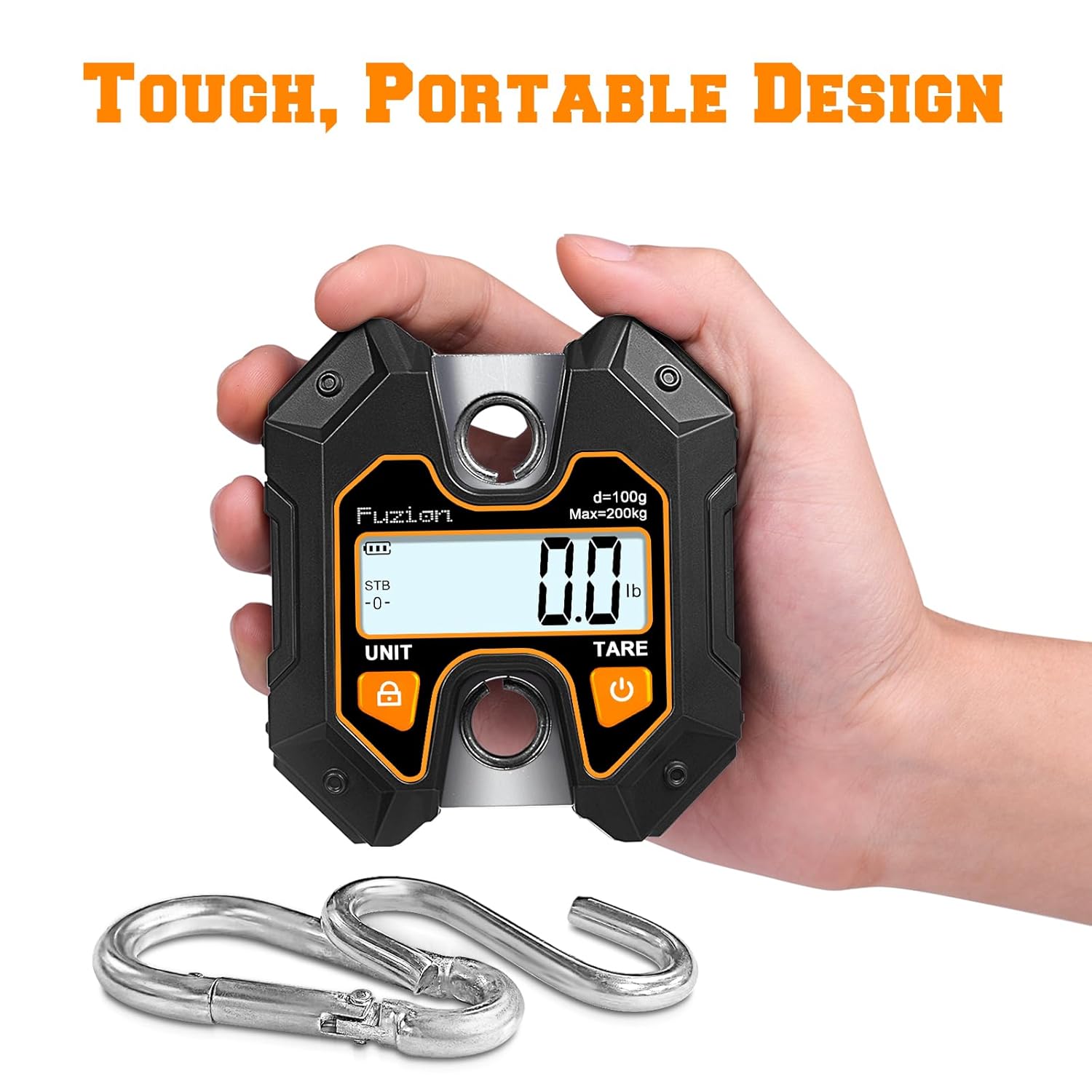
Figure 1: The Fuzion Hanging Scale, demonstrating its portable design.
2. Safety Information
- Do not overload the scale beyond its maximum capacity of 440lb (200kg). Overloading can damage the internal sensors and lead to inaccurate readings.
- Ensure the scale is securely hung from a stable support before attaching any items for weighing.
- Keep the scale away from extreme temperatures, humidity, and direct sunlight.
- Avoid dropping or subjecting the scale to strong impacts, as this may affect its accuracy and functionality.
- Do not attempt to disassemble or repair the scale yourself. Contact customer support for assistance.
- Keep batteries out of reach of children. Dispose of used batteries responsibly.
3. Package Contents
Verify that all items are present in the package:
- Fuzion Hanging Scale (Model MCS-200-BK)
- Battery Pack (typically AAA batteries)
- User Manual (this document)
4. Product Features
The Fuzion Hanging Scale offers a range of features designed for convenience and accuracy:
- High Capacity & Precision: Measures up to 440lb (200kg) with 0.2lb (0.1kg) increments.
- Multiple Units: Easily switch between pounds (lb), kilograms (kg), and Newtons (N).
- Hold Function: Freezes the measurement on the display for easy reading.
- Tare Function: Allows for easy net weight calculation by subtracting the weight of a container.
- Portable Design: Compact handheld size for easy transport and storage.
- Easy-to-Read Display: Features an LCD display for clear visibility of measurements.
- Durable Construction: Made from Acrylonitrile Butadiene Styrene (ABS), Aluminium, Iron, and Stainless Steel for longevity.

Figure 2: Various applications of the Fuzion Hanging Scale.
5. Setup
The Fuzion Hanging Scale is designed for quick and easy setup with no complex assembly required.
- Install Batteries: Open the battery compartment on the back of the scale and insert the included batteries, ensuring correct polarity.
- Attach Hooks: Securely attach the provided hooks to the top and bottom loops of the scale. The top hook is for hanging the scale, and the bottom hook is for attaching items to be weighed.
- Power On: Press the power button (usually marked with a power symbol) to turn on the scale. The display will light up and show "0.0" or "0.00".

Figure 3: Unboxing and attaching the hook for immediate use.
6. Operating Instructions
6.1. Power On/Off
- To turn on the scale, press the POWER button (often marked with ⏻).
- To turn off the scale, press and hold the POWER button for a few seconds until the display turns off. The scale will also automatically shut off after a period of inactivity to conserve battery life.
6.2. Unit Selection
- With the scale powered on, press the UNIT button to cycle through the available weighing units: pounds (lb), kilograms (kg), and Newtons (N).
- Select the desired unit before weighing.
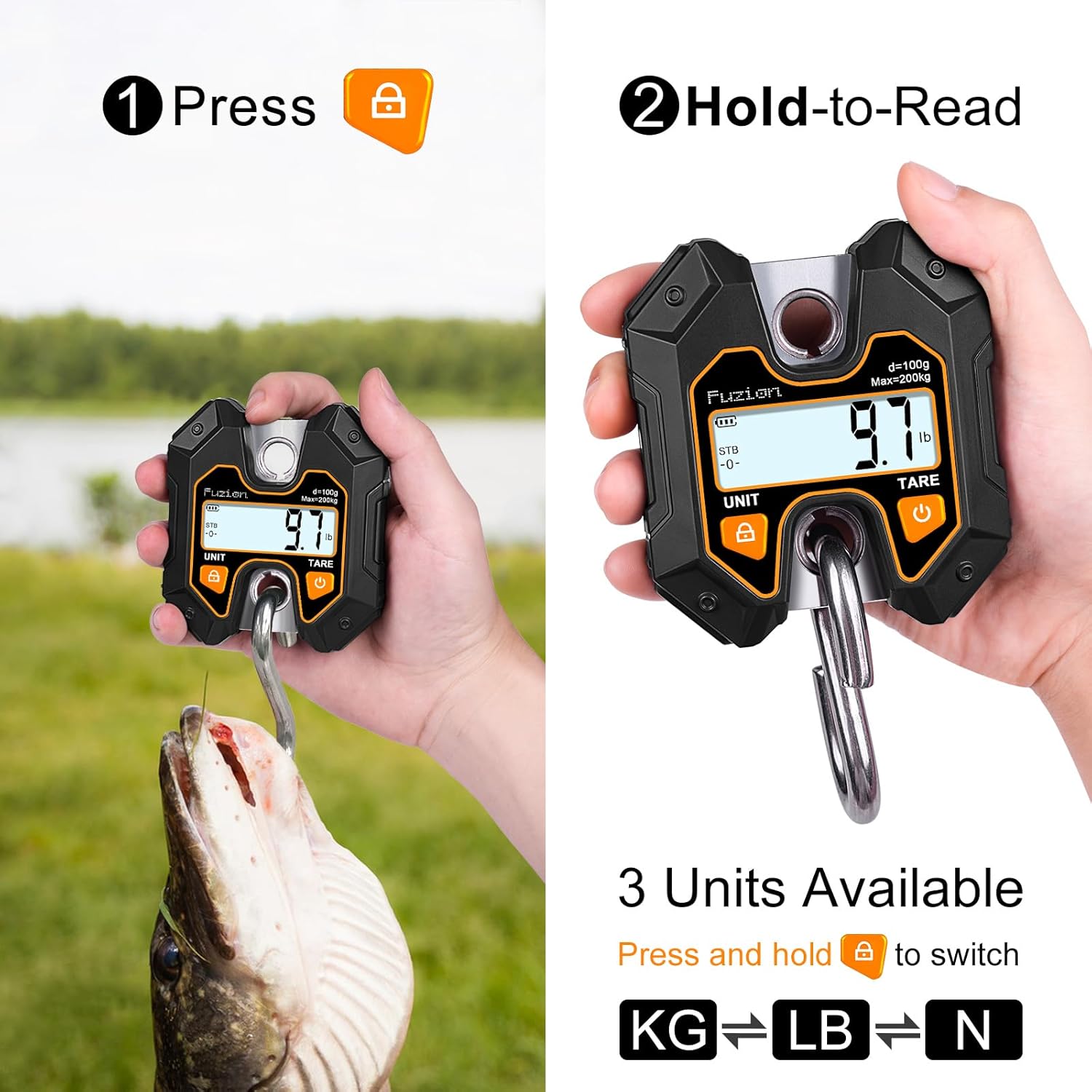
Figure 4: Using the Hold function and selecting weighing units.
6.3. Hold Function
- To activate the Hold function, press the HOLD button (often marked with a lock symbol 🔒) while an item is being weighed. The display will freeze the current weight, allowing you to remove the item and read the measurement clearly.
- Press the HOLD button again to release the hold and return to live weighing mode.
6.4. Tare Function
- The Tare function allows you to subtract the weight of a container or attachment, so you only measure the net weight of the contents.
- First, hang the empty container or attachment on the scale.
- Once the weight stabilizes, press the TARE button. The display will reset to "0.0" (or "0.00").
- Now, place the items you wish to weigh into the container. The scale will display only the weight of the items.
- To exit Tare mode, remove all items and the container, then press the TARE button again, or power cycle the scale.
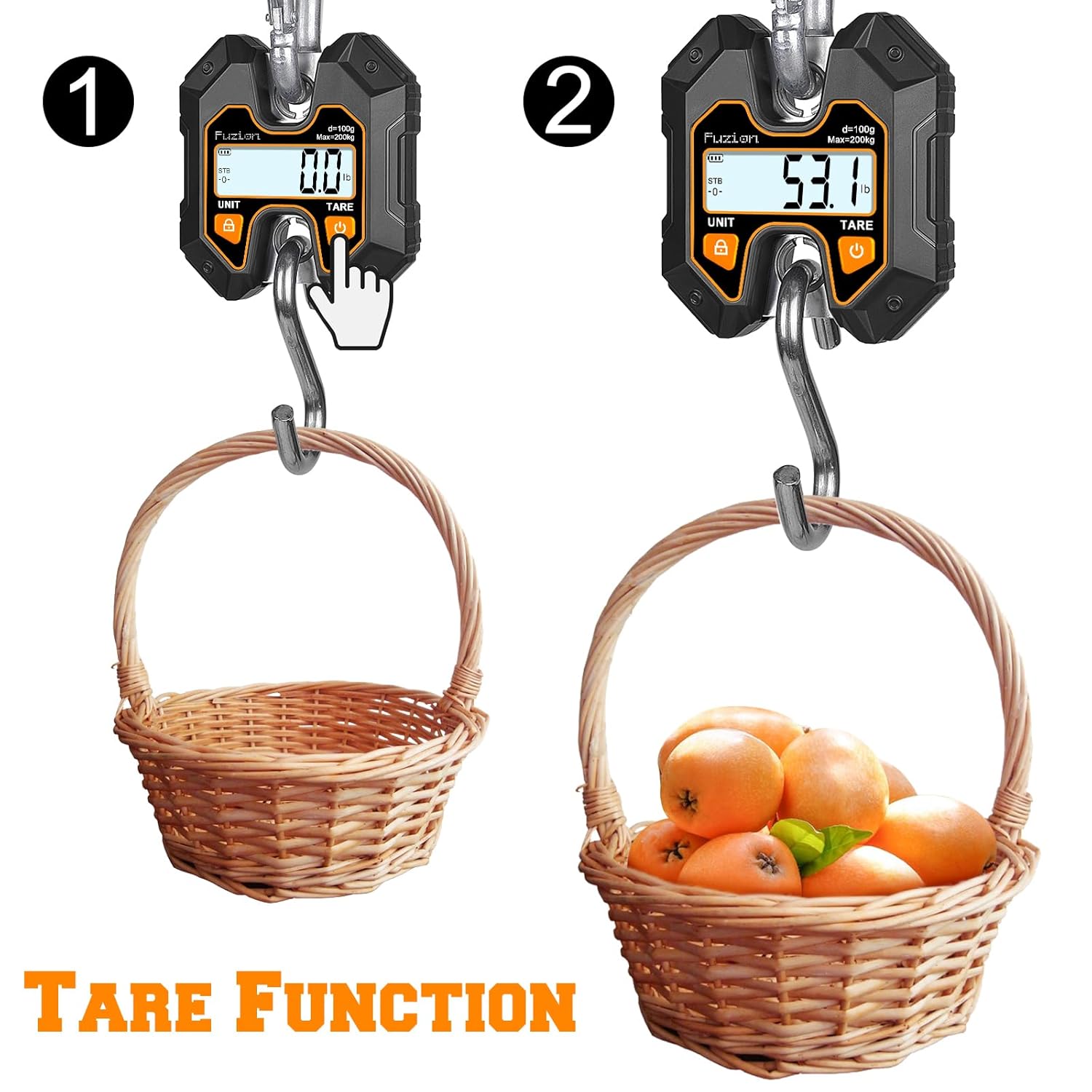
Figure 5: Step-by-step demonstration of the Tare function.
6.5. Weighing Procedure
- Ensure the scale is powered on and set to your desired unit (lb, kg, or N).
- Hang the scale securely from a stable support point.
- If using a container, perform the Tare function as described above.
- Carefully attach the item to be weighed to the bottom hook of the scale.
- Allow the reading to stabilize. The weight will be displayed on the LCD screen.
- If needed, press the HOLD button to freeze the reading.
- Remove the item from the hook.
7. Maintenance
- Cleaning: Wipe the scale with a soft, damp cloth. Do not use abrasive cleaners or immerse the scale in water.
- Storage: Store the scale in a dry, cool place when not in use. If storing for an extended period, remove the batteries to prevent leakage.
- Battery Replacement: When the battery indicator appears on the display, replace the batteries with new ones of the same type.
8. Troubleshooting
| Problem | Possible Cause | Solution |
|---|---|---|
| Scale does not turn on. | Dead or incorrectly installed batteries. | Replace batteries or ensure they are installed with correct polarity. |
| Inaccurate readings. | Overload, unstable hanging point, or scale not zeroed. | Ensure weight is within capacity, hang from a stable point, and press TARE before weighing. |
| Display shows "OL" or "EEEE". | Overload. | Remove the item immediately. The weight exceeds the scale's maximum capacity. |
| Display is dim or flickering. | Low battery. | Replace batteries. |
9. Specifications
- Model: MCS-200-BK
- Brand: Fuzion
- Maximum Capacity: 440 Pounds (200 Kilograms / 1960 Newtons)
- Accuracy: 0.1kg / 0.1lb / 0.1N
- Error Margin: ±200g
- Weighing Units: Pounds (lb), Kilograms (kg), Newtons (N)
- Display Type: LCD
- Special Features: Easy Setup, Easy-to-Read Display, Hold Function, Portable, Tare Function
- Material: Acrylonitrile Butadiene Styrene (ABS), Aluminium, Iron, Stainless Steel
- Item Weight: 0.34 Kilograms
- Power Source: Battery Pack (Included)
- Recommended Uses: Animals, Fish, Medicines, Packages

Figure 6: Key specifications and material composition of the scale.
10. Warranty and Support
Fuzion products are manufactured to high-quality standards. For information regarding warranty coverage or technical support, please refer to the warranty card included with your purchase or visit the official Fuzion website. Please retain your proof of purchase for warranty claims.