

1. Introduction
Thank you for choosing the GE Connectée Smart Impedance Scale. This device is designed to provide accurate measurements of your body weight and various body composition metrics, helping you monitor your health and fitness progress. Please read this manual carefully before using the scale to ensure proper operation and safety.

Image: Front view of the GE Connectée Smart Impedance Scale, displaying its digital screen and electrode pads.
2. Safety Information
- Do not use this device if you have a pacemaker or other internal medical device.
- Pregnant women should consult their doctor before using this scale.
- Ensure the scale is placed on a hard, flat surface for accurate measurements. Avoid carpets or uneven floors.
- Keep the scale dry. Do not immerse it in water or use abrasive cleaners.
- The scale's surface can be slippery when wet. Step on and off carefully.
- This scale is for household use only and not intended for medical diagnosis or treatment.
3. Package Contents
Please check the package for the following items:
- GE Connectée Smart Impedance Scale
- User Manual (this document)
- Batteries (if included, typically AAA or AA)
4. Setup
4.1 Battery Installation
- Open the battery compartment on the back of the scale.
- Insert the batteries, ensuring correct polarity (+ and -).
- Close the battery compartment securely.
4.2 App Download and Pairing
- Scan the QR code on the scale or in the manual (if provided) or search for the 'GE Connectée' app in your smartphone's app store (iOS or Android).
- Download and install the app.
- Create a user profile and enter your personal information (gender, age, height, activity level). This is crucial for accurate body composition analysis.
- Enable Bluetooth on your smartphone.
- Step onto the scale to activate it. The app should automatically detect and pair with the scale. Follow any on-screen prompts in the app.
4.3 Initial Calibration
Before first use or after moving the scale, perform an initial calibration:
- Place the scale on a hard, flat surface.
- Step onto the scale briefly, then step off. The display should show '0.0' or similar, indicating it's ready.
5. Operating Instructions
5.1 Taking a Measurement
- Ensure your feet are clean and dry.
- Step onto the scale barefoot, placing your feet on the electrode pads. Stand still.
- The scale will display your weight first, then cycle through other body composition metrics.
- Keep the app open on your smartphone during measurement to ensure data synchronization.
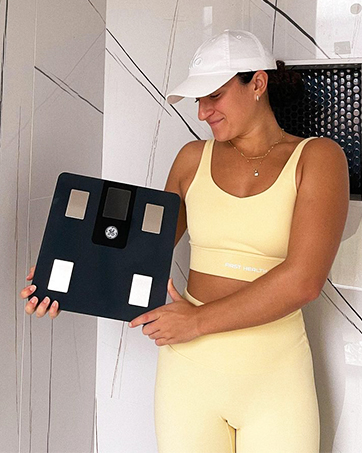
Image: A person standing barefoot on the GE Connectée Smart Impedance Scale, demonstrating proper usage for measurement.
5.2 Understanding Display Readings
The scale's display will show your weight. For detailed body composition metrics (BMI, body fat, muscle mass, water percentage, bone mass, etc.), refer to the GE Connectée app. The app provides comprehensive analysis and historical data tracking.
6. Maintenance
6.1 Cleaning
- Wipe the scale surface with a soft, damp cloth.
- Do not use chemical cleaning agents or abrasive materials.
- Ensure the scale is completely dry before storage or next use.
6.2 Storage
Store the scale in a cool, dry place, away from direct sunlight and extreme temperatures. Avoid placing heavy objects on the scale when not in use.
7. Troubleshooting
- No display/Low battery: Replace batteries. Ensure they are inserted with correct polarity.
- Inaccurate readings: Ensure the scale is on a hard, flat surface. Recalibrate by stepping on and off. Ensure feet are clean and dry.
- No body composition data: Ensure you are stepping on the scale barefoot with feet on electrodes. Check app connection and user profile settings.
- App not connecting: Ensure Bluetooth is enabled on your phone. Restart the app and the scale. Try re-pairing the device in the app settings.
- Error message 'Lo': Indicates low battery. Replace batteries.
- Error message 'Err': Indicates overload. The maximum weight capacity is 180kg.
8. Specifications
| Specification | Value |
|---|---|
| Brand | GE |
| Model | Connectée Balance Impédancemètre 180kg |
| ASIN | B0DBXW2PC1 |
| Manufacturer | Globel eFit (Licensed by GE) |
| Maximum Capacity | 180 kg |
| Connectivity | Bluetooth (for app synchronization) |
9. Warranty and Support
GE products are manufactured to high-quality standards. For warranty information and customer support, please refer to the warranty card included with your product or visit the official GE Connectée website. Keep your purchase receipt as proof of purchase.
For technical assistance or further inquiries, please contact GE customer service through the contact information provided on the official website or within the GE Connectée app.


