
1. Product Overview
This document provides instructions for the KRPTQJoo replacement remote control, designed for various Midea air conditioner models. This remote control offers essential functions for operating your Midea AC unit.
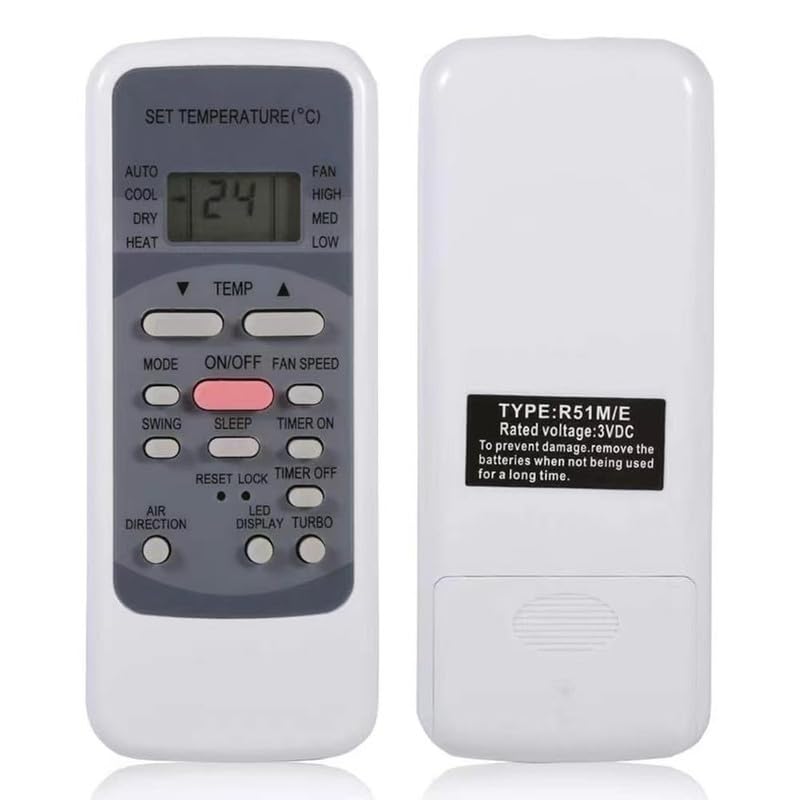
Image 1.1: Front and back view of the KRPTQJoo remote control. The front displays the LCD screen and various control buttons, while the back shows the battery compartment and product label.
Key Features:
- Infrared (IR) connectivity for reliable operation.
- No pairing or complex setup required; ready to use with compatible models.
- Controls essential air conditioner functions such as power, mode, temperature, and fan speed.
- Compact and lightweight design.
2. Important Notice Regarding Compatibility and Variations
This remote control is a replacement unit and is compatible with the Midea AC models listed in the product description. Please note the following:
- Multiple Appearances: There may be slight variations in the physical appearance or button layout of the remote control you receive, as different styles are shipped randomly. Functionality for the listed compatible models remains consistent.
- Button Functionality: Some buttons on this replacement remote may not have a corresponding function on your specific Midea AC unit if your original unit did not support that feature. Refer to your original air conditioner's manual to confirm supported features.
- No Manual or Batteries Included: This product includes the remote control unit only. Batteries (2 x AAA) and a user manual for the AC unit are not included.
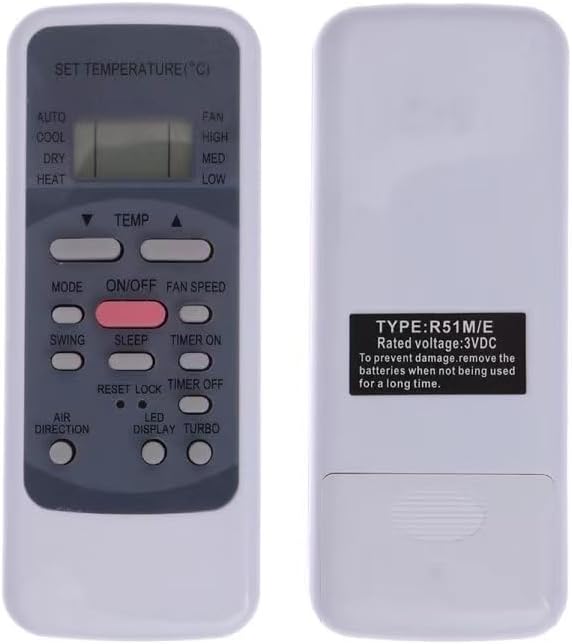
Image 2.1: An alternative style of the remote control, showing a slightly different button layout.

Image 2.2: Another alternative style of the remote control, highlighting potential variations in design.
3. Setup
3.1 Battery Installation
The remote control requires two (2) AAA batteries (not included) for operation. Follow these steps to install the batteries:
- Locate the battery compartment cover on the back of the remote control.
- Slide the cover downwards or press the latch and lift to open the compartment.
- Insert two AAA batteries, ensuring the positive (+) and negative (-) terminals align correctly with the markings inside the compartment.
- Replace the battery compartment cover by sliding it back into place until it clicks securely.

Image 3.1: The back of the remote control, illustrating the battery compartment where two AAA batteries are to be inserted.
3.2 Initial Use
This remote control is designed for immediate use with compatible Midea AC models. No pairing or complex setup procedures are required. Once batteries are installed, point the remote control towards your air conditioner and begin operation.
4. Operating Instructions
Familiarize yourself with the buttons on your remote control to operate your Midea AC unit effectively. The exact button layout may vary slightly, but the core functions are generally consistent.

Image 4.1: Front view of the remote control, displaying the LCD screen and various function buttons.
Common Button Functions:
- ON/OFF: Powers the air conditioner on or off.
- MODE: Cycles through operating modes (e.g., Auto, Cool, Dry, Heat, Fan).
- TEMP ▲ / ▼: Adjusts the temperature setting up or down.
- FAN SPEED: Changes the fan speed (e.g., Low, Med, High, Auto).
- SWING: Activates or deactivates the louver swing function.
- TIMER: Sets the timer for automatic on/off operations.
- RESET/LOCK: May reset settings or lock the remote to prevent accidental changes.
For specific advanced functions or features not listed, please consult the original user manual for your Midea air conditioner model.
5. Maintenance
Proper care and maintenance will extend the life of your remote control.
- Cleaning: Wipe the remote control with a soft, dry cloth. Do not use liquid cleaners or abrasive materials.
- Battery Replacement: Replace batteries when the remote's range decreases or the display becomes dim. Always replace both batteries at the same time with new AAA batteries.
- Storage: If the remote control will not be used for an extended period, remove the batteries to prevent leakage and potential damage to the unit.
- Avoid Exposure: Keep the remote control away from direct sunlight, high temperatures, and moisture.
6. Troubleshooting
If you experience issues with your remote control, try the following troubleshooting steps:
- Remote Not Responding:
- Check if the batteries are installed correctly with the correct polarity.
- Replace old batteries with new AAA batteries.
- Ensure there are no obstructions between the remote control and the air conditioner's receiver.
- Make sure you are within the effective operating range (up to 8 meters).
- Some Buttons Do Not Work:
- This is often due to your specific Midea AC model not supporting that particular function. Refer to your original AC manual.
- Confirm that your AC model is listed as compatible with this remote control.
- Intermittent Operation:
- Weak batteries can cause intermittent operation. Replace them.
- Ensure the remote's infrared emitter is clean and unobstructed.
7. Specifications
| Brand | KRPTQJoo |
| Model Number | Joo4725 |
| Compatible Devices | Midea Air Conditioners (RG51A(2)/E, RG51B(2)/E, RG51A(2)/EU1, RG51F2(2)/EFU1, RG51B1/CEU, RG51A/E, RG51B/E, RG51A/CE, RG51B/CE, RG51A10/E, RG51B10/E, MSAE-13CRN1) |
| Connectivity Technology | Infrared (IR) |
| Maximum Range | 8 Meters |
| Batteries Required | 2 x AAA (not included) |
| Color | Grey |
8. Support
For any questions or concerns regarding your KRPTQJoo remote control, please contact the seller directly. We aim to provide a quick response within 12 hours to assist you with your needs.
