
Introduction
Thank you for choosing the Quip 360 Oscillating Rechargeable Electric Toothbrush. This manual provides detailed instructions for the proper setup, operation, maintenance, and care of your new toothbrush. Please read this manual thoroughly before first use and keep it for future reference to ensure optimal performance and longevity of your device.
Package Contents
Your Quip 360 Oscillating Rechargeable Electric Toothbrush package includes the following items:
- Quip 360 Oscillating Rechargeable Electric Toothbrush Handle
- Oscillating Brush Head (pre-attached)
- Extra Oscillating Brush Head
- Magnetic Charging Cable (USB-A)
- Charging Stand/Base
- Mirror Mount
- Travel Case
- Instruction Guide

Image: The Quip 360 Oscillating Rechargeable Electric Toothbrush with its complete set of accessories, including the handle, brush heads, charging cable, stand, mirror mount, and travel case.
Setup
Video: An official Quip video demonstrating the unboxing, initial charging process, and basic operation of the Quip Rev 360 Oscillating Toothbrush.
Initial Charge
Your toothbrush comes pre-charged, but it is recommended to fully charge it before first use. An 8-hour charge provides up to 30 days of battery life when brushing twice daily for 2 minutes on gentle intensity.
- Connect the magnetic charging cable to the bottom of the toothbrush handle.
- Plug the USB-A end of the cable into a compatible USB-A power adapter (not included).
- The LED power button on the handle will breathe orange while charging. It will turn solid green when fully charged.
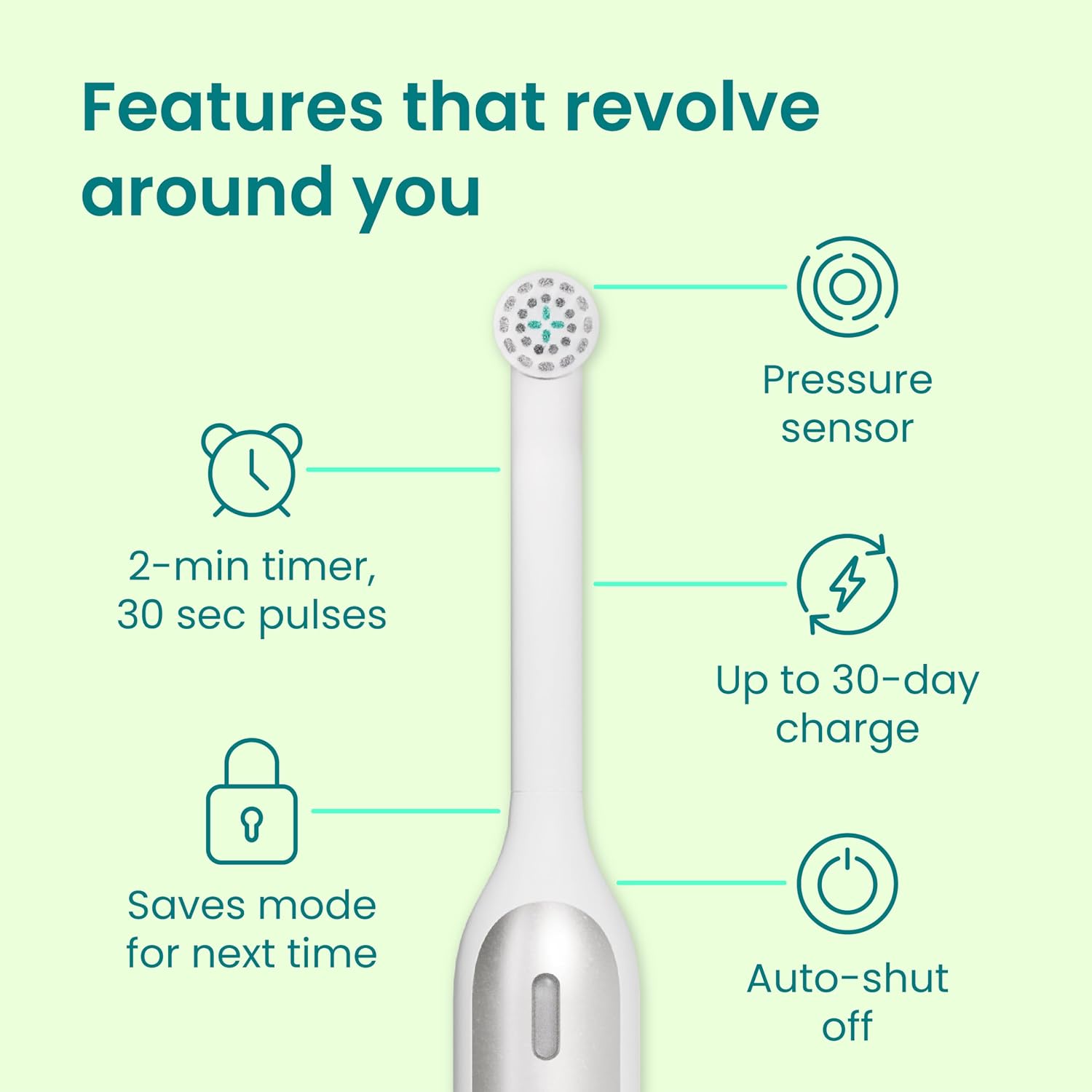
Image: Key features of the Quip toothbrush, highlighting the impressive 30-day battery life on a single charge.
Mirror Mount Installation
The included mirror mount allows for convenient storage of your toothbrush on a smooth, flat surface.
- Clean and thoroughly dry the desired smooth, flat surface (e.g., mirror, glass, tile) where you intend to place the mount.
- Peel off the protective backing from the adhesive on the back of the mirror mount.
- Firmly press the mount onto the cleaned surface for 10 seconds to ensure secure adhesion.
- Allow the adhesive to set for at least 24 hours before hanging the toothbrush.
Operation
Choosing Brushing Intensity
Your Quip toothbrush offers three brushing intensities to suit your preference:
- Gentle (Lavender Light): Ideal for sensitive teeth and gums.
- Daily (White Light): Standard intensity for everyday cleaning.
- Deep Clean (Blue Light): Our most powerful mode for an intense clean.
To select your desired intensity:
- Press the power button once to turn on the toothbrush.
- While the toothbrush is on, press and hold the power button to cycle through the three intensities. Release the button when the light indicates your preferred setting. The toothbrush will remember your last selected intensity for future use.

Image: Visual representation of the three brushing intensities: Gentle (lavender light), Daily (white light), and Deep Clean (blue light).
Brushing Technique
For an effective clean, follow these steps:
- Apply a pea-sized amount of toothpaste to the brush head.
- Press the power button to start the timed oscillations.
- Place the brush head at a 45-degree angle to your gumline, starting in one section (quadrant) of your mouth.
- Gently glide the brush over the front, back, and chewing surfaces of each tooth for approximately 3 seconds. Do not scrub; allow the brush to do the work.
- The toothbrush features a 2-minute timer with 30-second pulses. When the brush pulses, it's time to move to the next quadrant of your mouth.
- If you apply too much pressure, the built-in pressure sensor will alert you with a red light and pulses. Lighten your pressure to protect your teeth and gums.
- Continue brushing until the vibrations stop automatically after 2 minutes, indicating a complete brushing cycle.

Image: Close-up of the Quip toothbrush handle showing the pressure sensor illuminating a red light and pulsing when excessive pressure is applied during brushing.
Maintenance
Brush Head Replacement
For optimal performance and hygiene, replace your brush head every 3 months, or sooner if the bristles appear frayed or worn. This is in line with dentist recommendations.
- Gently pull off the old brush head from the handle. Dispose of the old head responsibly.
- Thoroughly clean the handle with a damp cloth. Do not submerge the handle in water.
- Ensure the handle is completely dry before attaching the new brush head.
- Click the new brush head onto the handle until it is securely in place.

Image: A close-up of the soft-bristle oscillating brush head, reminding users to replace it every three months for effective cleaning.
Cleaning Your Toothbrush and Accessories
Regular cleaning helps maintain hygiene and extends the life of your Quip products.
- Toothbrush Handle: After each use, rinse the brush head thoroughly. When replacing the brush head, wipe the handle with a damp cloth. Do not submerge the handle in water.
- Charging Stand/Base: Disassemble the stand and base periodically. Clean both parts with a damp cloth and dry completely before reassembling.
- Travel Case: Wipe the inside and outside of the travel case with a damp cloth as needed. Ensure it is dry before storing the toothbrush.
- Mirror Mount: Clean the mirror mount with a damp cloth.
- Charging Cable: Wipe the charging cable with a dry cloth. Ensure it is unplugged before cleaning.
Storage
Properly storing your Quip toothbrush helps keep it hygienic and protected.
- Travel Case: For travel or when not in use for extended periods, store your toothbrush in the provided travel case. The case is designed to be slim and breathable for extra hygiene.
- Mirror Mount: Use the mirror mount to keep your toothbrush conveniently accessible and off the countertop.
- Charging Stand/Base: The charging stand also serves as a stable base for everyday storage on your bathroom counter.

Image: The Quip toothbrush neatly stored within its slim and portable travel case, ideal for on-the-go use.
Troubleshooting
If you encounter any issues with your Quip 360 Oscillating Rechargeable Electric Toothbrush, please refer to the official troubleshooting guide for detailed solutions.
Specifications
| Feature | Detail |
|---|---|
| Package Dimensions | 9.61 x 3.86 x 2.64 inches; 14.89 ounces |
| Batteries | 1 Lithium Ion batteries required. (included) |
| Manufacturer | quip |
| Brand | Quip |
| Age Range (Description) | Adult |
| Special Feature | Pressure Sensor |
| Power Source | Battery Powered |
| Item Firmness Description | Medium |
Important Safety Information
- Do not use on children under age 3.
- Replace brush heads every 3 months for optimal performance and safety.
- Statements regarding dietary supplements have not been evaluated by the FDA and are not intended to diagnose, treat, cure, or prevent any disease or health condition.
Warranty and Support
For warranty information, product support, or any inquiries not covered in this manual, please visit the official Quip website or contact their customer service directly. Keep your purchase receipt as proof of purchase for warranty claims.


