
1. Product Overview
The Liiiyuan C2 Head Up Display (HUD) is a versatile automotive accessory designed to project essential driving data directly onto a transparent screen, enhancing driver safety and convenience. This device supports both OBD2 and GPS dual modes, making it compatible with a wide range of vehicles. It features a high-definition display with a transparent reflective panel, ensuring clear readability without ghosting.

Image 1: The Liiiyuan C2 Head Up Display unit, showcasing its transparent display panel with vehicle data.
Key Features:
- Dual Mode Operation: Supports both OBD2 and GPS modes for broad vehicle compatibility.
- High-Definition Display: Transparent reflective panel provides clear data projection without ghosting.
- Comprehensive Data Display: Shows vehicle speed, RPM, water temperature, voltage, fuel consumption, mileage, driving time, direction, altitude, and more.
- Multiple Alarm Functions: Includes overspeed, RPM, high water temperature, and low voltage alarms.
- Automatic Brightness Adjustment: Built-in light sensing system adjusts display brightness across 18 levels for optimal visibility in varying light conditions.
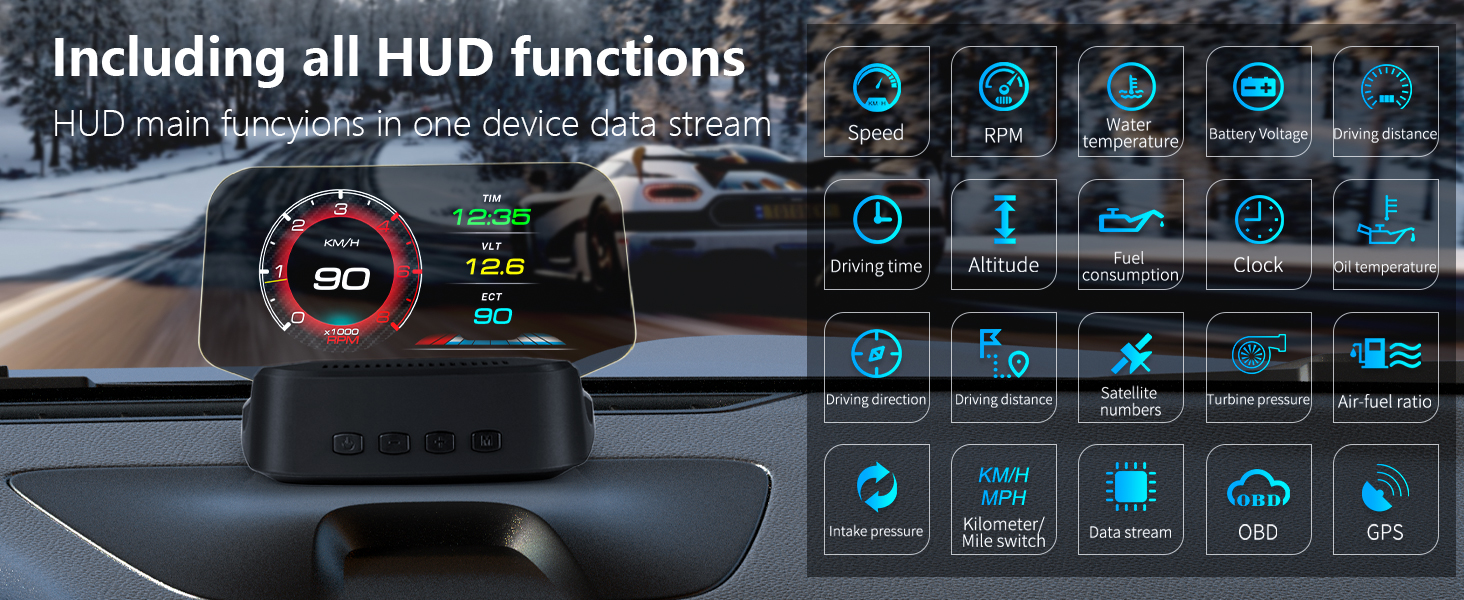
Image 2: An illustration detailing the extensive range of functions available on the C2 HUD, including speed, RPM, water temperature, and more.
2. Package Contents
Before installation, please verify that all items are present in the package:
- Liiiyuan C2 Head Up Display Unit
- OBD Cable
- USB Cable (for GPS mode only)
- Anti-slip Mat
- Instruction Manual
- Cleaning Cloth

Image 3: A visual representation of all accessories included with the Liiiyuan C2 HUD, such as the main unit, cables, and manual.
3. Setup and Installation
The Liiiyuan C2 HUD offers non-destructive installation and is designed for plug-and-play operation. It is compatible with most car models. For vehicles manufactured before 2008, only GPS mode is available via the USB cable. For vehicles manufactured after 2008, both OBD2 and GPS modes are available using the OBD cable.
Installation Steps:
- Connect Power: Plug the OBD cable into your vehicle's OBD socket. Alternatively, if your vehicle does not have an OBD interface or if you prefer GPS mode, use the provided USB cable and connect it to a cigarette lighter power source.
- Route Cable: Carefully route the cable along the A-pillar seal to conceal it and prevent interference with driving.
- Position HUD: Place the HUD unit on your dashboard using the anti-slip mat. Ensure it is positioned where the display is clearly visible on the windshield without obstructing your view of the road. Adjust the angle of the transparent reflective panel for optimal clarity.

Image 4: A step-by-step visual guide demonstrating how to install the HUD by connecting the cable, routing it, and positioning the device.

Image 5: The Liiiyuan C2 HUD installed on a vehicle dashboard, showing its compact size and placement.
4. Operating Instructions
The C2 HUD automatically powers on and off with your vehicle. Once powered, it will detect the connection type (OBD2 or GPS) and begin displaying data.
4.1 Display Modes and Data
The device offers various display interfaces that can be switched with a single click. The data displayed depends on the selected mode:
OBD Mode Functions:
- Vehicle Speed
- Engine RPM
- Water Temperature
- Voltage
- Fuel Consumption
- Single Mileage
- Total Mileage Accumulation
- Driving Time
- Driving Direction
- Intake Pressure
- Oil Temperature
- Air-Fuel Ratio
- Turbo Pressure
- Acceleration Test
- Brake Test
- Clear DTC (Diagnostic Trouble Codes)
- Read Data Stream
GPS Mode Functions:
- Vehicle Speed
- Travel Time
- Satellite Time
- Altitude
- Number of Satellites
- Driving Direction
- Single Mileage
- Voltage
- Acceleration Test
- Brake Test
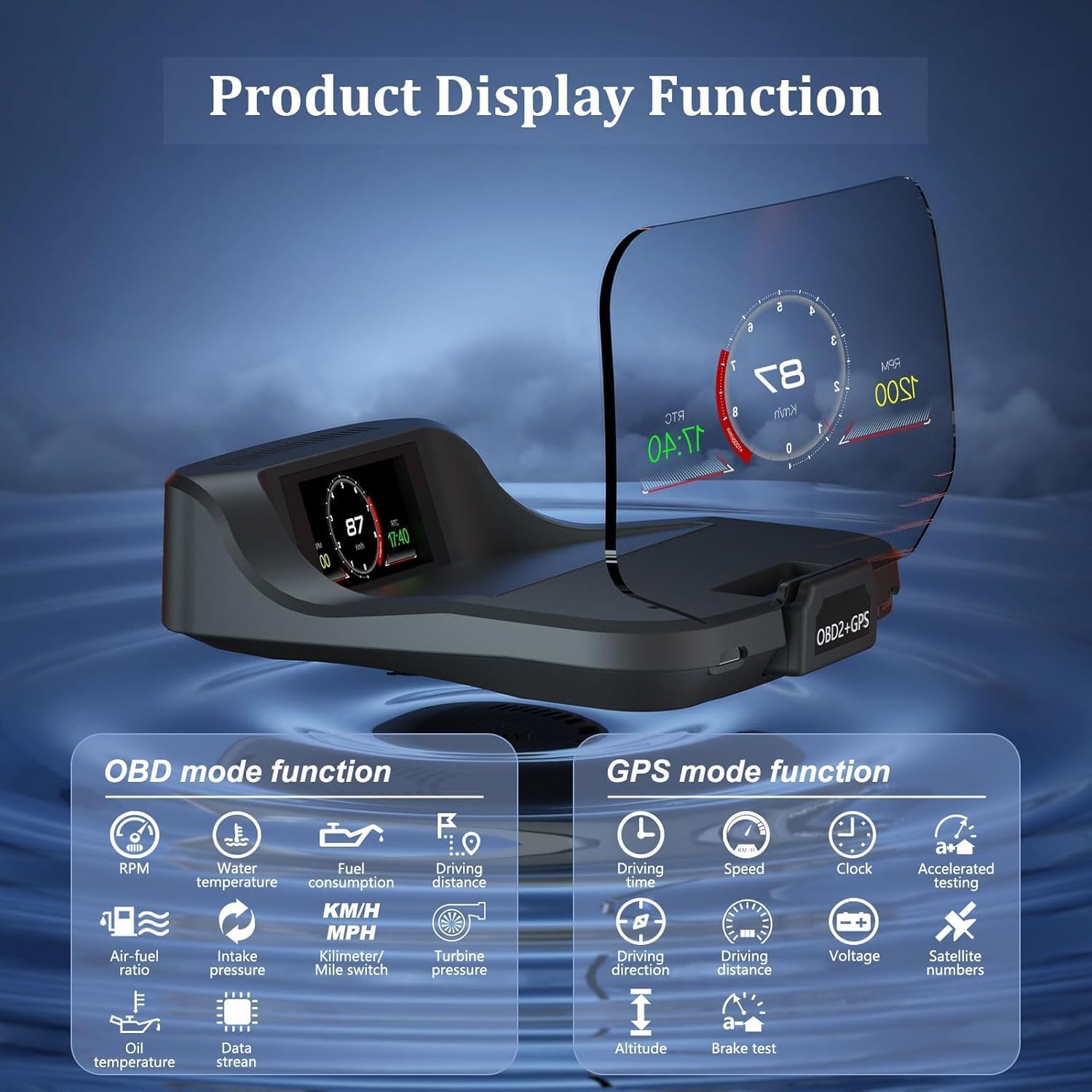
Image 6: A detailed view of the HUD's display, illustrating the distinct data sets available in both OBD and GPS operating modes.
4.2 Alarm Functions
The C2 HUD is equipped with several alarm functions to alert the driver to potential issues:
- Overspeed Alarm: Alerts when the vehicle exceeds a preset speed limit.
- RPM Alarm: Notifies when engine RPMs are too high.
- High Water Temperature Alarm: Warns of engine overheating.
- Low Voltage Alarm: Indicates low battery voltage.
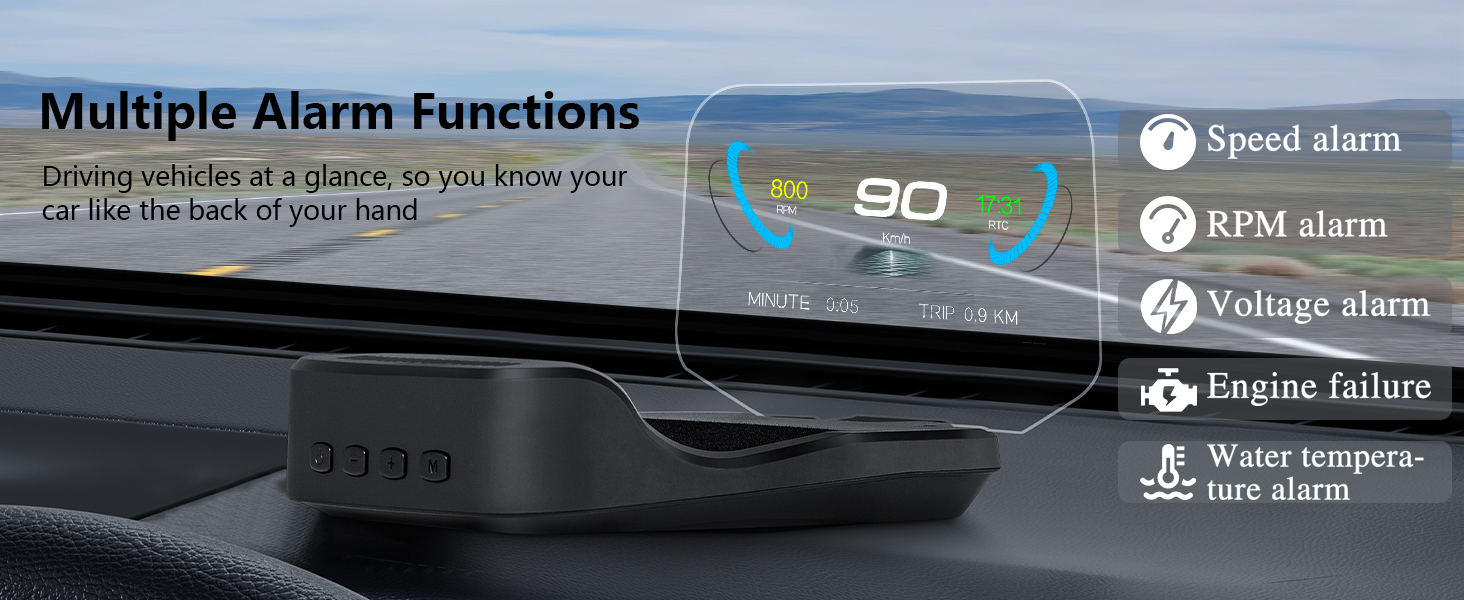
Image 7: The HUD displaying various alarm indicators, including speed, RPM, voltage, and water temperature warnings.
4.3 Settings and Customization
The HUD allows for customization of display content and alarm thresholds. Access the settings menu to adjust parameters such as:
- Language Set
- Sound Switch
- Speed Alarm Threshold
- Coolant Alarm Threshold
- RPM Alarm Threshold
- Speed Adjustment/Offset
- Battery Voltage Adjustment (BAT Adjust)
- Engine Size
- Fuel Adjustment
- Display Color (multiple options)
- Brightness (18 levels)
- Coolant Temperature Unit (CWT Unit)
- Speed Unit (KM/H, MPH)
- Sum Distance
- Power Off Time
- Sleep Voltage
- Time Adjustment
- Factory Reset
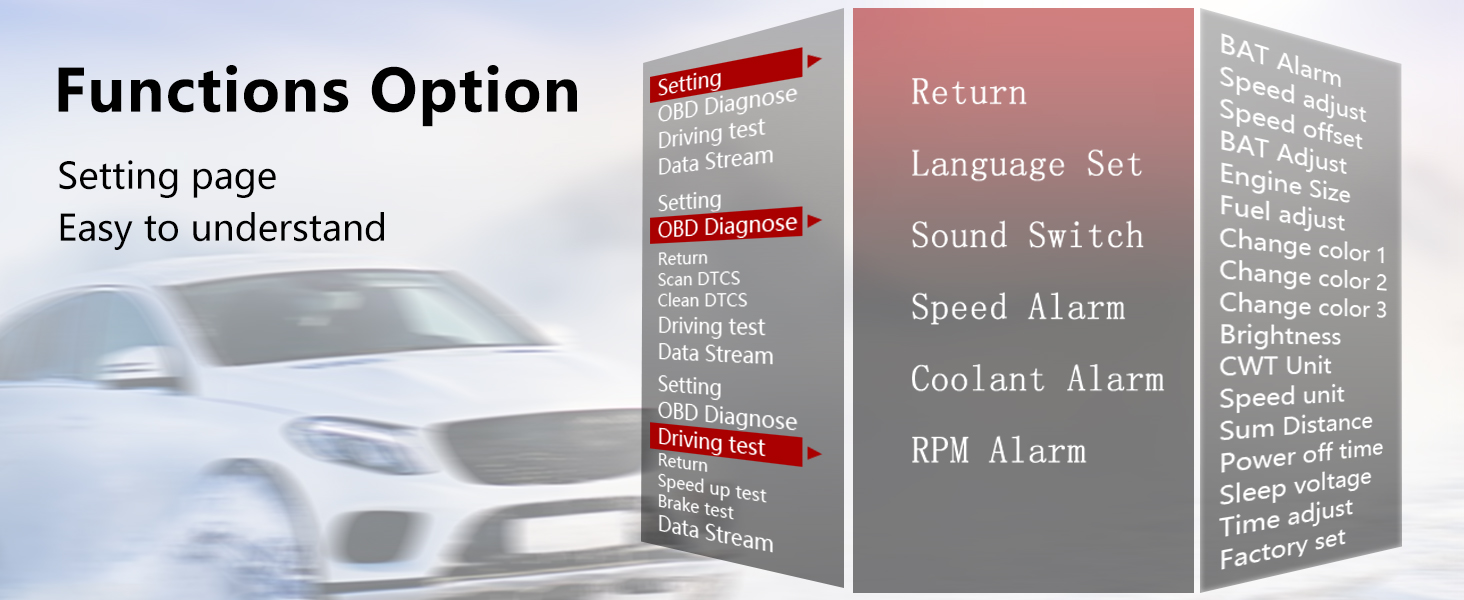
Image 8: A visual guide to the HUD's settings menu, showing various customizable options for display and alarms.
5. Maintenance
To ensure the longevity and optimal performance of your Liiiyuan C2 HUD, follow these simple maintenance guidelines:
- Cleaning: Use the provided cleaning cloth or a soft, dry, lint-free cloth to gently wipe the display screen and the unit's body. Avoid using abrasive cleaners, solvents, or chemical sprays, as these can damage the surfaces.
- Storage: When not in use for extended periods, store the HUD in a cool, dry place away from direct sunlight and extreme temperatures.
- Cable Care: Ensure that the OBD and USB cables are not kinked, pinched, or subjected to excessive tension, which could damage the wiring.
6. Troubleshooting
If you encounter any issues with your Liiiyuan C2 HUD, refer to the following common troubleshooting steps:
6.1 No Display/Power:
- Ensure the OBD or USB cable is securely connected to both the HUD unit and the vehicle's port/power source.
- Verify that the vehicle's ignition is on.
- If using OBD mode, confirm your vehicle is OBD2 compliant (generally post-2008 models).
6.2 Inaccurate Speed Reading:
- Access the settings menu and adjust the Speed Adjustment/Offset parameter to calibrate the speed with your vehicle's speedometer.
- Ensure the correct speed unit (KM/H or MPH) is selected in the settings.
6.3 Screen Dims or Blanks Out:
- The HUD features an automatic light sensing system. Ensure the sensor is not obstructed.
- In extreme hot weather conditions, some users have reported temporary dimming. If this occurs, allow the unit to cool down.
- Adjust the Brightness setting in the menu to a higher level if needed.
6.4 OBD Data Not Displaying (OBD Mode):
- Confirm your vehicle is OBD2 compliant.
- Check the OBD cable connection.
- If the issue persists, try clearing DTCs (Diagnostic Trouble Codes) through the HUD's menu or consult a professional mechanic.
6.5 GPS Signal Issues (GPS Mode):
- Ensure the vehicle is in an open area with a clear view of the sky for optimal satellite reception.
- Avoid placing the HUD directly under metallic objects or tinted windshield areas that might block GPS signals.
7. Specifications
| Feature | Specification |
|---|---|
| Brand | Liiiyuan |
| Model | C2 |
| Material | Plastic |
| Product Dimensions (L x W x H) | 5.04 x 4.32 x 3 inches |
| Item Weight | 0.37 Grams |
| Connectivity | OBD2, GPS |
| First Available Date | August 1, 2024 |
8. Support Information
For further assistance, technical support, or inquiries regarding your Liiiyuan C2 Head Up Display, please contact the manufacturer, Liiiyuan. You may also visit the official Liiiyuan Store on Amazon for product information and updates.
