
Introduction
This manual provides detailed instructions for the installation, operation, and maintenance of your ELIVED EV6011W Single Monitor Gas Spring Arm. Please read this manual thoroughly before installation and retain it for future reference. This monitor arm is designed to enhance your workspace by providing flexible and ergonomic monitor positioning.
The ELIVED EV6011W is compatible with most PC gaming monitors from 13 to 32 inches, weighing between 2-9 kg, and featuring VESA 75x75mm or 100x100mm mounting patterns. It supports both flat and curved monitors.
Safety Information
- Ensure all components are present and undamaged before installation. Do not use if any parts are missing or faulty.
- Verify that your monitor's weight and VESA pattern are within the specified limits (13-32 inches, 2-9 kg, VESA 75x75mm/100x100mm).
- Do not mount on glass tabletops. Ensure your desk thickness is between 10-70mm for clamp or grommet mounting.
- Always adjust the gas spring tension carefully. Hold the arm in a horizontal position during tension adjustment to prevent sudden movement.
- Keep children and pets away during installation.
- If you have any doubts about the installation process, consult a qualified professional.
Package Contents
Please check that all the following components are included in your package:
- Monitor Arm Assembly
- Desk Clamp (for C-clamp mounting)
- Grommet Base (for grommet mounting)
- VESA Plate (Quick Release)
- Hardware Kit (screws, washers, spacers for VESA mounting)
- Allen Keys (for adjustments)
- Instruction Manual
Setup and Installation
The ELIVED EV6011W offers two installation options: C-clamp mounting and grommet mounting. Choose the method best suited for your desk.
1. Choose Mounting Method

This image illustrates the two available mounting options: C-clamp and grommet. The C-clamp secures the arm to the edge of the desk, while the grommet mount uses a hole in the desk.

This image details the desk thickness requirements for both C-clamp and grommet mounting, which is 10-70mm. For grommet mounting, the hole diameter should be 10-60mm.
C-Clamp Mounting: Suitable for desks with a thickness of 10-70mm. Attach the C-clamp to the edge of your desk and tighten securely.
Grommet Mounting: Suitable for desks with a thickness of 10-70mm and a pre-drilled hole diameter of 10-60mm. Insert the grommet base through the hole and secure it from underneath the desk.
2. Attach VESA Plate to Monitor
Attach the quick-release VESA plate to the back of your monitor using the provided screws. Ensure the screws are tightened securely but do not overtighten. The VESA plate supports 75x75mm and 100x100mm patterns.

This image shows the quick-release VESA plate, highlighting its design for easy monitor attachment and removal. It ensures a secure fit without wobbling.
3. Mount Monitor to Arm
Slide the monitor (with the attached VESA plate) onto the monitor arm's VESA head until it clicks into place. Ensure it is firmly seated.
4. Adjust Gas Spring Tension
The gas spring tension needs to be adjusted according to your monitor's weight to ensure smooth movement and stability. Hold the arm in a horizontal position during this adjustment.
- For lighter monitors (monitor raises up): Turn the adjustment screw clockwise ("-") approximately 360 degrees per circle to reduce tension. Repeat until the monitor stays in position.
- For heavier monitors (monitor drops down): Turn the adjustment screw counter-clockwise ("+") approximately 360 degrees per circle to increase tension. Repeat until the monitor stays in position.

This diagram illustrates the gas spring tension adjustment points. Turning clockwise reduces tension for lighter monitors, while counter-clockwise increases tension for heavier monitors.
Operating Instructions
The ELIVED EV6011W monitor arm offers full motion adjustment for optimal viewing angles and ergonomic positioning.
Monitor Adjustments:
- Height Adjustment: The arm allows for a maximum height adjustment of 440mm and a minimum height of 130mm. Gently move the monitor up or down to your desired height.
- Tilt: The monitor can be tilted from +70° to -45°. Adjust the tilt to reduce glare and find a comfortable viewing angle.
- Swivel: The arm can swivel 180° at the base and at the monitor connection point. This allows you to share your screen or adjust its position horizontally.
- Rotation: The monitor can be rotated 360° (portrait to landscape and vice-versa).
- Arm Extension: The arm can extend up to 501mm, providing flexibility for screen distance.

This image illustrates the full range of motion: tilt (+70° to -45°), swivel (180°), and rotation (360°), allowing for versatile monitor positioning.

This image displays the height adjustment range (min 130mm, max 440mm) and the maximum arm extension (501mm), demonstrating how freely the screen can be positioned.
Cable Management:
The integrated cable management system helps keep your workspace tidy. Route your monitor cables through the designated channels on the arm to organize and protect them.

This image highlights the cable management feature, showing how cables can be neatly routed along the arm. It also shows a slot for storing Allen keys for convenience.
Maintenance
- Regularly check all screws and connections to ensure they remain tight and secure.
- Clean the monitor arm with a soft, damp cloth. Avoid abrasive cleaners or solvents.
- Periodically re-adjust the gas spring tension if you notice the monitor sagging or rising unexpectedly, especially after changing monitors or if the arm feels too stiff or too loose.
- Store the provided Allen keys in the designated slot on the arm for easy access.
Troubleshooting
| Problem | Possible Cause | Solution |
|---|---|---|
| Monitor sags or drops down. | Gas spring tension is too low for monitor weight. | Increase gas spring tension by turning the adjustment screw counter-clockwise ("+"). |
| Monitor rises too easily or won't stay down. | Gas spring tension is too high for monitor weight. | Decrease gas spring tension by turning the adjustment screw clockwise ("-"). |
| Monitor wobbles or feels unstable. | Mounting screws or clamp/grommet are loose. | Check and tighten all mounting screws, including VESA plate screws and desk clamp/grommet. |
| Arm movement is stiff. | Gas spring tension is too high. | Decrease gas spring tension by turning the adjustment screw clockwise ("-"). |
| Monitor does not fit VESA plate. | Incorrect VESA pattern or monitor size. | Verify your monitor's VESA pattern (75x75mm or 100x100mm) and size (13-32 inches). An additional VESA adapter may be needed for monitors without VESA holes. |
Specifications
- Model: EV6011W
- Brand: ELIVED
- Material: Metal
- Color: White
- Screen Size Compatibility: 13 - 32 inches
- Weight Capacity: 2 - 9 kg (4.4 - 19.8 lbs)
- VESA Compatibility: 75x75mm, 100x100mm
- Tilt Range: +70° to -45°
- Swivel Range: 180°
- Rotation: 360°
- Max Height Adjustment: 440 mm
- Min Height Adjustment: 130 mm
- Max Arm Extension: 501 mm
- Desk Thickness (Clamp/Grommet): 10 - 70 mm
- Grommet Hole Diameter: 10 - 60 mm
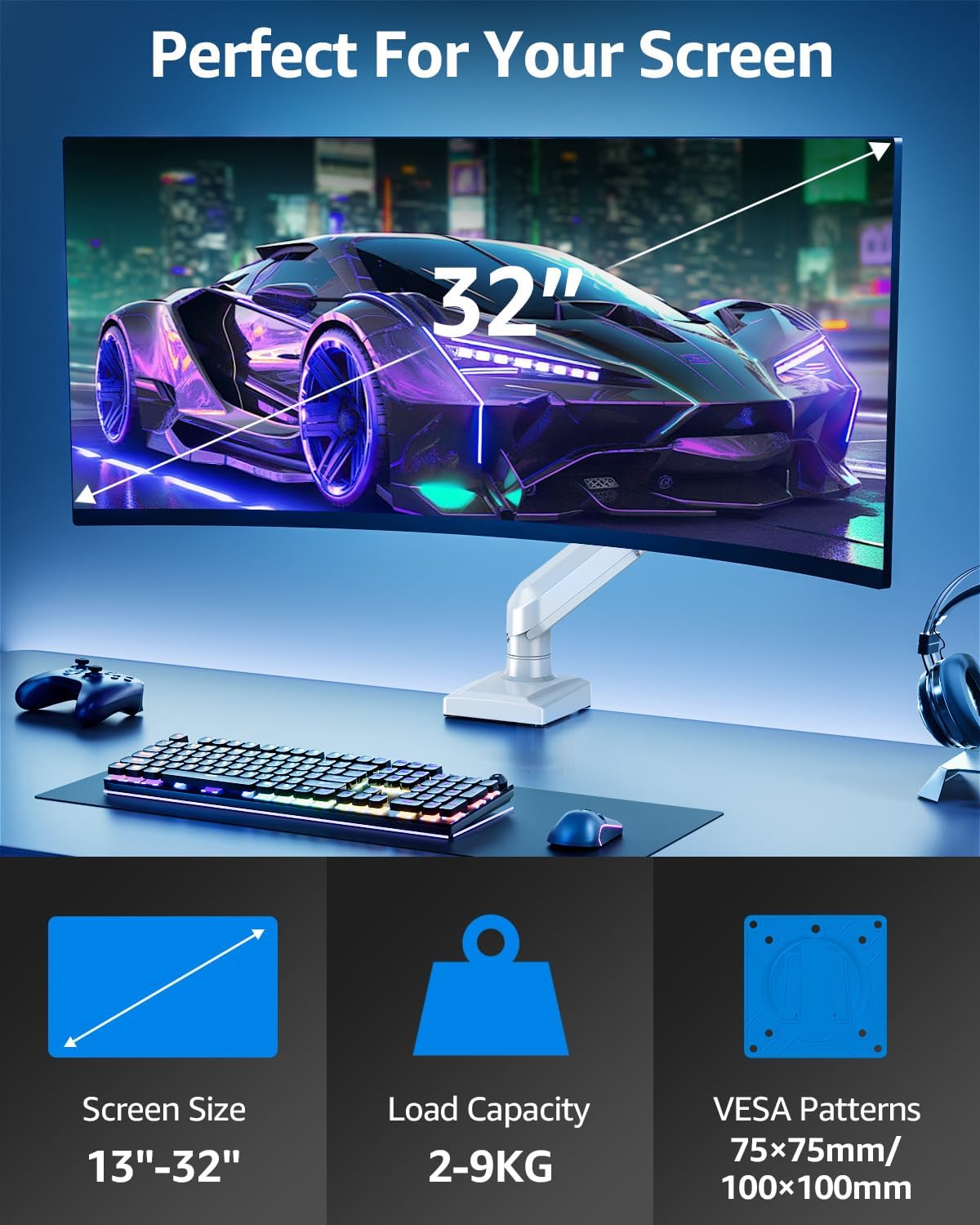
This image summarizes key specifications: screen size compatibility (13"-32"), load capacity (2-9kg), and VESA patterns (75x75mm/100x100mm).
Warranty and Support
ELIVED products are designed for durability and performance. For any questions, concerns, or assistance with your EV6011W monitor arm, please do not hesitate to contact our customer support team. Refer to your purchase documentation for specific warranty details.
You can typically find support contact information on the ELIVED official website or through your original point of purchase.
