Introduction
This manual provides detailed instructions for the safe and effective use of your Docooler Wireless Headphones Model BQ70. These earbuds feature advanced Bluetooth 5.3 technology, Active Noise Cancellation (ANC), Environmental Noise Cancellation (ENC), and a convenient slide-open charging case with a digital display. Please read this manual thoroughly before using the product and retain it for future reference.
Important Safety Information

Warning: If you find the product damaged, deformed, or exhibiting abnormal performance, please stop using it immediately and contact customer support. This image displays a universal warning symbol, emphasizing the importance of discontinuing use if any product anomalies are observed.
- Do not disassemble, repair, or modify the product.
- Keep the product away from extreme temperatures, direct sunlight, and moisture.
- Avoid dropping or subjecting the product to strong impacts.
- Use only the provided charging cable or a certified equivalent.
- Dispose of the product responsibly according to local regulations.
Package Contents
Please check to ensure all items are present in your package:
- 1 Pair of Docooler Wireless Earbuds
- 1 Charging Case
- 1 Charging Cable
- 1 User Manual (this document)
Product Overview
Familiarize yourself with the components of your Docooler Wireless Headphones.

Image 1.1: The sleek black charging case features a digital display indicating battery percentage, along with charging ports. This image highlights the compact design and the integrated battery level indicator.
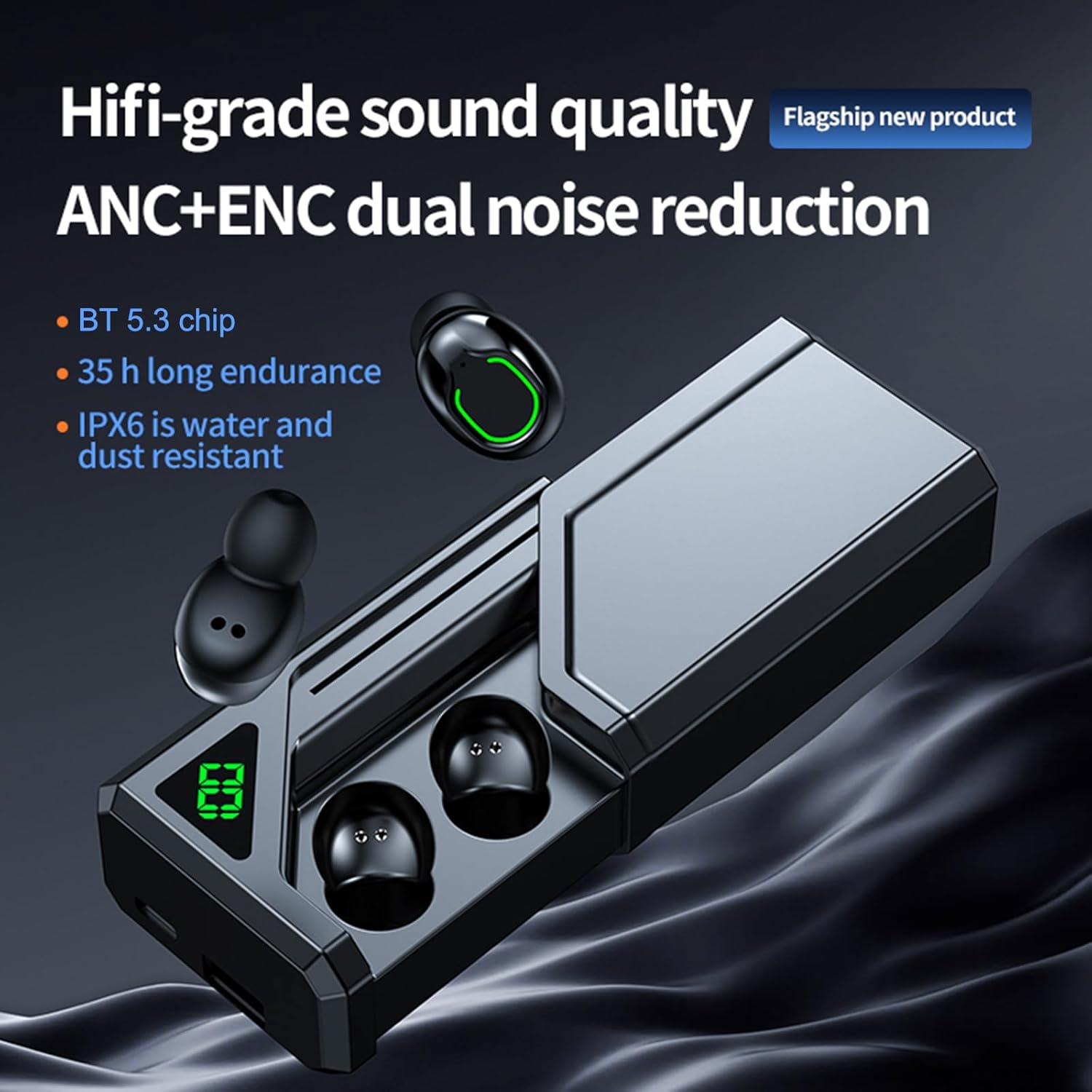
Image 1.2: This view shows the earbuds alongside the charging case, emphasizing key features such as Hi-fi grade sound quality, ANC+ENC dual noise reduction, BT 5.3 chip, 35-hour endurance, and IPX6 water and dust resistance. The slide-open design of the case is also visible.
Setup Guide
1. Charging the Earbuds and Case
Before first use, fully charge the charging case and earbuds.
- Connect the charging cable to the charging port on the case and to a USB power source (DC5V 1A recommended).
- The digital display on the case will show the battery percentage during charging.
- Place the earbuds into the charging case. Ensure they are correctly seated; indicators on the earbuds will show charging status.
- A full charge for the case and earbuds typically takes 1-2 hours.

Image 2.1: This image illustrates the charging process and battery life, showing 6-7 hours of play time, 1-2 hours of charging time, and up to 100 days of standby time for the charging case. The digital display on the case indicates its charge level.
2. Pairing with a Bluetooth Device
The earbuds utilize Bluetooth 5.3 for a stable and low-latency connection.
- Open the charging case. The earbuds will automatically power on and enter pairing mode.
- On your device (smartphone, tablet, etc.), enable Bluetooth and search for available devices.
- Select "Docooler BQ70" (or similar name) from the list of found devices.
- Once connected, you will hear an audible confirmation, and the earbuds' indicator lights will change.
- For subsequent uses, the earbuds will automatically connect to the last paired device when taken out of the case.

Image 2.2: This graphic highlights the advanced Bluetooth 5.3 chip, emphasizing its role in providing faster, more stable, and lower latency wireless connectivity for an enhanced user experience.
3. Wearing the Earbuds
For optimal sound quality and comfort, ensure the earbuds are properly seated in your ears.
- Identify the Left (L) and Right (R) earbuds.
- Gently insert each earbud into the corresponding ear canal.
- Rotate the earbud slightly until it feels secure and comfortable. A good seal is crucial for effective noise cancellation and bass response.
Operating Instructions
The Docooler Wireless Headphones feature intuitive touch controls. Specific touch functions may vary slightly, but common operations are listed below.
1. Power On/Off
- Power On: Open the charging case, and the earbuds will automatically power on. Alternatively, press and hold the touch area on both earbuds for approximately 3 seconds.
- Power Off: Place the earbuds back into the charging case and close the lid. They will automatically power off and begin charging. Alternatively, press and hold the touch area on both earbuds for approximately 5 seconds.
2. Music Playback Controls
- Play/Pause: Single tap on either earbud.
- Next Track: Double tap on the Right earbud.
- Previous Track: Double tap on the Left earbud.
- Volume Up: Triple tap on the Right earbud.
- Volume Down: Triple tap on the Left earbud.
3. Call Management
- Answer/End Call: Single tap on either earbud.
- Reject Call: Press and hold the touch area on either earbud for 2 seconds.
4. Noise Cancellation Modes (ANC/ENC)
The earbuds feature both Active Noise Cancellation (ANC) for immersive listening and Environmental Noise Cancellation (ENC) for clear calls.
- Toggle ANC/Transparency Mode: Press and hold the touch area on the Left earbud for 2 seconds to cycle between ANC On, Transparency Mode, and ANC Off.
- ENC is automatically active during phone calls to reduce background noise for the person you are speaking with.

Image 3.1: This image visually represents the noise reduction capability of the earbuds, indicating a depth of up to -36dB, allowing users to enjoy a quiet listening experience.

Image 3.2: This graphic illustrates the dual noise reduction technology, ANC (Active Noise Cancellation) and ENC (Environmental Noise Cancellation), highlighting how the earbuds suppress ambient sound for both listening and calls.
5. Low Latency Gaming Mode
Experience synchronized audio and visuals with ultra-low latency, ideal for gaming.
- Activate Gaming Mode: Triple tap on the Right earbud (or refer to specific product instructions if different).
- This mode reduces audio latency to as low as 38ms, enhancing your gaming experience.

Image 3.3: This image depicts a user gaming with the earbuds, emphasizing the ultra-low latency of 38ms, which provides a competitive advantage by ensuring audio and video are perfectly synchronized.
6. Single/Dual Earbud Use
The earbuds support both single and dual earbud modes, allowing flexible usage.
- You can use either the left or right earbud independently. Simply take one earbud out of the case, and it will connect to your device.
- To switch back to dual mode, take the other earbud out of the case. They will automatically pair with each other.

Image 3.4: This image demonstrates the "uncoupling ready-to-use" feature, allowing for easy switching between single and binaural modes. It shows the earbuds in the case and a phone displaying a music player interface, indicating seamless connectivity.
7. Charging Case as Portable Power Source
The 800mAh charging case can also serve as a portable power bank for other small electronic devices.
- Connect your device to the USB output port on the charging case using an appropriate cable.
- The charging case will begin to supply power to your connected device.
Care and Maintenance
1. Cleaning
- Regularly clean the earbuds and charging case with a soft, dry, lint-free cloth.
- Do not use harsh chemicals, cleaning solvents, or strong detergents.
- Gently remove any earwax or debris from the earbud tips and speaker mesh using a small, soft brush or cotton swab.
2. Water Resistance (IPX6)
The earbuds are rated IPX6 waterproof, meaning they are protected against powerful water jets. This makes them suitable for workouts and light rain.
- Do not submerge the earbuds in water.
- The charging case is NOT waterproof. Keep it dry.
- If earbuds get wet, wipe them dry completely before placing them back in the charging case.
3. Storage
- When not in use, store the earbuds in their charging case to protect them and keep them charged.
- Store the product in a cool, dry place, away from extreme temperatures and direct sunlight.
Troubleshooting
If you encounter issues with your earbuds, please refer to the following common solutions:
| Problem | Possible Solution |
|---|---|
| Earbuds not pairing with device. |
|
| No sound from one or both earbuds. |
|
| Charging case not charging. |
|
| Earbuds not charging in case. |
|
| Poor sound quality or intermittent connection. |
|
Specifications
| Model | BQ70 |
| BT Version | 5.3 |
| Transmission Distance | 10 meters (no obstacle) |
| Drive Unit | 8mm moving coil |
| Frequency Response | 15Hz-20KHz |
| Impedance | 32Ω |
| Rated Power | 3mW |
| Charging Box Battery Capacity | 800mAh |
| Earbud Battery Capacity | 45mAh (Each) |
| Charging Time | 1-2 hours |
| Music Time | 6-7 hours (depends on volume) |
| Charging Voltage/Current | DC5V 1A |
| Color | Black |
| Water Resistance Rating | IPX6 (Earbuds only) |
| Form Factor | In Ear |
| Item Weight | Approx. 4.4 ounces (119g package weight) |
| Manufacturer | Docooler |
Warranty and Support
Docooler products are designed and manufactured to the highest quality standards. For information regarding warranty coverage, please refer to the warranty card included in your product packaging or visit the official Docooler website.
If you require technical assistance or have questions about your product, please contact Docooler customer support through the retailer where you purchased the product or via the contact information provided on the official Docooler website.
Online Resources: For the latest product information, FAQs, and support, please visit the Docooler Store on Amazon.


