
Introduction
Welcome to the Wurkkos TD02 LED Tactical Flashlight user manual. The Wurkkos TD02 is a high-performance, compact, and durable tactical flashlight designed for various applications, from daily use to outdoor adventures. Featuring a powerful Luminus SST40 LED, USB-C charging, and multiple lighting modes, this flashlight provides reliable illumination and convenience.
Package Contents
Please check the package for the following items:
- Wurkkos TD02 LED Tactical Flashlight x1
- Rechargeable Battery x1
- USB-C Charging Cable x1
- Lanyard x1
- Spare O-rings x2

The package includes the Wurkkos TD02 flashlight, a rechargeable battery, a USB-C charging cable, a lanyard, and two spare O-rings for maintenance.
Specifications
| Feature | Detail |
|---|---|
| Model | TD02 |
| Color | Black |
| Power Source | Battery Powered |
| Included Components | USB Cable |
| Product Dimensions (L x W x H) | 15 x 8 x 6 cm |
| Battery Type | Lithium Ion |
| Number of Batteries | 1 Lithium Ion Battery |
| Luminous Flux | Up to 2000 Lumens |
| Beam Distance | Up to 254 meters |
| Impact Resistance | 1 meter (3.28 feet) |
| Water Resistance | IPX8 (underwater 2 meters) |
| Runtime (Eco Mode) | 150 hours |
| Runtime (Low Mode) | 18 hours |
| Runtime (Medium Mode) | 4 hours |
| Runtime (High Mode) | 2.6 hours |
| Runtime (Turbo Mode) | 2 hours |
| UPC | 763316127235 |
| Country of Origin | China |

This table details the performance specifications of the Wurkkos TD02 flashlight across its various lighting modes, including brightness, battery life, and beam range.
Setup
Battery Installation
Unscrew the tail cap of the flashlight. Insert the included 18650 lithium-ion battery with the positive (+) end facing towards the head of the flashlight. Screw the tail cap back on securely.
Charging
The TD02 features a built-in USB-C charging port. Connect the provided USB-C cable to the flashlight's charging port and to a USB power source (e.g., wall adapter, computer, power bank).
The battery indicator LED located near the charging port will show the charging status:
- Green: 50-100% charged
- Red: 20-50% charged
- Flashing Red: Below 20% charged (requires immediate charging)
Ensure the charging port cover is firmly closed after charging to maintain water resistance.

The flashlight is equipped with a USB-C charging port for convenient recharging. The indicator light changes color to show the battery level during charging and use.
Operating Instructions
Power On/Off
Press the tail switch fully to turn the flashlight ON or OFF.
Brightness Modes
With the flashlight ON, lightly tap (half-press) the tail switch to cycle through the brightness modes: Eco (10 lumens) → Low (100 lumens) → Medium (400 lumens) → High (1000 lumens) → Turbo (2000 lumens).
The flashlight has a memory function and will turn on in the last used brightness mode (excluding Strobe).
Strobe Mode
With the flashlight ON, quickly double-tap the tail switch to activate Strobe mode. Double-tap again to return to the previous mode.
Advanced Temperature Regulation (ATR)
The TD02 incorporates ATR technology. When the flashlight's temperature reaches 55°C, the system automatically reduces the brightness to prevent overheating, protecting the LED and extending its lifespan. Brightness will increase again as the flashlight cools.

The Wurkkos TD02 offers six distinct lighting modes to suit various needs, from a low-power Eco mode to a powerful 2000-lumen Turbo mode, along with a Strobe for tactical use.
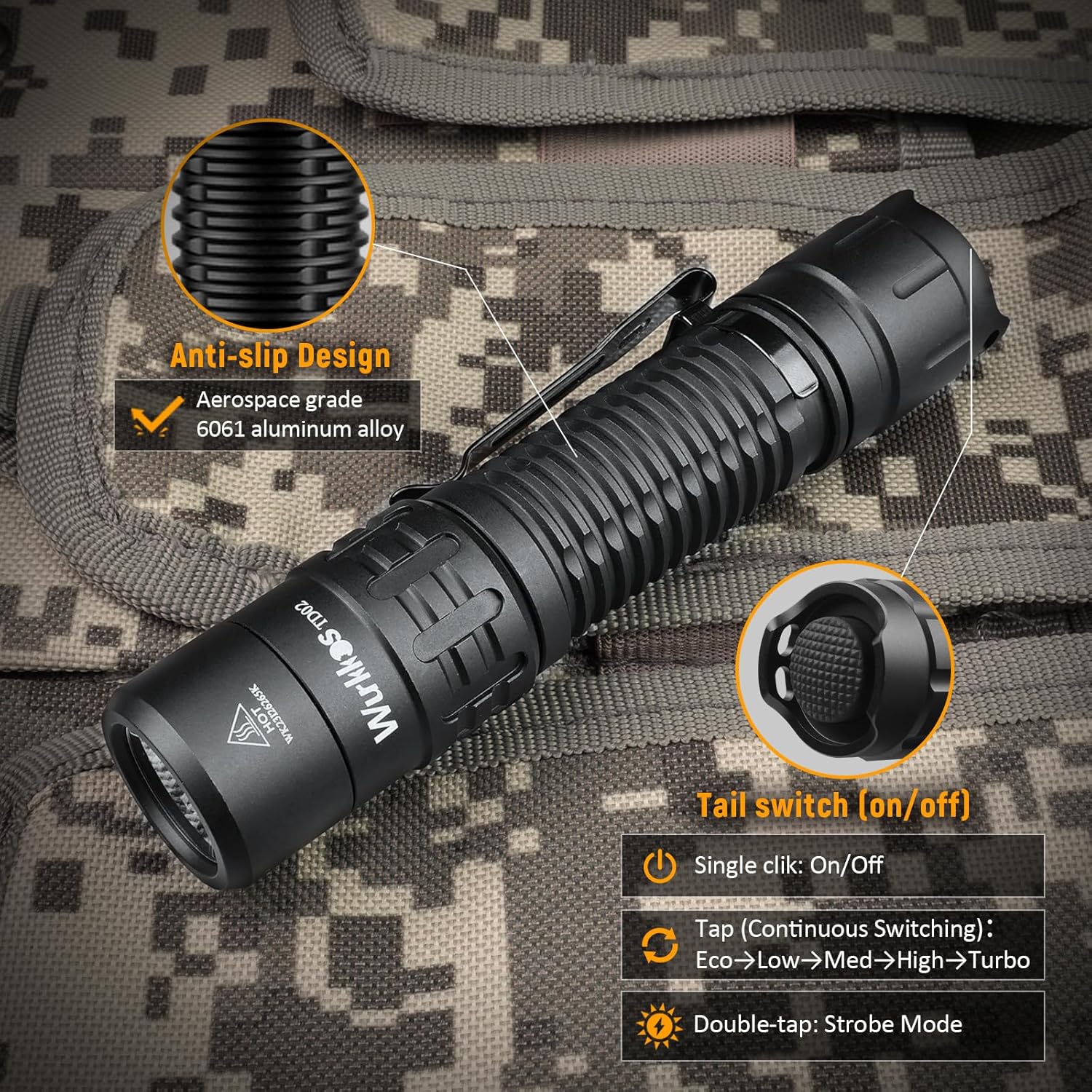
The flashlight features an anti-slip design for a secure grip and a responsive tail switch for easy power control and mode cycling.
Maintenance
Cleaning
Regularly clean the threads and O-rings with a clean cloth. Apply a thin layer of silicone grease to the O-rings periodically to maintain water resistance.
Clean the lens with a soft, lint-free cloth. Avoid abrasive materials that could scratch the lens.
Battery Care
If the flashlight will not be used for an extended period, remove the battery to prevent potential leakage.
Store the battery in a cool, dry place. Recharge the battery every 3-6 months to maintain its health.
General Care
Avoid dropping the flashlight or subjecting it to severe impacts, despite its durable construction.
Do not disassemble the flashlight head, as this may damage the LED or driver and void the warranty.
Troubleshooting
Flashlight Does Not Turn On
- Check Battery: Ensure the battery is correctly inserted with the positive (+) end facing the head. Verify the battery is charged.
- Tail Cap: Make sure the tail cap is fully tightened. A loose tail cap can prevent electrical contact.
- Clean Contacts: Clean the battery contacts and flashlight body contacts with a cotton swab dipped in rubbing alcohol.
Light is Dim or Flickering
- Battery Level: The battery may be low. Recharge the battery.
- Overheating: If the flashlight has been in Turbo or High mode for an extended period, the ATR system may have reduced brightness to prevent overheating. Allow it to cool.
- Loose Components: Ensure the tail cap and head are securely tightened.
Charging Issues
- Cable Connection: Verify the USB-C cable is securely connected to both the flashlight and the power source.
- Power Source: Try a different USB power source or cable to rule out a faulty charger or cable.
- Charging Port: Ensure the charging port is clean and free of debris.
Warranty and Support
Wurkkos provides a 24-month warranty for the TD02 LED Tactical Flashlight from the date of purchase. This warranty covers manufacturing defects and normal use.
For any issues, questions, or assistance, please contact Wurkkos customer service. Our friendly customer service team is available to provide prompt support.
Contact Information: Please refer to the product packaging or the official Wurkkos website for the most up-to-date customer support contact details.


