1. Introduction
The SATMW B15 Induction Tester Pen is a versatile electrical testing tool designed for detecting AC voltage, identifying live and neutral wires, locating line breakpoints, and performing electrical on-off detection. It features a wide voltage range of 24V-250V, a built-in flashlight, and a durable chromium vanadium steel probe. This manual provides essential information for safe and effective operation.

Image: Internal components of the B15 Induction Tester Pen, highlighting the intelligent chip for precise measurements.
2. Safety Information
Always observe the following safety precautions when using the SATMW B15 Induction Tester Pen:
- Do not use the tester if it appears damaged or is not functioning correctly.
- Ensure the voltage range of the tester (24V-250V) is suitable for the circuit you are testing.
- Always assume a circuit is live until proven otherwise.
- Wear appropriate personal protective equipment (PPE), such as insulated gloves and safety glasses, when working with electricity.
- Do not attempt to open or modify the tester. Refer servicing to qualified personnel.
- Keep the device away from water and moisture.
- Replace batteries promptly when the low voltage indicator appears to ensure accurate readings.
3. Package Contents
Verify that all items are present in the package:
- 1 x SATMW B15 Induction Tester Pen
- 1 x Packaging Color Box
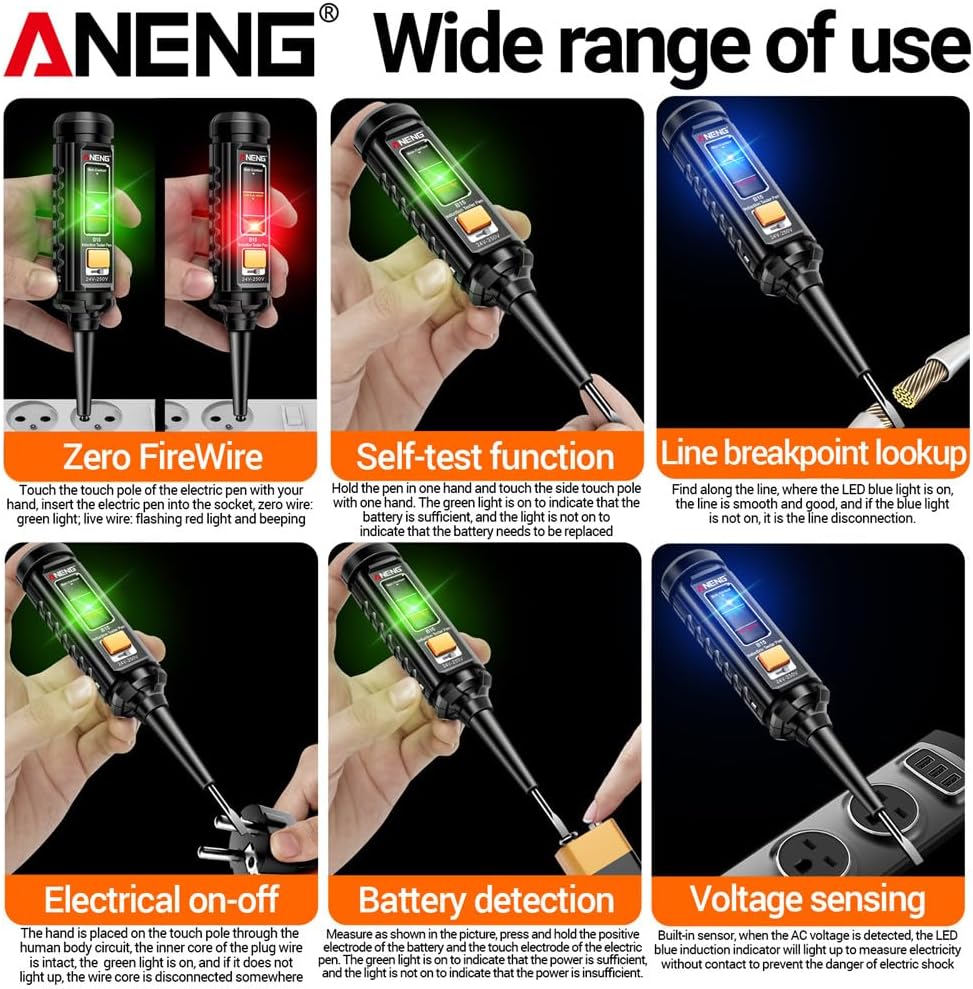
Image: The B15 Induction Tester Pen and its retail packaging.
4. Product Features and Components
Familiarize yourself with the key features and components of your B15 Induction Tester Pen:
- Induction Indicator Light: Bright blue light indicates induction.
- High Pressure Indicator: Bright red light indicates high voltage.
- Flashlight Button: Press to turn on the LED flashlight.
- Touch Metal: The contact point for measurements.
- Low Voltage/On-Off Indicator Light: Bright green light indicates low voltage or electrical continuity.
- LED Flashlight: Assists with night work or in dimly lit areas.
- Chromium Vanadium Steel Batch: High hardness one-word screwdriver probe.

Image: Labeled diagram of the B15 Induction Tester Pen components.

Image: Detailed views of the B15 Induction Tester Pen, highlighting battery compartment, probe, and pen clip.
5. Setup
5.1 Battery Installation
The B15 Induction Tester Pen requires two (2) 1.5V AAA batteries (not included).
- Unscrew the cap at the top of the tester pen.
- Insert two AAA batteries, ensuring correct polarity (+/-) as indicated inside the compartment.
- Screw the cap back on securely.
Note: Always use fresh batteries for optimal performance and accurate readings. Remove batteries if the device will not be used for an extended period.
6. Operating Instructions
The B15 Induction Tester Pen offers multiple testing functions:

Image: Visual guide to the various testing functions of the B15 Induction Tester Pen.
6.1 Zero FireWire (Live/Neutral) Detection
Insert the electrical pen into the socket. If the green light is on, it indicates a neutral wire. If the red light flashes and a beeping sound is heard, it indicates a live wire.
6.2 Self-Test Function
Hold the pen in one hand and touch the side touch pole with the other hand. A green light indicates sufficient battery power. If the light is not on, the battery needs to be replaced.
6.3 Line Breakpoint Lookup
Follow the line with the tester. The point where the LED blue light is on indicates an unobstructed and good line. If the blue light is not on, it signifies a line disconnection at that point.
6.4 Electrical On-Off Detection
Touch the touch pole of the electric pen. If the green light is on, the circuit is complete. If the green light is not on, the wire core is disconnected somewhere.
6.5 Battery Detection
Measure as shown in the picture (likely referring to the self-test or a specific battery contact point). A green light indicates sufficient power. If the light is not on, the power is insufficient.
6.6 Voltage Sensing (Non-Contact)
When the AC voltage is detected, the LED blue induction indicator light will illuminate. This function allows for voltage detection without direct contact, enhancing safety.
6.7 Flashlight Operation
Press the orange button on the tester to turn the built-in LED flashlight on or off. This assists in working in dark environments.

Image: The B15 Induction Tester Pen's flashlight in operation.
7. Maintenance
- Cleaning: Wipe the tester with a dry, soft cloth. Do not use abrasive cleaners or solvents.
- Storage: Store the tester in a cool, dry place, away from direct sunlight and extreme temperatures. Remove batteries if storing for extended periods to prevent leakage.
- Battery Replacement: Replace batteries when the self-test function indicates low power to ensure accurate operation.
8. Troubleshooting
| Problem | Possible Cause | Solution |
|---|---|---|
| Tester does not turn on or respond. | Dead or incorrectly installed batteries. | Replace batteries with new 1.5V AAA batteries, ensuring correct polarity. |
| Inconsistent or inaccurate readings. | Low battery power; environmental interference; faulty unit. | Replace batteries. Ensure testing in a clear environment. If problem persists, contact support. |
| Flashlight not working. | Low battery power; flashlight button malfunction. | Replace batteries. If still not working, the flashlight component may be faulty. |
9. Specifications
| Feature | Detail |
|---|---|
| Model | B15 |
| Material | ABS + Chromium Vanadium Steel |
| Voltage Range | 24V-250V AC |
| Alarm Method | Sound and Light Alarm |
| Probe Type | One-word batch (Screwdriver) |
| Flashlight | Yes |
| Zero FireWire Detection | Yes |
| Voltage Detection | Yes |
| Line Breakpoint Lookup | Yes |
| Electrical On-Off Detection | Yes |
| Self-Test Function | Yes |
| DC Detection | Yes |
| Power Supply | 2 x 1.5V AAA batteries (Not included) |
| Item Size | 160 x 28 x 27mm (6.29 x 1.10 x 1.06in) |
| Item Weight | 36g (1.26oz) |

Image: Dimensions of the B15 Induction Tester Pen.
10. Warranty and Support
Specific warranty information for the SATMW B15 Induction Tester Pen is not provided in the product details. For warranty claims or technical support, please refer to the retailer or seller from whom the product was purchased. Keep your proof of purchase for any potential claims.