1. Important Safety Information
Please read this entire manual before assembly and operation of the Hetoy 3-in-1 Ride-on Tractor. Failure to follow these instructions may result in serious injury or property damage. Keep this manual for future reference.
- Adult Supervision Required: This product is a toy and must be operated under direct adult supervision at all times.
- Age and Weight Limits: Suitable for children aged 3 to 8 years. Do not exceed the recommended weight capacity (refer to specifications).
- Environmental Conditions: Keep the ride-on vehicle and its remote control away from water and rain to prevent electrical damage and potential hazards.
- Protective Gear: Always ensure the child wears appropriate safety gear, such as a helmet, when operating the vehicle.
- Operating Area: Use only on flat, level surfaces away from public roads, steep inclines, swimming pools, or other potential hazards. Avoid operating in sand, mud, or excessively rough terrain to prevent damage.
- Seat Belt: Always ensure the child is securely fastened with the provided safety belt.
- Charging: Only use the charger provided by the manufacturer. Do not overcharge the battery.
2. Product Overview
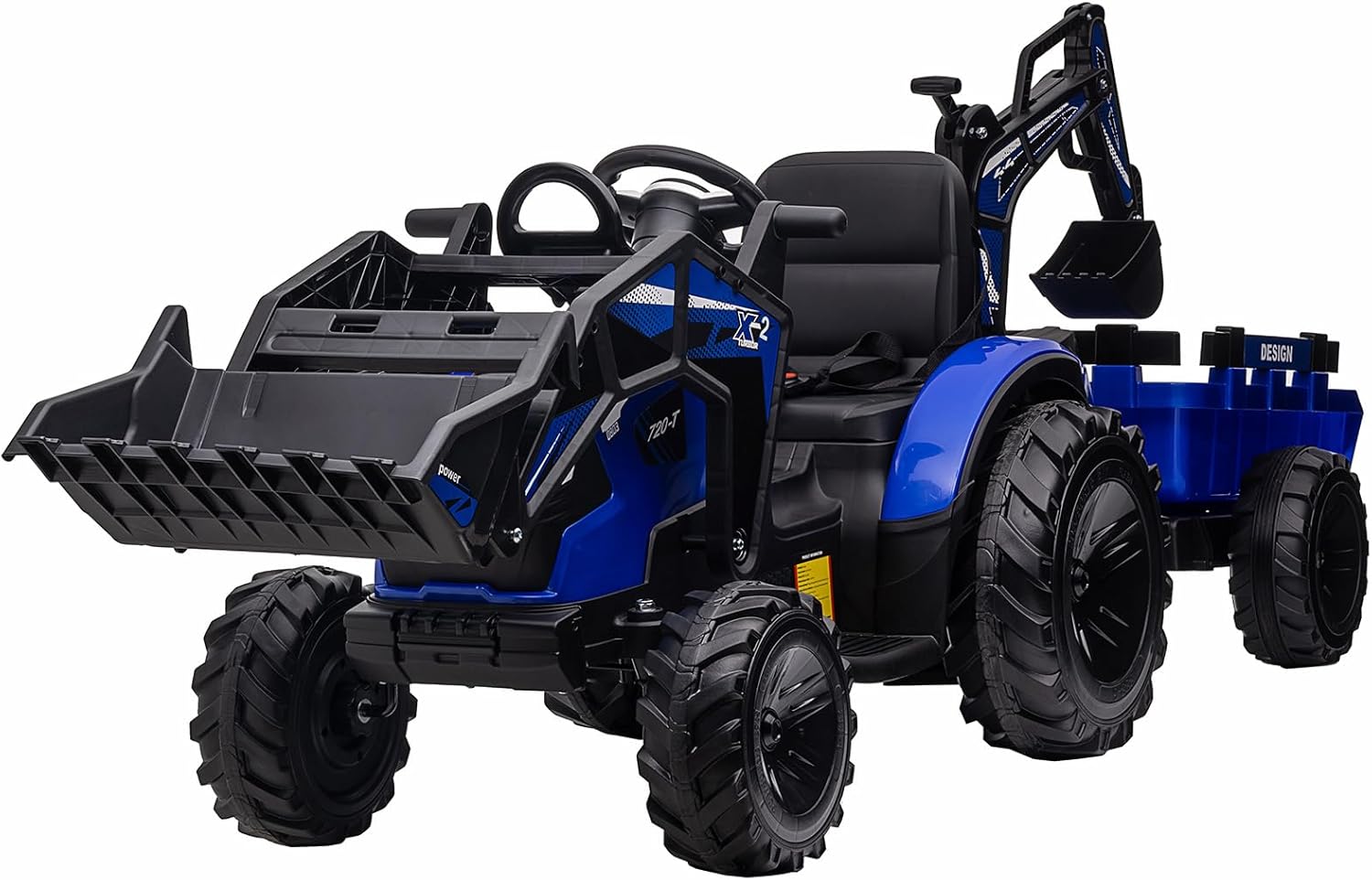
The Hetoy 3-in-1 Ride-on Tractor is a versatile electric construction vehicle designed for children. It offers three distinct play modes: a tractor, an excavator, and a bulldozer, providing an engaging and interactive experience. This 24V electric vehicle features a detachable trailer, a functional shovel bucket, and a digging arm. It includes a remote control for parental supervision, durable EVA tires, LED lights, and an entertainment system with music, USB, and Bluetooth connectivity.
3. What's in the Box
Upon opening the package, ensure all the following components are present:
- 3-in-1 Kids 24V Ride-on Tractor (main unit with front loader and excavator arm)
- Detachable Trailer
- Remote Control (2.4G)
- User Manual (this document)
- Charger
- 2 x 12V Batteries (pre-installed or separate, check packaging)
4. Specifications
| Feature | Detail |
|---|---|
| Model Number | PTO_0Z2NTW7Y-B-HJX-1 |
| Product Dimensions (L x W x H) | 95.7 x 25.6 x 32 inches |
| Item Weight | 74.5 pounds |
| Recommended Age | 3 - 8 years |
| Battery Type | 2 x 12V7AH (included) |
| Motor Power | 2 x 80W (7000rpm) |
| Run Time per Charge | Approximately 50-60 minutes (varies with usage) |
| Tire Type | EVA (non-slip, shock-absorbing) |
| Control Options | Manual (pedal) and Parental Remote (2.4G) |
| Entertainment Features | Built-in music/stories, USB, MP3, Bluetooth, LED lights |


5. Setup and Assembly
Assembly of the Hetoy 3-in-1 Ride-on Tractor requires adult supervision and basic tools. Refer to the separate assembly guide included in your package for detailed step-by-step instructions. The following provides a general overview:
- Unpacking: Carefully remove all components from the packaging. Inspect for any damage.
- Wheel Installation: Attach the EVA wheels to the main tractor unit and the trailer as per the assembly guide.
- Steering Wheel and Seat: Install the steering wheel and secure the seat. Ensure the safety belt is accessible.
- Battery Connection: Connect the pre-installed 12V batteries. Ensure connections are secure.
- Attaching Accessories: Securely attach the front shovel bucket and the excavator arm. The trailer can be attached to the rear hitch.
- Initial Charge: Before first use, fully charge the vehicle's batteries for the recommended duration (typically 8-12 hours). Refer to the charger instructions for specific charging times.
6. Operating Instructions
The Hetoy 3-in-1 Ride-on Tractor offers both manual control for the child and parental remote control for added safety and interaction.
6.1 Manual Operation (Child Control)
- Power Button: Press the power button to turn the vehicle on.
- Foot Pedal: The child presses the foot pedal to move the tractor forward. Releasing the pedal will engage the brake.
- Steering Wheel: Turn the steering wheel left or right to change direction.
- Speed Switch: Use the high/low speed switch to select the desired driving speed.
- Forward/Backward Switch: Select forward or backward motion using the designated switch.
6.2 Parental Remote Control
The included 2.4G remote control allows parents to safely guide the vehicle, especially for younger children.
- Pairing: Follow the remote control's specific instructions for pairing with the vehicle.
- Functions: The remote typically controls forward/backward movement, left/right steering, and speed selection.
- Priority: The remote control usually overrides manual child controls for safety.
6.3 3-in-1 Functionality
The vehicle can be configured and operated as a tractor, excavator, or bulldozer.
- Front Shovel Bucket (Bulldozer/Front Loader): Operate the front bucket using the designated levers or controls on the dashboard. It can be used for pushing or scooping light materials.
- Excavator Arm (Digger): The rear excavator arm can be manually or mechanically operated (depending on model features) to dig and lift. Use the digging handle to control its movement.
- Detachable Trailer: Attach the trailer to the rear hitch for hauling light loads such as toys, leaves, or sand.


6.4 Entertainment Features
- Music and Stories: The vehicle has built-in music and stories for entertainment.
- USB/MP3 Ports: Connect external devices via USB or MP3 ports to play custom audio.
- Bluetooth Connectivity: Pair a mobile phone via Bluetooth to stream music.
- LED Lights: Bright headlights illuminate the path during operation.
7. Charging and Battery Care
Proper charging and battery maintenance are crucial for the longevity and performance of your Hetoy ride-on tractor.
- Charging Procedure: Connect the charger to the charging port on the vehicle and then plug it into a standard wall outlet. Ensure the vehicle is turned off during charging.
- Charging Time: For initial use, charge for 8-12 hours. Subsequent charges typically take 8-10 hours, or until the charging indicator shows a full charge. Do not charge for more than 18 hours.
- Battery Indicator: The power display on the dashboard indicates the current battery level, prompting timely recharging.
- Battery Type: The vehicle uses two 12V batteries. Only use the manufacturer-supplied charger and batteries.
- Storage: If storing the vehicle for an extended period, fully charge the batteries and then disconnect them. Recharge every 3 months to maintain battery health.
- Safety: Do not allow children to handle the charger or batteries. Keep batteries away from heat and open flames.
8. Maintenance
Regular maintenance helps ensure the safe and optimal performance of your ride-on tractor.
- Cleaning: Wipe the vehicle with a soft, damp cloth. Do not use abrasive cleaners or solvents. Avoid spraying water directly onto electrical components.
- Inspection: Periodically check all nuts, bolts, and fasteners to ensure they are tight. Inspect the wheels, steering, and electrical connections for wear or damage.
- Lubrication: Lightly lubricate moving parts such as the steering mechanism and pedal pivot points as needed.
- Storage: Store the vehicle in a dry, covered area away from extreme temperatures. Protect it from direct sunlight and moisture.
9. Troubleshooting
If you encounter issues with your Hetoy ride-on tractor, refer to the following common problems and solutions:
| Problem | Possible Cause | Solution |
|---|---|---|
| Vehicle does not move | Battery low or disconnected; Power switch off; Loose wiring; Overload protection activated. | Charge battery; Turn power switch on; Check all wiring connections; Allow vehicle to cool down if overloaded. |
| Remote control not working | Remote batteries dead; Remote not paired; Interference. | Replace remote batteries; Re-pair remote with vehicle (refer to remote manual); Move to an area with less interference. |
| Reduced power or speed | Low battery charge; Operating on uneven/soft surfaces; Overweight load. | Fully charge battery; Operate on flat, hard surfaces; Reduce load. |
| Unusual noises (grinding, sparking) | Motor or gearbox issue; Loose components. | Immediately cease operation. Contact customer support for assistance. Do not attempt to repair electrical components yourself. |
| Lights not working | Loose connection; Damaged LED. | Check wiring to lights; Contact customer support for replacement parts. |
If the problem persists after attempting these solutions, please contact Hetoy customer support.
10. Warranty and Support
For warranty information, please refer to the documentation provided at the time of purchase or contact Hetoy customer support directly. Hetoy is committed to providing quality products and support.
If you require assistance with assembly, operation, troubleshooting, or parts replacement, please contact our customer support team. You can typically find contact information on the product packaging, the manufacturer's website, or through your retailer.
For general inquiries or to visit the Hetoy store, please use the following link: Hetoy Store on Amazon


