
Introduction
This manual provides detailed instructions for the installation, operation, and maintenance of your CASTA DIVA CD-Y010L Smart Toilet. Please read this manual thoroughly before installation and use to ensure proper function and safety. Keep this manual for future reference.
Safety Information
Always follow basic safety precautions when installing or using this product to reduce the risk of fire, electric shock, or injury.
- Ensure the power source is 120V as specified.
- Do not immerse the product in water or spray water directly onto electrical components.
- Unplug the unit before cleaning or performing any maintenance.
- Keep the remote control dry and away from water.
Setup and Installation
The CASTA DIVA CD-Y010L Smart Toilet requires a rough-in of at least 12 inches and a 120V power source with a 3.93-foot (1.2-meter) cable. Most of the main unit is pre-installed, simplifying the setup process.
Pre-Installation Checks
- Rough-in Measurement: Verify that your bathroom's rough-in measurement is ≥ 12 inches from the wall to the center of the drain.
- Power Outlet: Ensure a 120V power outlet is available within reach of the toilet's power cable.
- Water Supply: Confirm adequate water pressure and a shut-off valve are present.
Installation Steps
- Draw Drain Outlet Centerline: Mark the drain outlet centerline on the floor.
- Install Shut-off Valve: Install the provided shut-off valve on the wall, connecting it to your water supply.
- Check Water Volume: Connect a water hose to the shut-off valve, fully open the valve, and fill a bucket for 10 seconds. The water volume should be greater than 1.05 gallons per 10 seconds.
- Outline Toilet Position: Use the provided cardboard template to outline the toilet's position on the floor with a pencil or tape.
- Assemble Mounting Bracket: Assemble the mounting bracket with bolts and secure them to the pre-installed flange on the ground, tightening with nuts.
- Connect Water Supply Lines: Connect the toilet's water supply lines to the shut-off valve.
- Secure Toilet: Carefully place the toilet over the mounting bracket and secure it in place.
- Plug In: Connect the power cable to the 120V outlet.
Video: Installation guide for the Casta Diva smart toilet with tank and pump. This video demonstrates the steps for setting up the toilet, including connecting water lines and securing the unit.
Video: Installation overview for the Casta Diva Smart toilet with tank and pump-assisted CD-Y010L. This video provides a visual summary of the installation process.

Image: A step-by-step diagram illustrating the installation process of the smart toilet, from marking the drain to connecting the water supply and securing the unit.
Operating Instructions
The CASTA DIVA CD-Y010L Smart Toilet offers various intelligent features for enhanced comfort and hygiene. All functions can be controlled via the remote or side panel.
Digital Display
The HD digital display shows real-time water, seat, and air temperatures, allowing for precise adjustments and preventing unexpected temperature sensations.
Flushing Options
The toilet provides multiple flushing methods:
- Off-seat Auto Flush: The toilet automatically flushes when you stand up.
- Foot Kick Flush: A sensor at the base allows for hands-free flushing by a gentle foot tap.
- Remote Control Flush: Use the 'Flush' button on the remote control.
- Side Button Flush: A manual flush button is located on the side of the toilet.

Image: Visual representation of the various flushing methods available, including remote control, off-seat auto flush, side button, and foot kick flush.

Image: Diagram showing the different ways to operate the flushing mechanism, including off-seat auto flush, foot kick flushing, remote control, and a one-button flush option.
Bidet Functions
The integrated bidet offers comprehensive cleaning with adjustable settings:
- Wash Modes: Choose from Rear Wash, Front Wash, Oscillating Wash, and SPA Massage.
- Warm Water: Instant warm water is provided, with adjustable temperature settings.
- Water Pressure: Adjust the water pressure to your preference using the remote control.
- Nozzle Position: Adjust the nozzle position forward or backward for optimal cleaning.
- Self-Cleaning Nozzle: The nozzle performs a self-cleaning cycle before and after each use.

Image: Illustration of the four wash modes: Rear Wash, Oscillating Wash, Front Wash, and SPA Massage. It also shows the easy-to-remove nozzle for cleaning.

Image: Detailed view of the four washing modes, designed to meet various cleaning preferences.

Image: Close-up of the hygienic nozzle, highlighting its self-cleaning feature for improved sanitation after each use.
Heated Seat & Warm Air Dryer
Enjoy comfort with adjustable temperature settings for both the seat and the warm air dryer.
- Heated Seat: Adjust the seat temperature to your preference. The digital display shows the current temperature.
- Warm Air Dryer: After washing, use the warm air dryer with adjustable temperature settings to complete your cleaning experience.

Image: Visual display of the heated bidet seat and warm air dryer, showing temperature ranges for both features.

Image: Diagram illustrating the heated seat function with four levels of temperature adjustment for different seasons.

Image: Diagram illustrating the warm air dryer function with four levels of adjustable wind temperature for different seasons.
Foam Shield
The smart toilet features a foam shield that automatically dispenses foam into the bowl when you sit down. This feature helps prevent splashing, blocks odors, and resists waste sticking to the bowl. You can use body wash, shampoo, or dish soap to create the foam liquid.
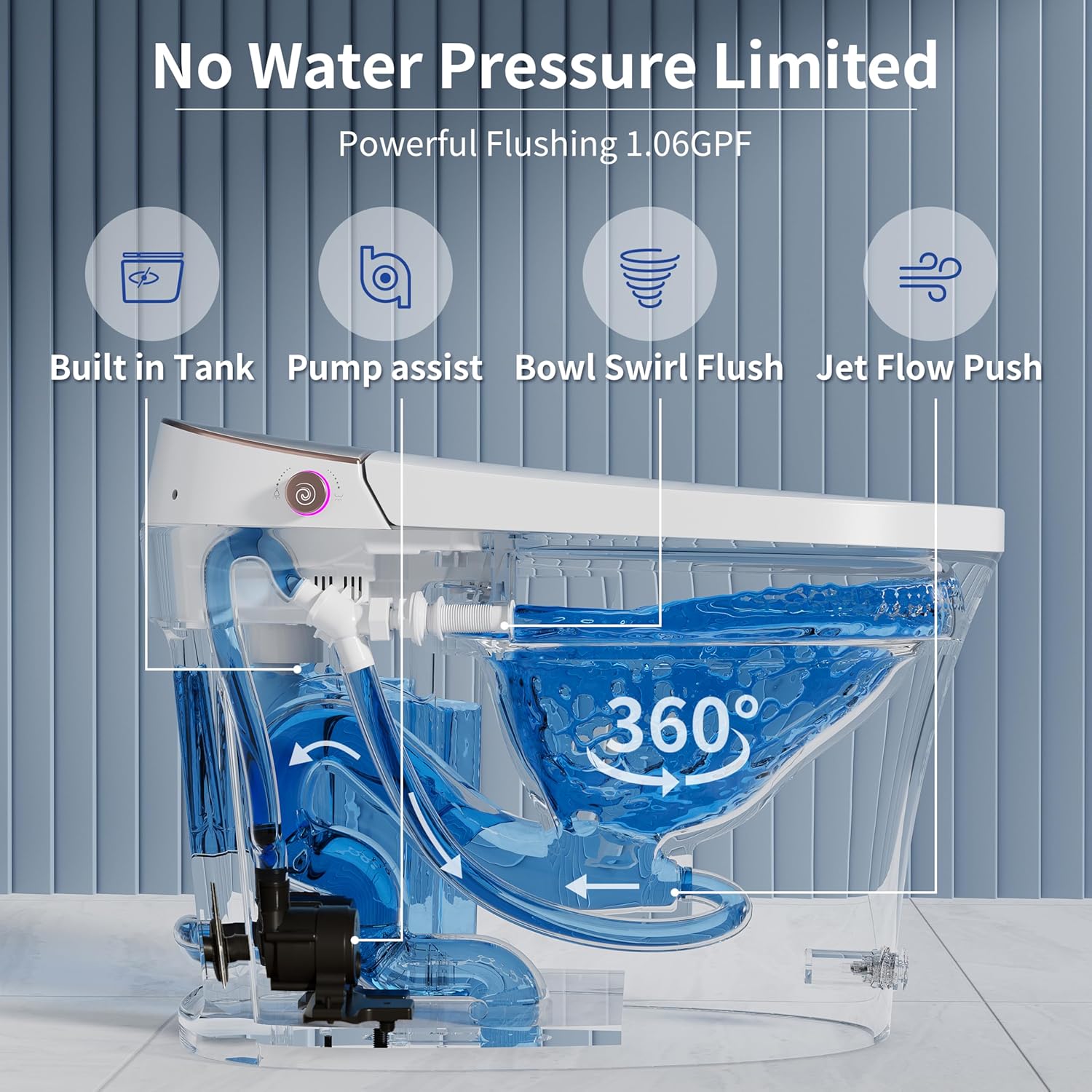
Image: Comparison showing how the built-in foam shield prevents splashing and covers odors, with an indication of easy refilling.

Image: Detailed view of the splash-proof foam feature, illustrating its benefits in preventing splashes, covering odors, and resisting sticking, along with the easy-to-fill mechanism.
Additional Features
- Smart Night Light: An integrated night light illuminates the bowl, providing visibility in the dark.
- ECO Mode: Long press 'Nozzle Clean' on the remote to activate Energy-Saving mode.
- Emergency Flush: A built-in capacitor allows for emergency flushing during power outages.
- Pre-Wet Function: The bowl surface is automatically pre-wet (0.08 GPF) when seated to help prevent dirt from sticking.
- Auto Deodorization: Automatically removes unpleasant odors to keep the bathroom air fresh.
- Soft-Close Lid: The lid and seat close slowly and quietly.

Image: The smart night light feature, showing the illuminated bowl and breathing button light for nighttime visibility.

Image: The smart night lights and LED digital display, indicating real-time water, seat, and warm air temperatures.

Image: Illustration of the auto deodorization system, which removes unpleasant smells to maintain fresh bathroom air.

Image: The Pre Wet function, showing the automatic wetting of the bowl surface to prevent dirt from sticking.

Image: The Emergency Flush feature, indicating that the capacitor allows for flushing even during a power outage.

Image: Diagram showing the dimensions of the smart toilet and a list of included components such as the remote control, T-valve, mounting bracket screws, wax ring, installation template, and flange.

Image: Internal view of the toilet's powerful flushing system, featuring a built-in tank, pump assist, bowl swirl flush, and jet flow push, ensuring no water pressure limitations and 1.06 GPF water saving.
Maintenance
Regular maintenance ensures the longevity and optimal performance of your smart toilet.
- Nozzle Cleaning: The bidet nozzle is self-cleaning. For manual cleaning, the nozzle can be easily removed as shown in the operating instructions.
- General Cleaning: Use a soft cloth and mild, non-abrasive cleaner to wipe down the exterior surfaces. Avoid harsh chemicals that may damage the finish.
- Foam Dispenser Refill: Periodically check and refill the foam dispenser with appropriate liquid (body wash, shampoo, or dish soap).

Image: The sanitary seat feature, emphasizing a healthier condition for users and families.
Troubleshooting
If you encounter any issues, please refer to the following common solutions or contact customer support.
- No Power: Check if the toilet is properly plugged into a 120V outlet. Ensure the circuit breaker is not tripped.
- No Flush: Verify water supply is open. If there's a power outage, the emergency flush should still function.
- Bidet Not Working: Check remote control batteries. Ensure the toilet seat sensor is activated (you must be seated for bidet functions to operate).
- Temperature Issues: Adjust water, seat, or air dryer temperatures using the remote control. Refer to the digital display for current settings.
For persistent issues, please contact CASTA DIVA customer support.
Specifications
| Feature | Detail |
|---|---|
| Model Number | CD-Y010L |
| Brand | CASTA DIVA |
| Color | CD-Y010A●Foam Shield&Kick Flush |
| Material | Ceramic (Toilet), Plastic (Seat) |
| Installation Type | Floor Mounted |
| Item Weight | 104.8 pounds |
| Product Dimensions | 26.7 x 16.3 x 16.99 inches |
| Rough-in Requirement | ≥ 12 inches |
| Power Source | 120V |
| Included Components | Remote control |
| Water Flush Volume | 1.06 GPF |
Warranty and Support
CASTA DIVA provides lifetime technical consulting for your smart toilet. Our products meet ETL and CUPC standards, ensuring quality and reliability.
For any issues regarding installation, function, or quality, please contact us. We commit to responding within 24 hours. Providing damaged photos, trouble videos, and the product barcode can expedite the resolution process.


