
1. Introduction
This manual provides essential information for the safe and efficient operation of your QNK 1.5KW Air Cooled CNC Spindle Motor. This high-speed spindle motor is designed for use with CNC routers, engravers, and milling machines, offering precision and durability for various material processing tasks.
Please read this manual thoroughly before installation and operation to ensure proper usage and to prevent damage to the equipment or injury to personnel.
2. Product Overview

Figure 2.1: QNK 1.5KW Air Cooled CNC Spindle Motor.
The QNK 1.5KW Air Cooled Spindle Motor is a robust component for CNC applications. It features a stainless steel body, air cooling system, and an ER11 collet for tool holding. Key characteristics include high rotation precision and a durable design.
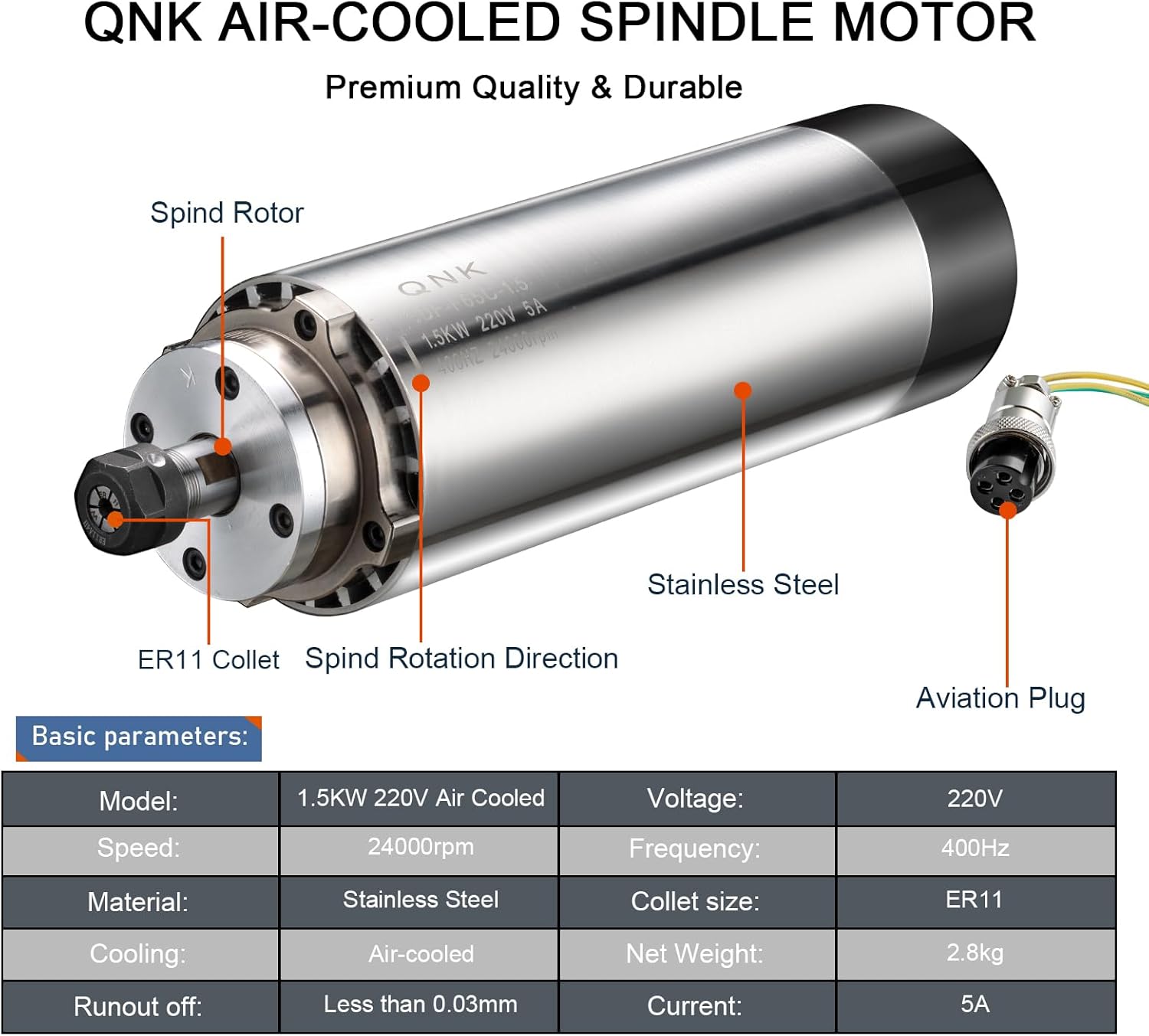
Figure 2.2: Labeled diagram showing the spindle rotor, ER11 collet, spindle rotation direction, stainless steel body, and aviation plug. A table of basic parameters is also included.
3. Specifications
| Parameter | Value |
|---|---|
| Model | 1.5KW220V |
| Power | 1.5 KW |
| Voltage | 220V |
| Current | 5A |
| Speed | 24000 RPM |
| Frequency | 400 HZ |
| Collet Type | ER11 |
| Net Weight | 2.8 KG |
| Runout Off | Taper hole runout ≤ 0.005mm, core gang runout ≤ 0.03mm |
| Diameter | Φ65mm |
| Cooling Method | Air Cooled (Fan Cooling) |
| Material | Stainless Steel |

Figure 3.1: Spindle Motor Dimensions.
4. Package Contents
Verify that all items are present and undamaged upon unpacking.
- 1x Air Cooled Spindle Motor (1.5KW 220V)
- 1x Aviation Wire
- 3x ER11 Collets (3.175mm (1/8"), 4mm (Φ4), 6mm (Φ6) - one collet is pre-installed in the motor)

Figure 4.1: Included ER11 Collets and Aviation Wire.
5. Safety Information
Always prioritize safety when working with machinery. Failure to follow safety guidelines can result in serious injury or equipment damage.
- Ensure the spindle motor is securely mounted before operation.
- Always disconnect power before performing any maintenance, installation, or collet changes.
- Wear appropriate personal protective equipment (PPE), including eye protection and hearing protection.
- Keep hands and loose clothing away from rotating parts.
- Operate the spindle motor within its specified voltage and frequency ranges.
- Ensure proper grounding of the equipment.
- Do not operate the spindle motor if it is damaged or malfunctioning.
- The spindle motor must be used with a Variable Frequency Drive (VFD) of appropriate specifications (220V, 400Hz).
6. Setup and Installation
6.1 Mounting the Spindle Motor
Mount the spindle motor securely onto your CNC machine's Z-axis carriage using appropriate clamps or brackets. Ensure the mounting is rigid to prevent vibration during operation.
6.2 Electrical Connection
The spindle motor requires a Variable Frequency Drive (VFD) for operation. Connect the spindle motor to a compatible 220V, 400Hz VFD. Refer to your VFD's manual for specific wiring and parameter settings.
The spindle motor's aviation plug is marked with numbers 1, 2, 3, and 4. Connect these as follows:
- Numbers 1, 2, 3: Connect to the VFD's U, V, W output terminals respectively.
- Number 4: This is the ground wire. Ensure it is properly connected to the VFD's ground terminal.

Figure 6.1: Aviation Plug Connection.
Note: Incorrect wiring can damage the spindle motor or VFD. If you are unsure, consult a qualified electrician.
6.3 Collet Installation
To install a tool, first insert the ER11 collet into the collet nut. Then, insert the tool into the collet. Finally, thread the collet nut onto the spindle shaft and tighten it firmly with a wrench. Ensure the tool is seated correctly and securely before operation.
7. Operating Instructions
7.1 Initial Start-up
Before the first use, ensure all connections are secure and correct. Power on the VFD and gradually increase the spindle speed. Listen for any unusual noises or vibrations. Allow the spindle to run at a low speed for a few minutes to ensure proper lubrication distribution.
7.2 Material Processing
This spindle motor is suitable for drilling and engraving various materials, including plastics, soft aluminum, brass, acrylics, PVC, PCB, wood, plywood, and nylon. Adjust spindle speed and feed rates according to the material and tool being used.

Figure 7.1: Example Applications.
7.3 Air Cooling System
The spindle motor utilizes an integrated fan for air cooling. This system is designed for convenience and low noise operation. Ensure the cooling fan at the rear of the motor is not obstructed to allow for efficient heat dissipation.

Figure 7.2: Air Cooling and Rotation Accuracy.
8. Maintenance
8.1 Cleaning
Regularly clean the exterior of the spindle motor to prevent dust and debris buildup, especially around the cooling fan vents. Use a soft, dry cloth. Avoid using solvents or harsh chemicals that could damage the stainless steel casing.

Figure 8.1: Spindle Motor Features: Dust-proof, Stainless Steel Casing, Low Noise, High Precision.
8.2 Lubrication
The spindle motor uses high-temperature resistant grease lubrication. This is a sealed system and generally does not require user intervention for lubrication. If you suspect an issue with lubrication, contact customer support.
8.3 Inspection
Periodically inspect the spindle motor for any signs of wear, damage, or loose connections. Check the collet and collet nut for wear and replace if necessary to maintain tool holding integrity.
9. Troubleshooting
| Problem | Possible Cause | Solution |
|---|---|---|
| Spindle motor does not start or rotate. | Incorrect VFD settings; Loose electrical connections; No power to VFD; VFD fault. |
|
| Excessive vibration or noise during operation. | Unbalanced tool; Loose mounting; Damaged bearings; Incorrect collet/tool installation. |
|
| Overheating. | Obstructed cooling fan; Prolonged heavy load; Incorrect VFD settings. |
|
| Poor machining quality (e.g., chatter marks). | Loose tool/collet; Spindle runout; Machine rigidity issues. |
|
10. Warranty and Support
For warranty information, technical support, or service inquiries, please contact QNK customer service through your purchase platform or the official QNK website. Please have your product model number (1.5KW220V) and purchase date available when contacting support.
Note: Unauthorized disassembly or modification of the spindle motor may void the warranty.
