Introduction
The GWENLAND Smart Watch is a versatile and advanced wearable device designed to enhance your daily life with its comprehensive features. It boasts an HD full-touch display, Bluetooth calling capabilities, and a functional crown for intuitive navigation. With over 100 sports modes, a complete health monitoring suite, and integrated voice assistance, this smartwatch is engineered to support your fitness goals, manage your health, and keep you connected. Its robust design includes IP68 resistance, ensuring durability for various activities.
Important Safety Information
- Do not attempt to disassemble, repair, or modify the device. This may cause damage, fire, or electric shock.
- Keep the device away from extreme temperatures, direct sunlight, and high humidity.
- Avoid exposing the device to strong impacts or dropping it.
- Clean the device with a soft, dry cloth. Do not use harsh chemicals or abrasive cleaners.
- While the device is IP68 resistant, it is not suitable for diving or high-pressure water activities. Avoid prolonged submersion.
- Consult a medical professional before starting any new exercise regimen or if you have pre-existing health conditions, especially if relying on the health monitoring features.
Package Contents
Please check the box for the following items:
- GWENLAND Smart Watch (Model: GWENLAND_smartwatch)
- Charging Cable
- User Manual (this document)
Setup Guide
1. Charging the Smart Watch
Before first use, fully charge your GWENLAND Smart Watch. Connect the charging cable to the charging port on the back of the watch and plug the other end into a standard USB power adapter (not included). The watch display will indicate charging status. A full charge provides up to 6 days of battery life depending on usage.
2. Powering On/Off
- To Power On: Press and hold the functional crown/side button until the GWENLAND logo appears.
- To Power Off: Press and hold the functional crown/side button, then select "Power Off" on the screen.
3. App Installation and Pairing
To unlock the full potential of your GWENLAND Smart Watch, you need to install the companion application on your smartphone.
- Download the App: Scan the QR code provided in the watch's initial setup screen or search for the official GWENLAND app in your smartphone's app store (Google Play Store for Android, Apple App Store for iOS).
- Create Account: Open the app and follow the on-screen instructions to create an account or log in.
- Enable Bluetooth: Ensure Bluetooth is enabled on your smartphone.
- Pairing: In the app, navigate to "Device" or "Add Device" and select your GWENLAND Smart Watch from the list of available devices. Confirm the pairing request on both your phone and the watch.
- Grant Permissions: Allow necessary permissions (e.g., notifications, location, contacts) for the app to function correctly.
Once paired, the watch will synchronize data with your phone, including time, date, and notifications.
Operating Instructions
Basic Navigation
- Touch Screen: Swipe left/right, up/down to navigate through menus and features. Tap to select.
- Functional Crown/Side Button: Press to return to the home screen or wake the display. Rotate to scroll through lists or zoom in/out (feature dependent).
Bluetooth Calling
After binding the watch to the app and enabling Bluetooth calling, you can make and receive calls directly from your wrist.
- Making Calls: Access the dialer on the watch, enter the number, or select a contact from your synchronized phonebook.
- Receiving Calls: When a call comes in, the watch will display the caller ID. Tap the green icon to answer or the red icon to reject.

Image: The GWENLAND Smart Watch showing its Bluetooth calling interface, including a dial pad and an incoming call notification.
Voice Assistance
The watch features powerful voice assistance. After the watch is bound to the app, click the voice function on the menu screen to perform voice command operations.
- Activate: Tap the voice assistant icon on the watch menu.
- Commands: Speak clearly to perform tasks such as setting reminders, taking notes, or conducting searches.

Image: The GWENLAND Smart Watch screen showing the "Talk After Tap" prompt for activating the voice assistant, alongside a visual representation of its smart voice capabilities.
100+ Sports Modes
The GWENLAND Smart Watch offers over 100 sports modes to accurately track your athletic activities. Select the appropriate mode for your workout to get precise data on calories burned, distance, and duration.
- Access: Navigate to the "Sports" or "Workout" section on your watch.
- Select Mode: Choose from a wide range of activities like running, cycling, swimming, yoga, and more.
- Start/Stop: Follow on-screen prompts to start, pause, and end your workout.

Image: The GWENLAND Smart Watch showcasing its extensive list of over 100 sports modes, with examples like Equestrian Sports, Athletics, and Auto Racing visible on the display.
Health Monitoring Suite
The watch provides comprehensive health vital monitoring, including heart rate, blood oxygen, breathing exercises, and sleep tracking.
- Heart Rate & Blood Oxygen: Access these features from the health menu. Ensure the watch is snug on your wrist for accurate readings.
- Sleep Monitor: Wear the watch to bed for automatic sleep tracking. View detailed sleep analysis in the app.
- Breathing Exercises: Follow guided breathing exercises to help reduce stress.
- Sedentary Reminders: Enable this feature in the app to receive alerts when you've been inactive for too long, prompting you to move.
- Menstrual Cycle Forecasts: Track and predict menstrual cycles through the companion app.
Customizing Watch Faces
Personalize your watch with over 100 unique watch faces available through the companion app.
- Change Face: Long-press the watch face on the home screen or navigate to the "Watch Face" section in the app to browse and apply new designs.

Image: The GWENLAND Smart Watch showcasing a vibrant watch face featuring a pink heart design, demonstrating the customization options available.
Notifications
Receive notifications from your smartphone directly on your watch. Ensure notification permissions are granted in the app.
- View: Swipe down from the top of the watch face to view recent notifications.
- Manage: Configure which app notifications you receive through the companion app settings.
Music Control
Control music playback on your connected smartphone directly from your watch.
- Access: Find the "Music Player" or "Music Control" option in the watch's menu.
- Controls: Play, pause, skip tracks, and adjust volume.
Stopwatch and Weather Forecast
- Stopwatch: Access the stopwatch function from the watch menu for accurate time tracking.
- Weather: View current weather conditions and forecasts directly on your watch. Ensure location services are enabled on your phone and synchronized with the app.
Maintenance
- Cleaning: Regularly clean your watch and strap with a soft, lint-free cloth. If necessary, dampen the cloth slightly with water. Avoid using soap or harsh detergents.
- Water Resistance (IP68): The GWENLAND Smart Watch is IP68 water-resistant, meaning it can withstand dust, dirt, and sand, and is resistant to submersion up to a maximum depth of 1.5m for up to 30 minutes. It is suitable for daily use and light water exposure (e.g., hand washing, rain). Do not use it for showering with hot water, diving, or high-speed water sports.
- Battery Care: To prolong battery life, avoid fully discharging the battery frequently. Charge the watch when the battery level is low. Store the watch in a cool, dry place if not used for extended periods.
Troubleshooting
| Problem | Possible Solution |
|---|---|
| Watch does not power on. | Ensure the watch is fully charged. Connect it to the charger for at least 30 minutes. |
| Cannot pair with smartphone. |
|
| Notifications are not received. |
|
| Inaccurate health data. |
|
| Short battery life. |
|
Specifications
| Feature | Detail |
|---|---|
| Model Name | GWENLAND_smartwatch |
| Display Type | HD Full Touch Display, Analog-Digital |
| Connectivity | Bluetooth |
| Battery Life | Up to 6 days (230mAh Battery) |
| Water Resistance | IP68 |
| Special Features | Alarm Clock, Always On Display, Audio Recording, Body Temperature Monitor, Custom Activity Tracking, Daily Workout Memory, Multisport Tracker, Music Player, Time Display, Voice Call, Voice Assistance, Functional Crown, 100+ Sports Modes, 100+ Watch Faces, Health Suite (Heart Rate, Blood Oxygen, Sleep Monitor, Breathing Exercises, Sedentary Reminders, Menstrual Cycle Forecasts), Stopwatch, Weather Forecast |
| Shape | Square |
| Colour | Black |
| Target Audience | Unisex Adults |
| Dimensions (Approx.) | 40mm (1.57inch) width, 12mm (0.47inch) thickness, 270mm (10.63inch) total length (including strap) |
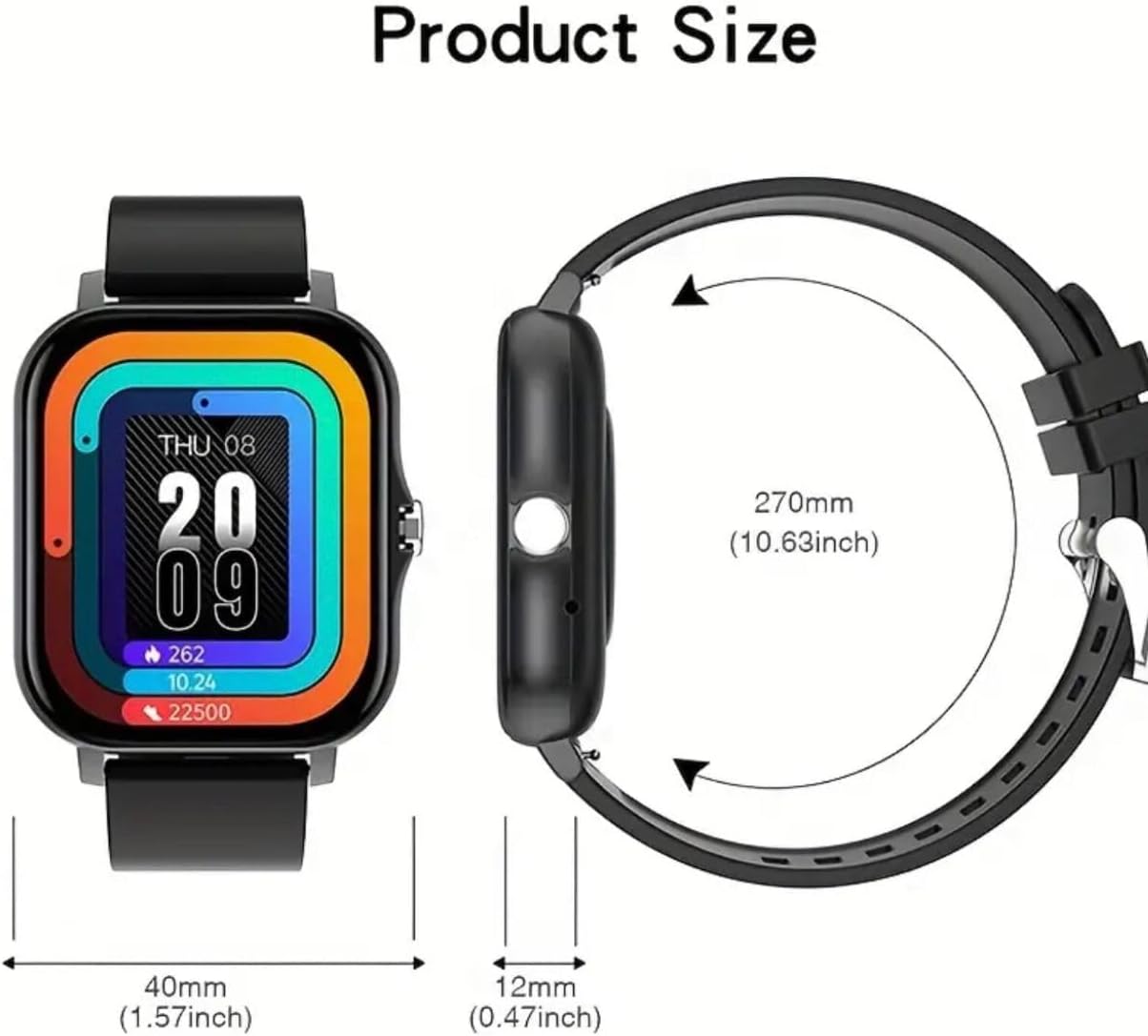
Image: A diagram illustrating the physical dimensions of the GWENLAND Smart Watch, including its width, thickness, and overall length with the strap.
Warranty and Support
For warranty information and customer support, please refer to the documentation provided with your purchase or contact the retailer/manufacturer directly. Spare part information is not available or provided through this manual.
For the latest updates, FAQs, and additional support, please visit the official GWENLAND product support website (if available).