
1. Introduction
Thank you for choosing the Tresda LED Rechargeable Work Light with Clamp. This manual provides essential information for the safe and efficient operation, maintenance, and troubleshooting of your new work light. Please read this manual thoroughly before use and retain it for future reference.
This work light is designed to provide versatile and bright illumination for various tasks, featuring a powerful COB LED, multiple light modes, adjustable angles, and a rechargeable battery with power bank functionality.
2. Safety Instructions
- Always ensure the work light is fully charged before initial use to optimize battery life.
- Do not look directly into the LED light when it is on, as it can cause eye strain or damage.
- Keep the device away from extreme temperatures, direct sunlight, and corrosive liquids.
- Do not attempt to disassemble or modify the work light. This may void the warranty and pose safety risks.
- Ensure the charging port cover is securely closed when not charging to maintain IPX5 water resistance.
- Use only the provided charging cable or a certified equivalent.
- Keep out of reach of children.
3. Package Contents
Verify that all items are present and in good condition upon opening the package:
- Tresda LED Rechargeable Work Light with Clamp (x2)
- USB Charging Cable (x2)
- User Manual (this document)
4. Product Overview
The Tresda LED Rechargeable Work Light is designed for versatility and durability. Familiarize yourself with its key components:

Figure 4.1: Detailed view of the Tresda LED Rechargeable Work Light, highlighting its components including the COB LED panel, 270° rotation mechanism, power switch, built-in 2600mAh rechargeable battery, USB charging port, USB output port, magnetic base, and large clamp.
- COB LED Panel: Provides 2100 lumens of bright 6000K daylight.
- Power Switch: Controls power and cycles through light modes.
- Rotation Mechanism: Allows 180-degree forward/backward adjustment and 270-degree swivel for precise light positioning.
- USB Charging Port: For recharging the internal battery.
- USB Output Port: Functions as a power bank to charge external devices.
- Magnetic Base: Provides a secure hold on metal surfaces.
- Clamp: Attaches to surfaces up to 2 inches thick.
- Power Indicator: Displays remaining battery charge.
5. Setup
5.1 Initial Charging
Before first use, fully charge the work light. Connect the provided USB charging cable to the work light's charging port and to a standard USB power adapter (not included). The power indicator lights will show charging progress. A full charge typically takes several hours.
5.2 Mounting Options

Figure 5.1: Illustration of the three primary usage methods for the work light: clamping onto a surface, attaching via the magnetic base, and handheld portable use.
- Clamp Use: Open the clamp and attach it securely to any surface up to 2 inches thick. Ensure the clamp has a firm grip before releasing the light.
- Magnetic Use: The base of the work light contains strong magnets. Attach the light directly to any ferrous metal surface for hands-free operation.
- Portable Use: The ergonomic handle allows for comfortable handheld use, making it easy to carry and direct light where needed.
6. Operating Instructions
6.1 Powering On/Off and Light Modes
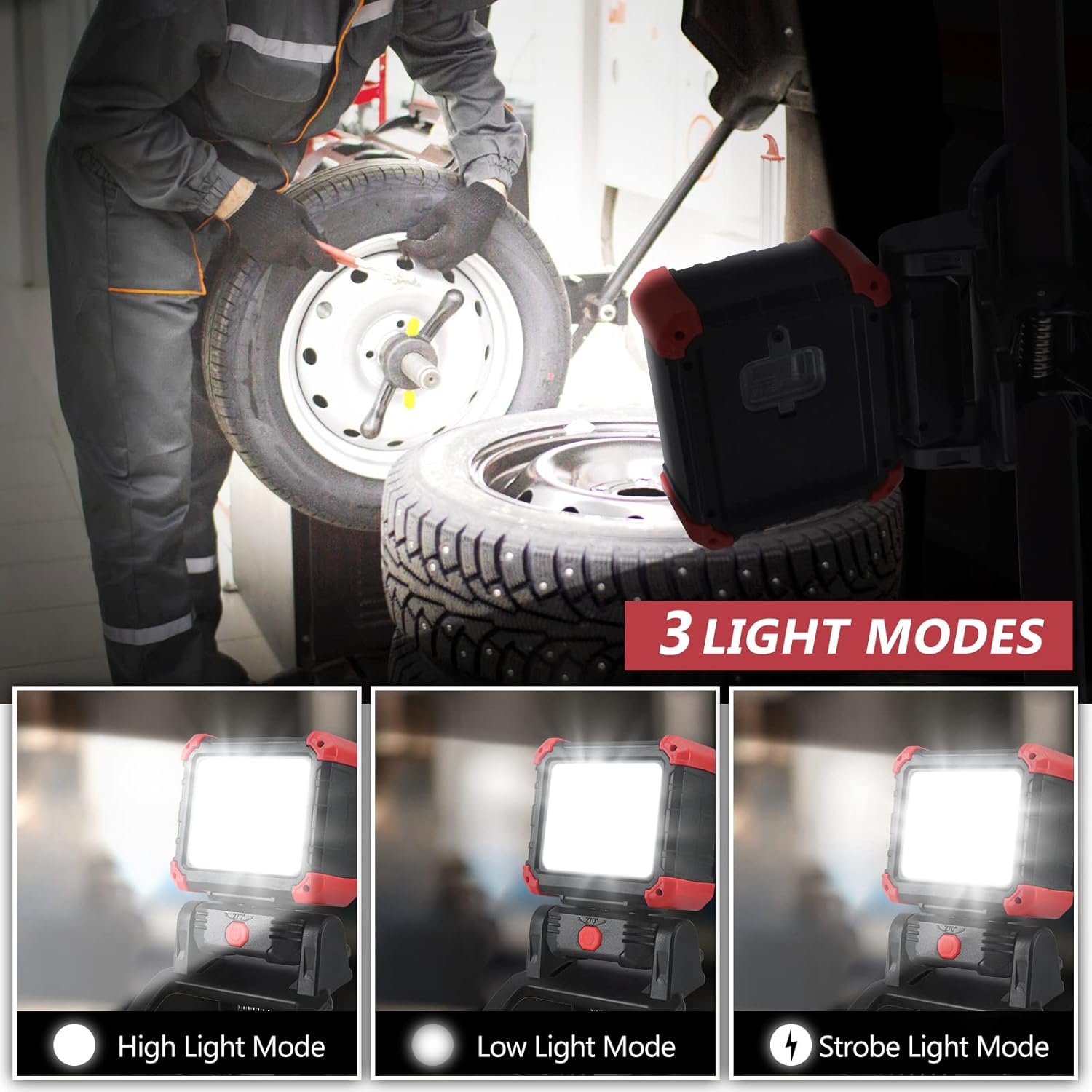
Figure 6.1: Visual representation of the three available light modes: High Light Mode for maximum brightness, Low Light Mode for extended battery life, and Strobe Light Mode for signaling or emergencies.
- Press the power switch once to turn on the light in High Light Mode.
- Press the power switch a second time to switch to Low Light Mode.
- Press the power switch a third time to activate Strobe Light Mode.
- Press the power switch a fourth time to turn off the light.
6.2 Adjusting Light Angle
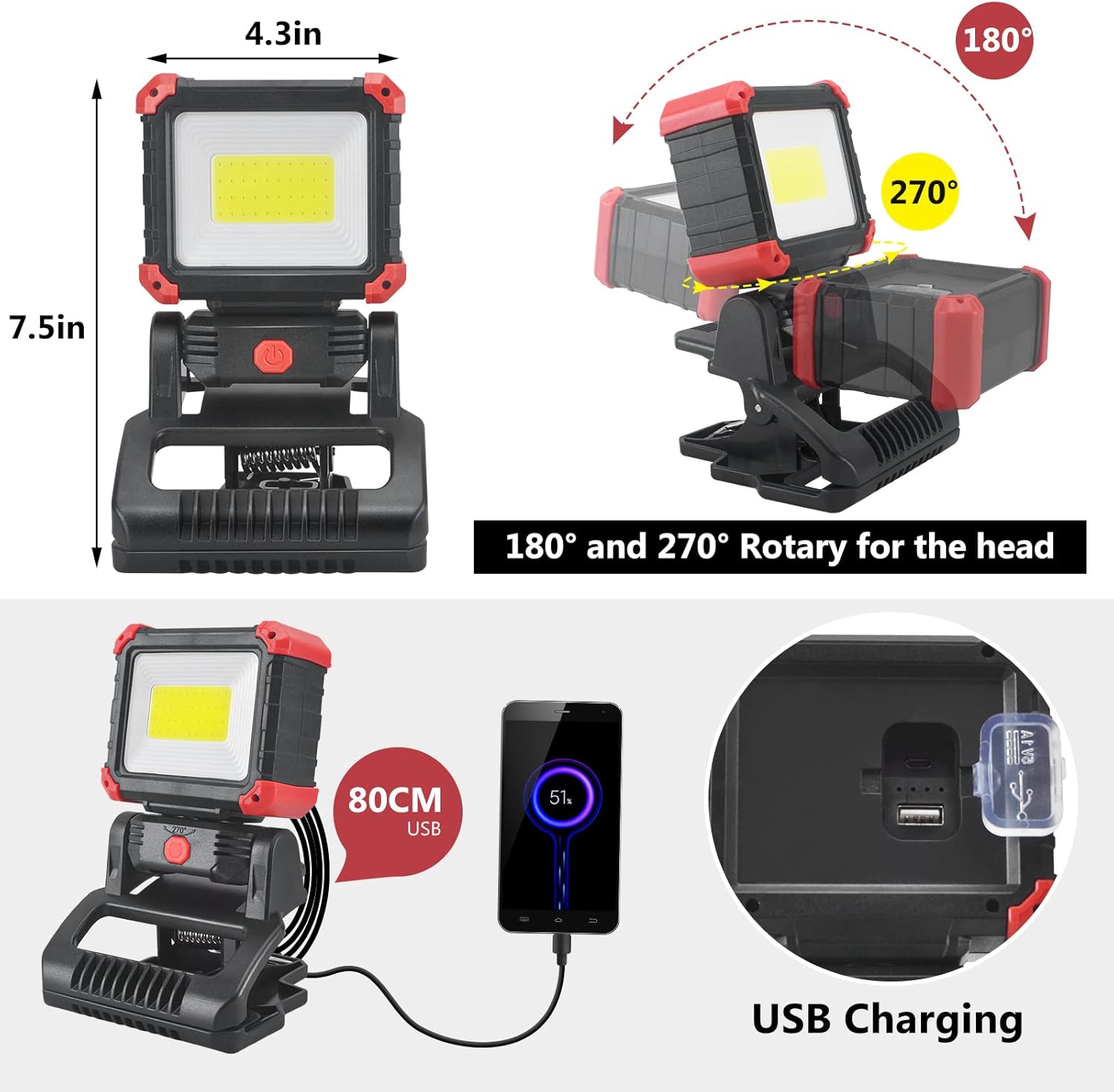
Figure 6.2: Diagram illustrating the adjustable head of the work light, capable of 180-degree forward/backward tilt and 270-degree swivel rotation for optimal light direction.
The light head can be manually adjusted to direct illumination precisely where needed. It offers 180 degrees of forward and backward tilt and 270 degrees of swivel rotation. Gently pivot and rotate the light head to achieve the desired angle.
6.3 Using as a Power Bank
To charge external devices, open the protective cover on the side of the work light to reveal the USB output port. Connect your device's charging cable to this port. The work light will begin charging your device. Note that using the power bank feature will reduce the work light's operational time.
7. Charging the Work Light
When the power indicator lights show low battery, it is time to recharge the work light. Open the protective cover and connect the provided USB charging cable to the micro-USB input port. Connect the other end of the cable to a USB power source (e.g., wall adapter, computer USB port, power bank). The indicator lights will illuminate to show charging status and turn solid when fully charged. Ensure the protective cover is sealed after charging to maintain water resistance.
8. Maintenance
- Cleaning: Wipe the work light with a soft, damp cloth. Do not use abrasive cleaners or solvents.
- Storage: Store the work light in a cool, dry place away from direct sunlight when not in use. For long-term storage, charge the battery to approximately 50% every 3-6 months to preserve battery health.
- Water Resistance: The work light is IPX5 rated, meaning it is protected against low-pressure water jets from any direction. Do not submerge the light in water. Always ensure the charging port cover is sealed.
9. Troubleshooting
| Problem | Possible Cause | Solution |
|---|---|---|
| Light does not turn on. | Battery is depleted. | Charge the work light fully. |
| Light is dim. | Low battery or in Low Light Mode. | Recharge the battery or cycle to High Light Mode. |
| Device not charging from work light. | Work light battery is low or cable is faulty. | Ensure work light is sufficiently charged. Try a different USB cable. |
| Water ingress. | Charging port cover not sealed. | Ensure the charging port cover is always securely closed when not in use. Do not submerge. |
10. Specifications
| Feature | Detail |
|---|---|
| Model Number | ST24-2P |
| Light Source | COB LED |
| Brightness | 2100 Lumens (High Mode) |
| Color Temperature | 6000K Daylight |
| Light Modes | High, Low, Strobe |
| Battery Type | Lithium Ion (2600mAh built-in) |
| Runtime (Low Mode) | Up to 7 hours |
| Rotation Angles | 180° (forward/backward), 270° (swivel) |
| Water Resistance | IPX5 |
| Dimensions | 17.53 x 22.86 x 12.19 cm (approx.) |
| Weight | 0.9 kg (approx.) |
| Power Source | Battery Powered (Rechargeable via USB) |
11. Warranty and Support
Tresda products are manufactured to high-quality standards. For warranty information or technical support, please refer to the purchase platform or contact Tresda customer service directly. Please have your model number (ST24-2P) and purchase details ready when contacting support.
Note: Specific warranty terms may vary by region and retailer.