
Product Overview
The XTRONS 12.3 Inch Android 13 Car Stereo is designed for Left Hand Drive Audi Q5 models from 2009-2017, specifically compatible with Audi Concert or Audi Symphony radio systems. This unit features an Octa-core processor with 4GB DDR4 RAM and 64GB Solid State ROM, running on the latest Android 13 operating system for stable and responsive performance. It boasts a 12.3-inch high-fidelity IPS touch screen with a 24:9 aspect ratio, offering wide viewing angles and detailed visuals. Key features include Global 4G LTE connectivity (Micro-SIM required, data only), built-in wireless CarPlay and wireless/wired Android Auto, Bluetooth 5.0 for stable connections, dual Wi-Fi band support (2.4GHz/5GHz), and Picture-in-Picture (PIP) functionality. The system retains original vehicle functions such as the amplifier system, radio, CD player, Bluetooth, backup camera display, and steering wheel controls.

Image: XTRONS 12.3 Inch Android 13 Car Stereo main unit, showcasing the large display and key features like 4GB RAM, 64GB ROM, Android 13, Octa Core, and 4G LTE.

Image: Comparison of 12.3-inch display size versus 10.25-inch, highlighting multi-task display, Picture-in-Picture, IPS Touch Screen, and built-in dual USB input.

Image: Visual representation of retained original car functions including amplifier system, original radio, original CD player, Bluetooth, backup camera display, and steering wheel control.
What's in the Box
- 1 × ISO Wiring Harness
- 1 × LVDS Cable
- 1 × Tweezers
- 1 × 4G Antenna
- 1 × Audio Cable
- 1 × AMI Cable
- 1 × Mini Speaker
- 1 × GPS Antenna
- 1 × User Manual
- 1 × Installation Instruction
- 1 × Mini Microphone
- 1 × Installation Frame
- 1 × Fix Mount
- 8 × Screw
Specifications
- Display Size: 12.3 Inches
- Model Name: QLA22UCA12Q5L
- Operating System: Android 13
- Processor: Octa-core
- RAM: 4GB DDR4
- ROM: 64GB Solid State
- Screen Type: IPS Touch Screen
- Connectivity: Bluetooth 5.0, USB, Wi-Fi (2.4GHz/5GHz), Global 4G LTE
- Special Features: Wireless CarPlay, Wireless/Wired Android Auto, Picture-in-Picture, G52 GPU (2K video up to 60fps)
- Vehicle Service Type: Car (Audi Q5 2009-2017, Left Hand Drive)
- Audio Output Mode: Speaker, Stereo
- Mounting Type: Dashboard Mount
- Warranty: 1 Year
Setup and Installation
This section provides guidance for installing your XTRONS 12.3 Inch Android 13 Car Stereo. Professional installation is recommended.

Image: Illustrates the applicable Audi Q5 models (2009-2017) and compatible radio systems (Audi Concert or Audi Symphony) with before and after installation views.
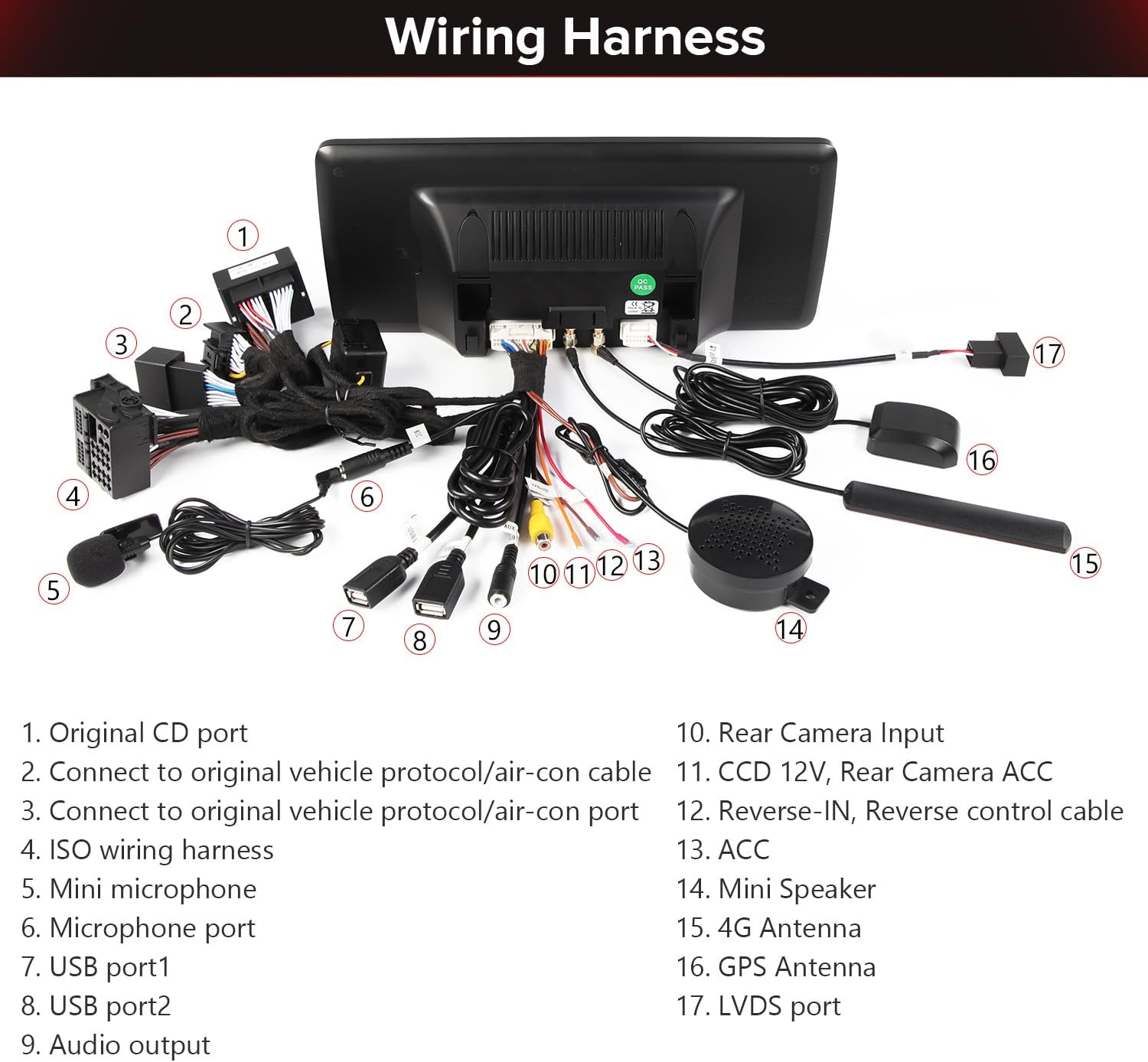
Image: Detailed diagram of the wiring harness, labeling each port and cable for correct connection during installation.
Installation Video Guides
Video: "How to install Touchscreen CarPlay Auto for an Audi vehicle" - This video provides a step-by-step guide on the physical installation process of the touchscreen unit in an Audi vehicle.
Video: "How to install Android CarPlay Screen Radio for Audi Vehicle" - This video demonstrates the installation of an Android CarPlay screen radio specifically for Audi vehicles.
Operating Instructions
Learn how to use the various features of your XTRONS car stereo.

Image: Shows how to display and control your smartphone wirelessly using Wireless CarPlay, Wireless/Cable Android Auto, and Screen Mirroring features.
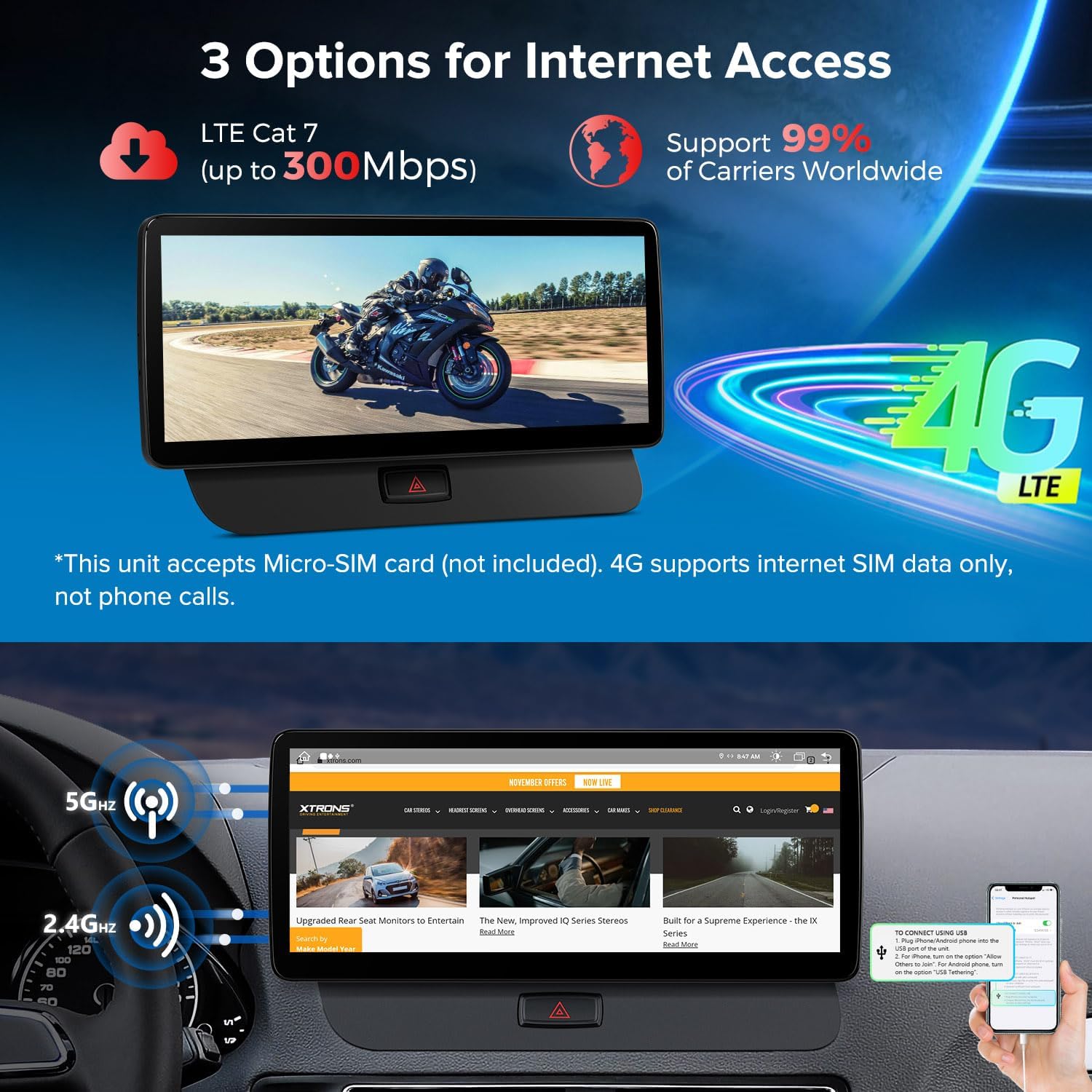
Image: Details the three options for internet access: LTE Cat 7 (up to 300Mbps) via Micro-SIM, 5GHz Wi-Fi, and 2.4GHz Wi-Fi, along with mobile network sharing via USB tethering.
Operating Video Guides
Video: "How to use Android touchscreen most functions for Audi Radio" - This video demonstrates how to navigate and utilize the various functions of the Android touchscreen interface.
Video: "operating system for Linux System" - A short video showcasing the operating system interface and basic navigation.
Troubleshooting
This section addresses common issues you might encounter with your car stereo.
Common Issues and Solutions
- No Sound: Ensure all audio cables are securely connected. Check the AUX input settings on your original car system.
- Original Car Information Not Displayed: Verify that the original CD player host is correctly plugged in and installed tightly.
- Connectivity Issues: Check Wi-Fi and Bluetooth settings on both the stereo and your mobile device. Ensure 4G SIM card is correctly inserted and has data.
Troubleshooting Video Guides
Video: "How to Connect Original Car Bluetooth to Solve Audio for Q5" - This video guides you through connecting your original car's Bluetooth to resolve audio issues with the new unit.
Video: "no sound How to transfer fiber optic cables" - This video provides instructions on how to properly transfer fiber optic cables, which can resolve no-sound issues.
Warranty and Support
The XTRONS 12.3 Inch Android 13 Car Stereo comes with a 1-Year Warranty. For technical support or warranty claims, please contact XTRONS customer service through your purchase platform or visit the official XTRONS website.