
Introduction
Thank you for choosing the PRUNUS J-555 AM/FM Portable Rechargeable Radio. This compact and versatile radio is designed for ease of use and excellent reception, making it ideal for daily listening, outdoor activities, and emergency preparedness. Please read this manual carefully to ensure proper operation and to get the most out of your device.
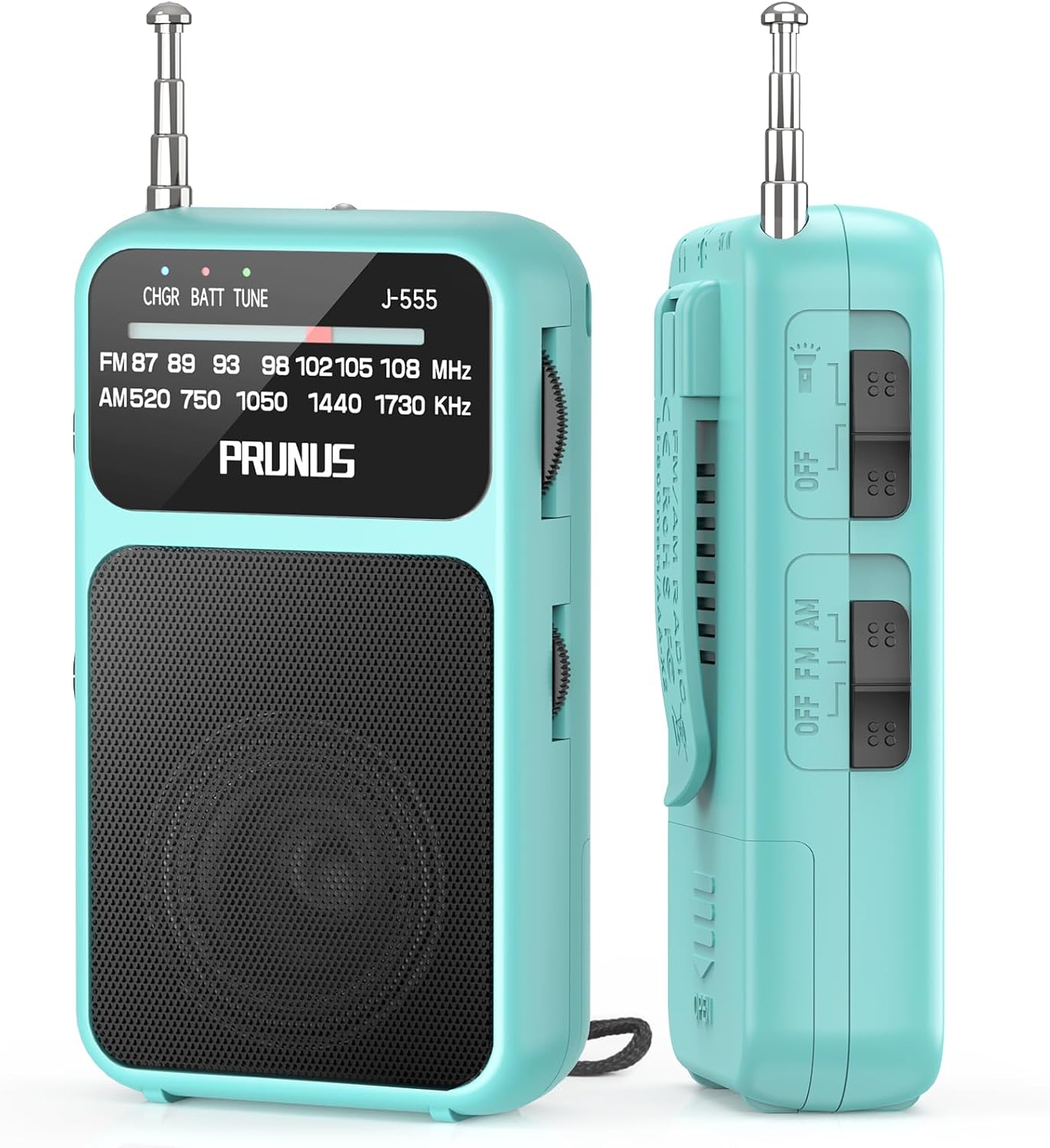
Figure 1: Front and side view of the PRUNUS J-555 Portable Radio, showcasing its compact design and antenna.
Product Features
The PRUNUS J-555 radio is designed with several key features to enhance your listening experience and portability:
- Dual Power Options: Equipped with a built-in 800 mAh rechargeable battery and supports 2 x AAA batteries for extended use.
- Ultra-Mini Design: Compact and lightweight (9.9 x 5.8 x 2.5 cm, 100g) with a strap and clip for easy portability.
- Outstanding Reception: Features a 19.5 cm telescopic antenna and built-in DSP chip for clear AM (520-1730 KHz) and FM (87-108 MHz) reception.
- User-Friendly Controls: Simple AM/FM switch, rotary tuning, and volume controls.
- Integrated Flashlight: Provides illumination in low-light conditions.
- Clear Audio: Built-in magnetic speaker and a 3.5mm headphone jack for private listening.

Figure 2: The ultra-mini design of the PRUNUS J-555, demonstrating its compact size and light weight for easy pocket portability.
Setup and Power Supply
Battery Installation and Charging
The PRUNUS J-555 offers flexible power options: an internal rechargeable battery and external AAA batteries.
- Internal Rechargeable Battery:
- Connect the included USB-C cable to the radio's USB-C port and to a standard USB power adapter (not included) or a computer USB port.
- The charging indicator light will illuminate during charging.
- A full charge provides extended listening time.
- AAA Battery Power (Backup):
- Locate the battery compartment on the back of the radio.
- Open the compartment cover.
- Insert 2 x AAA batteries (not included) according to the polarity markings (+/-).
- Close the battery compartment cover securely.
- Ensure the power source selector switch inside the battery compartment is set to "Alkaline Battery" when using AAA batteries, or "Lithium Battery" when using the internal rechargeable battery.

Figure 3: Illustration of the dual power options, showing USB-C charging and the AAA battery compartment.
Operating Instructions
Turning On/Off and Band Selection
- To turn the radio on, slide the OFF/FM/AM switch to either "FM" or "AM" position.
- To turn the radio off, slide the switch to the "OFF" position.
- Select your desired band (FM or AM) using the same switch.
Tuning and Volume Control
- Tuning: Rotate the Tuning Knob on the side of the radio to scan for stations. The tuning indicator light will help identify strong signals.
- Volume: Rotate the Volume Knob to adjust the audio output level.
Antenna Adjustment for Optimal Reception
For best FM reception, fully extend the telescopic antenna. For AM reception, the antenna is internal; try rotating the radio for better signal clarity.

Figure 4: The radio with its telescopic antenna extended, illustrating optimal signal reception for FM bands.
Using the Headphone Jack
Connect any standard 3.5mm headphones (not included) to the headphone jack for private listening. The internal speaker will automatically mute when headphones are connected.

Figure 5: A user enjoying the radio with headphones connected via the 3.5mm jack.
Flashlight Function
The radio includes a built-in flashlight. To activate it, locate the flashlight switch (often integrated with the power/band switch or a separate button, refer to the physical unit for exact location). This feature is useful in dark environments or emergencies.

Figure 6: Detailed view of the radio's controls, including the telescopic antenna, battery/tuning indicators, tuning knob, belt clip, flashlight, and OFF/FM/AM switch.
Maintenance and Care
- Keep the radio dry. Avoid exposure to water or high humidity.
- Clean the radio with a soft, dry cloth. Do not use abrasive cleaners or solvents.
- If not using the radio for an extended period, remove the AAA batteries to prevent leakage.
- Store the radio in a cool, dry place away from direct sunlight and extreme temperatures.
Troubleshooting
| Problem | Possible Cause | Solution |
|---|---|---|
| No power | Battery depleted or incorrectly installed; power switch off. | Charge the internal battery or replace AAA batteries. Ensure power source selector is correct. Slide power switch to FM or AM. |
| Poor reception / Static | Weak signal; antenna not extended; interference. | Fully extend the telescopic antenna for FM. Rotate the radio for AM. Move away from electronic devices that may cause interference. |
| No sound from speaker | Volume too low; headphones connected; faulty speaker. | Increase volume. Disconnect headphones. If problem persists, contact customer support. |
| Flashlight not working | Battery depleted; flashlight switch off. | Charge the internal battery or replace AAA batteries. Ensure flashlight switch is on. |
Specifications
| Feature | Detail |
|---|---|
| Brand | PRUNUS |
| Model | J-555 |
| Dimensions (L x W x H) | Approx. 9.9 x 5.8 x 2.5 cm (3.9 x 2.3 x 1.0 inches) |
| Weight | Approx. 100 g (0.22 lbs) |
| FM Frequency Range | 87-108 MHz |
| AM Frequency Range | 520-1730 KHz |
| Power Source | Built-in 800 mAh rechargeable battery (USB-C charging) or 2 x AAA batteries |
| Headphone Jack | 3.5mm |
| Special Features | Integrated flashlight, Portable design, Rechargeable |
What's in the Box
- PRUNUS J-555 AM/FM Portable Radio x 1
- USB-C Charging Cable x 1
- Lanyard x 1
- User Manual x 1
Warranty and Support
Specific warranty information is not provided in the product data. For warranty claims, technical support, or any inquiries regarding your PRUNUS J-555 radio, please contact the seller or manufacturer directly through the platform where you purchased the product. Keep your purchase receipt as proof of purchase.


