
1. Product Overview
The KEYDOL YSD01 is a versatile 2-in-1 cordless electric pump designed for both vacuum storage bags and inflatable items. Its compact and lightweight design makes it suitable for home use and travel. This manual provides instructions for safe and efficient operation.

Image: The KEYDOL electric pump shown in use, illustrating its dual functionality for both deflating vacuum bags and inflating items.

Image: A banner highlighting the KEYDOL 2-in-1 pump's features including 150 L/min air flow, dimensions, 1-hour charging, 4.0 kPa pressure, and 1500 mAh battery capacity.
2. Safety Information
- Read all instructions before using the appliance.
- Keep the pump away from water and moisture. Do not operate with wet hands.
- Do not allow children to operate the pump without supervision.
- Avoid continuous operation for more than five minutes to prevent overheating. Allow the pump to rest between extended uses.
- Do not block the air intake or outlet during operation.
- Use only the provided Type-C cable for charging.
- Do not attempt to disassemble or repair the pump yourself. Contact customer support for assistance.
- This pump is not suitable for inflating high-pressure items such as car tires, balloons, or sports balls (e.g., soccer, basketball).
3. Package Contents
Verify that all items are present in the package:
- 1 x KEYDOL Electronic Air Pump
- 1 x Packaging Box
- 4 x Inflatable Nozzles
- 1 x Deflating Port Adapter
- 1 x Type-C Cable
- 1 x Instruction Manual
4. Product Features and Components
Familiarize yourself with the different parts of your KEYDOL electric pump:
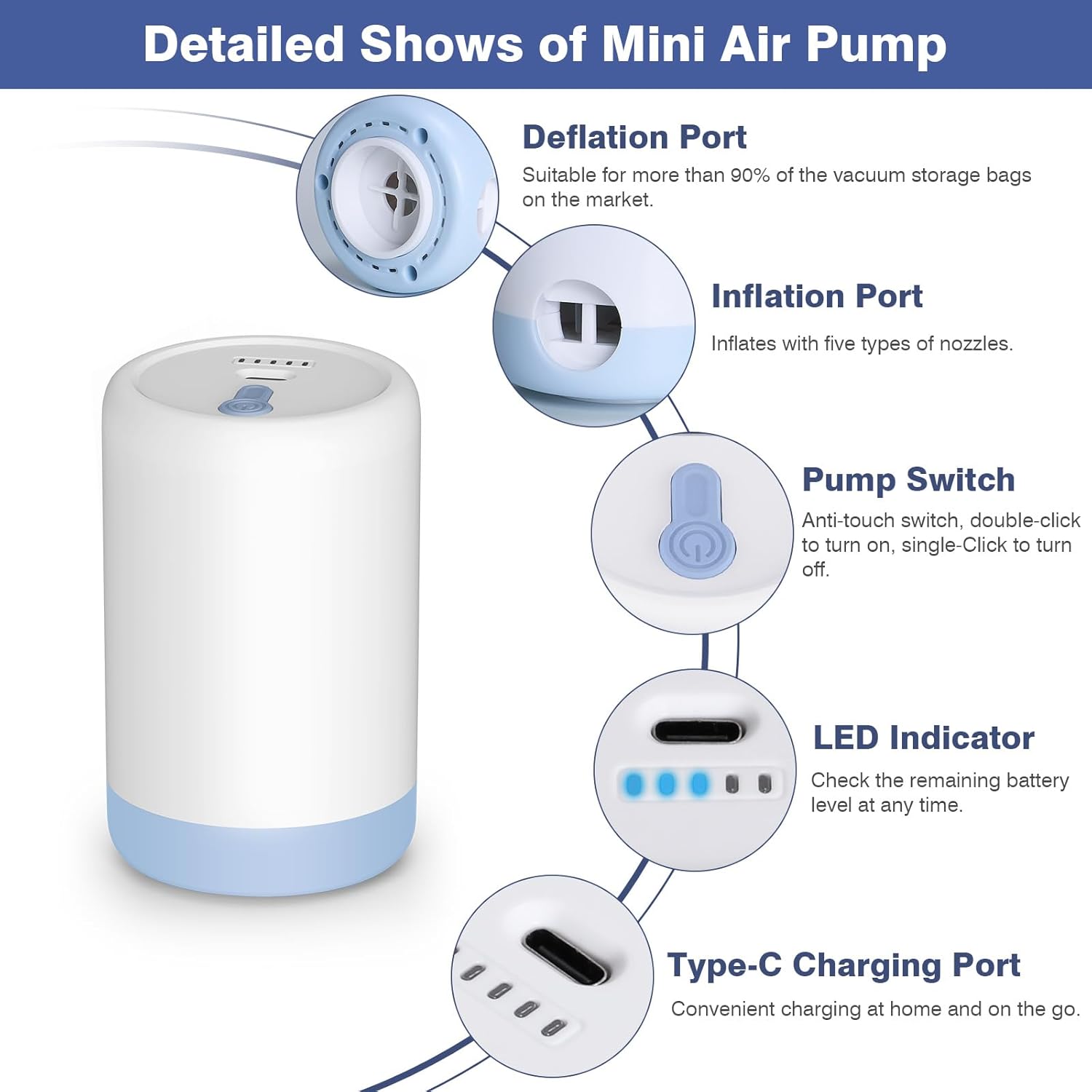
Image: A detailed diagram illustrating the various components of the KEYDOL pump, including the deflation port, inflation port, pump switch, LED indicator, and Type-C charging port.
- Deflation Port: Located at the bottom of the pump. Suitable for most vacuum storage bags. Includes an adapter for wider compatibility (33mm to 19mm).
- Inflation Port: Located on the side of the pump. Used with the provided nozzles to inflate various items.
- Pump Switch: An anti-false-touch button. Double-click to turn on, single-click to turn off.
- LED Indicator: Displays the remaining battery level.
- Type-C Charging Port: For convenient charging using the included Type-C cable.
5. Charging Instructions
The pump is equipped with a 1500mAh battery and charges via a USB Type-C port.
5.1. Charging the Pump
- Connect the provided Type-C cable to the charging port on the pump.
- Connect the other end of the cable to a USB power source such as a laptop, power bank, car USB port, or a wall adapter (not included).
- The LED indicators will illuminate to show the charging status.
5.2. Battery Level Indicator

Image: A visual guide to the LED indicator lights, showing how different numbers of illuminated LEDs correspond to battery charge levels (e.g., one LED for 5-20%, all four for 80-100%).
- The LED indicators display the approximate battery charge level.
- When the last LED indicator flashes, the pump requires charging.
- A full charge allows for approximately one hour of continuous use, capable of compressing about 50 storage bags (duration may vary based on bag size).

Image: Demonstrations of the pump being charged via various Type-C compatible power sources, including a wall adapter, a laptop, and a portable power bank.
6. Operating Instructions
6.1. Deflating Vacuum Storage Bags

Image: A six-step visual guide demonstrating the process of compressing a vacuum storage bag: choosing the right bag, sealing, unscrewing the valve cover, aiming the pump, double-clicking to start, and tightening the valve cover.
- Prepare the Bag: Place items neatly inside the vacuum storage bag. Ensure the bag is not overfilled and the zipper seal is completely closed.
- Open the Valve: Unscrew the valve cover on the vacuum storage bag in the direction of the word "OPEN".
- Attach the Pump: Place the deflation port (bottom) of the electric pump directly onto the open valve of the vacuum bag. If the valve diameter is 33mm, use the pump directly. If the valve is 19mm, attach the complimentary deflating port adapter to the pump first.
- Start Deflation: Double-click the pump switch button to turn on the pump and begin suction.
- Monitor: Allow the pump to remove air until the bag is compressed to the desired level.
- Stop and Seal: Single-click the pump switch button to turn off the pump. Immediately tighten the valve cover in the direction of the word "CLOSE" to prevent air from re-entering.
6.2. Inflating Items

Image: A three-step visual guide demonstrating how to inflate items: choosing the correct nozzle, connecting it to the pump's side port, and double-clicking to start inflation.
- Select Nozzle: Choose the appropriate inflatable nozzle from the included accessories that fits the valve of the item you wish to inflate (e.g., swimming ring, air bed, inflatable pillow).
- Attach Nozzle: Insert the selected nozzle firmly into the inflation port (side) of the electric pump.
- Inflate Item: Insert the nozzle into the item's air valve. Double-click the pump switch button to turn on the pump and begin inflation.
- Monitor: Inflate the item to the desired firmness.
- Stop: Single-click the pump switch button to turn off the pump. Remove the nozzle and close the item's air valve.
Note: This pump is designed for low-pressure inflatable items. Do not use for high-pressure items like vehicle tires or sports balls.

Image: A visual guide indicating suitable items for inflation (air mattresses, swimming rings, air pillows) and unsuitable items (balloons, soccer balls, basketballs, tires).
7. Maintenance
- Cleaning: Wipe the exterior of the pump with a soft, dry cloth. Do not use abrasive cleaners or immerse the pump in water.
- Storage: Store the pump and its accessories in a cool, dry place away from direct sunlight and extreme temperatures.
- Battery Care: For optimal battery life, charge the pump fully before long-term storage and recharge every 3-6 months if not in use.
8. Troubleshooting
| Problem | Possible Cause | Solution |
|---|---|---|
| Pump does not turn on. | Low battery. Incorrect operation. | Charge the pump. Double-click the power button to turn on. |
| Pump stops working during use. | Overheating. Low battery. | Allow the pump to cool down for 10-15 minutes. Recharge the pump. |
| Ineffective vacuuming/inflating. | Improper connection. Blocked port. | Ensure the pump is securely attached to the bag valve or item. Check for obstructions in the ports. Ensure the bag is properly sealed. |
| LED indicator flashes. | Low battery. | Recharge the pump. |
9. Specifications
| Feature | Detail |
|---|---|
| Brand | KEYDOL |
| Model Number | YSD01 |
| Material | Plastic |
| Color | White |
| Product Dimensions | 2.52"L x 2.52"W x 4.17"H |
| Item Weight | 5.19 Ounces (147g) |
| Battery Capacity | 1500mAh |
| Voltage | 5V |
| Power | 20W |
| Air Flow Capacity | 150 L/min |
| Air Pressure | 4000pa |
| Charging Port | USB Type-C |
| Special Feature | Lightweight, LED Indicator |
10. Warranty and Support
This KEYDOL product comes with a 1-year warranty from the date of purchase.
For warranty claims, technical support, or any questions regarding the product, please contact KEYDOL customer service through the retailer where the product was purchased or refer to the contact information provided in the product packaging.
Please retain your proof of purchase for warranty validation.