
1. Product Overview
The Gigigo Gi02 E-Moto Headlight is a high-performance lighting solution designed for enhanced visibility during night riding. This 40-watt headlight features a dual beam system, combining spot and flood lights to provide comprehensive illumination. It is engineered for durability and reliable performance across various riding conditions.

Figure 1: Front view of the Gigigo Gi02 E-Moto Headlight, showcasing its compact design and dual light lenses.
2. What's in the Box
Verify that all components are present before proceeding with installation.
- Gigigo Gi02 E-Moto Headlight
- Mounting Bracket
- Mounting Bolts and Hardware

Figure 2: Contents of the Gigigo Gi02 E-Moto Headlight package, including the headlight unit, mounting bracket, and hardware.
3. Specifications
| Feature | Detail |
|---|---|
| Model Number | Gi02 |
| Power Output | 40 Watts |
| Light Source Type | LED |
| Brightness | 502 Lumens |
| Beam System | Dual (Spot and Flood) |
| Lighting Modes | Low Beam, High Beam, Combined Mode |
| Control | Built-in Switch |
| Color | Black/Gray |
| Water Resistance | Water Resistant |
| Power Source | Battery Powered |
4. Installation Guide
The Gigigo Gi02 Headlight is designed for straightforward installation on most small e-motos. It features a plug-and-play system.
4.1 Required Tools
- Appropriate wrench or Allen key for mounting bolts (usually included with hardware).
4.2 Installation Steps
- Attach Mounting Bracket: Secure the provided mounting bracket to your e-moto's designated headlight mounting point using the supplied mounting bolts and hardware. Ensure the bracket is firmly tightened to prevent movement.
- Mount Headlight Unit: Align the Gigigo Gi02 Headlight with the installed mounting bracket. Use the remaining hardware to attach the headlight securely to the bracket.
- Connect Power: Locate the power connector on your e-moto. Connect the headlight's power cable to the e-moto's power supply. The system is designed for plug-and-play compatibility.
- Special Note for Talaria Sting MX4/R and Talaria XXX: These models may require an additional connector for proper fitment. Please ensure you have the correct adapter if installing on these specific e-moto models.

Figure 3: Side view of the Gigigo Gi02 Headlight, showing the integrated control buttons for mode selection.
5. Operating Instructions
The Gigigo Gi02 Headlight features a built-in switch for easy control of its lighting modes.
5.1 Powering On/Off
- Press the power button on the headlight unit to turn the light on or off.
5.2 Switching Lighting Modes
The headlight offers three distinct lighting modes:
- Low Beam: Provides a focused, lower intensity light suitable for general riding conditions.
- High Beam: Offers maximum intensity and extended range for improved visibility at higher speeds or in very dark environments.
- Combined Mode: Activates both spot and flood beams simultaneously for a broad and powerful illumination.
To cycle through the modes, press the mode selection button on the headlight unit. Each press will switch to the next available mode.
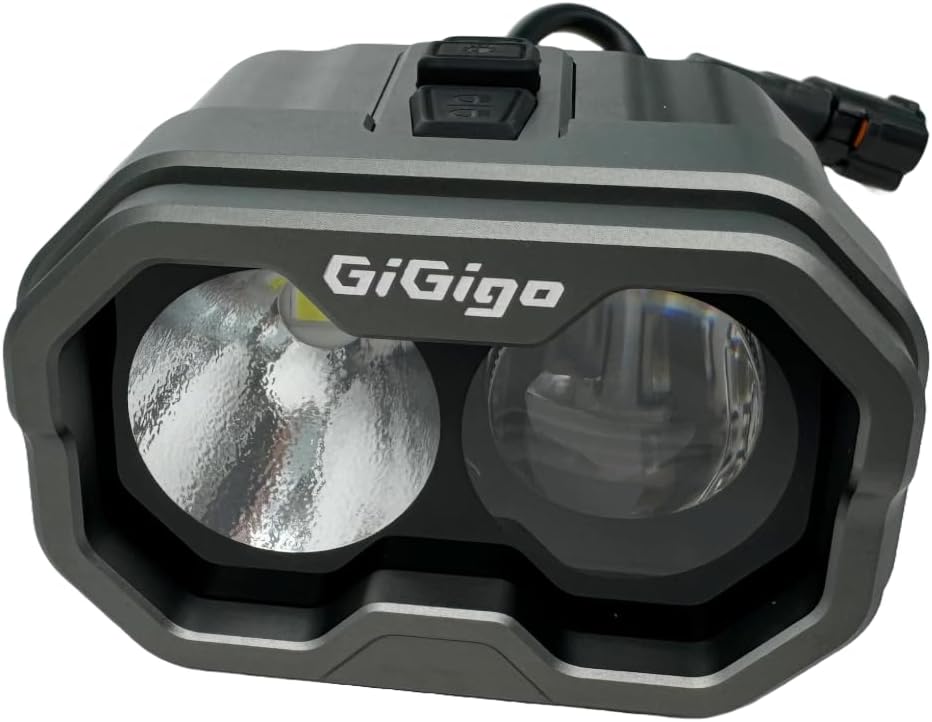
Figure 4: Close-up view of the Gigigo Gi02 Headlight's dual lenses, illustrating the spot and flood beam design.
6. Maintenance
Regular maintenance ensures optimal performance and longevity of your Gigigo Gi02 Headlight.
- Cleaning: Periodically clean the headlight lens with a soft, damp cloth to remove dirt and debris. Avoid abrasive cleaners that could scratch the lens.
- Inspections: Regularly check all mounting bolts and connections to ensure they remain secure. Tighten any loose fasteners.
- Wiring: Inspect the power cable for any signs of wear, fraying, or damage. If damage is observed, discontinue use and replace the unit.
7. Troubleshooting
This section addresses common issues you might encounter with your Gigigo Gi02 Headlight.
7.1 Light Does Not Turn On
- Check Power Connection: Ensure the headlight's power cable is securely connected to the e-moto's power source.
- Verify E-Moto Power: Confirm that your e-moto's battery has sufficient charge and its electrical system is functioning correctly.
- Inspect Wiring: Look for any visible damage to the wiring or connectors.
7.2 Light Flickers or is Dim
- Check Connections: Ensure all electrical connections are tight and free from corrosion.
- Battery Level: A low e-moto battery charge can affect headlight performance.
- Clean Lens: A dirty lens can reduce light output. Clean the lens as described in the Maintenance section.
8. Warranty and Support
For warranty information or technical support, please refer to the documentation provided with your purchase or contact Gigigo customer service. Keep your proof of purchase for warranty claims.
Manufacturer: Gigigo
Brand: TB Electric