
Introduction
Thank you for choosing the WAIKIL 5-in-1 Haircut Set. This versatile grooming tool is designed to provide a comprehensive and efficient personal care experience. Please read this manual thoroughly before using the product to ensure safe and optimal performance. Keep this manual for future reference.
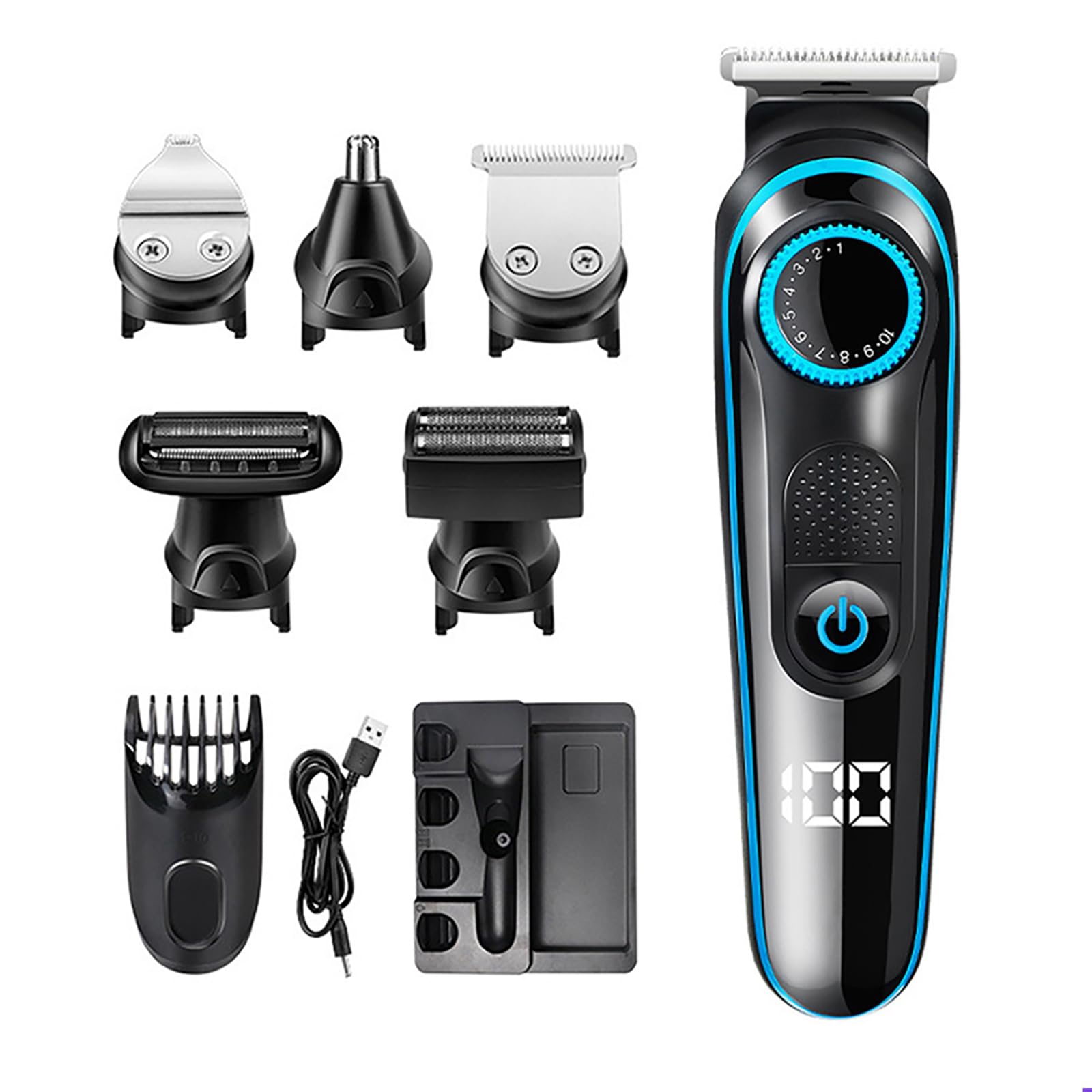
Image: The WAIKIL 5-in-1 Haircut Set, showcasing the main trimmer unit and various interchangeable heads and accessories.
Package Contents
Verify that all items listed below are included in your package:
- Hair Trimmer Unit (main device)
- Nose Hair Trimmer Head
- Foil Shaver Head
- Precision Trimmer Head
- Beard Trimmer Head
- Limit Combs (various sizes)
- USB Charging Cable
- Cleaning Brush
- User Manual (this document)
Safety Information
To reduce the risk of electric shock, injury, or damage, please observe the following safety precautions:
- This appliance is not intended for use by persons (including children) with reduced physical, sensory or mental capabilities, or lack of experience and knowledge, unless they have been given supervision or instruction concerning use of the appliance by a person responsible for their safety.
- Do not immerse the charging cable or the main unit in water.
- Keep the appliance away from heated surfaces.
- Do not use the appliance with a damaged or broken attachment, as injury may occur.
- Ensure the charging port is dry before connecting the USB cable.
- Store the appliance in a dry place when not in use.
Setup
1. Initial Charging
Before first use, fully charge the device. The WAIKIL Haircut Set features a quick-charging lithium polymer battery.
- Connect the USB charging cable to the charging port on the bottom of the trimmer unit.
- Plug the other end of the USB cable into a compatible USB power source (e.g., laptop, car charger, USB wall adapter).
- The LED display will indicate the charging status.
- Once fully charged, disconnect the charging cable.
Note: The device can be charged anytime and anywhere with various USB power sources.
2. Attaching and Detaching Trimmer Heads
The WAIKIL 5-in-1 Haircut Set comes with interchangeable heads for different grooming needs.
- To Attach: Align the desired trimmer head with the main unit and gently push until it clicks into place.
- To Detach: Hold the main unit firmly and pull the trimmer head straight off. Do not twist.
Ensure the device is turned off before changing heads.
Operating Instructions
The WAIKIL Haircut Set offers both wet and dry shaving capabilities.
1. General Operation
- Press the power button to turn the device on or off.
- The LED display will show battery level and current speed setting.
- Adjust the speed as needed for different hair types and areas.
2. Using the Attachments
Select the appropriate head for your grooming task:
- Hair Trimmer Head: Ideal for general haircuts and shaping. Attach a limit comb for desired hair length.
- Nose Hair Trimmer Head: Gently insert into nostrils or ear canals to trim unwanted hair. Do not insert too deeply.
- Foil Shaver Head: For a close, smooth shave on facial hair or other body areas. Move in circular motions or against the direction of hair growth.
- Precision Trimmer Head: For detailing, creating sharp lines, and intricate designs.
- Beard Trimmer Head: For maintaining beard length and styling. Use with or without a limit comb.
3. Wet and Dry Shaving
- Dry Shaving: Use the trimmer on dry skin for quick touch-ups.
- Wet Shaving: For a more comfortable shave, apply shaving foam or gel to your skin before use. This can help protect your skin and provide a smoother result.
Maintenance
Regular cleaning and proper storage will extend the life of your WAIKIL Haircut Set.
1. Cleaning
The trimmer heads are washable for easy cleaning.
- Turn off the device and detach the trimmer head.
- Rinse the trimmer head under running water to remove hair and debris.
- Use the provided cleaning brush to remove any stubborn hair from the blades.
- Allow the trimmer head to air dry completely before reattaching or storing.
- Do not rinse the main unit under water. Wipe it with a damp cloth if necessary.
Note: For optimal performance, regularly oil the blades with a drop of light machine oil (not included) after cleaning.
2. Storage
Store the WAIKIL Haircut Set and its accessories in a cool, dry place, away from direct sunlight and out of reach of children.
Troubleshooting
If you encounter any issues with your WAIKIL Haircut Set, please refer to the following common problems and solutions:
| Problem | Possible Cause | Solution |
|---|---|---|
| Device does not turn on. | Low battery or no charge. | Charge the device fully using the provided USB cable. |
| Trimmer pulls hair or cuts poorly. | Blades are dull, dirty, or not oiled. | Clean the trimmer head thoroughly. Apply a drop of oil to the blades. If problem persists, blades may need replacement (contact support). |
| LED display is not working. | Device malfunction. | Ensure the device is charged. If the issue persists, contact customer support. |
| Device makes unusual noise. | Hair caught in blades or internal issue. | Clean the trimmer head. If the noise continues, discontinue use and contact support. |
Specifications
| Feature | Detail |
|---|---|
| Model Number | 709 |
| Power Source | Battery Powered (Lithium Polymer) |
| Battery Type | 1 Lithium Polymer battery (included) |
| Charging | USB Charging Cable |
| Motor | Powerful, low-noise motor |
| Display | LED Display |
| Water Resistance | Washable heads (main unit not submersible) |
| First Available Date | July 31, 2024 |
| Manufacturer | WAIKIL |
Warranty and Support
Warranty Information
WAIKIL products are manufactured with quality and durability in mind. This product is covered by a standard manufacturer's warranty against defects in materials and workmanship. Please retain your proof of purchase for warranty claims.
For specific warranty terms and conditions, please refer to the warranty card included in your package or visit the official WAIKIL website. The product typically has a return policy of 30 days from the date of purchase for refund or replacement, as per retailer policies.
Customer Support
If you have any questions, require assistance, or need to report a problem with your WAIKIL 5-in-1 Haircut Set, please contact our customer support team.
- Online: Visit the official WAIKIL Store on Amazon: WAIKIL Store
Please have your model number (709) and purchase details ready when contacting support.