
Introduction
This manual provides essential information for the installation, operation, maintenance, and troubleshooting of the replacement water pump for Braun CareStyle 7 Pro series steam irons. This component is designed to restore the proper water flow and steam generation function to your compatible iron.
Please read these instructions carefully before attempting any installation or repair to ensure safety and proper functionality.
Product Compatibility
This water pump (Part Code: AS00005885) is compatible with the following Braun CareStyle 7 Pro steam iron models:
- Braun CareStyle 7 Pro IS7285
- Braun CareStyle 7 Pro IS7286
- Braun CareStyle 7 Pro IS7262
- Braun CareStyle 7 Pro IS7282
- Specific variants including: IS 7286 BL SS GBGCC, IS 7285 BK SS GBGCC, IS 7285 BK SS CN, IS 7285 BK SS AUNZ, IS7286BK, IS7282BL, IS7262GY, IS7266VI.
Always verify your iron's model number before purchasing or installing this replacement part.
Setup and Installation
Replacing the water pump requires careful attention. If you are not comfortable with appliance repair, it is recommended to seek professional assistance.
Safety Precautions:
- DANGER: Always unplug the steam iron from the power outlet and allow it to cool completely before beginning any repair work.
- Ensure the water tank is empty.
- Wear appropriate personal protective equipment, such as gloves and safety glasses.
- Work in a well-lit and clean area.
Tools Required (Typical):
- Screwdriver set (Phillips, Torx, Flathead - depending on iron model)
- Pliers
- Small container for screws/parts
- Clean cloth
Installation Steps:
- Access the Pump: Carefully disassemble the iron's casing to gain access to the internal components, specifically the water pump. Refer to your iron's original service manual or online guides for specific disassembly instructions for your model.
- Disconnect Old Pump: Once the old pump is accessible, carefully disconnect any electrical connectors and water hoses attached to it. Note their positions for reassembly.
- Remove Old Pump: Unscrew or unclip the old pump from its mounting bracket.
- Install New Pump: Position the new water pump in the same location as the old one. Secure it with the original screws or clips.
- Connect New Pump: Reconnect the water hoses and electrical connectors to the new pump. Ensure all connections are secure and properly seated to prevent leaks or electrical issues.
- Reassembly: Carefully reassemble the iron's casing, ensuring all screws are tightened and no parts are pinched.
- Initial Test: Fill the water tank with clean, distilled water. Plug in the iron and perform a test run to check for proper water flow, steam generation, and any leaks.
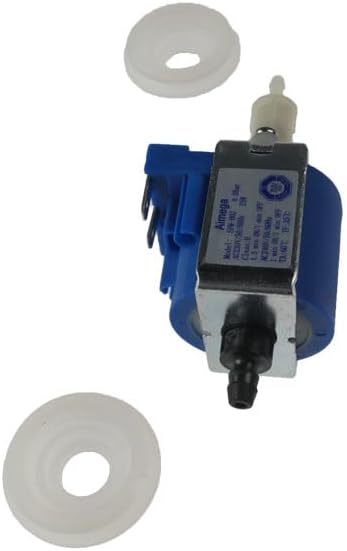
Image 1: The replacement water pump, showing the main pump body and two white gaskets. This component is crucial for water circulation within the steam iron.
Operating (Post-Installation Check)
After successful installation of the new water pump, the steam iron should function as intended. Perform the following checks:
- Power On: Plug in the iron and turn it on. Allow it to heat up to the desired temperature setting.
- Steam Function: Activate the steam function. Observe if steam is generated consistently and powerfully.
- Water Flow: Listen for the pump operating sound. It should be a consistent, low hum. Check for any unusual noises or vibrations.
- Leak Check: Visually inspect the iron for any water leaks, especially around the areas where the pump was installed and hoses were connected.
If any issues are observed, refer to the Troubleshooting section.
Maintenance
Proper maintenance of your steam iron can extend the life of its components, including the water pump.
- Use Distilled Water: To prevent mineral buildup (limescale) that can clog the pump and steam vents, always use distilled or demineralized water in your steam iron.
- Regular Descaling: Follow the descaling instructions provided in your original Braun iron manual. Regular descaling is crucial for maintaining optimal pump performance and preventing blockages.
- Empty Water Tank: After each use, empty any remaining water from the tank to prevent stagnant water and potential mineral deposits.
- Storage: Store the iron upright in a dry place.

Image 2: Recycling information for plastic components. This indicates that the product, being made of plastic, should be disposed of through separate plastic collection. Always check local municipal regulations for proper disposal.
Troubleshooting
If you encounter issues after installing the new water pump, consult the following table:
| Problem | Possible Cause | Solution |
|---|---|---|
| No steam or very little steam. |
|
|
| Pump making unusual noises (loud hum, grinding). |
|
|
| Water leaking from the iron. |
|
|
If the issue persists after attempting these solutions, it is advisable to contact a qualified technician or the product seller for further assistance.
Specifications
| Product Type: | Replacement Water Pump for Steam Iron |
| Brand (Component): | generico |
| Compatible Iron Brand: | Braun |
| Compatible Iron Models: | CareStyle 7 Pro IS7285, IS7286, IS7262, IS7282 (and specific variants listed in Compatibility section) |
| Part Code: | AS00005885 |
| Material: | Plastic |
| ASIN: | B0DBMTWZYT |
| First Available Date: | July 30, 2024 |
Warranty Information
Specific warranty details for this replacement part are not provided in this manual. Please refer to the warranty information provided by the original seller or manufacturer at the time of purchase. Keep your proof of purchase for any warranty claims.
Customer Support
For technical assistance, questions regarding installation, or warranty claims, please contact the seller from whom you purchased this product. You may also refer to the official Braun customer support channels for assistance related to your steam iron model.
Seller Name: Elettro Amiata Shop
For general Braun product support, visit the official Braun website or consult your iron's original user manual for contact information.