
1. Product Overview
The PRETTYCARELIFE Cordless Vacuum Cleaner (Model W400) is a versatile 6-in-1 cleaning device designed for efficient home maintenance. It features a lightweight, self-standing design, powerful suction, and a 180° bendable wand for enhanced maneuverability. This rechargeable stick vacuum is suitable for various floor types, including hardwood and carpet, providing a convenient and effective cleaning solution.

Figure 1: PRETTYCARELIFE W400 Cordless Vacuum Cleaner showcasing its 6-in-1 versatility and various attachments.
2. What's Included
Verify that all components are present in the packaging:
- LED Roller Brush
- Cordless Vacuum (Main Unit)
- 2-in-1 Dust Brush
- Wall Mount
- Adapter
- Long Crevice Tool
- Filter * 2 (one pre-installed, one spare)
- Foldable Metal Tube

Figure 2: All components included with the PRETTYCARELIFE W400 Cordless Vacuum Cleaner.
3. Setup
3.1 Assembly
- Attach the Foldable Metal Tube to the main Cordless Vacuum Unit by aligning the connectors and pushing until it clicks securely into place.
- Connect the LED Roller Brush to the other end of the Foldable Metal Tube, ensuring it clicks firmly.
- For handheld use, attach desired accessories (e.g., 2-in-1 Dust Brush or Long Crevice Tool) directly to the main Cordless Vacuum Unit or the Foldable Metal Tube.
3.2 Charging
Before first use, fully charge the vacuum cleaner.
- Connect the Adapter to the charging port on the main Cordless Vacuum Unit.
- Plug the Adapter into a standard wall outlet.
- The battery indicator lights on the main unit will illuminate to show charging status. A full charge is indicated when all lights are solid green.
3.3 Wall Mount Installation (Optional)
To save space and keep your vacuum accessible, you can install the provided wall mount.
- Choose a suitable location on a wall, ensuring it's near a power outlet if you plan to charge while mounted.
- Use the provided screws and wall anchors to securely fasten the Wall Mount to the wall.
- Hang the main Cordless Vacuum Unit onto the wall mount.
4. Operating Instructions
4.1 Power On/Off and Suction Modes
- Press the Power Button on the main unit to turn the vacuum cleaner on.
- The vacuum will start in the default (minimum) suction mode.
- Press the Max/Min Button to toggle between minimum and maximum suction power as needed for different cleaning tasks.
- Press the Power Button again to turn the vacuum cleaner off.
4.2 Using the Bendable Wand and LED Headlights
The 180° bendable wand allows for easy cleaning under low-lying furniture without excessive bending.
- To activate the bendable feature, press the release button on the foldable metal tube and adjust the angle.
- The LED Headlights on the roller brush automatically illuminate the cleaning path, making dust and debris visible in dimly lit areas.
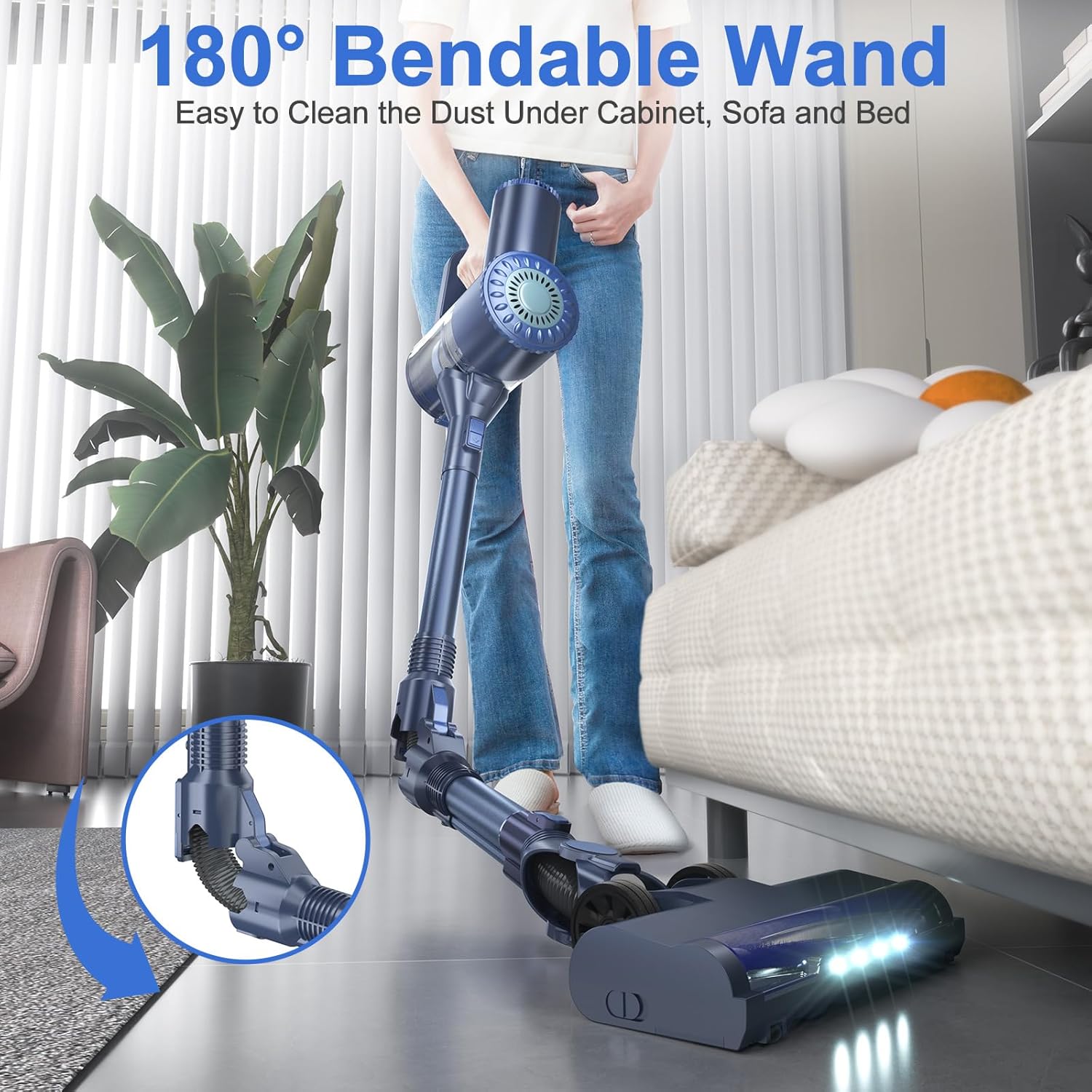
Figure 3: The 180° bendable wand facilitates cleaning under furniture.

Figure 4: Flexible adjustment and LED headlights for improved visibility.
4.3 Using Attachments
- The 2-in-1 Dust Brush is ideal for cleaning upholstery, curtains, and delicate surfaces.
- The Long Crevice Tool is designed to reach narrow gaps, corners, and tight spaces in your home or car.
4.4 Self-Standing Design
The vacuum features a self-standing design, allowing it to remain upright on its own when not in use or during temporary pauses in cleaning, eliminating the need for a wall mount or leaning against furniture.

Figure 5: The self-standing design offers convenient storage and temporary placement.
5. Maintenance
5.1 Emptying the Dustbin
- Ensure the vacuum is turned off.
- Locate the dustbin release button on the main unit.
- Press the button to open the bottom flap of the dustbin and empty its contents into a trash receptacle.
5.2 Cleaning Filters
Regularly clean the filters to maintain optimal suction performance.
- Twist and remove the dustbin from the main unit.
- Carefully remove the HEPA Filter and Stainless Steel Filter from the dustbin.
- Rinse both filters under running water until clean. Do not use detergent.
- Allow the filters to air dry completely for at least 24 hours before reinserting them into the dustbin. Ensure they are completely dry to prevent damage to the motor.
- Reassemble the filters and dustbin, then attach the dustbin back to the main unit.

Figure 6: Components of the 6-Stage & Double Cyclone Filtration System.
5.3 Cleaning the Roller Brush
To prevent tangles and maintain effective cleaning, periodically clean the roller brush.
- Ensure the vacuum is turned off.
- Locate the release mechanism on the side of the LED Roller Brush head.
- Unlock and remove the roller brush.
- Use scissors or the provided cleaning tool to cut and remove any tangled hair or debris from the brush.
- Reinsert the clean roller brush and lock it into place.
6. Troubleshooting
- No Power: Check if the battery is charged. Ensure the adapter is properly connected during charging.
- Reduced Suction: Empty the dustbin if full. Clean the HEPA and stainless steel filters. Check the foldable metal tube and roller brush for any blockages.
- Roller Brush Not Spinning: Turn off the vacuum and check for tangled hair or debris obstructing the roller. Ensure the roller brush is correctly inserted and locked.
7. Specifications
| Brand | PRETTYCARELIFE |
| Model Number | W400 |
| Special Feature | Cordless, Foldable, HEPA, Lightweight |
| Filter Type | HEPA Filter |
| Maximum Suction | 187.5 Inches (25Kpa) |
| Form Factor | Stick |
| Product Dimensions | 40.6"L x 8.2"W x 9.9"H |
| Battery Type | Lithium-Ion (1 included) |
| Controller Type | Push Button |
| Motor Horsepower | 2.01 horsepower |
| Number of Speeds | 2 |
| Item Weight | 3 pounds |
8. Warranty and Support
For warranty information, technical support, or any product-related inquiries, please refer to the contact information provided in your product packaging or visit the official PRETTYCARELIFE website. Some customers have reported up to 2 years of technical support availability.