
PRETTYCARELIFE W400
PRETTYCARELIFE Cordless Vacuum Cleaner
Model: W400
Introduction
This manual provides detailed instructions for the safe and efficient use, maintenance, and troubleshooting of your PRETTYCARELIFE W400 Cordless Vacuum Cleaner. Please read this manual thoroughly before operating the appliance and retain it for future reference.
What's Included
Verify that all components are present in the packaging before beginning assembly.

Image: All components included in the PRETTYCARELIFE W400 package, featuring the main vacuum unit, LED roller brush, 2-in-1 dust brush, long crevice tool, wall mount, adapter, and two filters.
- Cordless Vacuum Unit
- LED Roller Brush
- 2-in-1 Dust Brush
- Long Crevice Tool
- Wall Mount
- Power Adapter
- 2 x Filters (HEPA Filter, Stainless Steel Filter)
- Foldable Metal Tube (Extension Wand)
Setup
Assembly
- Attach the extension wand to the main vacuum unit until it clicks securely into place.
- Connect the desired cleaning head (e.g., LED roller brush) to the other end of the extension wand, ensuring a secure connection.
- For handheld use, attach accessories directly to the main vacuum unit.
Charging
Ensure the vacuum is fully charged before first use. Connect the power adapter to the charging port on the main vacuum unit and plug it into a wall outlet. The battery indicator will show charging status.
Operating Instructions
Powering On/Off and Suction Modes
Press the power button to turn the vacuum on. The W400 features 2 speed settings for varying cleaning needs. Use the control button to switch between standard and max suction modes.
Maneuverability and Features
The PRETTYCARELIFE W400 is designed for versatile cleaning across various surfaces.
- 180° Bendable Wand: The flexible extension wand allows for easy cleaning under furniture, beds, and cabinets without excessive bending.
- Flexible Adjustment & LED Headlight: The cleaning head offers 180° left and right swivel, and 90° up and down movement for enhanced maneuverability. Integrated LED headlights illuminate dust and debris in dark areas, ensuring thorough cleaning.
- Self-Standing Design: The vacuum can stand upright on its own, providing convenient storage and easy pausing during cleaning tasks without needing a wall mount.
- 6-in-1 Versatility: Easily convert the stick vacuum into a handheld unit by detaching the extension wand and attaching the appropriate accessories for cleaning upholstery, car interiors, or tight spaces.

Image: The vacuum cleaner demonstrating its 180-degree bendable wand, allowing it to reach under low furniture.

Image: Close-up of the vacuum head showing its flexible movement and bright LED headlights, designed to improve visibility during cleaning.

Image: The PRETTYCARELIFE W400 standing independently, highlighting its self-standing design for easy storage and accessibility.
Maintenance
Regular maintenance ensures optimal performance and extends the lifespan of your vacuum cleaner.
Emptying the Dust Cup
The dust cup should be emptied regularly, ideally after each use or when debris reaches the MAX fill line. To empty, detach the dust cup from the main unit and press the release button to open the bottom flap, allowing debris to fall into a trash bin.
Cleaning Filters
The W400 features a 6-stage and double cyclone high-efficiency filtration system, including a HEPA filter and stainless steel filter. Filters should be cleaned periodically to maintain suction power.
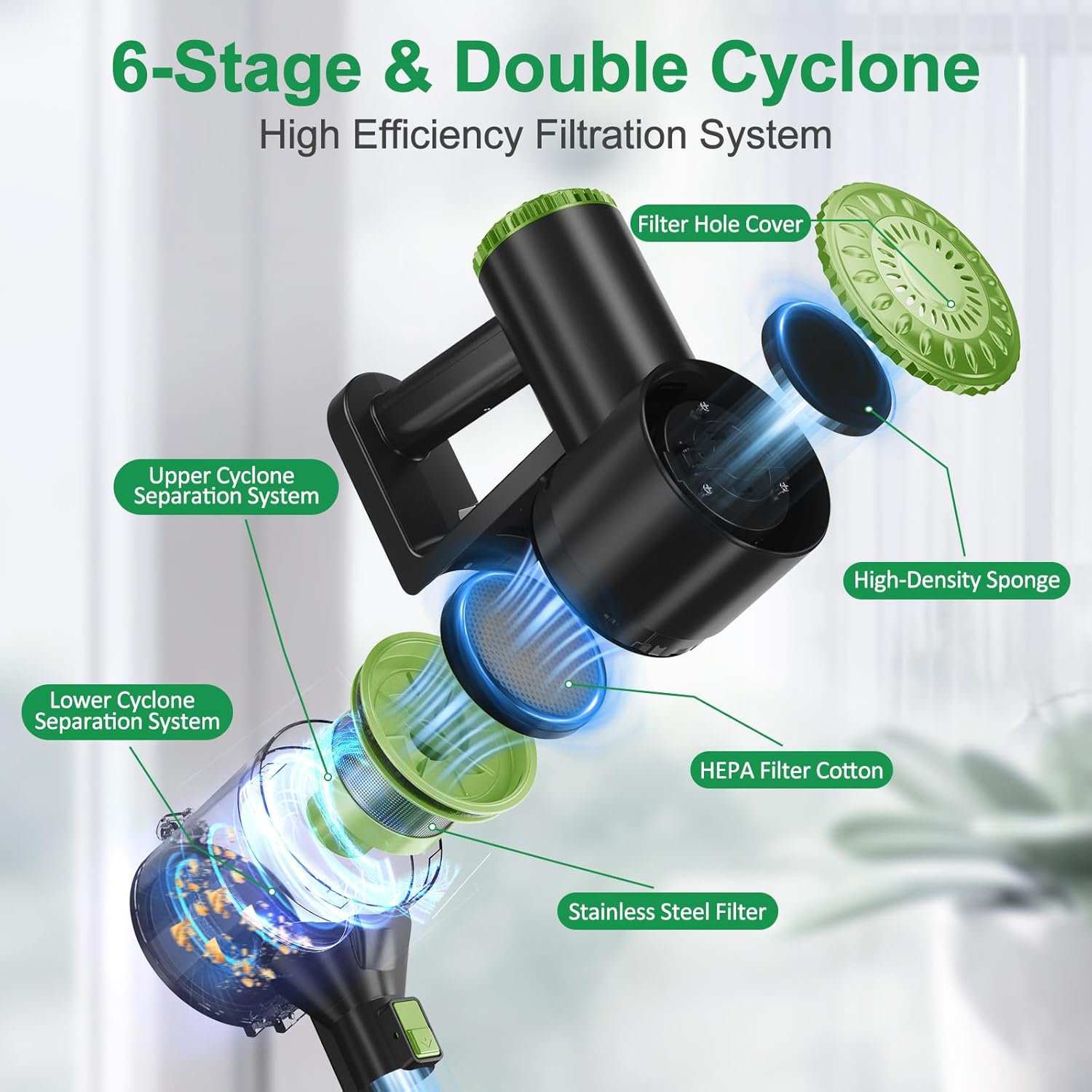
Image: Diagram illustrating the 6-stage and double cyclone filtration system of the PRETTYCARELIFE W400, showing the filter hole cover, upper and lower cyclone separation systems, high-density sponge, HEPA filter cotton, and stainless steel filter.
- Twist and pull to remove the filter assembly from the dust cup.
- Tap the filters gently over a trash can to remove loose dust.
- For a deeper clean, rinse the filters under running water. Ensure they are completely dry (allow 24-48 hours) before reassembling to prevent damage to the motor.
Cleaning the Brush Roll
Periodically check the brush roll for tangled hair or debris. Use scissors to cut away any wrapped hair and remove it. The brush roll can typically be removed from the cleaning head for easier cleaning.
Troubleshooting
| Problem | Possible Cause | Solution |
|---|---|---|
| Vacuum not turning on | Battery is depleted | Charge the battery fully. |
| Low suction power | Dust cup is full | Empty the dust cup. |
| Low suction power | Filters are clogged | Clean or replace the filters. |
| Low suction power | Brush roll is tangled or blocked | Remove hair and debris from the brush roll. Check for blockages in the wand or cleaning head. |
| Vacuum stops unexpectedly | Overheating due to blockage or prolonged use | Turn off the vacuum, clear any blockages, and allow it to cool down for at least 30 minutes before restarting. |
Specifications
| Feature | Detail |
|---|---|
| Brand | PRETTYCARELIFE |
| Model Number | W400 |
| Special Feature | Bagless |
| Filter Type | HEPA Filter |
| Included Components | Crevice Tool, Dusting Brush, Extension Wand |
| Is Cordless? | Yes |
| Form Factor | Stick |
| Battery Description | Lithium-Ion |
| Number of Items | 1 |
| Controller Type | Push Button |
| Control Method | Touch |
| Number of Speeds | 2 |
| Portable | Yes |
| Number of Handles | 1 |
| Number of Power Levels | 2 |
| Indoor/Outdoor Usage | Indoor |
| UPC | 630456585785 |
| Product Dimensions | 40.6 x 8.2 x 9.9 inches |
| Item Weight | 3 pounds |
| Batteries | 1 Lithium Ion batteries required. (included) |
| Batteries required | Yes |
| Battery type | Lithium-Ion |
Warranty and Support
Your PRETTYCARELIFE W400 Cordless Vacuum Cleaner is covered by the manufacturer's warranty. Please refer to the warranty card included in your product packaging for specific terms and conditions. For technical support, replacement parts, or any inquiries, please contact PRETTYCARELIFE customer service through the contact information provided on the product packaging or their official website.
Ask a question about this manual
Ask about setup, troubleshooting, compatibility, parts, safety, or missing instructions. Manuals+ will review the question and use this page’s manual context to help answer it.