
Hiseeu WK-12V-4HB315-3T
Hiseeu 5MP Wireless Pro Security Camera System User Manual
Model: WK-12V-4HB315-3T
Brand: Hiseeu
1. Introduction
This manual provides detailed instructions for the installation, operation, and maintenance of your Hiseeu 5MP Wireless Pro Security Camera System. Please read this manual thoroughly before using the product to ensure proper functionality and safety. Keep this manual for future reference.
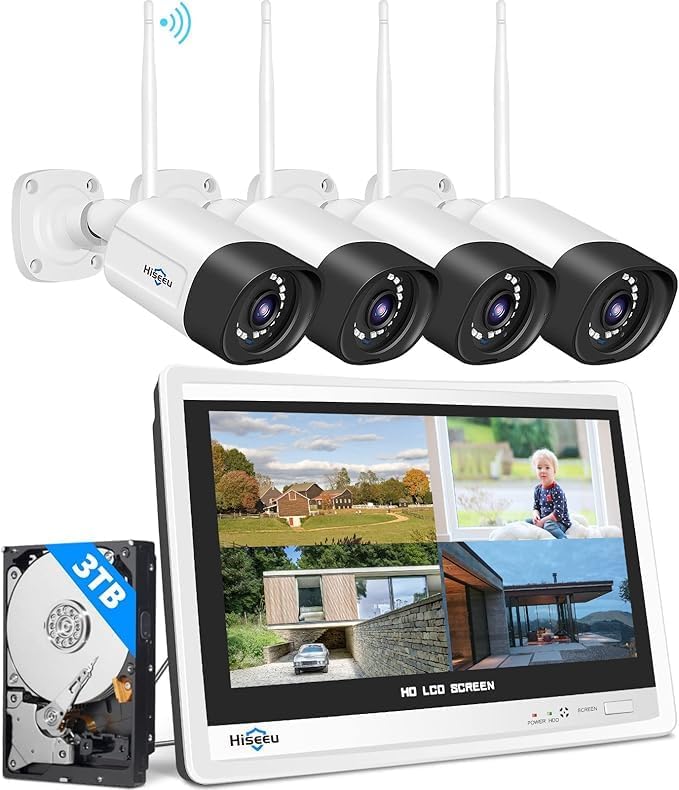
Image: The Hiseeu 5MP Wireless Pro Security Camera System, showing the NVR with integrated 12-inch LCD monitor, four wireless cameras, and a 3TB hard disk drive.
2. Safety Information
To ensure safe operation and prevent damage, please observe the following precautions:
- Use only the power adapters supplied with the system.
- Do not expose the NVR or cameras to extreme temperatures, humidity, or direct sunlight.
- Ensure all cables are securely connected to prevent disconnections.
- Avoid placing the NVR in poorly ventilated areas.
- Do not attempt to disassemble or modify the product. Refer all servicing to qualified personnel.
- Adhere to local laws and regulations regarding surveillance recording.
3. Package Contents
Verify that all items are present in your package:
- 1 x Hiseeu 12-inch LCD NVR (with pre-installed 3TB HDD)
- Wireless 5MP Pro Cameras (quantity may vary based on package)
- Power Adapters for NVR and Cameras
- USB Mouse
- Ethernet Cable
- Mounting Screws and Plugs
- User Manual (this document)
4. Product Overview
The Hiseeu Wireless Pro Security Camera System is designed for robust and reliable surveillance. Key features include:
- Wireless Pro Technology: Enhanced stability, faster video transmission, and lower latency for reliable security.
- Integrated 12-inch LCD Monitor: All-in-one NVR with a built-in display for convenient viewing.
- 5MP High-Resolution Cameras: Deliver clear and detailed video footage.
- 3TB Hard Disk Drive: Provides ample storage for continuous 24/7 recording, supporting approximately 90 days of recording with H.265+ compression.
- Color Night Vision: Equipped with floodlights for clear color night vision in low-light conditions.
- Two-Way Audio: Allows for communication through the camera.
- Humanoid Motion Detection: Advanced detection to minimize false alarms.
- Expandable 10CH NVR: Supports up to 10 cameras for comprehensive coverage.
- IP66 Waterproof Cameras: Suitable for outdoor use in various weather conditions.
4.1. Wireless Pro Technology
The system utilizes advanced Wireless Pro technology to minimize lag, enhance stability, and provide 25% faster transmission speed, ensuring a robust connection for your security needs.

Image: Visual representation of the Hiseeu WiFi Pro chip, highlighting features like minimized lag, greater stability, and faster transmission speed.
4.2. Color Night Vision
The cameras are equipped with floodlights to provide clear color night vision, ensuring visibility even in complete darkness. This feature allows for better identification of details compared to traditional infrared night vision.

Image: A Hiseeu camera mounted outdoors, demonstrating its full color night vision capability with integrated spotlights, showing a clear, illuminated view at night.
4.3. Humanoid Motion Detection
The system features intelligent humanoid motion detection, which can trigger sound alarms and send app notifications upon detecting human figures, reducing false alerts from other movements.

Image: A scene depicting a person triggering humanoid motion detection, resulting in a light alarm from the camera and an app notification on a smartphone.
4.4. Two-Way Audio
Each camera includes a built-in waterproof speaker, enabling smooth two-way audio communication. You can hear and talk with individuals in the surveillance area directly through the app.
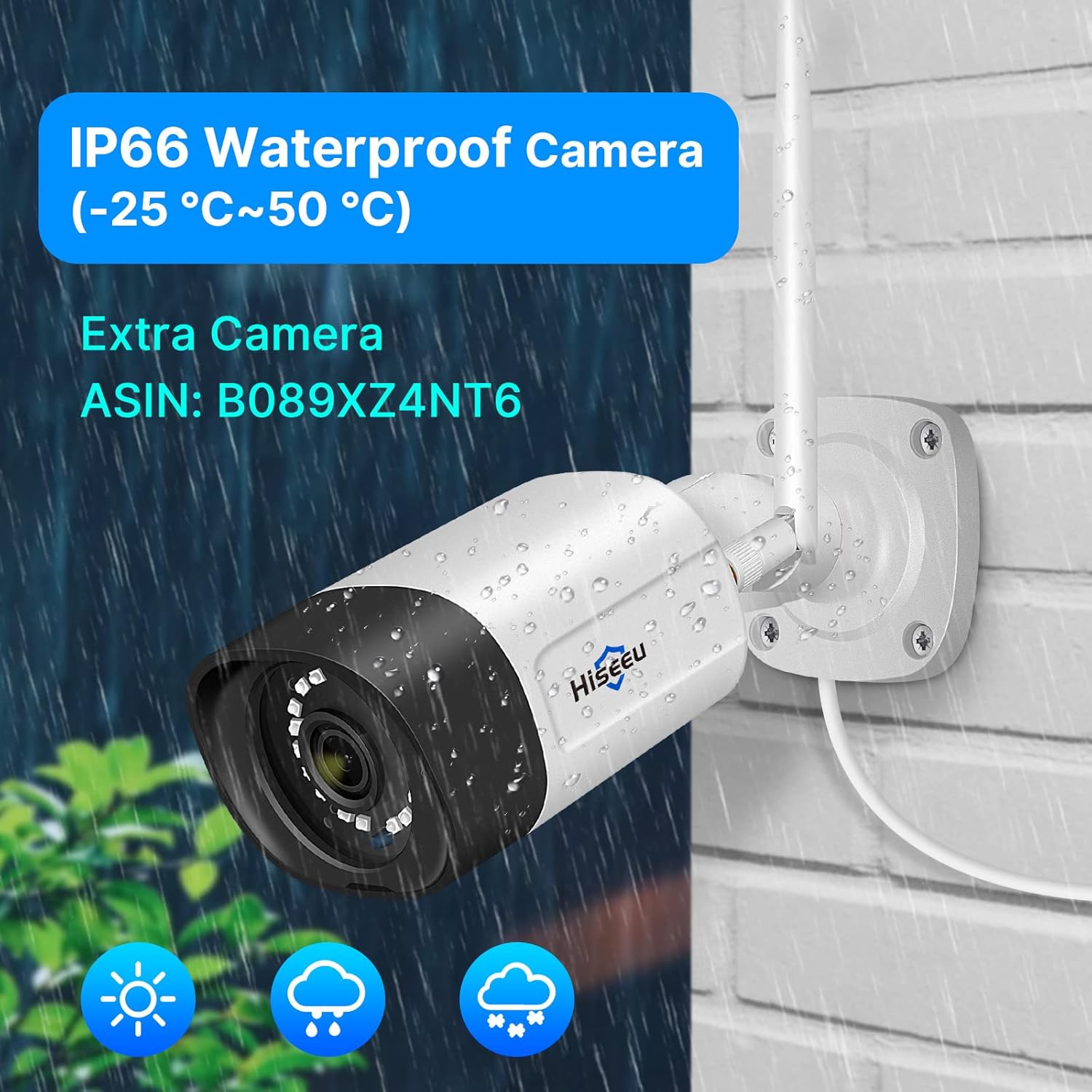
Image: A user interacting with a delivery person via the camera's two-way audio feature, showing a conversation bubble from the camera's speaker.
4.5. IP66 Waterproof Cameras
The cameras are rated IP66 waterproof, making them suitable for outdoor installation and capable of withstanding various weather conditions, including rain and snow.

Image: A Hiseeu camera with water droplets on its casing, illustrating its IP66 waterproof rating, suitable for outdoor use.
5. Setup
The Hiseeu security system is designed for true plug-and-play installation. The wireless cameras and NVR monitor are auto-paired during factory setting.
5.1. Initial Power-Up
- Connect the power adapters to the NVR and all cameras.
- Connect the NVR to a TV monitor using a VGA or HDMI cable if you prefer a larger display. The built-in 12-inch LCD monitor will display the camera feeds automatically.
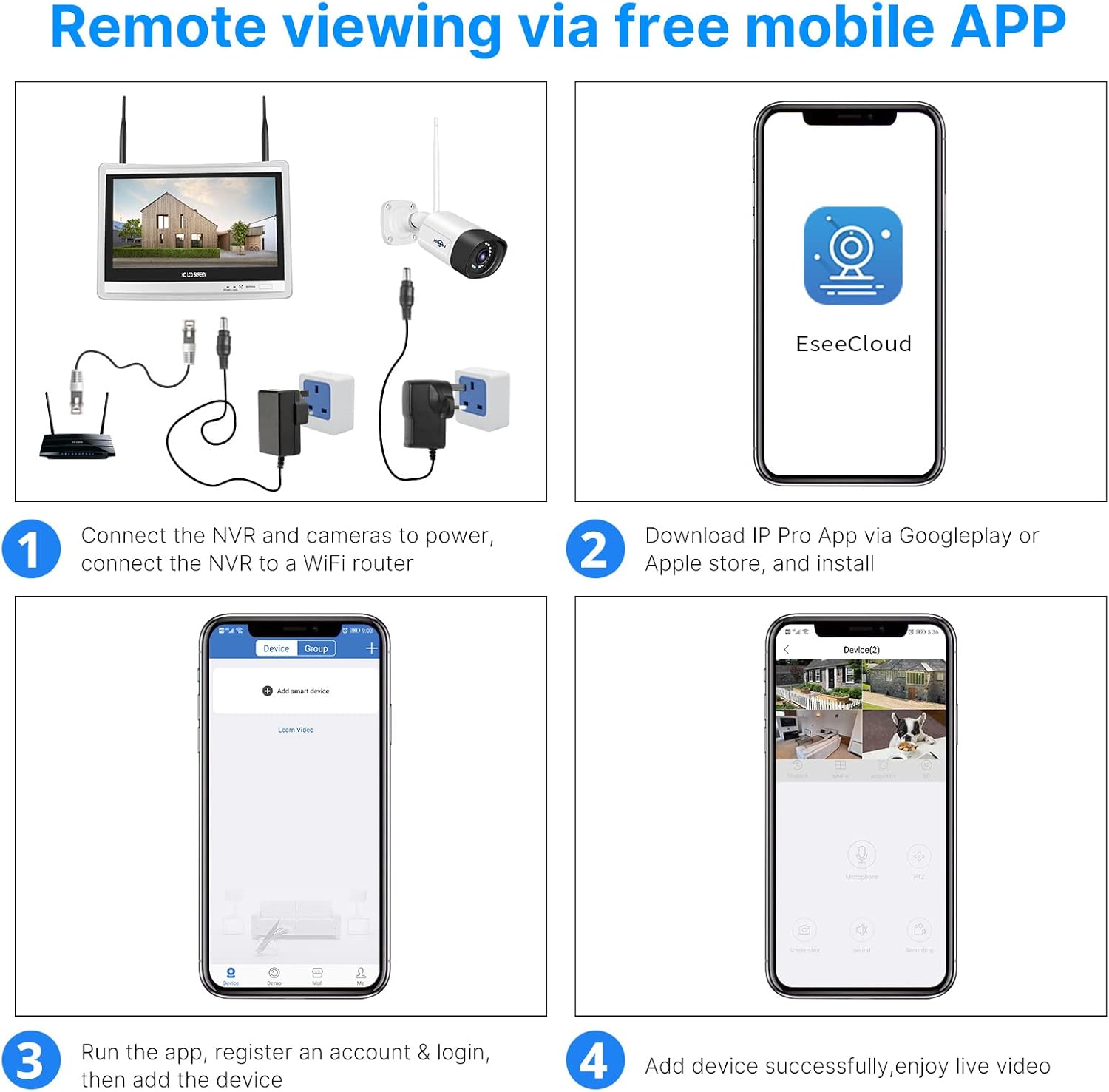
Image: Diagram showing the NVR and a camera connected to power outlets, illustrating the auto-pairing and plug-and-play setup.
5.2. Mobile App Setup (Eseecloud)
For remote viewing and advanced features, download and configure the Eseecloud mobile application.
- Download the Eseecloud app from Google Play Store (Android) or Apple App Store (iOS).
- Register an account and log in.
- Add your device by scanning the QR code on the NVR or camera, or by manually entering the device ID.
- Once added, you can enjoy live video feeds and control your system remotely.

Image: Step-by-step guide for setting up remote viewing via the Eseecloud mobile app, showing NVR connection, app download, registration, and device addition.
For a visual guide on setting up the Eseecloud app, please watch the official video:
Video: Eseecloud APP Manual - Video Version. This video provides a step-by-step visual guide for setting up and using the Eseecloud mobile application with your Hiseeu security system.
6. Operating Instructions
6.1. Real-Time Video and Recording
You can view live feeds from your cameras and initiate recordings through the NVR or the Eseecloud app. The system supports both SD and HD viewing modes.
6.2. Two-Way Audio Function
To use the two-way audio feature, open the sound button in the app when viewing the camera. Ensure your phone volume is up. To speak, click the microphone icon, and click 'hang up' to end the call.
6.3. Screenshot & Recording
You can take screenshots or record important video segments directly from the app. Saved media can be accessed in the 'Photo album' section.
6.4. Motion Detection Alert
Configure motion detection settings to receive alerts. You can adjust sensitivity, set detection periods (day, night, or custom), and define specific detection areas to reduce false alarms.
6.5. Siren Setting
Enable or disable the siren feature. When activated, the camera will emit an alarm sound if motion is detected in the designated area.
6.6. Recording Mode
Choose between two recording modes: Event recording (records when screen changes are detected) or Keep recording (continuous recording). You can also set specific time schedules for recording.
6.7. Night Vision Modes
The camera offers different night vision modes: Full Color Night Vision (uses floodlights for color images), Infrared Night Vision (black and white image), and Smart Night Vision (switches between black-and-white and color based on detection).
6.8. Privacy Area
Set privacy zones within the camera's view to block out specific areas from being recorded or monitored.
6.9. PTZ Control (for compatible cameras)
If you have PTZ (Pan-Tilt-Zoom) cameras, you can control their movement and zoom through the app. Adjust PTZ speed, set cruise modes, and define preset positions for quick viewing.
6.10. Work With Alexa
The system supports integration with Alexa. Enable Alexa service authorization in the app settings, then link your Eseecloud account through the Alexa app to view camera feeds on compatible Echo devices.
7. Maintenance
7.1. Cleaning
Regularly clean the camera lenses with a soft, dry cloth to ensure clear image quality. Do not use harsh chemicals or abrasive materials.
7.2. Storage Management
The NVR comes with a pre-installed 3TB HDD. The H.265+ video compression technology helps save up to 50% storage space compared to H.264, allowing for approximately 90 days of recording. You can also view cloud storage usage and format the SD card (if inserted) via the app settings.
8. Troubleshooting
If you encounter any issues, please refer to the following common solutions:
- No Video Feed: Check power connections for NVR and cameras. Ensure cameras are within range and properly paired.
- Poor Image Quality: Clean camera lenses. Check network signal strength. Ensure cameras are set to HD mode in the app.
- No Recording: Verify HDD status in NVR settings. Ensure recording schedules are correctly set. Check if the SD card is inserted and has sufficient space.
- App Connectivity Issues: Ensure your NVR is connected to the internet. Check your home WiFi signal. Restart the app or your mobile device.
- False Motion Alerts: Adjust motion detection sensitivity and detection areas in the app settings.
For more detailed troubleshooting or persistent issues, please contact Hiseeu Customer Service.
9. Specifications
| Feature | Specification |
|---|---|
| Brand | Hiseeu |
| Model Number | WK-12V-4HB315-3T |
| Connectivity Technology | Wireless |
| Video Capture Resolution | 1080p (Cameras are 5MP, NVR supports 4K cameras, but output resolution is 1080p) |
| Memory Storage Capacity | 3 TB HDD |
| Item Dimensions L x W x H | 12.72 x 7.87 x 11.14 inches |
| Compatible Devices | WiFi-enabled Smartphones, Personal Computers, Laptops, Tablets |
| Low Light Technology | Night Vision (Color Night Vision supported) |
| Hardware Interface | 802.11 ac/b/g/n |
| Video Input | Wireless |
| Item Weight | 10.54 pounds |
| First Available Date | July 30, 2024 |
10. Warranty and Support
Hiseeu offers comprehensive customer support for your security system.
- Warranty: A 12-month limited warranty is provided. The actual warranty period is implemented according to local laws and regulations.
- APP Online Support: The Eseecloud app provides one-on-one 7/24 online support. For any questions, please contact support directly through the app to get assistance.
- Contact Information: You can contact Hiseeu by telephone and email. Hiseeu aims to reply within 12 hours. This is also a channel for collecting customer suggestions.
For further assistance, please visit the official Hiseeu store or contact their customer service team.
Related Documents - WK-12V-4HB315-3T
 |
Hiseeu Wireless Video Recorder System User Manual Comprehensive user manual for the Hiseeu Wireless Video Recorder System, detailing setup, configuration, and operation for home and business surveillance. |
 |
Hiseeu WiFi CCTV Kits Quick Guide A017-V5.0 Quick guide for Hiseeu WiFi CCTV Kits, model A017-V5.0. Provides setup, safety, and troubleshooting information for Hiseeu surveillance systems. |
 |
Hiseeu Security Camera System User Manual and Guide Comprehensive user manual for Hiseeu Security Camera Systems, detailing features like 5MP/1080p resolution, PoE, 2-way audio, face/human detection, night vision, motion alerts, remote access, and H.265+ recording. Includes setup and connectivity information. |
 |
Hiseeu B004-V2.0 PoE Security Camera System: Quick Start Guide Comprehensive quick start guide for the Hiseeu B004-V2.0 PoE Security Camera System, featuring 5MP H.265 8CH NVR capabilities. This guide covers package contents, product review, system connection, live view setup, mobile app and PC client access, motion detection, and factory reset procedures. |
 |
Hiseeu WKIT-4HB612-1T User Manual: Setup, Features, and Troubleshooting Guide Comprehensive user manual for the Hiseeu WKIT-4HB612-1T Wireless Battery Security Camera System. Covers installation, setup, network configuration, features, and frequently asked questions for optimal system performance. |
 |
Hiseeu Wireless Network Video Recorder System User Manual User manual for the Hiseeu Wireless Network Video Recorder (NVR) System, covering setup, features, troubleshooting, and support for various Hiseeu CCTV kits. |