
Waykar CTH80A
Waykar 80 Pint Energy Star Dehumidifier User Manual
Model: CTH80A | Brand: Waykar
1. Introduction
This user manual provides detailed instructions for the safe and efficient operation of your Waykar 80 Pint Energy Star Dehumidifier. Designed for homes, basements, and large rooms up to 5,000 sq. ft., this unit effectively removes excess moisture, improves air quality, and enhances comfort. Please read this manual thoroughly before initial use and retain it for future reference.

Figure 1: Waykar 80 Pint Energy Star Dehumidifier
The Waykar 80 Pint Energy Star Dehumidifier is a compact and efficient appliance designed to reduce humidity levels in various indoor environments.
2. Important Safety Instructions
To reduce the risk of fire, electric shock, or injury when using your dehumidifier, follow these basic precautions:
- Read all instructions before using the appliance.
- Use only a properly grounded electrical outlet.
- Do not operate the unit with wet hands or while standing in water.
- Keep the air inlet and outlet clear of obstructions.
- Unplug the unit before cleaning, maintenance, or moving.
- Do not allow children to operate or play with the dehumidifier.
- Ensure the unit is placed on a stable, level surface to prevent tipping.
- Do not use the unit near flammable gases or combustible materials.
3. Package Contents
Verify that all items are included in the package:
- Waykar 80 Pint Dehumidifier Unit
- Instruction Manual
- Repair Card
- Drainage Hose (3.3 ft)
- Wire Holder
4. Product Overview
Familiarize yourself with the main components of your dehumidifier:

Figure 2: Front View - Shows the water tank and overall design.

Figure 3: Back View - Features the air inlet and continuous drain port.

Figure 4: Control Panel - Intuitive touch panel for settings adjustment.

Figure 5: Unit Features - Includes smooth-rolling wheels and tidy cable storage.
5. Setup Instructions
5.1 Placement
Place the dehumidifier on a flat, stable surface in the desired location. Ensure there is at least 8 inches of space around the unit for proper airflow.
5.2 Power Connection
Plug the power cord into a grounded electrical outlet. The unit is ready for operation.
5.3 Drainage Options
Your Waykar dehumidifier offers two methods for water removal:
A. Manual Drainage (Water Tank)
The unit comes with a 1.24-gallon visual water tank. When the tank is full, the unit will automatically shut off and an indicator light will illuminate. Carefully remove the tank from the front of the unit, empty the collected water, and reinsert the tank until it clicks into place.

Figure 6: Water Tank and Drain Hose Connection
The water tank is easily accessible from the front for manual emptying, and the continuous drain port is located at the back.
B. Continuous Drainage (Drain Hose)
For continuous operation without needing to empty the tank, connect the included 3.3-foot drain hose to the continuous drain port on the back of the unit. Ensure the hose is not bent or raised above the drainage outlet level to allow for gravity drainage into a suitable floor drain or large container.
Video 1: Waykar 80 Pints Dehumidifiers for Home - This video demonstrates the setup and drainage options of the dehumidifier, including the continuous drain hose connection.
6. Operating Instructions
6.1 Control Panel Functions
The intuitive touch control panel allows for easy adjustment of settings:
- Power Button: Turns the unit On/Off.
- Humidity Adjustment Buttons (∨ / ∧): Adjusts the target humidity level (35% RH to 80% RH).
- Fan Speed Button: Cycles through High, Medium, and Low fan speeds.
- Timer Button: Sets the 24-hour On/Off timer.
- Auto Mode (Hold for 3s): Activates Auto Comfort Mode.
Figure 7: Detailed View of the Control Panel
The control panel provides clear indicators and responsive buttons for all operational settings.
6.2 Operating Modes
- Auto Comfort Mode: The dehumidifier automatically controls humidity to a comfortable level based on ambient temperature. Humidity and fan speed are not adjustable in this mode.
- Manual Control: Use the humidity adjustment buttons to set your desired relative humidity (RH) level. The unit will operate until the set humidity is reached.
- Continuous Dehumidifying: Lower the humidity setting until "CO" appears on the screen. The unit will run continuously to keep the space dry, regardless of the humidity level.
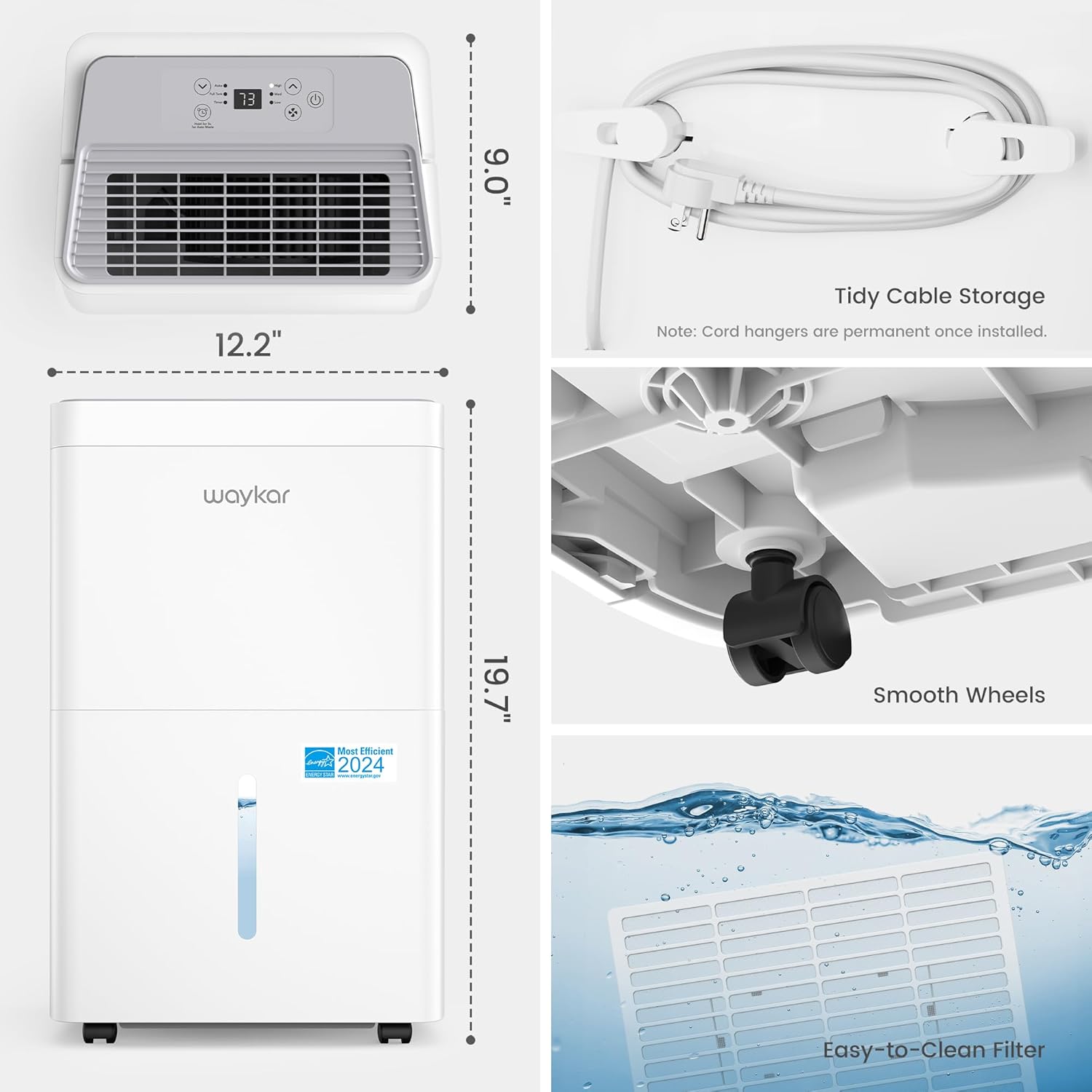
Figure 8: Auto Comfort Mode in operation
This mode intelligently maintains optimal humidity for comfort without manual adjustments.

Figure 9: Manual Humidity Control
Customize humidity and fan speed settings to your preference for specific needs.
6.3 Additional Features
- Auto Defrost: Prevents frost buildup on the coils.
- Overload Protection: Safeguards the compressor from damage.
- Power Outage Memory: Restores previous settings after a power interruption.
- Overflow Protection: Automatically shuts off when the water tank is full.
- Auto Screen Off: Dims the display after a period of inactivity for quiet operation.
7. Maintenance
Regular maintenance ensures optimal performance and longevity of your dehumidifier.
7.1 Cleaning the Air Filter
The washable, reusable A/C grade filter should be cleaned regularly (e.g., every two weeks or as needed) to prevent hair and pet fur from entering the machine and to maintain efficiency.
- Turn off and unplug the dehumidifier.
- Remove the filter from the back of the unit.
- Wash the filter with warm, soapy water.
- Rinse thoroughly and allow it to air dry completely before reinserting.
7.2 Cleaning the Water Tank
Clean the water tank periodically to prevent mold and mildew growth. Use mild detergent and warm water, rinse thoroughly, and dry before reinserting.
7.3 Storage
When storing the unit for an extended period, ensure the water tank is empty and clean, and the filter is dry. Use the integrated cable wrap post to neatly organize and secure the power cord, preventing tangles and damage.
8. Troubleshooting
If you encounter issues with your dehumidifier, refer to the following common problems and solutions. For more detailed troubleshooting, please consult the full user manual (PDF) linked in the support section.
| Problem | Possible Cause | Solution |
|---|---|---|
| Unit does not turn on. | No power, water tank full, or tank not properly seated. | Check power connection, empty and reinsert water tank correctly. |
| No water collected. | Humidity too low, air filter clogged, or room temperature too low. | Increase target humidity, clean air filter, ensure room temperature is above 41°F (5°C). |
| Unit is noisy. | Unit not level, air filter clogged, or fan speed too high. | Place on a level surface, clean air filter, select a lower fan speed. |
9. Specifications
| Feature | Detail |
|---|---|
| Brand | Waykar |
| Model Name | 80 Pint Energy Star Dehumidifier |
| Model Number | CTH80A |
| Dehumidification Capacity | 80 Pints per Day (under 95°F, 90% RH) |
| Coverage Area | Up to 5,000 Sq. Ft. |
| Water Tank Volume | 1.24 Gallons (4.7 Liters) |
| Product Dimensions | 9"D x 12.2"W x 19.7"H |
| Item Weight | 27.06 Pounds |
| Fan Speeds | 3 (High, Medium, Low) |
| Noise Level | Below 40 dB (lowest setting) |
| Wattage | 390 watts |
| Air Flow Capacity | 200 Cubic Feet Per Minute (CFM) |
| Special Features | Automatic Restart, Portable, Adjustable Humidity Control, Automatic Defrost, Timer, Overload Protection, Power Outage Memory, Overflow Protection, Auto Screen Off, Compressor Self-Protection |
| Included Components | Dehumidifier, Instruction Manual, Repair Card, Drainage Hose, Wire Holder |
10. Warranty & Support
All Waykar dehumidifiers come with a comprehensive 2-year warranty and lifetime expert technical support. Our customer care team is dedicated to providing a worry-free experience.
Contact Us
Should you have any questions or require assistance, please reach out to us through the following channels. We aim to respond within 24 hours.
- Phone: Refer to your Repair Card for contact number.
- Email: Refer to your Repair Card for email address.
- Online Chat: Visit the official Waykar website for online chat support.
Additional Resources
For a complete guide and further details, you can download the official User Manual (PDF): Waykar 80 Pint Dehumidifier User Manual (PDF)
Related documentsCTH80A


Ask a question about this manual
Ask about setup, troubleshooting, compatibility, parts, safety, or missing instructions. Manuals+ will review the question and use this page’s manual context to help answer it.