
Introduction
This manual provides detailed instructions for the NBD 4K Digital Camera, Model NBD-LK-SD-EU-2407. Designed for photography and video enthusiasts, this camera offers 4K video recording at 30 frames per second and 48-megapixel still images. It is equipped with both wide-angle and macro lenses, and features 16x digital zoom, making it suitable for various shooting scenarios, from vlogging to detailed close-ups.
What's in the Box
Upon unpacking your NBD 4K Digital Camera, please ensure all components are present:
- NBD 4K Digital Camera Body
- Wide-Angle Lens
- Macro Lens
- Rechargeable Lithium-Ion Batteries (1500 mAh)
- Battery Charger
- USB Cable
- 32GB SD Card
- Camera Pouch

Figure 1: NBD 4K Digital Camera with included accessories: wide-angle lens, macro lens, two batteries, battery charger, USB cable, 32GB SD card, and camera pouch.
Setup
1. Battery Installation and Charging
- Open the battery compartment cover located at the bottom of the camera.
- Insert the 1500 mAh lithium-ion battery, ensuring the correct orientation as indicated inside the compartment.
- Close the battery compartment cover securely.
- To charge, connect the battery to the provided charger, then plug the charger into a power outlet. The indicator light on the charger will show charging status.
2. Memory Card Installation
- Locate the SD card slot, usually near the battery compartment.
- Insert the 32GB SD card with the metal contacts facing the correct direction until it clicks into place.
- To remove, gently press the card until it springs out.
3. Attaching Lenses
- The camera comes with a wide-angle lens and a macro lens.
- To attach, align the lens with the camera's main lens thread and gently twist clockwise until secure.
- The wide-angle lens (Truview 0.45x) allows for capturing a broader scene.
- The macro lens (15x) is designed for extreme close-up photography.
Operating Instructions
1. Power On/Off
Press and hold the power button (usually located on the top or side of the camera) to turn the camera on or off.
2. Basic Photography and Video Recording
The camera supports 4K video recording at 30 frames per second and 48-megapixel still images.

Figure 2: Screen display indicating 48 Megapixel shooting, showing children playing outdoors. This image demonstrates the high resolution capture capability.
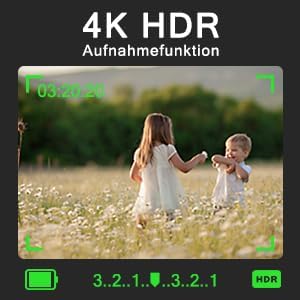
Figure 3: Screen display showing 4K HDR recording function in progress, with two children playing in a field. The image highlights the camera's ability to capture high-dynamic-range video.
3. Manual Focus (MF)
This camera supports manual focus. In either video or camera mode, gently press the camera button. A focus frame will appear on the screen, allowing you to adjust the focus to precisely capture your subject.
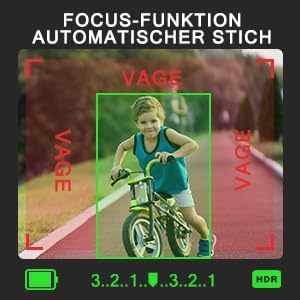
Figure 4: Screen display showing the automatic focus function, with a child on a bicycle in sharp focus within a green frame, while the background is slightly blurred. This illustrates the camera's focusing ability.
4. Digital Zoom
The camera features 16x digital zoom. Use the zoom controls (typically a rocker switch) to magnify your subject. Note that digital zoom may reduce image quality compared to optical zoom.

Figure 5: Four panels illustrating the 16x digital zoom capability, showing a family portrait progressively zoomed in from 1x to 16x magnification.
5. Special Features
- Recording While Charging: The camera supports recording while connected to a power source, ideal for extended shooting sessions.
- Scene Selections & Filter Effects: Photo and video modes offer 8 scene selections and 16 interesting filter effects. Choose your preferred option before capturing.
- Slow Motion & Time-Lapse: Utilize these modes for creative video capture.
- Continuous & Timed Shooting: Capture a series of photos rapidly or at set intervals.
- Self-Timer: Set a delay before the shutter fires for self-portraits or group shots.
- Flashlight: Use the built-in flashlight for illumination in low-light conditions.
- Webcam Function: Connect the camera to a computer via USB to use it as a webcam.
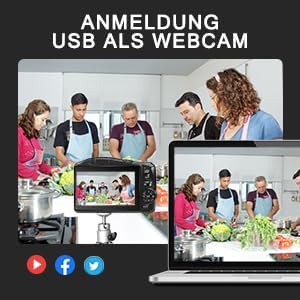
Figure 6: An image depicting the camera connected via USB to a laptop, functioning as a webcam for a video call with multiple participants in a kitchen setting. This highlights the USB webcam feature.
6. Button Functions
Familiarize yourself with the camera's controls for optimal use:

Figure 7: A diagram of the camera's rear panel, labeling various buttons and their functions. Key controls include: Menu Button, OK Button, EV Adjustment, and directional controls for functions such as Light Sensitivity, Delay, and Mute.
Maintenance
1. Battery Care
- Always use the provided charger for the 1500 mAh lithium-ion battery.
- Avoid fully discharging the battery frequently to prolong its lifespan.
- Store batteries in a cool, dry place when not in use.
2. Lens Cleaning
- Use a soft, lint-free cloth specifically designed for camera lenses.
- For stubborn smudges, use a small amount of lens cleaning solution applied to the cloth, not directly to the lens.
- Avoid touching the lens surface with your fingers.
3. General Camera Care
- Keep the camera away from dust, moisture, and extreme temperatures.
- Use the camera pouch for protection during transport.
- Do not attempt to disassemble the camera; refer to qualified service personnel for repairs.
Troubleshooting
Common Issues and Solutions:
- Camera not powering on: Ensure the battery is fully charged and correctly inserted.
- Poor image quality: Check lens cleanliness, ensure proper focus, and verify lighting conditions. Digital zoom beyond certain levels can also reduce quality.
- Memory card error: Ensure the SD card is correctly inserted and not full. Try reformatting the card (this will erase all data).
- Camera not recognized as webcam: Ensure the USB cable is securely connected and the camera is in webcam mode (if applicable). Check computer's device manager.
If problems persist, please refer to the support section or contact customer service.
Specifications
| Feature | Detail |
|---|---|
| Brand | NBD |
| Model Name | NBD-LK-SD-EU-2407 |
| Item Model Number | NBD-LK-SD-EU-2407 |
| Photo Sensor Technology | CMOS |
| Photo Sensor Format | 1/4 inch |
| Maximum Webcam Image Resolution | 48 MP |
| Aspect Ratio | 16:9 |
| Supported File Format | JPEG, MP4 |
| Maximum Aperture | 3.5 Millimeters |
| Metering Description | Matrix Metering |
| Compatible Mounts | M42 |
| Batteries | 1 Lithium Ion battery required (included) |
| Software Updates Guaranteed Until | Unknown |
Warranty and Support
Warranty Information
For information regarding warranty and returns, please refer to the retailer's policies where the product was purchased. Typically, products can be returned within 30 days of receipt if you change your mind. For defective or damaged products, specific return policies apply.
Customer Support
If you encounter any issues not covered in this manual or require further assistance, please contact NBD customer support through the official brand store or your point of purchase. Keep your purchase receipt and model number handy for faster service.