
1. Introduction
Thank you for choosing the Taopodo M10-NEWGAO Bluetooth Speaker. This wireless Bluetooth 5.3 speaker delivers powerful bass sound, features IPX7 waterproofing, offers up to 40 hours of battery life, and provides 360-degree surround sound. It supports TWS pairing for an enhanced audio experience and is suitable for outdoor use, parties, and travel. Please read this manual carefully before use to ensure proper operation and to maximize your enjoyment of the product.
2. Package Contents
Please check the package for the following items:
- 1 x Taopodo M10-NEWGAO Portable Bluetooth Speaker
- 1 x Type-C Charging Cable
- 1 x Quick Start Guide
3. Product Overview
The Taopodo M10-NEWGAO is a compact and robust Bluetooth speaker designed for versatile audio playback. It features intuitive controls and a durable, waterproof design.
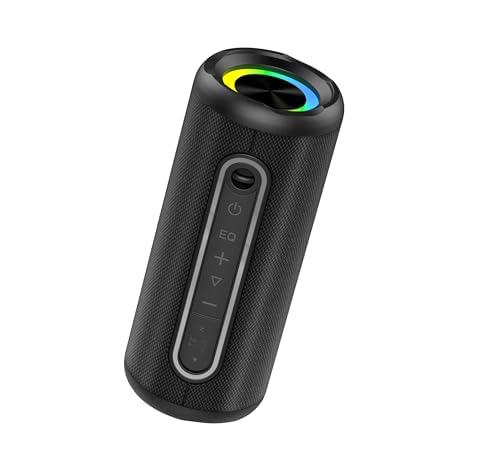
Image of the Taopodo M10-NEWGAO Bluetooth Speaker, showcasing its compact design and integrated light.
Key Features:
- Bluetooth 5.3: For stable and efficient wireless connectivity.
- Dual 40W Speakers & Dual Bass Drivers: Delivers powerful and rich audio.
- 40-Hour Battery Life: Extended playback for prolonged use.
- IPX7 Waterproof: Protected against immersion in water up to 1 meter for 30 minutes.
- 360-Degree Surround Sound: Provides immersive audio experience.
- TWS Pairing: Connect two speakers for true wireless stereo sound.
- Integrated Light: Enhances the ambiance.
- Multiple Playback Modes: Supports Bluetooth, AUX, and TF Card.
4. Setup
4.1 Charging the Speaker
- Connect the provided Type-C charging cable to the charging port on the speaker.
- Connect the other end of the cable to a USB power adapter (not included) or a computer's USB port.
- The charging indicator light will illuminate, typically red, during charging.
- Once fully charged, the indicator light will change color or turn off (refer to specific LED behavior in the Quick Start Guide if available).
Note: For optimal battery life, fully charge the speaker before first use.
4.2 Powering On/Off
- To Power On: Press and hold the Power button for approximately 2-3 seconds. You will hear an audible prompt, and the indicator light will flash.
- To Power Off: Press and hold the Power button for approximately 2-3 seconds. You will hear an audible prompt, and the indicator light will turn off.
5. Operating Instructions
5.1 Bluetooth Pairing
- Ensure the speaker is powered on and in Bluetooth pairing mode (the indicator light will typically flash blue rapidly).
- Enable Bluetooth on your device (smartphone, tablet, computer).
- Search for Bluetooth devices and select "M10-NEWGAO" from the list.
- Once paired, you will hear a confirmation sound, and the indicator light will turn solid blue.
5.2 True Wireless Stereo (TWS) Pairing
TWS allows you to connect two M10-NEWGAO speakers for a stereo sound experience.
- Ensure both M10-NEWGAO speakers are powered on and not connected to any Bluetooth device.
- On one speaker (this will be the primary speaker), press and hold the TWS button (if available, or a designated button as per Quick Start Guide) for a few seconds until you hear a pairing prompt.
- The two speakers will automatically search and pair with each other. Once connected, you will hear a confirmation sound.
- Now, connect your device to the primary speaker via Bluetooth as described in Section 5.1. Both speakers will play audio in stereo.
5.3 AUX Mode
To play audio from devices without Bluetooth:
- Connect a 3.5mm audio cable (not included) to the AUX-in port on the speaker.
- Connect the other end of the cable to the audio output of your device.
- The speaker will automatically switch to AUX mode, or you may need to press a Mode button to select AUX.
5.4 TF Card Mode
To play music directly from a TF (MicroSD) card:
- Insert a TF card (not included) with MP3 audio files into the TF card slot on the speaker.
- The speaker will automatically switch to TF card mode and begin playing music, or you may need to press a Mode button to select TF card.
5.5 Light Control
The speaker features an integrated light. Refer to the Quick Start Guide for specific button functions, but typically:
- A dedicated Light button or a long press on a specific button may cycle through light modes or turn the light on/off.
5.6 Volume and Track Control
- Volume Up: Short press the '+' button.
- Volume Down: Short press the '-' button.
- Next Track: Long press the '+' button.
- Previous Track: Long press the '-' button.
- Play/Pause: Short press the Play/Pause button.
6. Maintenance
- Cleaning: Wipe the speaker with a soft, damp cloth. Do not use abrasive cleaners or solvents.
- Storage: Store the speaker in a cool, dry place away from direct sunlight and extreme temperatures.
- Water Resistance: While IPX7 rated, avoid prolonged submersion and ensure the charging port cover is securely closed before exposure to water.
7. Troubleshooting
| Problem | Solution |
|---|---|
| Speaker does not power on. | Ensure the speaker is charged. Connect it to a power source using the Type-C cable. |
| Cannot pair via Bluetooth. | Ensure the speaker is in pairing mode. Turn off and on Bluetooth on your device. Move the speaker closer to your device. Forget previous pairings on your device and try again. |
| No sound. | Check volume levels on both the speaker and your connected device. Ensure the correct input mode (Bluetooth, AUX, TF Card) is selected. |
| TWS pairing fails. | Ensure both speakers are fully charged and not connected to any other Bluetooth device before initiating TWS pairing. |
8. Specifications
| Feature | Detail |
|---|---|
| Brand | Taopodo |
| Model Name | M10-NEWGAO |
| Connectivity Technology | Bluetooth |
| Wireless Communication Technology | Bluetooth |
| Speaker Size | 55 mm |
| Power Source | Battery Powered |
| Control Method | Touch |
| Water Resistance | IPX7 (True) |
| Audio Output Mode | Surround |
| Speaker Type | 3D |
| Special Feature | Bluetooth |
| Product Dimensions | 8 x 8 x 8 cm; 690 grams |
| Recommended Uses | For Computers, DVD Players, Gaming Consoles, Music Players, Smartphones or Tablets, Televisions |
| Compatible Devices | Smartphone, Home Theater, Game Console, Laptop, Projector, Desktop, Karaoke Machine, TV, MP3 Player, Tablet |
| Color | Dark Black |
9. Safety Information
- Do not disassemble, repair, or modify the product.
- Keep the speaker away from extreme temperatures, direct sunlight, and open flames.
- Do not expose the speaker to strong magnetic fields.
- Use only the provided charging cable or a certified Type-C cable for charging.
- Ensure the charging port cover is securely closed when near water to maintain IPX7 rating.
- Avoid listening at high volume levels for extended periods to prevent hearing damage.
10. Warranty and Support
The Taopodo M10-NEWGAO Bluetooth Speaker comes with a standard manufacturer's warranty. For detailed warranty information, please refer to the warranty card included in your package or contact Taopodo customer support.
If you encounter any issues or have questions regarding your product, please contact our customer support team through the retailer where you purchased the product or visit the official Taopodo website for support options.
