
ITCARDIAG TACHOPRO 2008
Tacho Pro 2008 Full Set V2008.7 Universal Dash Correction Tool User Manual
Model: TACHOPRO 2008
Introduction
The ITCARDIAG Tacho Pro 2008 Full Set V2008.7 is a universal dash correction tool designed for automotive diagnostic and odometer adjustment tasks. This comprehensive kit includes the main handheld device and a wide array of cables and adapters to support various vehicle models. It provides an easy-to-use interface for reading, editing, and storing vehicle data.
Important Note: This device primarily supports most vehicle models manufactured before 2008. The software version is 2008.7 and cannot be updated.
Supported languages include English, Polish, Spanish, Italian, French, and German.

Figure 1: Tacho Pro 2008 Full Set with main unit and included accessories.
Package Contents
Verify that all components listed below are present in your package:
- Tacho Universal hand-held device (0684)
- Cable P607 for Tacho Universal (0676)
- Cable 11DU for Tacho Universal (0677)
- Dongle CAN Hardware for Tacho Universal (0709)
- Cable for BMW OBD-2 + MB Service Reset for Tacho Universal (0742)
- Cable for ALFA156 for Tacho Universal (0678)
- Cable for ALFA145_146 for Tacho Universal (0679)
- Cable P206 for JAEGER for Tacho Universal (0684)
- Cable ALFA166 for Tacho Universal (0681)
- Cable P908 for Tacho Universal (0682)
- Cable ACCORD for Tacho Universal (0683)
- Cable P406 for JAEGER for Tacho Universal (0680)
- Cable for MB-DiaMox for Tacho Universal (0685)
- Cable GTV SPIDER for Tacho Universal (0686)
- Cable for MB SPRINTER Kienzle for Tacho Universal (0687)
- Cable for MB-OBD-2 for Tacho Universal (0688)
- Cable for MB-CAN for Tacho Universal (0689)
- Cable for CRYSLER OBD-2 for Tacho Universal (0743)
- Cable Multi CAN for Tacho Universal (0690)
- Cable P-106 for Tacho Universal (0691)
- Cable SCOPRIO for Tacho Universal (0692)
- Cable for V-W GOLF3 + MB C-CLASS OLD for Tacho Universal (0744)
- Cable SPRINT VDO for Tacho Universal (0693)
- Cable for V-W CAN for Tacho Universal (0694)
- Cable for BMW HW 4,5,6 for Tacho Universal (0695)
- Cable SHARAN 2000 for Tacho Universal (0696)
- Cable for AUDI 2000 for Tacho Universal (0697)
- Cable OBD-2 V-=W-OPEL for Tacho Universal (0698)
- Cable POLO98/BELLTLE/B5 for Tacho Universal (0699)
- Cable for BMW DIAG for Tacho Universal (0700)
- Cable for BMW E36 for Tacho Universal (0701)
- Cable for BMW Z3/compact for Tacho Universal (0702)
- Cable for AUDI+VW OBD-2+2 for Tacho Universal (0783)
- DONGLE for CRYSLER OBD-2 for Tacho Universal (0703)
- Dongle 912 for Tacho Universal (0704)
- Cable 912 for Tacho Universal (0712)
- NEC Dongle for Tacho Universal (9S12 DONGLE) (0732)
- Adapter 93cx6 for Tacho Universal (0705)
- Adapter 24COX for Tacho Universal (0706)
- Adapter 35/95XXX for Tacho Universal (0707)
- CLIP EEPROM DIP-8CON for Tacho Universal (0715)
- CLIP EEPROM SOIC-8CON for Tacho Universal (5250) (0713)
- Cable power supply for Tacho Universal (0711)
- BMW CAS CABLE
- GE Cherokee (4199)
- Serial Communication Cable
- USER MANUAL PDF DVD

Figure 2: A selection of the various cables and adapters provided in the full set.

Figure 3: Detailed view of specific diagnostic cables and adapters.
Setup
Before operating the Tacho Pro 2008, ensure proper connection to the vehicle or component. Refer to the specific cable and adapter required for your vehicle model and the task at hand.
- Identify Vehicle Compatibility: Confirm that your vehicle model is supported by the Tacho Pro 2008 (primarily models before 2008).
- Select Appropriate Cable/Adapter: Based on your vehicle's make, model, and the specific diagnostic port (e.g., OBD-II, specific manufacturer port), select the correct cable or adapter from the package contents.
- Connect to Tacho Universal Device: Connect one end of the selected cable to the appropriate port on the Tacho Universal hand-held device. The device features various ports for different cable types.
- Connect to Vehicle: Connect the other end of the cable or adapter to the vehicle's diagnostic port. Ensure a secure connection.
- Power On: The device typically draws power from the vehicle's OBD-II port. If an external power supply cable (0711) is required for certain operations or components, connect it as instructed.

Figure 4: Rear view of the Tacho Pro 2008 device highlighting its connection interfaces.
Operating Instructions
The Tacho Pro 2008 features a user-friendly interface with clear menu guidance on its backlit LCD display, enabling operation even in low-light conditions.
- Navigation: Use the keypad (buttons A-F, 0-9, STOP, OK) to navigate through the menus and input data. The "OK" button confirms selections, and "STOP" typically acts as a back or cancel function.
- Reading Odometer: The current odometer reading is decoded and displayed on the LCD screen.
- Data Editing: All datasets accessible through the device can be edited. Follow the on-screen prompts for specific editing procedures.
- Saving and Loading Data: Edited or retrieved data can be saved directly on the Tacho Universal device. Up to 200 files can be stored internally. Saved data can also be loaded for review or further modification.
- Transferring Data to PC: For archiving or more detailed analysis, stored data can be transferred to a personal computer using the Serial Communication Cable and the provided USER MANUAL PDF DVD, which likely contains necessary software or drivers.
- Speedometer Repair: The device facilitates the comfortable repair of broken speedometers by allowing access and adjustment of relevant data.
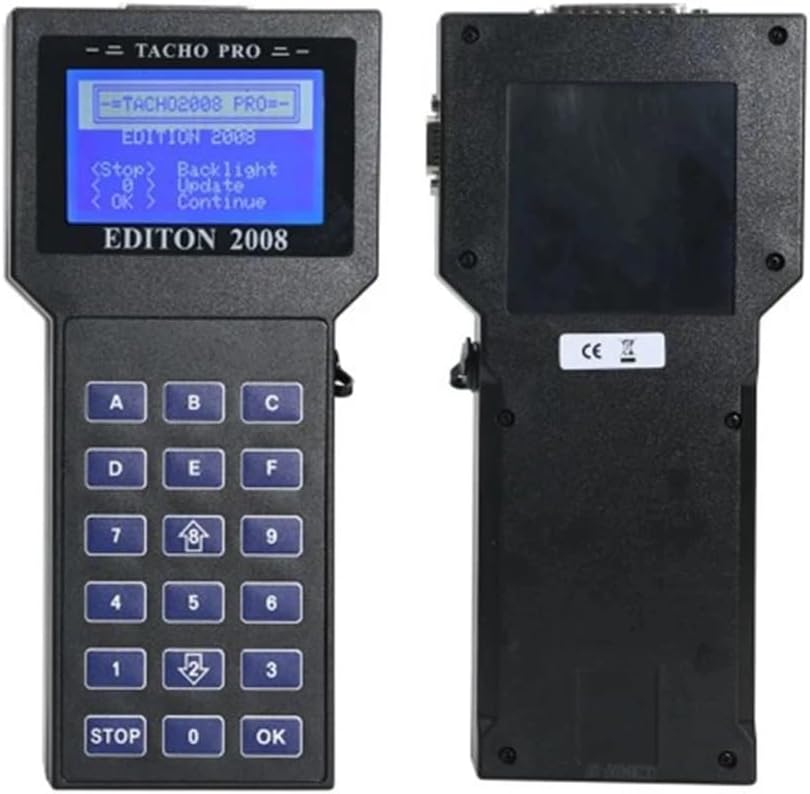
Figure 5: Front panel of the Tacho Pro 2008 showing the LCD display and keypad for operation.
Maintenance
To ensure the longevity and optimal performance of your Tacho Pro 2008, follow these general maintenance guidelines:
- Cleaning: Use a soft, dry cloth to clean the device and cables. Avoid using abrasive cleaners or solvents, which can damage the plastic and electronic components.
- Storage: Store the device and all accessories in a dry, cool place, away from direct sunlight and extreme temperatures. Keep them in the original packaging or a protective case when not in use to prevent physical damage.
- Cable Care: Handle cables by the connectors, not the wires, to prevent internal damage. Avoid sharp bends or kinks in the cables.
- Software: As the software version 2008.7 cannot be updated, ensure you have the necessary drivers and software from the provided DVD installed on your PC for data transfer and archiving.
Troubleshooting
This section addresses common issues and limitations of the Tacho Pro 2008.
| Problem | Possible Cause / Solution |
|---|---|
| Device does not power on. |
|
| Cannot connect to vehicle / No data reading. |
|
| Software version cannot be updated. | This is an inherent limitation of the Tacho Pro 2008.7 version. The device is designed to operate with its current software and does not support updates. |
| Data transfer to PC fails. |
|
Specifications
| Feature | Detail |
|---|---|
| Model | TACHOPRO 2008 |
| Software Version | 2008.7 (Non-updatable) |
| Supported Vehicle Models | Primarily models before 2008 |
| Supported Languages | English, Polish, Spanish, Italian, French, German |
| Internal Storage Capacity | Up to 200 files |
| Display | Backlit LCD |
| Dimensions (L x W x H) | Approximately 14 x 10 x 8 inches (Product Dimensions) |
| Item Weight | Approximately 9.9 pounds |
| Operating System (for PC connection) | Windows 7 (as per product specifications) |
| Country of Origin | China |
Warranty and Support
Information regarding product warranty and direct customer support for the ITCARDIAG Tacho Pro 2008 is not available in the provided product data. For any warranty claims or technical assistance, please refer to the documentation included with your purchase or contact the seller directly.
The product includes a "USER MANUAL PDF DVD" which may contain further support details and contact information.
Ask a question about this manual
Ask about setup, troubleshooting, compatibility, parts, safety, or missing instructions. Manuals+ will review the question and use this page’s manual context to help answer it.