
1. Safety Information
For safe use, please follow all installation instructions provided. Ensure the desk is stable and do not overload the desktop or monitor stand beyond the recommended weight capacity. Keep children and pets away from the desk during height adjustments. Avoid placing liquids directly on the control panel.
2. Product Overview
The TRIUMPHKEY Electric Height Adjustable Desk is designed to provide a versatile and ergonomic workspace. It features an electric lifting system, a spacious desktop, and an integrated monitor stand to promote healthier working postures.
Key Features:
- Ergonomic Monitor Support: An additional monitor stand helps position your screen at a comfortable height, reducing neck strain and saving desk space.
- Durable Materials: Constructed with a high-quality steel frame and a spacious, waterproof, and scratch-resistant desktop. The T-shaped leg design enhances stability.
- Electric Height Adjustment with Memory: Smoothly adjust the desk height between 73cm and 118cm. Two memory buttons allow you to save and recall your preferred sitting and standing heights.
- Versatile Use: Suitable for various applications including gaming, computer work, studying, and office tasks, both at home and in professional environments.

Figure 2.1: The TRIUMPHKEY Electric Height Adjustable Desk in a typical setup.

Figure 2.2: Desk in a home office environment, highlighting its ergonomic design.
3. Setup and Assembly
The TRIUMPHKEY desk is designed for straightforward assembly. Each part is numbered, and the package includes detailed installation instructions along with the necessary screwdriver. Follow the steps carefully to ensure correct assembly.
Assembly Notes:
- The desktop is composed of multiple panels joined together. Ensure these panels are aligned correctly during assembly to minimize gaps.
- Do not overtighten screws, especially for the monitor stand brackets, to prevent damage.
- It is recommended to have two people for assembly due to the weight of the components.

Figure 3.1: Product dimensions and available colors.
4. Operating Instructions
Height Adjustment:
- Manual Adjustment: Use the Up (▲) and Down (▼) buttons on the control panel to raise or lower the desk to your desired height. The LED screen will display the current height.
- Memory Presets: The desk features two memory buttons (1 and 2) to save your preferred heights. To save a height: adjust the desk to the desired position, then press and hold one of the memory buttons (1 or 2) until the LED screen flashes or beeps, indicating the height is saved. To recall a saved height, simply press the corresponding memory button (1 or 2) once.
The electric lifting system operates smoothly and quietly, with noise levels typically below 55dB, ensuring minimal disruption to your work environment.

Figure 4.1: Electric height adjustment range (73cm - 118cm).

Figure 4.2: The convenient control panel with LED display and memory functions.
Ergonomic Monitor Stand:
The integrated monitor stand is designed to elevate your screen by 10cm, promoting a healthier sitting posture by aligning your eye level with the top of your monitor. This helps prevent neck and shoulder discomfort during prolonged use.

Figure 4.3: Benefits of the ergonomic monitor stand for posture.
Cable Management:
The desk includes features to help organize cables, contributing to a tidy workspace. Utilize the cable grommets and any integrated cable management solutions to keep wires neat and out of sight.
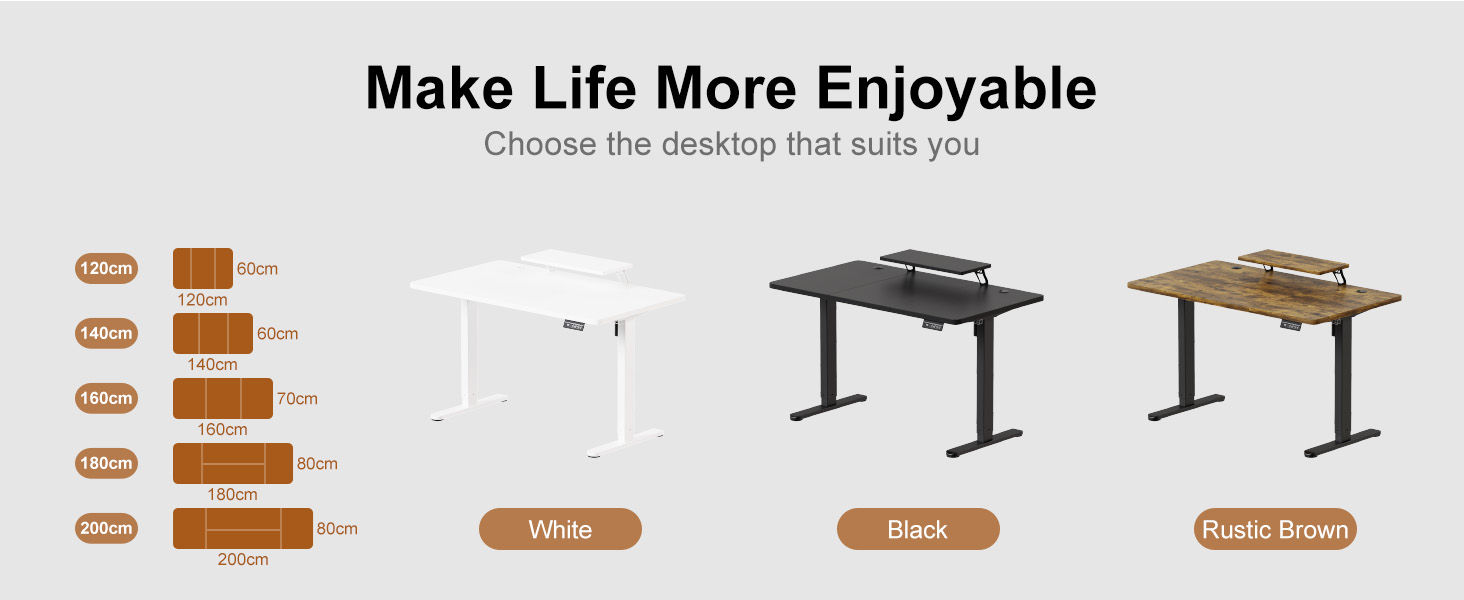
Figure 4.4: Example of a tidy desktop with organized cables.
5. Maintenance
Cleaning:
- Wipe the desktop surface with a soft, damp cloth. The surface is waterproof and scratch-resistant, but avoid abrasive cleaners.
- For the steel frame and legs, use a dry or slightly damp cloth. Do not use harsh chemicals.
Regular Checks:
- Periodically check all screws and bolts to ensure they are tight. Retighten if necessary.
- Inspect power cables and connections for any signs of wear or damage.
- Ensure the desk legs are on a level surface to maintain stability during height adjustments. The rubberized protective layer on the legs helps prevent floor damage and ensures quiet movement.
6. Troubleshooting
Common Issues and Solutions:
- Desk Not Moving:
- Check if the power cable is securely plugged into both the desk and the wall outlet.
- Ensure there are no obstructions preventing the desk from moving up or down.
- Desk Instability/Wobbling:
- Verify that all assembly screws are properly tightened.
- Ensure the desk is placed on a flat, level surface. Adjust the leveling feet if necessary.
- Avoid placing excessive weight unevenly on the desktop. The maximum weight capacity is 60kg.
- Desktop Gaps/Unevenness:
- The desktop is made from multiple panels. While designed to fit snugly, minor gaps may be present. Ensure the panels were aligned as closely as possible during assembly.
- Memory Presets Not Working:
- Ensure you are pressing and holding the memory button until the controller confirms the setting is saved (e.g., by flashing or beeping).
If you encounter issues not covered here, please refer to the full safety and installation guide or contact customer support.
7. Specifications
| Feature | Detail |
|---|---|
| Brand | TRIUMPHKEY |
| Model | DT-HAD24-0463-140FW |
| Color | Brown |
| Product Dimensions (L x W x H) | 140 x 60 x 73-118 cm |
| Monitor Stand Dimensions (L x W) | 70 x 22 cm (approximate, based on image) |
| Material | Wood (desktop), Alloy Steel (base) |
| Special Features | Height Adjustable, Electric, Monitor Support |
| Item Weight | 34.7 Kilograms |
| Height Adjustment Range | 73cm - 118cm |
| Memory Presets | 2 |
| Max Weight Capacity | 60kg |
8. Warranty and Support
Specific warranty details for the TRIUMPHKEY Electric Height Adjustable Desk are not provided in this manual. For warranty information, please refer to the documentation included with your purchase or contact the seller directly.
For product support, technical assistance, or to inquire about replacement parts, please contact TRIUMPHKEY customer service or visit the official TRIUMPHKEY store on Amazon: TRIUMPHKEY Store.
