
1. Important Safety Information
Please read all instructions carefully before using the RENPHO Eyeris 3 Eye Massager. Keep this manual for future reference.
- Do not use if you have eye injuries, inflammation, or have undergone eye surgery. Consult a doctor if you have any pre-existing eye conditions.
- This device is not a medical device and is not intended to diagnose, treat, cure, or prevent any disease.
- Keep out of reach of children.
- Do not use while driving or operating machinery.
- Ensure the device is fully charged before first use.
- Do not immerse the device in water or other liquids.
- Use only the provided charging cable.
Note: The product is NOT SUITABLE for certain conditions as per safety information. Statements regarding dietary supplements have not been evaluated by the FDA and are not intended to diagnose, treat, cure, or prevent any disease or health condition.
2. Product Overview
The RENPHO Eyeris 3 is an advanced eye massager designed to provide relief from eye strain, puffiness, and headaches through a combination of heat, cooling, air pressure, and gentle vibration massage. It features voice control and Bluetooth connectivity for an enhanced user experience.

Image: The RENPHO Eyeris 3 Eye Massager in its golden finish, alongside its product packaging. This image provides a clear view of the device's design and presentation.
Package Contents:
- RENPHO Eyeris 3 Eye Massager
- Removable Cooling Gel Mask
- USB-C Charging Cable (DC 5V/2A charger not included)
- Travel Storage Bag
- User Manual
3. Setup
3.1 Charging the Device
Before first use, fully charge the eye massager. The built-in 1500mAh rechargeable battery fully charges in approximately 1.5 hours.
- Connect the USB-C charging cable to the device's charging port.
- Connect the other end of the cable to a DC 5V/2A charger (not included).
- The LED charging indicator will flash red during charging.
- The indicator will turn solid red when fully charged.

Image: A visual representation of the 1500mAh large-capacity battery, highlighting the USB-C charging port, 1.5 hours charging time, and the LED charging indicator status (blinking red for charging, solid red for fully charged).
3.2 Attaching the Cooling Gel Mask
For a refreshing cooling effect, you can use the removable gel mask.
- Place the removable gel mask in a freezer for 35-60 minutes.
- Once chilled, attach it to the eye massager before use.
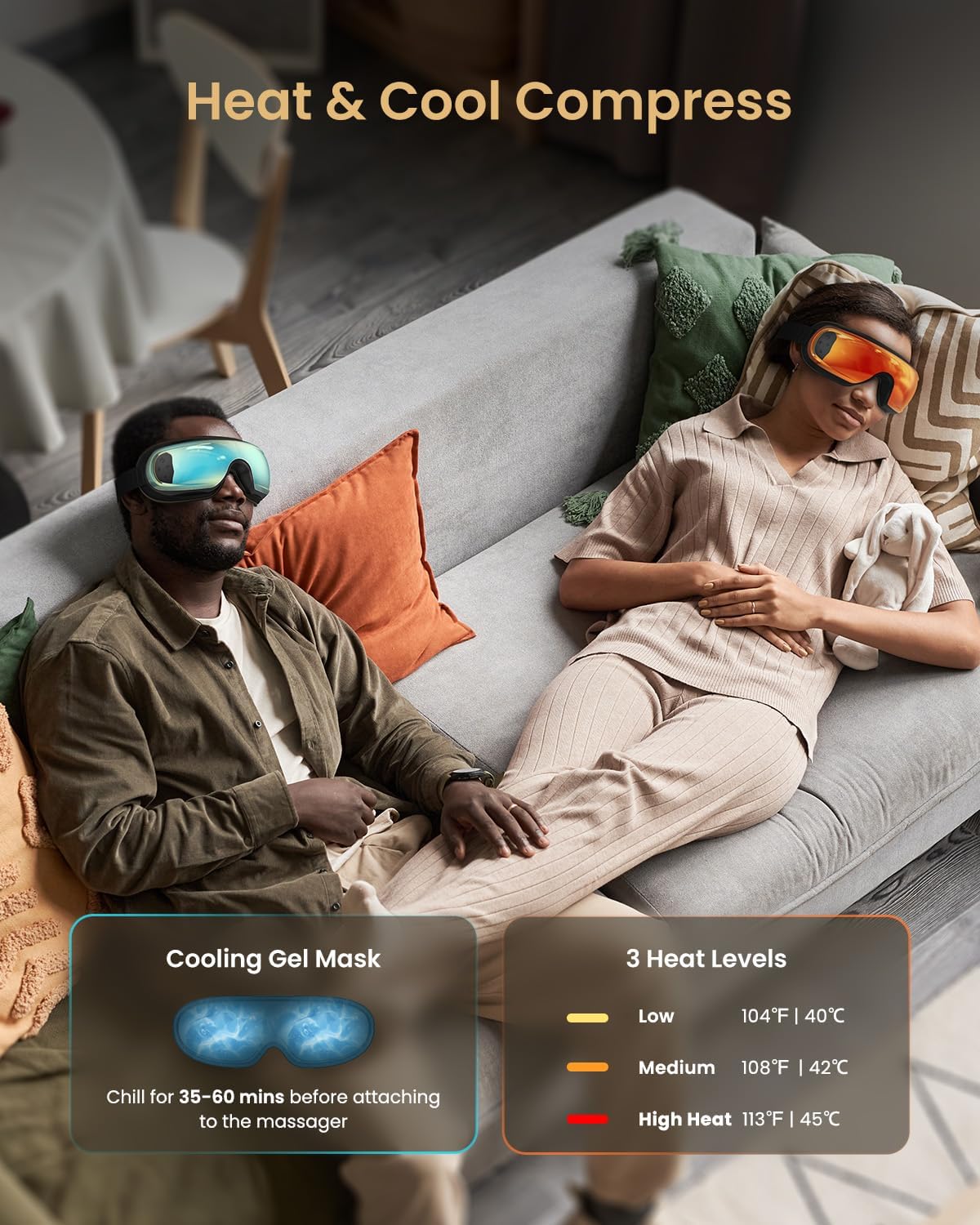
Image: Two individuals relaxing with the RENPHO Eyeris 3. One is experiencing the heat compress function, while the other benefits from the cooling gel mask, illustrating both temperature therapy options.

Image: A graphic detailing the Cooling Gel Mask feature, showing how it assists in reducing puffiness, dark circles, and dryness around the eyes. It also provides instructions to put the gel mask in the fridge for 35-60 minutes for a cooling effect.
4. Operating the Device
4.1 Basic Controls
The RENPHO Eyeris 3 features intuitive controls for easy operation.

Image: A close-up view of the eye massager's interior, highlighting the soft protein PU leather material designed for comfort, ease of cleaning, and breathability.

Image: A detailed diagram illustrating the functions of the control buttons on the RENPHO Eyeris 3. It shows controls for Power (long press to turn on/off, short press to adjust timer), Heat (short press to adjust heat level, long press for vibration on/off), Compression (long press to adjust pressure mode, short press to adjust pressure level), and Volume (short press for volume +/-, long press to switch music, press twice for silent/voice mode).
- Power Button: Long press to turn on/off. Short press to adjust the timer (3 auto-off timers available).
- Heat Button: Short press to adjust heat level (104℉/40℃ to 113℉/45℃). Long press to turn vibration on/off.
- Compression Button: Long press to adjust pressure mode (3 modes: Tension Relief, Retinal Protection, Regeneration). Short press to adjust pressure level (3 levels: Soft, Medium, Strong).
- Volume Button: Short press for volume up/down. Long press to switch music. Press twice for silent/voice mode.
4.2 Voice Control
The Eyeris 3 features upgraded voice control for hands-free operation.
- Simply say "Hi Eyeris" to activate voice control.
- Use 18 voice commands to switch between modes, adjust settings, and control music.

Image: A woman smiling while wearing the RENPHO Eyeris 3 Eye Massager, illustrating the convenience of its voice control feature. Text overlays indicate commands like "Hi Eyeris", "High Heat", "Sound On", "Change Mode", and "Vibration On".
4.3 Massage Modes and Settings
Customize your massage experience with various modes and pressure levels.
- Compression Modes:
- Tension Relief Mode: Targets eyes & temples.
- Retinal Protection Mode: Focuses on eyes only.
- Regeneration Mode: Focuses on temples only.
- Pressure Levels: Soft, Medium, Strong, or No Pressure.
- Heat Levels: Adjustable from 104℉ (40℃) to 113℉ (45℃).
- Vibration Function: Can be turned on or off.

Image: A man relaxing while wearing the RENPHO Eyeris 3, demonstrating the customizable massage experience. The image highlights three massage modes (Tension Relief, Retinal Protection, Regeneration) and three pressure levels (Soft, Medium, Strong).

Image: A woman enjoying a massage with the RENPHO Eyeris 3, illustrating the "DIY Mode" which allows users to pamper themselves with 3 massage modes, 3 pressure levels, 3 heat levels, or vibration. It shows the massage area options: Tension Relief Mode (Eyes & Temples), Retinal Protection Mode (Eyes Only), and Regeneration Mode (Temples Only), along with the three pressure levels.
4.4 Bluetooth Connectivity and Music
Enhance your relaxation with built-in music or connect your own device.
- The device comes with pre-set music tracks.
- Connect your phone via Bluetooth to play your favorite music. The Bluetooth name is R-G010V (Audio).
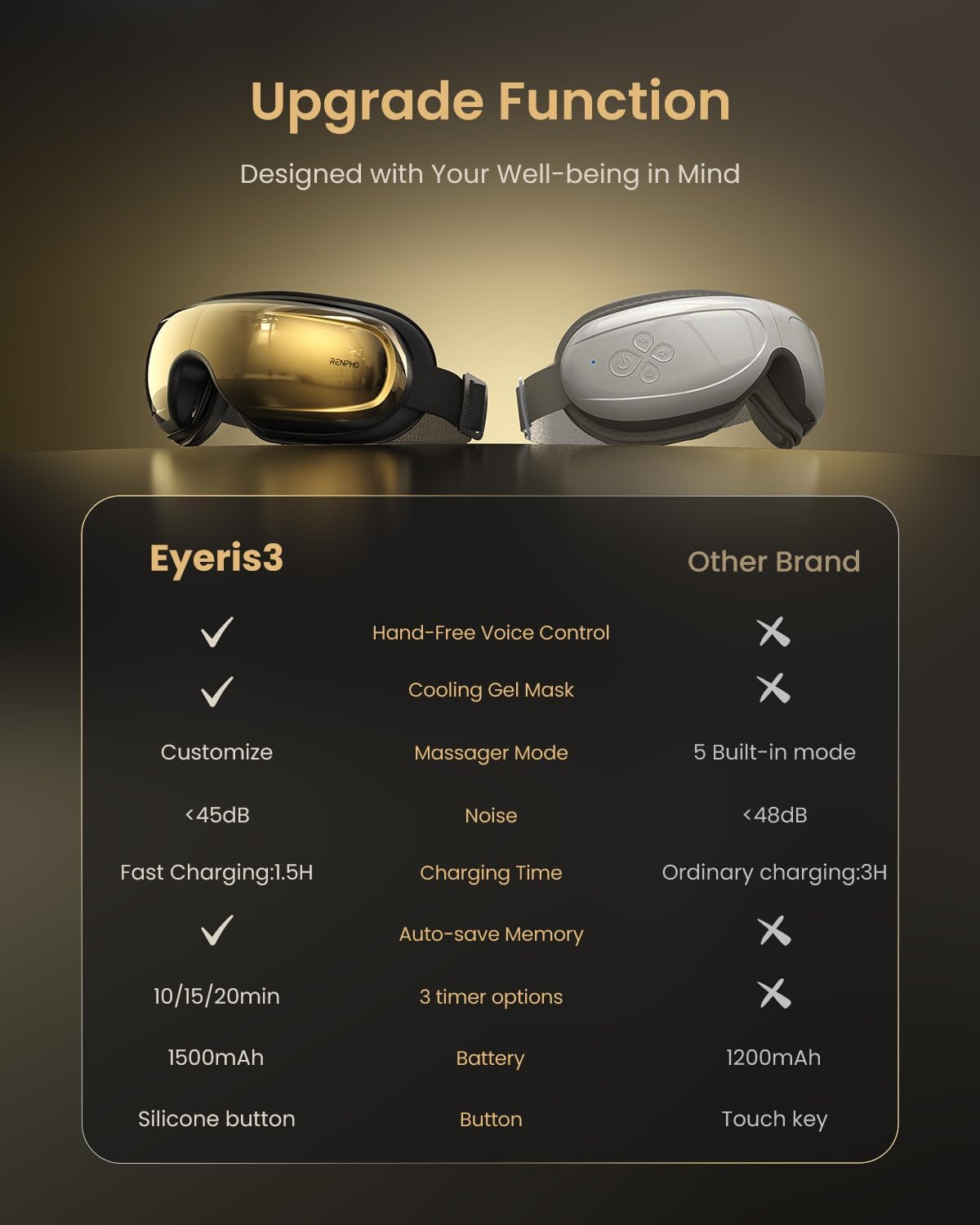
Image: A man relaxing with the RENPHO Eyeris 3 Eye Massager, with a smartphone displaying a music player app next to him, demonstrating the immersive music experience via Bluetooth connectivity.

Image: A man relaxing with the RENPHO Eyeris 3 Eye Massager, with a smartphone displaying a music player app next to him, illustrating the "Immersive Music Relaxation Experience" feature. It highlights built-in music tracks and Bluetooth music connectivity to de-stress.
5. Maintenance
5.1 Cleaning the Device
The soft protein PU material is comfortable to wear and easy to clean.
- Wipe the surface of the eye massager with a soft, damp cloth.
- Do not use abrasive cleaners or immerse in water.
- Ensure the device is completely dry before storing.
5.2 Storage
- Store the eye massager in its travel storage bag when not in use.
- Keep in a cool, dry place away from direct sunlight and extreme temperatures.
6. Troubleshooting
| Problem | Possible Cause | Solution |
|---|---|---|
| Device does not turn on. | Low battery. | Charge the device fully. |
| No heat or cooling effect. | Heat/Cooling function not activated or gel mask not chilled. | Ensure heat function is selected or gel mask is properly chilled and attached. |
| Voice control not responding. | "Hi Eyeris" command not recognized or background noise. | Speak clearly and ensure minimal background noise. Try repeating "Hi Eyeris". |
| Bluetooth connection issues. | Device not in pairing mode or too far from phone. | Ensure Bluetooth is enabled on your phone and the device is within range. Re-pair if necessary. |
7. Specifications
- Model: R-G010V
- Product Dimensions: 10.23 x 6.06 x 4.33 inches
- Weight: 1.81 Pounds
- Battery Capacity: 1500mAh
- Charging Time: Approx. 1.5 hours
- Material: Protein PU and Gel
- Color: Golden
- Heat Levels: 104℉ (40℃) to 113℉ (45℃)
- Head Circumference Fit: 18.89 in (48 cm) to 27.56 in (70 cm)
8. Warranty and Support
RENPHO provides a standard warranty for its products. Please refer to the warranty card included in your package for specific terms and conditions.
For technical support, troubleshooting, or warranty claims, please contact RENPHO customer service through their official website or the contact information provided in your product packaging.
Visit the official RENPHO Store for more information and product registration: RENPHO Store


