
1. Introduction
This instruction manual provides detailed guidance for the installation, operation, and maintenance of your Dexnor Full-Body Protective Case for the Google Pixel 9 Pro XL. This case is engineered to offer comprehensive protection, featuring a slide camera cover, built-in screen protector, and a versatile kickstand.
Please read this manual thoroughly to ensure proper use and to maximize the protective benefits of your case.
2. Compatibility
This Dexnor Full-Body Protective Case is specifically designed for the Google Pixel 9 Pro XL (6.8 inch). It is not compatible with the Google Pixel 9 (6.3 inch) or Google Pixel 9 Pro (6.3 inch).

Image 2.1: Compatibility chart for Dexnor case.
This image illustrates that the case is exclusively designed for the Google Pixel 9 Pro XL (6.8 inch model), explicitly stating it is not suitable for the smaller Google Pixel 9 (6.3 inch) or Google Pixel 9 Pro (6.3 inch) models.
3. Package Contents
- Dexnor Full-Body Protective Case (with pre-installed front frame and screen protector)
- Alternative Front Frame (without screen protector)
4. Key Features
- Smooth-Sliding Camera Cover: Provides secure lens protection and a smooth sliding experience for camera access.
- Dual Front Frame Options: Includes one frame with a built-in PET screen protector and another frame for use with your own tempered glass screen protector.
- Versatile Kickstand: Offers stable support for hands-free viewing in both landscape and portrait orientations, and provides a secure grip.
- Military-Grade Protection: Engineered with shock-absorbent TPU bumpers and a robust PC back to safeguard against drops and impacts.
- Precise Fit and Grip: Designed for a snug fit with accurate cutouts for all ports and buttons, featuring textured edges for an anti-slip grip.

Image 4.1: Overview of the Dexnor Google Pixel 9 Pro XL case components.
This image displays the multi-part design of the Dexnor case, highlighting the back shell with its integrated kickstand, the separate front frame with a screen protector, and a side profile view of the assembled case.
5. Installation Guide
Follow these steps to properly install your Dexnor protective case:
- Separate the Case: Gently pry apart the front frame from the main back cover. There is usually a small indentation or seam to assist with separation.
- Choose Your Front Frame:
- If using the built-in screen protector: Ensure your phone screen is clean and free of dust. Place your Google Pixel 9 Pro XL into the front frame with the built-in screen protector.
- If using your own tempered glass screen protector: Apply your tempered glass screen protector to your phone first. Then, place your Google Pixel 9 Pro XL into the alternative front frame (without the built-in screen protector).
- Assemble the Case: Align the front frame (with your phone inside) with the main back cover. Press firmly around all edges until the two parts snap securely together. Ensure all buttons and ports are correctly aligned.
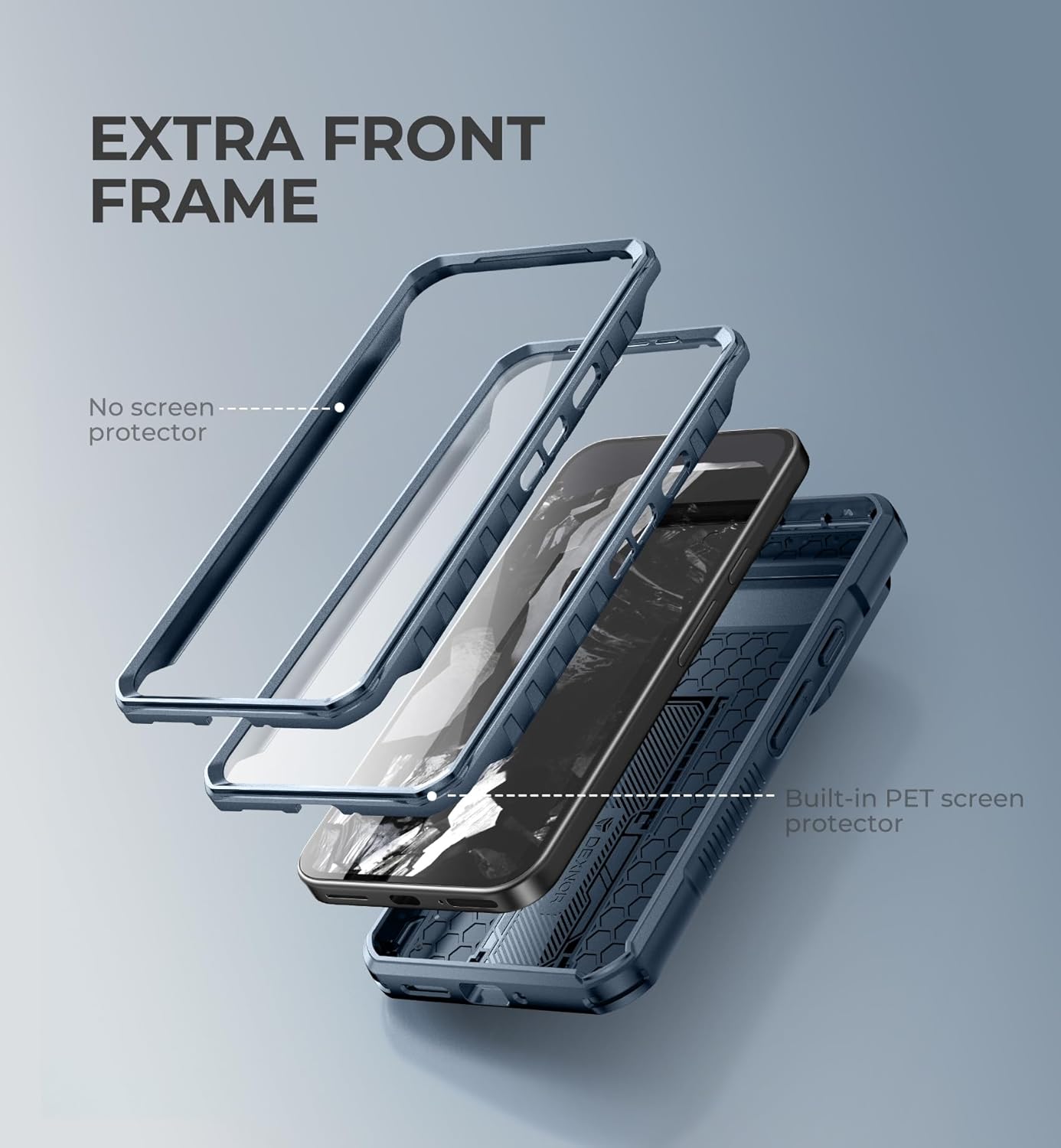
Image 5.1: Case assembly diagram.
This diagram illustrates the three main components of the case: the phone, the front frame (with or without screen protector), and the rugged back cover, demonstrating how they fit together during installation.
6. Operating Instructions
6.1. Using the Slide Camera Cover
The integrated slide camera cover protects your phone's camera lenses from scratches and dust when not in use.
- To cover the camera: Gently slide the cover downwards until it clicks into place over the camera module.
- To uncover the camera: Gently slide the cover upwards to reveal the camera lenses for photography or video recording.
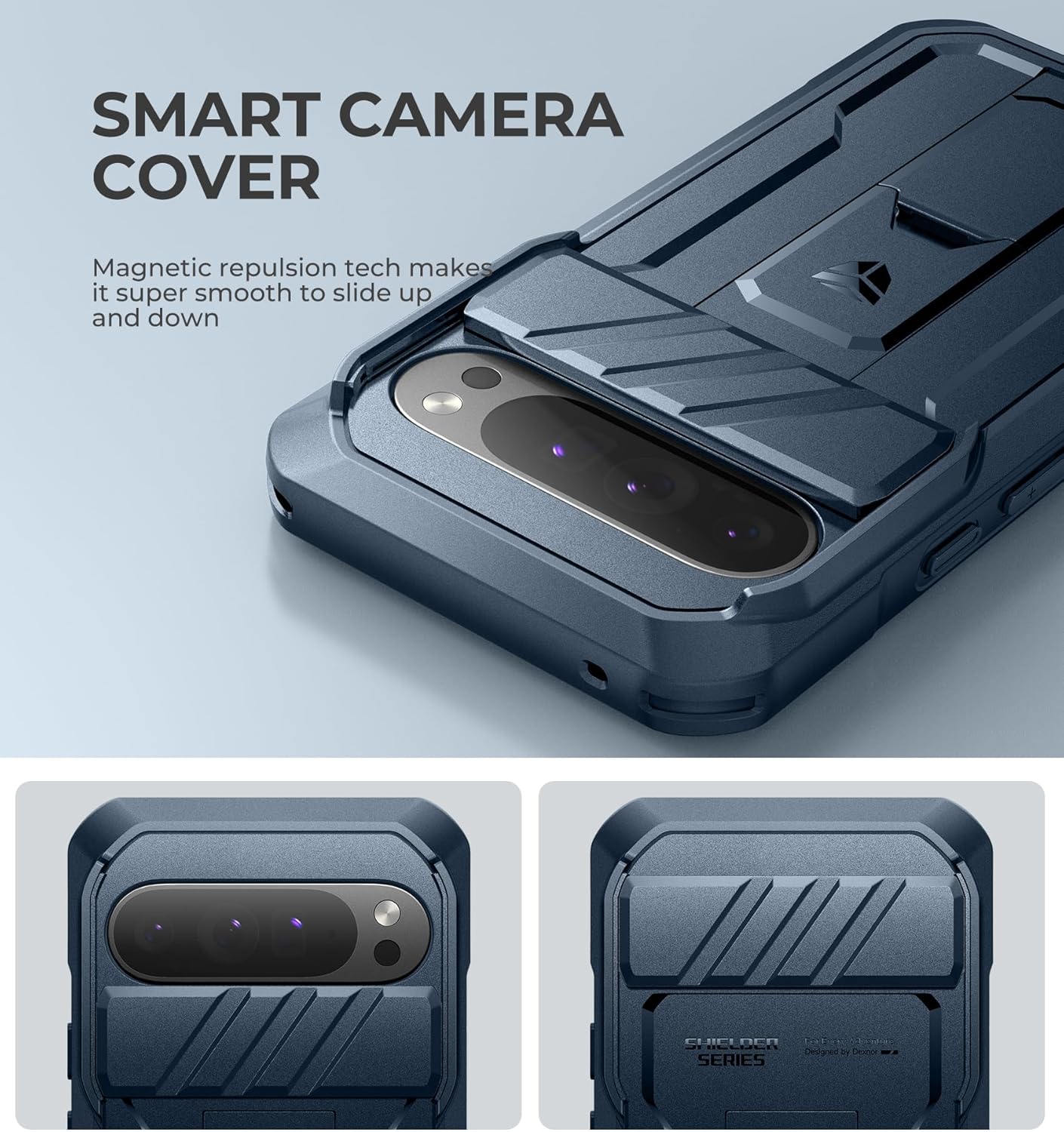
Image 6.1: Slide Camera Cover in action.
This image provides a detailed view of the camera cover mechanism, showing how it slides to protect or expose the phone's camera lenses.
6.2. Using the Versatile Kickstand
The built-in kickstand allows for convenient hands-free viewing.
- To deploy the kickstand: Locate the small tab on the kickstand and pull it outwards until it locks into an open position.
- To retract the kickstand: Push the kickstand back into its recess until it sits flush with the case.
- The kickstand supports both landscape and portrait orientations for optimal viewing angles. It can also serve as a finger ring for a more secure grip.

Image 6.2: Kickstand usage examples.
This image demonstrates the kickstand in use, supporting the phone in both vertical and horizontal positions for hands-free viewing.
Video 6.1: Dexnor Case Features Overview.
This video provides a visual demonstration of the Dexnor case's key features, including the smooth-sliding camera cover, precise cutouts, foldable kickstand, and secure support in various modes. It highlights the functionality and design aspects of the case.
7. Care and Maintenance
- Cleaning: Use a soft, damp cloth to wipe the case clean. Avoid harsh chemicals or abrasive materials that could damage the finish.
- Screen Protector: If using the built-in screen protector, regularly clean it with a microfiber cloth to maintain touch sensitivity and clarity.
- Inspection: Periodically inspect the case for any signs of wear or damage, especially after significant drops, to ensure continued protection.
8. Troubleshooting
- Issue: Difficulty installing the case.
Solution: Ensure the front frame and back cover are properly aligned. Apply even pressure around the edges until they snap together. Refer to the installation guide. - Issue: Reduced touch sensitivity with built-in screen protector.
Solution: Ensure the phone screen and the inside of the screen protector are clean and free of dust or smudges. Reinstall the case, ensuring no air bubbles are trapped. If issues persist, consider using the alternative front frame with your own tempered glass protector. - Issue: Kickstand feels loose or does not stay open.
Solution: Ensure the kickstand is fully extended until it locks into place. If it becomes excessively loose over time, it may indicate wear. - Issue: Camera cover slides too easily or gets stuck.
Solution: Ensure no debris is obstructing the sliding mechanism. Clean the track with a soft cloth. If it slides too easily, check for any damage to the magnetic repulsion mechanism.
9. Specifications
| Feature | Detail |
|---|---|
| Product Dimensions | 6.81 x 3.26 x 0.72 inches |
| Item Weight | 5.3 ounces |
| Material | Thermoplastic Polyurethane (TPU), Polycarbonate (PC) |
| Color | Navy Blue |
| Special Features | Built-in Screen Protector, Slide Camera Cover, Kickstand, Military-Grade Drop Protection |
| Compatible Phone Model | Google Pixel 9 Pro XL |
10. Warranty and Support
Dexnor stands behind the quality of its products.
- Return Policy: A 60-day return policy is available for this product.
- Warranty: This Dexnor case is covered by a 10-year warranty.
For further assistance, product inquiries, or warranty claims, please contact Dexnor customer support through the retailer's platform or visit the official Dexnor store.

Image 10.1: Dexnor Brand Overview.
This image features the Dexnor brand logo and slogan, along with a collage of various Dexnor products, emphasizing the brand's commitment to protective accessories for diverse adventures.