
Introduction
Thank you for choosing the Aitek Mini Speed Dome Sigma L1520CB PTZ AHD IP66 Security Camera. This camera is designed to provide high-definition surveillance for various environments, including businesses, supermarkets, schools, airports, factories, and hotels. It combines advanced imaging technology with robust construction to ensure reliable performance.
Key features include 2MP 1080P resolution, 4-in-1 video output compatibility (AHD/TVI/CVI/CVBS), IP66 weather resistance, and color night vision capabilities. Please read this manual thoroughly before installation and operation to ensure proper use and optimal performance of your device.
Product Overview
The Aitek Mini Speed Dome Sigma L1520CB is a compact and versatile security camera. Below is an image illustrating its main components.
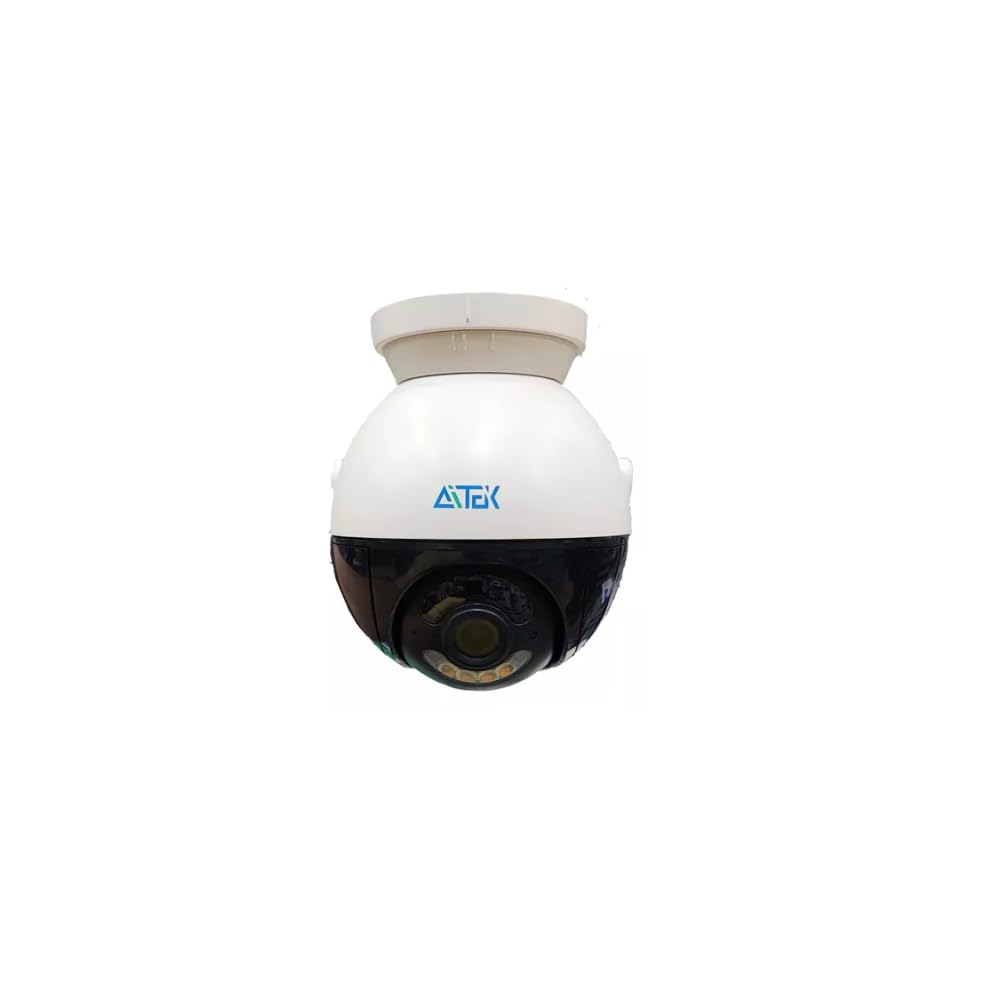
Image: Front view of the Aitek Mini Speed Dome Sigma L1520CB security camera. It features a white upper dome housing with the Aitek logo, and a black lower dome containing the camera lens and infrared LEDs for night vision. A mounting arm is visible on the right side.
The camera's design allows for Pan-Tilt-Zoom (PTZ) functionality, enabling dynamic monitoring. Its robust IP66-rated casing ensures protection against dust and water, making it suitable for both indoor and outdoor installations.
Setup and Installation
Follow these steps for proper installation of your Aitek security camera:
- Unpack the Camera: Carefully remove all components from the packaging. Verify that all accessories, including the installation kit, are present.
- Choose a Mounting Location: Select a suitable location for the camera. Due to its IP66 rating, the camera can be installed in both indoor and outdoor environments. Ensure the chosen location provides the desired field of view and is within reach of necessary cabling.
- Mount the Camera: Use the provided installation kit to securely mount the camera. Follow local safety regulations and ensure the mounting surface can support the camera's weight.
- Connect the Coaxial Cable: Connect a standard coaxial cable (up to 500 meters) from the camera to your Digital Video Recorder (DVR). Ensure a secure connection.
- Connect Power: Connect the camera to a suitable power source. Refer to the power adapter specifications for correct voltage and current.
- Configure DVR Settings: The camera supports 4-in-1 video output (AHD/TVI/CVI/CVBS). Access your DVR settings to select the appropriate video input mode that matches the camera's output. This ensures compatibility with various AHD, TVI, CVI, or analog DVRs.
- Adjust Camera Angle: Once powered on, adjust the camera's pan, tilt, and zoom (PTZ) to achieve the desired monitoring area.
For detailed wiring diagrams and specific mounting instructions, please refer to the separate installation guide included with your product.
Operating Instructions
Once installed and connected to your DVR, the Aitek Mini Speed Dome camera offers advanced surveillance capabilities:
- Video Output: The camera provides 2MP (1080p) high-definition video. Its 4-in-1 technology allows seamless integration with AHD, TVI, CVI, and traditional CVBS analog DVR systems.
- PTZ Control: Utilize your DVR's interface or a compatible PTZ controller to remotely pan (rotate horizontally), tilt (rotate vertically), and zoom the camera lens. This allows for dynamic adjustment of the viewing area.
- Color Night Vision: The camera features advanced sensors and noise reduction technology to enhance sensitivity, providing clear, full-color images even in low-light conditions.
- Real-time Transmission: Video signals are transmitted without compression encoding, ensuring real-time, high-fidelity recording and viewing.
- Image Enhancement: Advanced Y/C separation signal filter and noise reduction features contribute to refined image quality and accurate color reproduction.
Refer to your DVR's user manual for specific instructions on controlling PTZ functions and accessing camera settings.
Maintenance
Proper maintenance ensures the longevity and optimal performance of your security camera:
- Cleaning the Lens: Regularly clean the camera lens with a soft, lint-free cloth. For stubborn dirt, use a lens cleaning solution specifically designed for optical surfaces. Avoid abrasive materials or harsh chemicals.
- Casing Cleaning: Wipe the camera's exterior casing with a damp cloth to remove dust and dirt. The IP66 rating protects against water, but avoid direct high-pressure water jets.
- Cable Inspection: Periodically inspect all cables for any signs of wear, damage, or loose connections. Ensure all connections remain secure to prevent signal loss or power interruptions.
- Environmental Checks: For outdoor installations, ensure that no vegetation or obstructions are blocking the camera's view. Clear any debris that may accumulate around the camera.
- Firmware Updates: Check the manufacturer's website periodically for any available firmware updates. Updating firmware can improve performance, add new features, or fix bugs.
Troubleshooting
If you encounter issues with your Aitek security camera, refer to the following common troubleshooting steps:
- No Video Signal:
- Check power supply to the camera.
- Verify coaxial cable connections at both the camera and DVR.
- Ensure the DVR input mode matches the camera's output (AHD/TVI/CVI/CVBS). Try cycling through modes on your DVR if unsure.
- Test with a different cable if possible.
- Poor Image Quality:
- Clean the camera lens.
- Check cable integrity; damaged cables can degrade signal quality.
- Ensure the camera is receiving adequate power.
- Verify DVR resolution settings are configured for 1080p.
- PTZ Control Not Responding:
- Confirm the camera is powered on and connected.
- Check PTZ control settings on your DVR or controller.
- Ensure the correct protocol is selected for PTZ communication (if applicable).
- Night Vision Issues:
- Ensure there are no obstructions blocking the camera's view or the infrared LEDs.
- Verify power supply is stable, as insufficient power can affect IR performance.
If these steps do not resolve the issue, please contact customer support.
Specifications
| Feature | Detail |
|---|---|
| Model | Sigma L1520CB |
| Resolution | 2 Megapixels (1080p) |
| Video Output | AHD / TVI / CVI / CVBS (4-in-1 Technology) |
| Connectivity | Coaxial Cable |
| Transmission Distance | Up to 500 meters (standard coaxial cable) |
| Weather Protection | IP66 (Dust and Water Resistant) |
| Night Vision | Color Night Vision |
| Color | White |
| Dimensions (L x W x H) | 15 x 15 x 15 cm |
| Weight | 700 g |
| Manufacturer | COMERCIAL HUTLON DO BRASIL LTDA |
Warranty Information
This Aitek Mini Speed Dome Sigma L1520CB security camera comes with a 6-month warranty from the date of purchase. This warranty covers manufacturing defects and malfunctions under normal use. It does not cover damage caused by misuse, accidents, unauthorized modifications, or improper installation.
Please retain your proof of purchase for warranty claims. For service or support under warranty, refer to the contact information in the Support section.
Support
For technical assistance, troubleshooting beyond this manual, or warranty inquiries, please contact your retailer or the manufacturer directly.
Manufacturer: COMERCIAL HUTLON DO BRASIL LTDA
Please have your product model (Sigma L1520CB) and proof of purchase ready when contacting support.