
Walfront KDT2400B 007
Walfront RF Power Amplifier User Manual
Model: KDT2400B 007
1. Introduction
This user manual provides detailed instructions for the Walfront RF Power Amplifier, Model KDT2400B 007. This compact and efficient amplifier is designed for various RF applications, offering reliable performance across a broad frequency range. Please read this manual thoroughly before operating the device to ensure proper use and longevity.
2. Safety Information
- Load Connection: Always connect a proper 50 Ω load to the output before powering on the device. Operating without a load can severely damage the amplifier.
- Heat Dissipation: The module generates heat during operation. Ensure adequate ventilation and do not obstruct the heatsink. Prolonged operation may require additional cooling.
- Power Supply: Use a stable 6V DC power supply with sufficient current capacity (450mA at maximum output). Incorrect voltage or unstable power can lead to malfunction or damage.
- Handling: Handle the device with care. Avoid dropping or subjecting it to strong impacts.
- Environment: Do not expose the amplifier to moisture, extreme temperatures, or corrosive environments.
3. Product Overview
The Walfront RF Power Amplifier is a compact unit featuring a double-sided PCB and an integrated heatsink for efficient thermal management. It is designed for ease of integration into various systems.
Key Features:
- Mini Size: Compact design with SMA input/output and solder power supply, ideal for space-constrained applications.
- Dual Version Capability: Covers a broadband range of 1500-2600 MHz with saturated output, or the entire bandwidth with maximum gain within a narrow 2.4 GHz bandwidth, catering to diverse application needs.
- Double-Sided PCB: Utilizes a 1.6mm thick double-sided PCB with a first-stage driven tube (approx. 21dBm) and a second-stage RF2126 power amplifier tube (30dBm compression point), ensuring excellent pass-through performance for both large and small currents.
- Integrated Heatsink: Equipped with a heatsink for superior heat dissipation and long-term stable performance.
- Typical Applications: Suitable for 2.4 GHz amplification, positioning amplification, and medium power amplification, ensuring reliable performance in various scenarios.
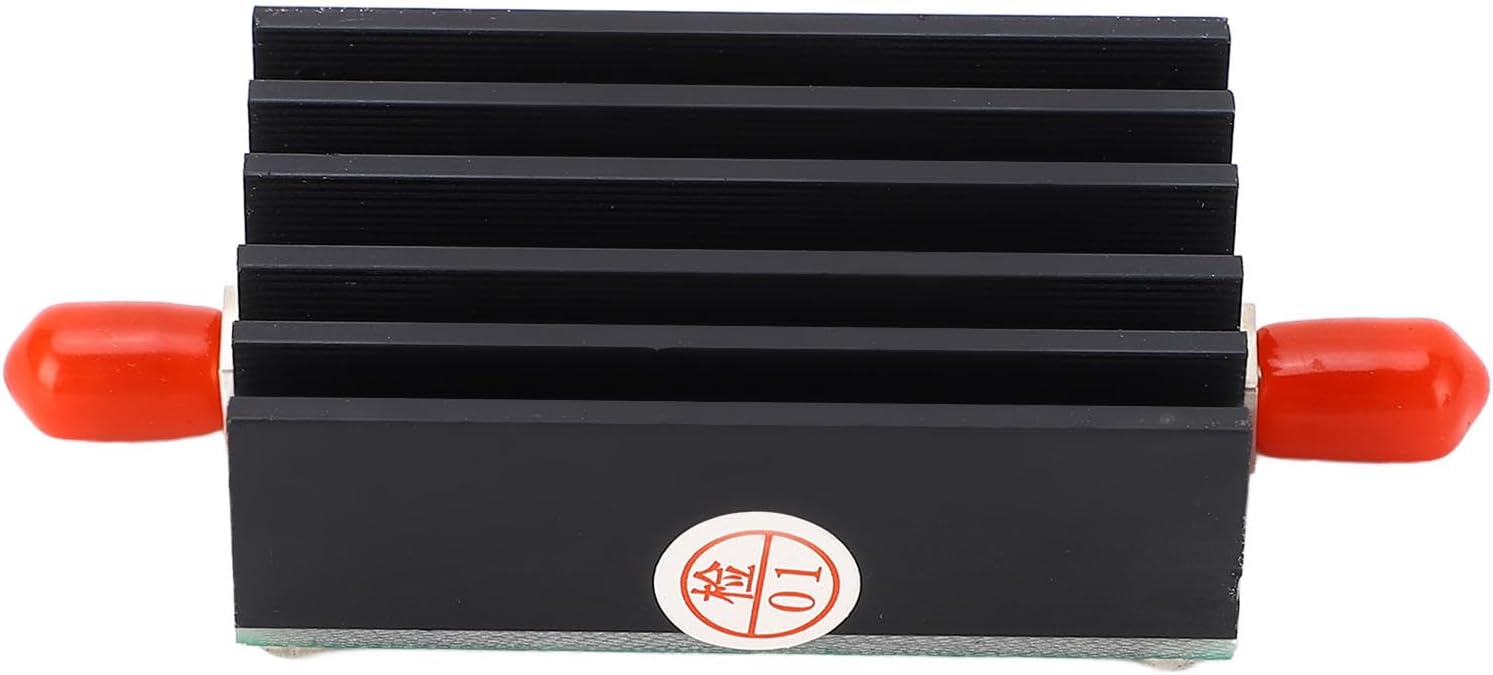
Figure 3.1: Front view of the RF Power Amplifier, showing the black heatsink and red protective caps on the SMA connectors.

Figure 3.2: Top view of the amplifier, revealing the green printed circuit board (PCB) with various electronic components and screw mounts.

Figure 3.3: A detailed close-up of the PCB, highlighting the RF2126 chip and other surface-mount components.
4. Specifications
| Parameter | Value |
|---|---|
| Model | KDT2400B 007 |
| Material | Aluminum Alloy, PCB |
| Working Frequency | 1500–2600 MHz |
| Gain | 30 dB at 2000 MHz |
| Power Supply | 6 V (450 mA at maximum output power) |
| P1dB Power Compression Point | 30 dBm |
| Maximum Input | 10 dBm |
| Input/Output Impedance | 50 Ω |
| Item Weight | 47 g |
| Package Dimensions | 13 x 9 x 2 cm |

Figure 4.1: Dimensional drawing of the RF Power Amplifier, indicating approximate measurements of 70mm (2.76in) length, 30mm (1.18in) width, and 16.5mm (0.65in) height for the main body.
5. Setup
The Walfront RF Power Amplifier is designed for straightforward integration. Follow these steps for initial setup:
- Unpack: Carefully remove the RF Power Amplifier and any included accessories from its packaging.
- Inspect: Check the device for any visible damage. If damage is found, do not proceed with setup and contact support.
- Connect Load: Before applying power, connect a 50 Ω RF load to the output SMA connector (labeled RFOUT). This is crucial to prevent damage to the amplifier.
- Connect Input: Connect your RF signal source to the input SMA connector (labeled RFIN).
- Connect Power: Connect a stable 6V DC power supply to the designated power input terminals (VIN and GND). Ensure correct polarity. The device requires approximately 450mA at maximum output.
- Secure Placement: Place the amplifier on a stable, non-conductive surface, ensuring adequate airflow around the heatsink.
6. Operating Instructions
Once the amplifier is properly set up with a load and input signal, you can begin operation:
- Power On: Apply power to the 6V DC input.
- Apply Input Signal: Introduce your RF input signal to the RFIN port. Ensure the input signal level does not exceed 10 dBm to prevent saturation or damage.
- Monitor Output: Monitor the amplified output signal from the RFOUT port using appropriate test equipment (e.g., spectrum analyzer, power meter).
- Observe Heat: During operation, especially at higher power levels or prolonged use, the heatsink will become warm. This is normal. If the device becomes excessively hot, reduce the input power or ensure better ventilation.
- Power Off: To power down, first remove the input signal, then disconnect the 6V DC power supply.
7. Maintenance
The Walfront RF Power Amplifier is designed for low maintenance. Follow these guidelines to ensure its longevity:
- Cleaning: Keep the device clean and free from dust. Use a soft, dry cloth to wipe the exterior. Do not use liquid cleaners or solvents.
- Ventilation: Ensure the heatsink fins remain clear of obstructions to allow for proper heat dissipation. Periodically check for dust buildup in the fins.
- Storage: When not in use for extended periods, store the amplifier in a cool, dry place, away from direct sunlight and extreme temperatures.
- Connections: Periodically check the SMA connections for tightness and ensure they are free from corrosion.
8. Troubleshooting
If you encounter issues with your RF Power Amplifier, refer to the following troubleshooting guide:
| Problem | Possible Cause | Solution |
|---|---|---|
| No output signal | No power supply; Incorrect power supply voltage/polarity; No input signal; Damaged unit; Output not connected to load. | Check power supply connection and voltage (must be 6V); Ensure input signal is present; Always connect a 50 Ω load to the output before powering on. If issues persist, contact support. |
| Low output power | Low input signal; Incorrect load impedance; Amplifier operating outside specified frequency range; Overheating. | Increase input signal (up to 10 dBm max); Ensure load is 50 Ω; Verify operating frequency is within 1500-2600 MHz; Ensure proper ventilation. |
| Excessive heat | Prolonged operation at high power; Insufficient ventilation; Ambient temperature too high. | Reduce input power or duty cycle; Ensure heatsink is clear and has adequate airflow; Operate in a cooler environment. |
| Unstable operation | Unstable power supply; Loose connections; RF feedback. | Use a stable and regulated 6V power supply; Check all SMA and power connections for tightness; Ensure proper shielding and grounding in your setup to prevent feedback. |
9. Package Contents
- 1 x RF Power Amplifier
- 1 x Cable
10. Support
For further assistance or inquiries, please contact Walfront customer support through your purchase platform or visit the official Walfront store page on Amazon.
Walfront Store: https://www.amazon.de/stores/WalfrontHeimwerkerWerkzeuge/page/E0CBA462-BF73-4706-86AB-DFB96ED51A28
Ask a question about this manual
Ask about setup, troubleshooting, compatibility, parts, safety, or missing instructions. Manuals+ will review the question and use this page’s manual context to help answer it.