
1. Introduction
Thank you for choosing the Dlyfull 8-Bay AA/AAA Ni-MH Battery Charger and 2800mAh AA Rechargeable Batteries. This manual provides essential information for the safe and efficient use of your product. Please read it thoroughly before operation and retain it for future reference.
2. Product Features
- High Capacity AA Batteries: Includes 8 Dlyfull 2800mAh Ni-MH AA rechargeable batteries, designed for extended usage.
- Long Cycle Life: Batteries support up to 1200 charge cycles, offering a sustainable and economical power solution.
- Low Self-Discharge: Batteries retain over 80% of their capacity even after 3 years of storage, ensuring power is available when needed.
- 8-Bay Universal Charger: Features 8 independent charging slots, allowing simultaneous charging of any combination of AA and AAA Ni-MH/Ni-CD rechargeable batteries without pairing.
- Reversible USB-C Interface: Provides convenient and durable connection for power input.
- Smart Charging Indicators: Individual LED indicators for each slot display charging status (Red for charging, Green for fully charged, Red flashing for battery failure).
- Fast Charging: Optimized charging speeds, approximately 3 hours for AAA 800mAh batteries and 7 hours for AA 2000mAh batteries.
- Safety Protections: Built-in explosion-proof and leak-proof design for enhanced safety during use and storage.
- Broad Compatibility: Can be powered via various USB sources including PCs, wall adapters, power banks, and car chargers.
3. Safety Information
To ensure safe operation and prevent damage, please observe the following precautions:
- Only charge Ni-MH or Ni-CD rechargeable batteries. Do not attempt to charge alkaline, carbon-zinc, or any other battery types, as this may lead to leakage, rupture, or explosion.
- Ensure correct polarity (+/-) when inserting batteries into the charger.
- Do not disassemble, modify, or short-circuit the charger or batteries.
- Avoid exposing the charger or batteries to water, fire, high temperatures, or direct sunlight.
- Keep out of reach of children and pets.
- Unplug the charger from the power source when not in use or before cleaning.
- If a battery shows signs of damage, leakage, or overheating, discontinue use immediately.
4. Setup
- Unpack: Carefully remove the charger and batteries from the packaging.
- Connect Power: Connect the provided USB-C cable to the charger's USB-C port. Plug the other end of the USB-C cable into a compatible USB power source (e.g., wall adapter, PC, power bank, car charger). The charger's indicator lights may briefly illuminate.
- Insert Batteries: Insert AA or AAA Ni-MH/Ni-CD rechargeable batteries into the charging slots, ensuring the positive (+) and negative (-) terminals align correctly with the markings in the charger.

Image: The Dlyfull 8-bay charger with AA batteries in various stages of charging, connected via USB-C.

Image: The charger demonstrating compatibility with various power sources: PC, wall plug, power bank, and car charger.
5. Operating Instructions
- Initiate Charging: Once batteries are correctly inserted and the charger is connected to power, the individual LED indicators for each slot will turn red, indicating that charging has begun.
- Monitor Charging Status:
- Red LED: Battery is currently charging.
- Green LED: Battery is fully charged.
- Red Flashing LED: Indicates a battery error or failure (e.g., non-rechargeable battery, damaged battery, or incorrect battery type). Remove the battery immediately.
- Charging Time: Charging times vary depending on battery capacity and discharge level. Refer to the 'Fast Charging' feature in Section 2 for approximate times.
- Remove Batteries: Once the LED indicator turns green, the battery is fully charged. You can safely remove the charged battery from the slot.

Image: The charger's smart reminder lights indicating different charging statuses: Full Charge (Green), Charging (Red), and Battery Failure (Red Flashing).

Image: The USB-C port on the Dlyfull charger, highlighting its fast charge capability for AA and AAA batteries.
6. Maintenance
- Cleaning: Disconnect the charger from power before cleaning. Use a soft, dry cloth to wipe the charger and batteries. Do not use abrasive cleaners or solvents.
- Storage: Store the charger and batteries in a cool, dry place away from direct sunlight and extreme temperatures. For long-term storage, it is recommended to store batteries with a partial charge (around 50%).
- Battery Care: Avoid fully discharging Ni-MH batteries frequently, as this can reduce their lifespan. Recharge them when they are low, but not necessarily completely drained.
7. Troubleshooting
- Charger not powering on: Ensure the USB-C cable is securely connected to both the charger and a functional power source. Try a different USB-C cable or power adapter.
- Batteries not charging (Red LED not lit): Check if batteries are inserted with correct polarity. Ensure they are Ni-MH or Ni-CD rechargeable batteries. Try cleaning the battery contacts and charger terminals.
- Red LED flashing: This indicates a battery error. Remove the battery and inspect it for damage. Do not attempt to charge damaged or non-rechargeable batteries.
- Batteries not holding charge: Over time, all rechargeable batteries degrade. If batteries consistently fail to hold a charge after proper charging, they may need to be replaced.
8. Specifications
| Brand | DLYFULL |
| Model Number | DLYFULL-AA-AAA-CHARGER |
| Battery Type (Included) | Ni-MH AA |
| Battery Capacity (Included) | 2800mAh |
| Charger Compatibility | AA, AAA Ni-MH/Ni-CD Rechargeable Batteries |
| Input Voltage | 120 Volts (via USB-C adapter) |
| Output Voltage | 1.2 Volts |
| Charging Slots | 8 Independent Slots |
| Charging Interface | USB-C |
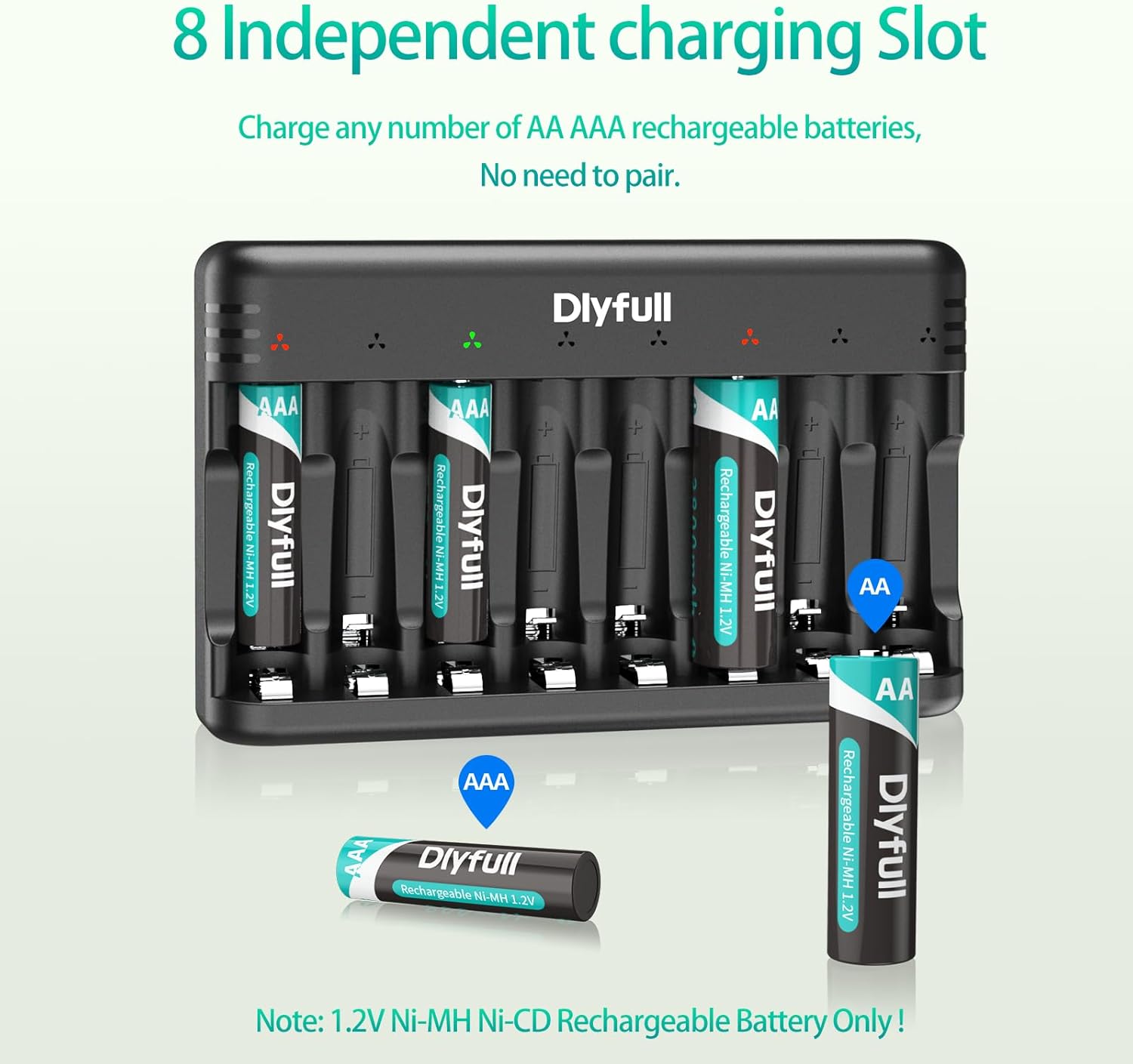
Image: A Dlyfull AA 2800mAh battery, highlighting its high capacity and low self-discharge technology.

Image: The Dlyfull 8-bay charger demonstrating its independent slots for charging both AA and AAA batteries.
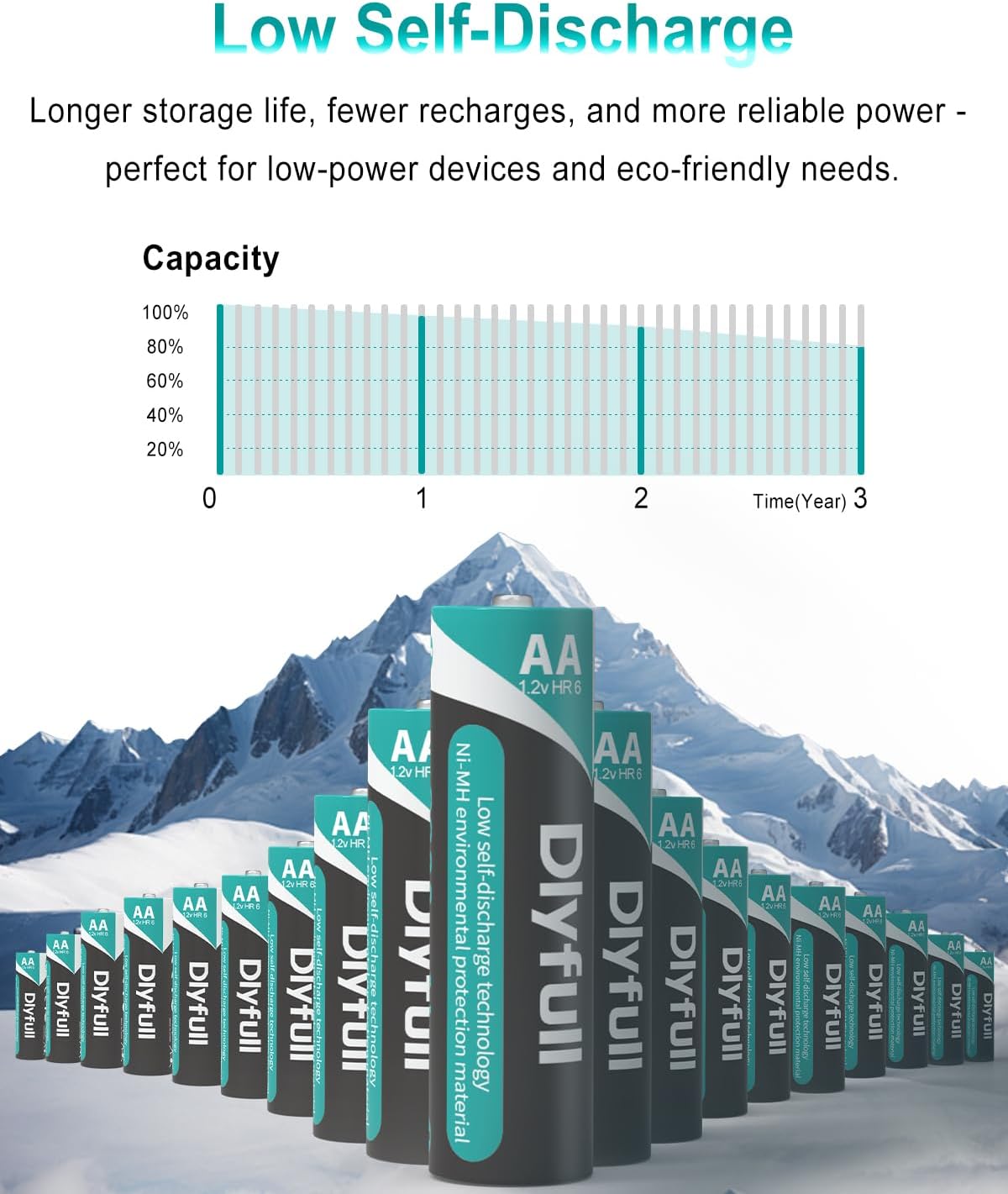
Image: Dlyfull AA batteries emphasizing their 1200 charge cycle capability.

Image: A graph illustrating the low self-discharge rate of Dlyfull batteries, maintaining over 80% capacity after 3 years.

Image: An exploded view of a Dlyfull battery, detailing its explosion-proof and leak-proof design elements.
9. Warranty and Support
Dlyfull products are manufactured to high-quality standards. For specific warranty details, please refer to the warranty card included with your purchase or visit the official Dlyfull website. If you encounter any issues or have questions regarding your product, please contact Dlyfull customer support through the contact information provided on the packaging or website.
Please retain your proof of purchase for warranty claims.


