
Introduction
This manual provides essential information for the safe and efficient operation of your Zodiac Z250 iQ Heat Pump, model MD6. Please read these instructions carefully before installation and use, and keep them for future reference.
Safety Information
Always follow basic safety precautions to reduce the risk of fire, electric shock, and injury to persons. This appliance must be installed by a qualified professional in accordance with all local and national regulations.
- Ensure the power supply matches the specifications of the unit.
- Do not operate the unit if any part is damaged.
- Keep children and pets away from the unit during operation.
- Disconnect power before performing any maintenance or repairs.
Product Overview
The Zodiac Z250 iQ Heat Pump is designed for efficient pool heating, featuring Full Inverter technology for optimal performance and energy savings. It includes built-in connectivity for remote control via the Fluidra Pool App.
Key Features:
- Full Inverter Technology: Automatically adjusts power for efficiency.
- Three Operating Modes: Boost, Smart, and Ecosilence.
- Integrated Connectivity: Control via Fluidra Pool App.
- Titanium Water Exchanger: Compatible with saltwater treatment.
- Automatic Defrost: Ensures reliable operation in various conditions.
- LCD Display: User-friendly interface with touch buttons.
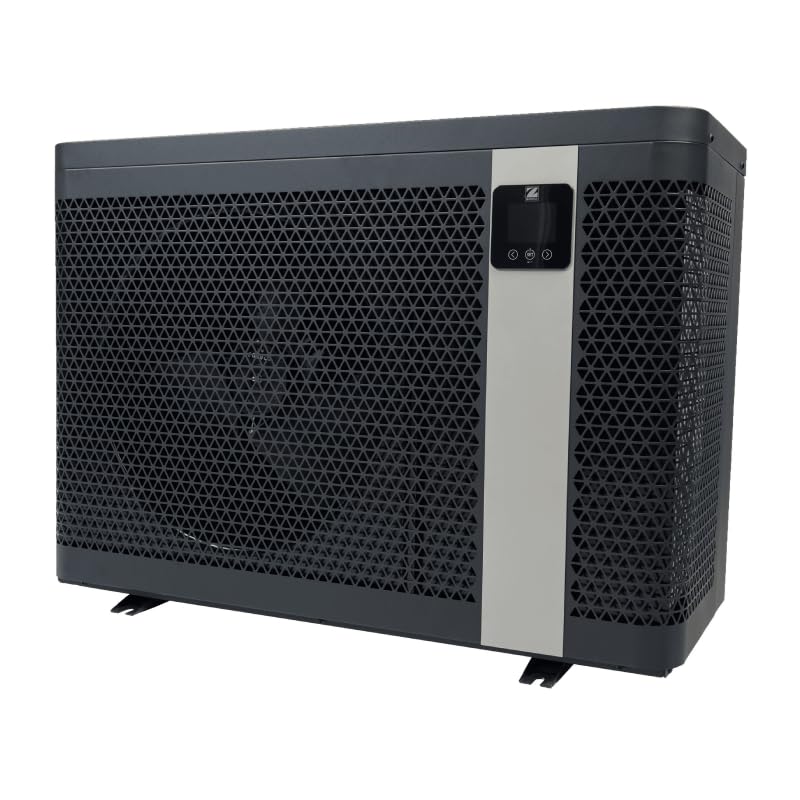
Figure 1: Rear view of the Zodiac Z250 iQ Heat Pump, illustrating the water inlet and outlet connections on the left and the fan grille on the right. This view is crucial for understanding plumbing and airflow.
Setup and Installation
Proper installation is critical for the performance and longevity of your heat pump. This section provides general guidelines. Always refer to the detailed installation manual provided with the product for specific instructions and diagrams.
Unpacking and Placement:
- Carefully remove the heat pump from its packaging. Inspect for any shipping damage.
- Place the unit on a stable, level surface, ensuring adequate clearance around the unit for proper airflow (refer to the detailed manual for specific distances).
- Ensure the horizontal air outlet is unobstructed.
- Install the four anti-vibration feet provided to reduce noise and vibration.
Plumbing Connections:
- Connect the pool's filtration system to the heat pump's water inlet and outlet using the provided PVC 1/2 connections (Ø 50).
- Ensure all connections are watertight to prevent leaks.
- The recommended flow rate for the MD6 model is 6 m³/h. Verify your pump can meet this requirement.
Electrical Connections:
- Electrical installation must be performed by a qualified electrician.
- The unit requires a 220-240V/1/50-60Hz electrical supply.
- Use a recommended electrical cable cross-section of 3 x 4 mm² for the MD6 model.
- Ensure proper grounding and install appropriate circuit protection.
Operating Instructions
The Zodiac Z250 iQ Heat Pump features an intuitive LCD display with touch buttons for easy operation. You can also control the unit via the Fluidra Pool App.
Initial Startup:
- Ensure the pool's filtration system is running and water is flowing through the heat pump.
- Connect the heat pump to the main power supply.
- The LCD display will illuminate. Follow the on-screen prompts for initial setup, including setting the desired water temperature.
Operating Modes:
- Boost Mode: Provides maximum power for rapid heating, ideal at the beginning of the swimming season.
- Smart Mode: Automatically adjusts power between Ecosilence and Boost modes to maintain the desired temperature efficiently.
- Ecosilence Mode: Prioritizes energy savings and reduced noise levels, suitable for maintaining temperature.
Fluidra Pool App Connectivity:
Download the free Fluidra Pool App from your device's app store. Follow the in-app instructions to connect your Z250 iQ heat pump for remote monitoring and control.
Heating Priority Mode:
This mode controls the filter pump to ensure heating priority, optimizing the heating cycle.
Timed Mode:
Allows you to set specific operating times for the heat pump.
Maintenance
Regular maintenance ensures optimal performance and extends the lifespan of your Zodiac Z250 iQ Heat Pump.
Routine Checks:
- Clean the Fan Grille: Periodically check and clean the fan grille to ensure unobstructed airflow.
- Inspect Water Connections: Regularly check for any signs of leaks at the plumbing connections.
- Monitor Performance: Observe the heat pump's operation and temperature output. Any significant changes may indicate an issue.
Winterization:
Before the winter season, it is essential to properly winterize your heat pump to prevent damage from freezing. Refer to the detailed manual for specific winterization procedures, which typically include draining the water circuit and covering the unit with the provided winter cover.
Cleaning:
For thorough cleaning, an optional HP cleaning kit is available. Consult your dealer or the full manual for details on using this kit.
Troubleshooting
This section provides solutions to common issues you might encounter with your heat pump. For more complex problems, contact a qualified technician or Zodiac customer support.
Common Issues and Solutions:
| Problem | Possible Cause | Solution |
|---|---|---|
| Heat pump not starting | No power supply; circuit breaker tripped; low water flow. | Check power connection; reset circuit breaker; ensure pool pump is running and filters are clean. |
| Insufficient heating | Incorrect temperature setting; dirty evaporator coil; low ambient temperature; undersized unit. | Verify desired temperature setting; clean evaporator coil; ensure unit is appropriate for pool size and climate. |
| Unusual noise | Loose components; fan obstruction; compressor issue. | Inspect for loose parts; clear any obstructions from the fan; if noise persists, contact service. |
| Water leaks | Loose plumbing connections; damaged O-rings or seals. | Tighten connections; inspect and replace damaged seals. |
Specifications
Below are the technical specifications for the Zodiac Z250 iQ Heat Pump, model MD6.
| Specification | Value (MD6 Model) |
|---|---|
| Manufacturer | Zodiac |
| Model Number | MD6 |
| Product Dimensions (L x H x D) | 906 x 646 x 375 mm |
| Weight | 56 kg |
| Power Supply | 220-240V/1/50-60Hz |
| Wattage | 1000 watts (Nominal absorbed power varies) |
| Refrigerant | R32 |
| Refrigerant Quantity | 0.7 kg |
| Recommended Flow Rate | 6 m³/h |
| Acoustic Power (max-min) | 67 - 54 dBA |
| Acoustic Pressure at 10m (max-min) | 36 - 23 dBA |
| Delivered Power (max-min) (AIR 26°C / WATER 26°C / HUMID. 80%) | 19.0 - 7.5 kW |
| Absorbed Power (max-min) (AIR 26°C / WATER 26°C / HUMID. 80%) | 2.5 - 0.15 kW |
| COP (AIR 26°C / WATER 26°C / HUMID. 80%) | 6.5 |
| EN 17645 SCOP | 9.9 |
Warranty and Support
Zodiac products are manufactured to high-quality standards. For warranty information, please refer to the warranty card included with your product or visit the official Zodiac website. Keep your proof of purchase for warranty claims.
Customer Support:
If you require technical assistance, spare parts, or have questions not covered in this manual, please contact your authorized Zodiac dealer or visit the Zodiac Poolcare website for support resources.
For service, please provide the model number (MD6) and serial number of your unit.


