
Supersonic SC-2514
Supersonic SC-2514 14-inch Portable DVD Player with Hybrid TV Tuners User Manual
Model: SC-2514
1. Introduction
Thank you for purchasing the Supersonic SC-2514 Portable DVD Player with Built-in Hybrid TV Tuners. This device offers versatile entertainment options, including DVD playback, digital TV reception, and multimedia file playback via USB and SD card. This manual provides essential information for setup, operation, and maintenance to ensure optimal performance and longevity of your device.
2. Safety Information
- Read all instructions before operating the device.
- Do not expose the unit to rain or moisture to prevent fire or electric shock.
- Do not block ventilation openings. Ensure adequate space around the unit for proper airflow.
- Use only the power adapter supplied with the unit. Using other adapters may cause damage or malfunction.
- Protect the power cord from being walked on or pinched.
- Do not attempt to service the unit yourself. Refer all servicing to qualified personnel.
- Keep the unit away from direct sunlight, heat sources, and strong magnetic fields.
- Avoid dropping or subjecting the unit to strong impacts.
- Dispose of the battery according to local regulations. Do not expose to excessive heat.
3. Package Contents
Verify that all items are present in the package:
- Supersonic SC-2514 Portable DVD Player
- Full Function Remote Control
- TV Antenna
- AC Adapter (AC110-240V)
- Car Charger (DC 12V/1.5A)
- AV Cables
- User Manual (this document)
4. Product Features
- 14-inch Widescreen LED Swivel Display: 800 x 480 resolution with 270° swivel for flexible viewing angles.
- Built-in Hybrid TV Tuners: For receiving over-the-air digital television broadcasts.
- Versatile Media Compatibility: Supports DVD, DIVX, MPEG4, JPGE, MP4, CD±R, CD±RW, JPEG, EVD, VCD, and MP3 formats.
- USB and SD Card Inputs: Play audio and video files directly from external storage devices.
- Portable Power: Integrated lithium-ion rechargeable battery for on-the-go use.
- Multiple Power Options: Operates with AC adapter (110-240V) or car charger (12V/1.5A).
- Enhanced Audio: Built-in speaker, 3.5mm headphone jack, and 2 x 2W stereo speakers.
- Comprehensive Playback Functions: Fast forward, rewind, play, pause, slow motion, search, and repeat.
- Auto Channel Programming: Simplifies TV channel setup.
5. Product Layout and Components
Familiarize yourself with the various parts of your portable DVD player.
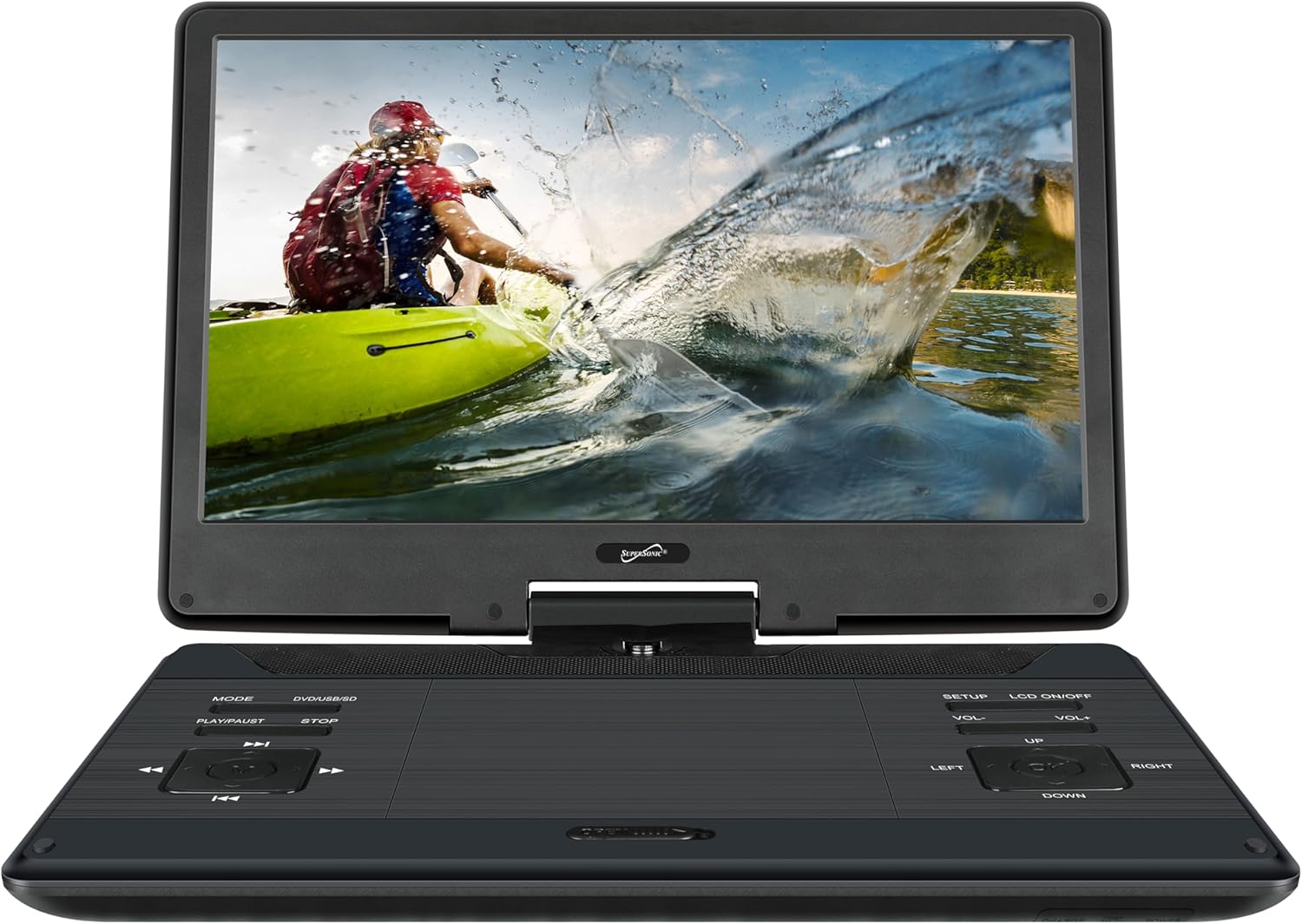
Figure 5.1: Front view of the Supersonic SC-2514 Portable DVD Player with the screen open, showing the main display and control panel.
5.1 Front Panel Controls
- MODE: Switches between DVD, TV, USB, SD modes.
- PLAY/PAUSE: Starts or pauses playback.
- STOP: Stops playback.
- PREVIOUS/NEXT: Navigates tracks/chapters or channels.
- SETUP: Accesses the system settings menu.
- LCD ON/OFF: Toggles the display backlight.
- VOL-/VOL+: Adjusts volume level.
- LEFT/RIGHT/UP/DOWN/ENTER: Navigation and selection buttons.
5.2 Side Panel Ports and Connections

Figure 5.2: Right side panel with various input/output ports.
- USB Input: For connecting USB flash drives.
- SD Card Slot: For inserting SD memory cards.
- AV Input/Output: Connects to external audio/video devices.
- Headphone Jack (3.5mm): For private listening.
- DC IN 12V: Power input for AC adapter or car charger.

Figure 5.3: Left side panel with TV antenna input.
- TV Antenna Input: Connects the included TV antenna for broadcast reception.
5.3 Remote Control

Figure 5.4: The included full-function remote control for convenient operation.
The remote control provides full functionality for operating the device from a distance. Refer to the remote control diagram in the included quick start guide for specific button functions.
6. Setup
6.1 Charging the Battery
- Connect the AC adapter to the DC IN 12V port on the player.
- Plug the AC adapter into a standard wall outlet.
- The charging indicator light will illuminate. Allow several hours for a full charge before first use.
- Alternatively, use the car charger to power or charge the unit in a vehicle.
6.2 Connecting the TV Antenna
- Locate the TV Antenna Input port on the left side of the player.
- Connect the included TV antenna to this port.
- For optimal reception, position the antenna in an area with clear line-of-sight to broadcast towers. Note that TV reception requires the unit to be stationary.
6.3 Initial Power On
- Open the display panel.
- Press the 'POWER' button (usually located on the side or front panel) to turn on the device.
- The screen will light up, and the initial setup wizard or main menu will appear.
7. Operating Instructions
7.1 Basic Operation
- Power On/Off: Press the 'POWER' button.
- Mode Selection: Press the 'MODE' button to cycle through DVD, TV, USB, and SD modes.
- Volume Adjustment: Use 'VOL+' and 'VOL-' buttons.
- Menu Navigation: Use the directional arrows (LEFT, RIGHT, UP, DOWN) and 'ENTER' button.
7.2 DVD Playback
- Ensure the unit is in DVD mode (press 'MODE' if necessary).
- Gently insert a DVD disc into the disc slot with the label facing up. The player will automatically load and begin playback.
- Use 'PLAY/PAUSE', 'STOP', 'PREVIOUS', 'NEXT', 'FAST FORWARD', and 'REWIND' buttons for control.
- Press 'SETUP' to access DVD specific settings like audio language, subtitle, and aspect ratio.
7.3 TV Tuner Operation
- Ensure the TV antenna is connected and the unit is in TV mode.
- Auto Channel Scan: If using for the first time or in a new location, navigate to the 'SETUP' menu, select 'Channel Search' or 'Auto Scan', and confirm. The player will scan for available digital TV channels.
- Channel Selection: Use the 'PREVIOUS' and 'NEXT' buttons to change channels, or enter channel numbers directly using the remote control.
- Signal Strength: TV reception quality depends on location and antenna positioning. Adjust the antenna for better signal if needed.
7.4 USB/SD Media Playback
- Insert a USB flash drive into the USB port or an SD card into the SD card slot.
- Switch the unit to USB or SD mode using the 'MODE' button.
- The device will display a file browser. Navigate through folders and select the desired audio, video, or image file using the directional buttons and 'ENTER'.
- Supported formats include DIVX, MPEG4, JPGE, MP4, and MP3.
8. Maintenance
- Cleaning: Use a soft, dry cloth to clean the unit's exterior. For the screen, use a specialized screen cleaning solution and a microfiber cloth. Do not use abrasive cleaners or solvents.
- Disc Care: Handle discs by their edges. Clean dirty discs with a soft, lint-free cloth wiping from the center outwards.
- Battery Care: To prolong battery life, avoid fully discharging the battery frequently. If storing the unit for an extended period, charge it to about 50% every few months.
- Storage: Store the unit in a cool, dry place away from direct sunlight and extreme temperatures.
9. Troubleshooting
| Problem | Possible Cause | Solution |
|---|---|---|
| No power | Battery discharged; AC adapter not connected or faulty. | Connect AC adapter and charge the unit. Ensure power outlet is functional. |
| No picture/sound from DVD | Disc inserted incorrectly; disc is dirty or scratched; incorrect mode selected. | Reinsert disc correctly; clean or replace disc; switch to DVD mode. |
| Poor TV reception | Antenna not connected; weak signal; antenna position. | Connect TV antenna securely; perform auto channel scan; adjust antenna position for better signal. Ensure unit is stationary. |
| USB/SD not recognized | Incorrect mode; unsupported file system; corrupted files. | Switch to USB or SD mode; ensure USB/SD is formatted to FAT32; check files for corruption. |
| Remote control not working | Batteries depleted; obstruction between remote and unit; remote sensor blocked. | Replace remote batteries; remove obstructions; ensure remote is pointed at the unit's sensor. |
10. Specifications
- Model: SC-2514
- Screen Size: 14 inches (36 cm visible diagonal)
- Display Type: LED Widescreen Swivel Display
- Resolution: 800 x 480 pixels (16:9 aspect ratio)
- Media Compatibility: DVD, DIVX, MPEG4, JPGE, MP4, CD±R, CD±RW, JPEG, EVD, VCD, MP3
- Inputs: USB, SD Card, AV Input, TV Antenna Input
- Outputs: AV Output, 3.5mm Headphone Jack
- Audio Output: Built-in Speaker, 2 x 2W Stereo Speakers
- Power Supply: AC 110-240V (via AC adapter), DC 12V/1.5A (via car charger)
- Battery: Rechargeable Lithium-ion
- Item Weight: Approximately 5.5 pounds (2.5 kg)
- Product Dimensions: Approximately 21.1 x 14.1 x 7.5 inches (53.6 x 35.8 x 19 cm)
11. Warranty and Support
This product comes with a standard manufacturer's warranty. Please refer to the warranty card included in your package for specific terms and conditions, including warranty period and coverage details. For technical support, service, or inquiries, please contact Supersonic customer service through the contact information provided on the warranty card or the official Supersonic website.
Ask a question about this manual
Ask about setup, troubleshooting, compatibility, parts, safety, or missing instructions. Manuals+ will review the question and use this page’s manual context to help answer it.