
1. Introduction
This manual provides essential information for the safe and efficient installation, operation, and maintenance of the CSCPEXCZ SU900 Variable Frequency Drive (VFD), specifically the 7.5KW 380V model. The SU900 series VFD is designed to control the speed of AC motors by varying the frequency and voltage supplied to the motor. Please read this manual thoroughly before installation and operation to ensure proper use and to prevent damage or injury.
2. Safety Information
WARNING: DANGEROUS VOLTAGES. DISCHARGE TIME 5 MIN.
Always observe the following safety precautions:
- Only qualified personnel should install, operate, or maintain this equipment.
- Disconnect all power sources before performing any work on the VFD or connected motor. Wait at least 5 minutes after power-off for capacitors to discharge. Verify zero voltage before touching any terminals.
- Ensure proper grounding of the VFD and motor.
- Do not operate the VFD with covers removed.
- Protect the VFD from moisture, dust, and corrosive gases.
- Ensure adequate ventilation to prevent overheating.
3. Product Overview
The SU900 VFD is a high-performance variable frequency drive designed for precise motor speed control. Key features include:
- High-power output suitable for various industrial applications.
- Support for 485 communication for remote control and monitoring.
- Integrated cooling system for reliable operation.

Figure 1: SU900 VFD showing overall dimensions (242.5mm x 125mm x 169.5mm) and key specifications for the 7.5KW 380V model, including 3KG weight and 485 communication capability.
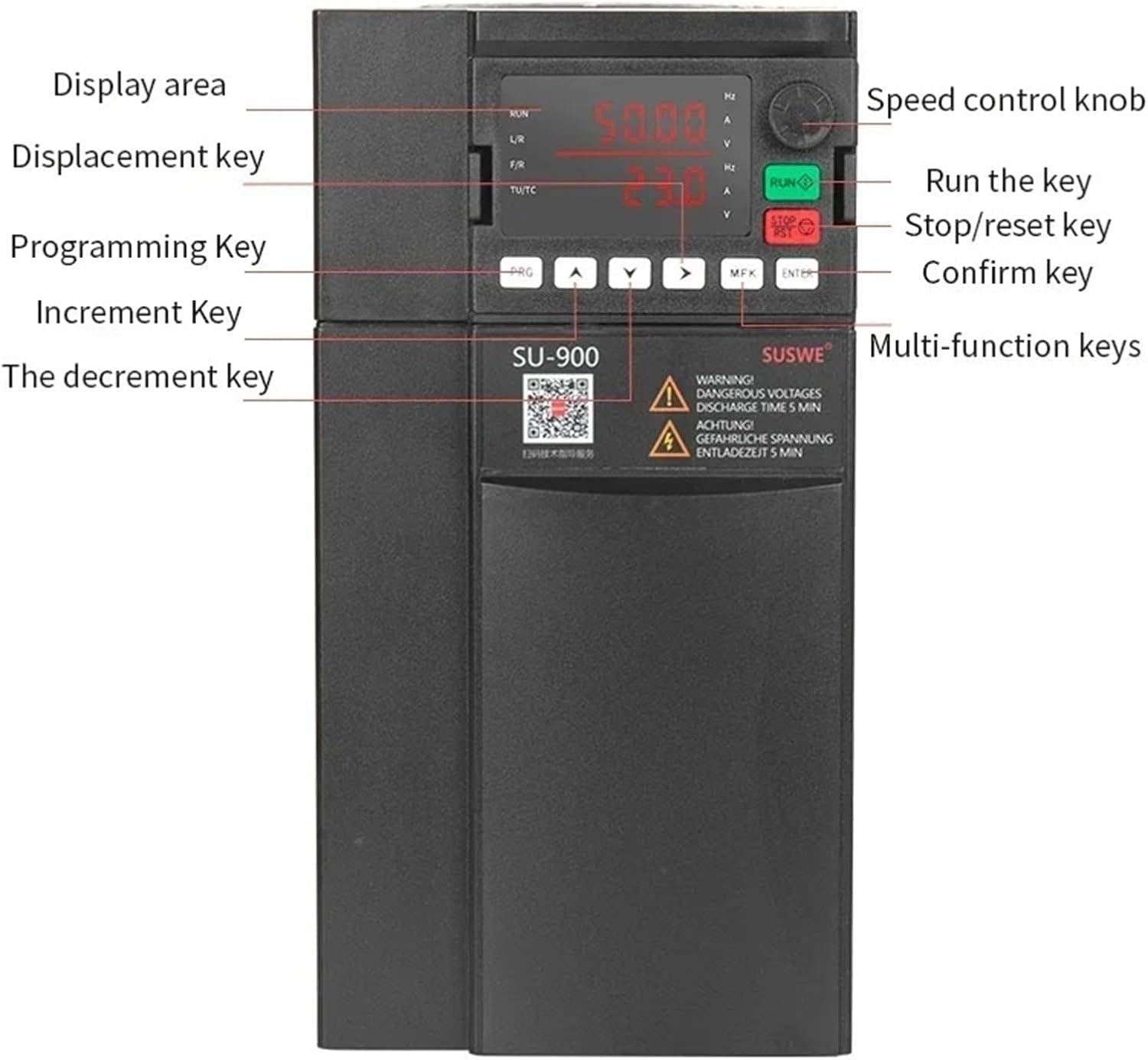
Figure 2: Close-up view of the SU900 VFD control panel, indicating the display area, speed control knob, run key, stop/reset key, confirm key, programming key, displacement key, increment key, decrement key, and multi-function keys.
4. Setup
4.1. Mounting
Mount the VFD vertically on a flat, non-flammable surface. Ensure sufficient clearance around the unit for proper airflow and heat dissipation. Refer to Figure 1 for dimensions. Avoid mounting in direct sunlight or near heat sources.
4.2. Wiring
All wiring must comply with local and national electrical codes. Use appropriate wire gauges for the VFD's power rating. Ensure all connections are tight and secure.
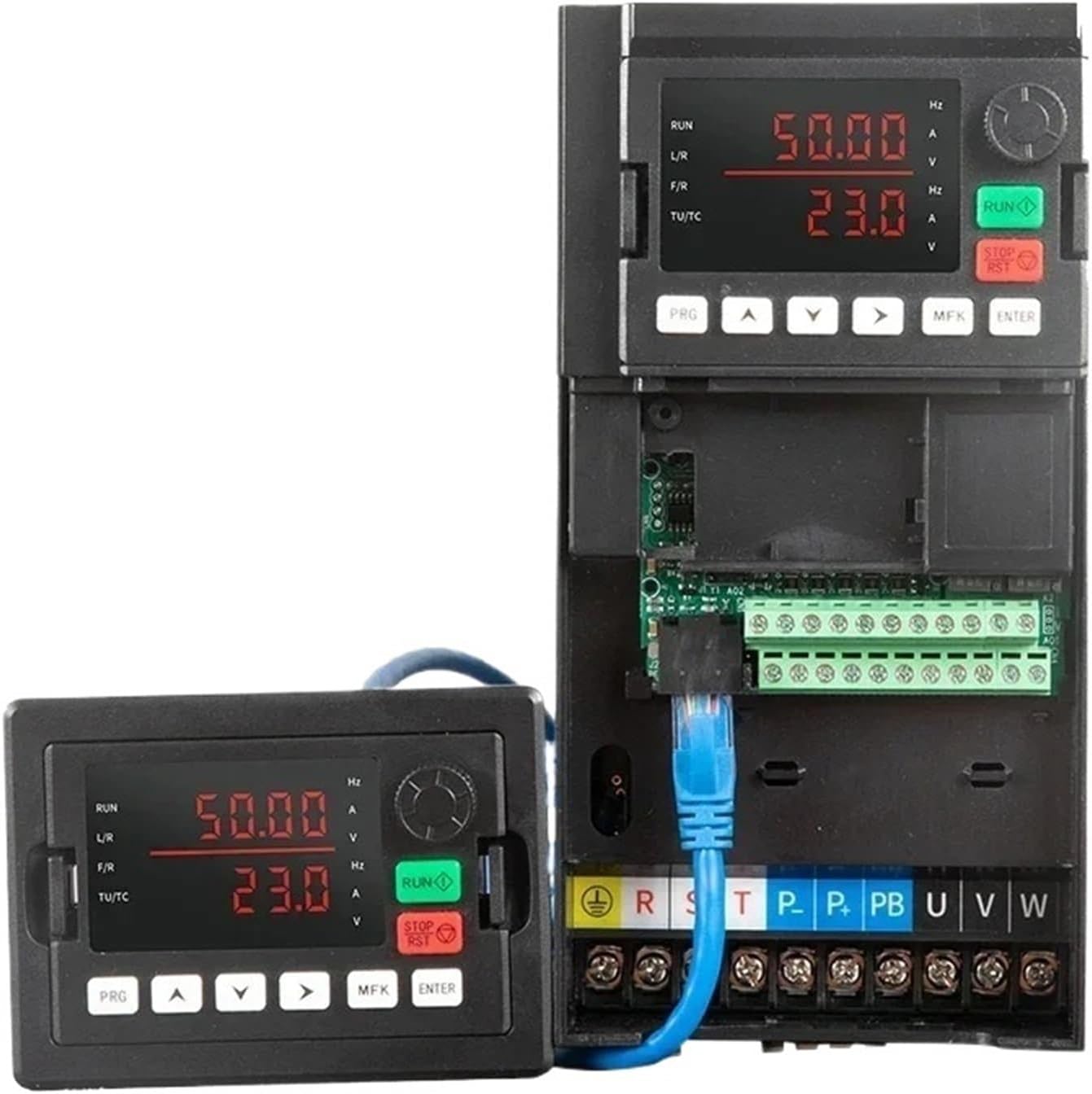
Figure 3: SU900 VFD showing the main unit with its terminal block and a detachable control panel. The terminal block includes connections for input power (R, S, T), motor output (U, V, W), and control signals (P, PB, etc.).
- Power Input (R, S, T): Connect the 380V three-phase AC power supply to these terminals.
- Motor Output (U, V, W): Connect the three-phase motor leads to these terminals.
- Ground (PE): Connect the protective earth ground to the PE terminal.
- Control Terminals: Use these terminals for external control signals, such as start/stop commands, speed reference, and fault indications. Refer to the detailed wiring diagram in the full product manual for specific terminal functions.
- 485 Communication: The VFD supports RS485 communication for integration into control systems.
4.3. Initial Power-Up
After completing all wiring and verifying connections, apply power to the VFD. The control panel display should illuminate. Do not connect the motor during the initial power-up if performing a self-test or parameter verification.
5. Operating Instructions
5.1. Control Panel Functions
Refer to Figure 2 for the layout of the control panel. The main functions are:
- RUN Key: Starts the motor.
- STOP/RESET Key: Stops the motor or clears fault indications.
- PRG (Program) Key: Enters or exits the parameter setting mode.
- MFK (Multi-Function Key): Used for various functions depending on the context.
- ENTER Key: Confirms parameter settings or menu selections.
- Arrow Keys (Up/Down/Left/Right): Navigate menus and adjust parameter values.
- Speed Control Knob: Adjusts the output frequency/motor speed directly (if configured).
5.2. Basic Operation
- Power On: Ensure the VFD is properly wired and power is applied.
- Set Frequency: Use the PRG key to enter parameter mode and adjust the desired output frequency (motor speed) using the arrow keys or the speed control knob.
- Start Motor: Press the RUN key. The motor should start and accelerate to the set frequency.
- Stop Motor: Press the STOP/RESET key. The motor will decelerate and stop.
5.3. Parameter Programming
The SU900 VFD has numerous parameters for fine-tuning its operation. Common parameters include:
- Motor Parameters: Rated power, rated voltage, rated current, rated frequency.
- Acceleration/Deceleration Time: Controls how quickly the motor speeds up or slows down.
- Max/Min Output Frequency: Sets the operational limits.
- Control Mode: V/F control, vector control, etc.
For a complete list and detailed explanation of all parameters, please refer to the comprehensive programming manual provided by the manufacturer.
6. Maintenance
Regular maintenance ensures the longevity and reliable operation of your VFD.
6.1. Cleaning
Periodically clean the VFD's exterior and cooling fins to prevent dust accumulation. Use a soft, dry cloth. For internal cleaning, disconnect power and use compressed air to remove dust from heat sinks and fans. Ensure no moisture enters the unit.
6.2. Inspection
- Check all electrical connections for tightness and signs of corrosion.
- Inspect cooling fans for proper operation and obstructions. (See Figure 4)
- Look for any signs of discoloration, burning, or damage on the VFD's casing or internal components.

Figure 4: Detail of the cooling fan on the SU900 VFD, essential for maintaining optimal operating temperature.
6.3. Environmental Conditions
Ensure the operating environment remains within the specified temperature and humidity ranges. Excessive heat or moisture can significantly reduce the VFD's lifespan.
7. Troubleshooting
This section provides guidance for common issues. For complex problems, contact technical support.
| Problem | Possible Cause | Solution |
|---|---|---|
| VFD does not power on | No input power; Blown fuse; Incorrect wiring | Check power supply; Inspect fuses; Verify wiring connections. |
| Motor does not run | Incorrect start command; Motor wiring error; VFD fault | Check control wiring; Verify motor connections; Check VFD display for fault codes. |
| Motor runs at incorrect speed | Incorrect frequency setting; Speed reference issue; Parameter misconfiguration | Adjust frequency setting; Check speed reference signal; Review VFD parameters. |
| Overcurrent/Overload fault | Motor overload; Short circuit in motor wiring; Incorrect motor parameters | Reduce motor load; Check motor wiring for shorts; Verify motor parameters in VFD. |
| Overvoltage/Undervoltage fault | Unstable input voltage; Rapid deceleration; Incorrect DC bus voltage setting | Check input power quality; Increase deceleration time; Verify voltage parameters. |
If a fault code appears on the display, consult the detailed fault code list in the full product manual for specific diagnostic steps.
8. Specifications
| Feature | Specification |
|---|---|
| Model | SU900 |
| Power Rating | 7.5 KW (10 HP) |
| Input Voltage | 380V Three-Phase |
| Output Voltage | 380V Three-Phase |
| Communication | RS485 |
| Dimensions (L x W x H) | 242.5mm x 125mm x 169.5mm |
| Weight | 3 KG |
| ASIN | B0DB8W6W5G |
9. Warranty and Support
Warranty information for the CSCPEXCZ SU900 VFD is typically provided at the time of purchase. Please refer to your purchase documentation for details regarding warranty coverage and duration.
For technical support, service, or further inquiries, please contact the manufacturer or your authorized dealer. Ensure you have your product model number (SU900) and ASIN (B0DB8W6W5G) available when seeking assistance.