
1. Introduction
This manual provides instructions for the ZWP RC-883 replacement remote control. This remote is designed to function as a direct replacement for specific Denon receiver models, offering essential control without the need for complex programming.
The ZWP RC-883 remote control is constructed from durable ABS material and features soft plastic buttons for comfortable use.
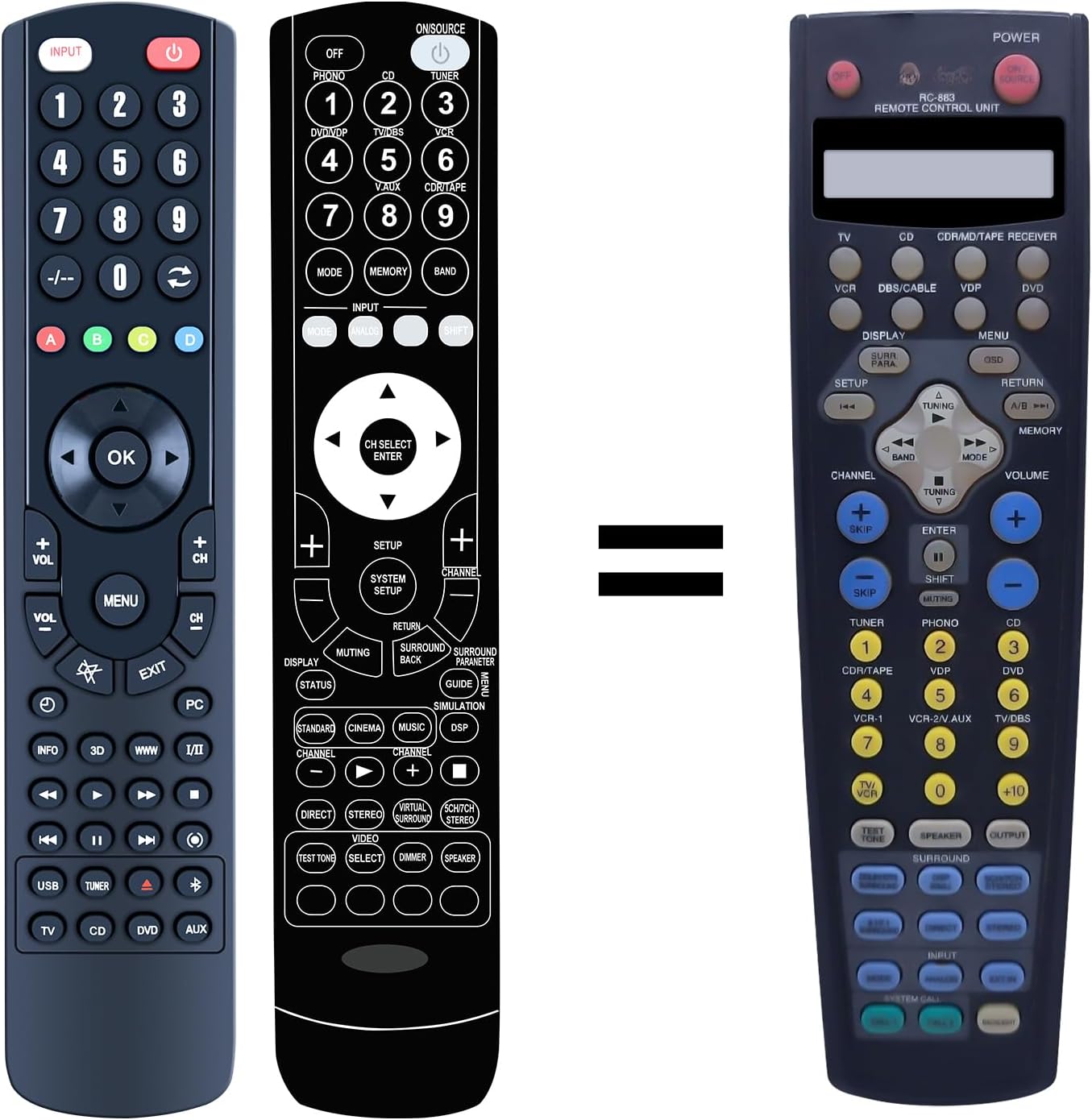
Figure 1: The ZWP RC-883 Remote Control. This image displays the front view of the remote control, highlighting its button layout and ergonomic design.
2. Compatibility
The ZWP RC-883 remote control is compatible with the following Denon Receiver models:
- AVR-1082
- AVR-3800
- AVR-3801
- AVR-3802
This remote is intended to replace the original remote controls for these specific Denon models. While the button layout may differ from the original, the core functionalities are designed to be compatible.

Figure 2: Comparison of the ZWP RC-883 (left) with a typical original Denon remote (right). This image illustrates the visual differences between the replacement remote and the original unit it is designed to replace, emphasizing that while appearance may vary, functionality is maintained.
3. Package Contents
The package for the ZWP RC-883 remote control typically includes:
- 1 x ZWP RC-883 Remote Controller
Note: Batteries are not included and must be purchased separately.
4. Setup
4.1 Battery Installation
The ZWP RC-883 remote control requires two 1.5V AAA batteries for operation. Follow these steps to install the batteries:
- Locate the battery compartment cover on the back of the remote control.
- Slide the cover downwards or press the latch (if present) to open the compartment.
- Insert two AAA batteries, ensuring the positive (+) and negative (-) terminals align correctly with the markings inside the compartment.
- Replace the battery compartment cover by sliding it back into place until it clicks securely.

Figure 3: Illustration of battery installation. This image shows the back of the remote control with the battery cover removed, indicating where to insert two AAA batteries and the correct polarity.
4.2 Initial Use (No Programming Required)
The ZWP RC-883 remote control is designed for immediate use with compatible Denon receivers. No programming, pairing, or complex setup procedures are required. Once batteries are correctly installed, the remote is ready to operate your receiver.

Figure 4: Remote control in use with a television, illustrating the "no programming needed" feature. This image depicts the remote control next to a TV screen, signifying that it works directly out of the box after battery insertion.
5. Operating Instructions
5.1 General Operation
Point the remote control directly at your Denon receiver. Press the desired function buttons to control your device. Common functions include:
- Power: Turns the receiver on or off.
- Input: Selects the audio/video input source.
- Volume Up/Down: Adjusts the audio volume.
- Channel Up/Down: (If applicable for tuner functions) Changes channels.
- Numeric Keypad: For direct input of numbers (e.g., radio station frequencies).
- Navigation Buttons (OK, Arrow Keys): For menu navigation.
Refer to the button layout in Figure 1 for the location of specific controls.
5.2 Operating Range
The remote control utilizes infrared (IR) technology for signal transmission. It offers a long-distance, precise control range, typically up to 10 meters (approximately 33 feet), under optimal conditions. Ensure there are no obstructions between the remote and the receiver's IR sensor for best performance.

Figure 5: Remote control being used from a distance. This image demonstrates the remote's capability for long-distance control, showing a hand holding the remote pointed towards a TV in a living room setting.
6. Maintenance
6.1 Cleaning
To clean the remote control, use a soft, dry cloth. For stubborn dirt, slightly dampen the cloth with water or a mild, non-abrasive cleaner. Avoid using harsh chemicals, solvents, or abrasive materials, as these can damage the remote's surface or internal components.
6.2 Battery Replacement
Replace batteries when the remote's performance diminishes or it stops responding. Always replace both batteries at the same time with new AAA batteries. Do not mix old and new batteries, or different types of batteries, as this can lead to leakage or improper function. Dispose of used batteries according to local regulations.
7. Troubleshooting
- Remote not responding:
- Ensure batteries are installed correctly with the correct polarity.
- Replace old batteries with new ones.
- Check for any obstructions between the remote and the receiver's IR sensor.
- Ensure you are within the operating range (approximately 10 meters / 33 feet).
- Some buttons do not work or perform unexpected functions:
- Verify that your Denon receiver model is listed in the compatibility section (Section 2).
- Note that while the remote is a replacement, the button layout may not exactly match your original remote. Refer to the button descriptions in Figure 1 and experiment to identify corresponding functions.
- Clean the remote control, especially around the buttons, to ensure no debris is interfering with button presses.
- Remote turns on the receiver but cannot turn it off:
- This can sometimes occur with universal or replacement remotes if the power toggle command differs slightly. Try pressing the power button firmly and holding it for a second or two.
- Ensure the receiver is not in a state that prevents it from powering off (e.g., a specific mode or error state).
8. Specifications
| Feature | Specification |
|---|---|
| Model Number | RC-883 |
| Brand | ZWP |
| Material | High-quality ABS |
| Power Source | 2 x 1.5V AAA Batteries (not included) |
| Operating Technology | Infrared (IR) |
| Operating Range | Up to 10 meters (33 feet) |
| Dimensions (L x W x H) | Approximately 8.85 x 1.81 x 0.74 inches |
| Item Weight | Approximately 2.99 ounces |

Figure 6: Dimensional view of the ZWP RC-883 Remote Control. This image provides side and front views with measurements, indicating the length, width, and thickness of the remote.
9. Warranty and Support
For any questions, concerns, or issues regarding your ZWP RC-883 remote control, please contact the seller or manufacturer directly. Provide your purchase details and a clear description of the issue to facilitate support.
The manufacturer, ZWP, is committed to assisting customers with product-related inquiries.