
1. Important Safety Information
Please read all instructions carefully before using the SANSUI ES-24C1 monitor. Keep this manual for future reference.
- Do not expose the monitor to rain or moisture to prevent fire or electric shock hazards.
- Do not open the monitor casing. There are no user-serviceable parts inside. Refer all servicing to qualified personnel.
- Place the monitor on a stable, flat surface to prevent it from falling.
- Ensure proper ventilation around the monitor. Do not block ventilation openings.
- Use only the power adapter supplied with the monitor.
- Unplug the monitor from the power outlet during lightning storms or when unused for long periods.
2. Package Contents
Verify that all items are present in the package:
- SANSUI ES-24C1 24-inch Curved Monitor
- Monitor Stand (Base and Neck)
- Power Adapter
- HDMI Cable
- User Manual
3. Product Overview
The SANSUI ES-24C1 is a 24-inch Full HD (1920x1080) curved monitor featuring a 100Hz refresh rate, 1ms MPRT response time, and built-in speakers. It is designed for both home and office use, offering a 1500R curvature for an immersive viewing experience.

Image: Overview of the SANSUI ES-24C1 monitor highlighting its key features and curved design.

Image: Summary of the monitor's main features including 100Hz, 1ms MPRT, USB Type-C, HDR, 100% sRGB, 3000:1 contrast, 250 Nits, built-in speakers, and VESA mount.
Ports and Controls

Image: Close-up view of the monitor's rear ports, including HDMI, USB Type-C, and Audio Out.
- USB Type-C: 1 port for video input (does not support charging).
- HDMI 1.4: 1 port for video input.
- 3.5mm Audio Jack: For connecting external headphones or speakers.
- DC IN: Power input port.
- Five-Way Joystick: Located on the back for OSD menu navigation.
4. Setup
4.1 Monitor Assembly
Follow these steps to assemble the monitor stand:
- Attach the stand neck to the monitor panel.
- Secure the stand base to the neck.
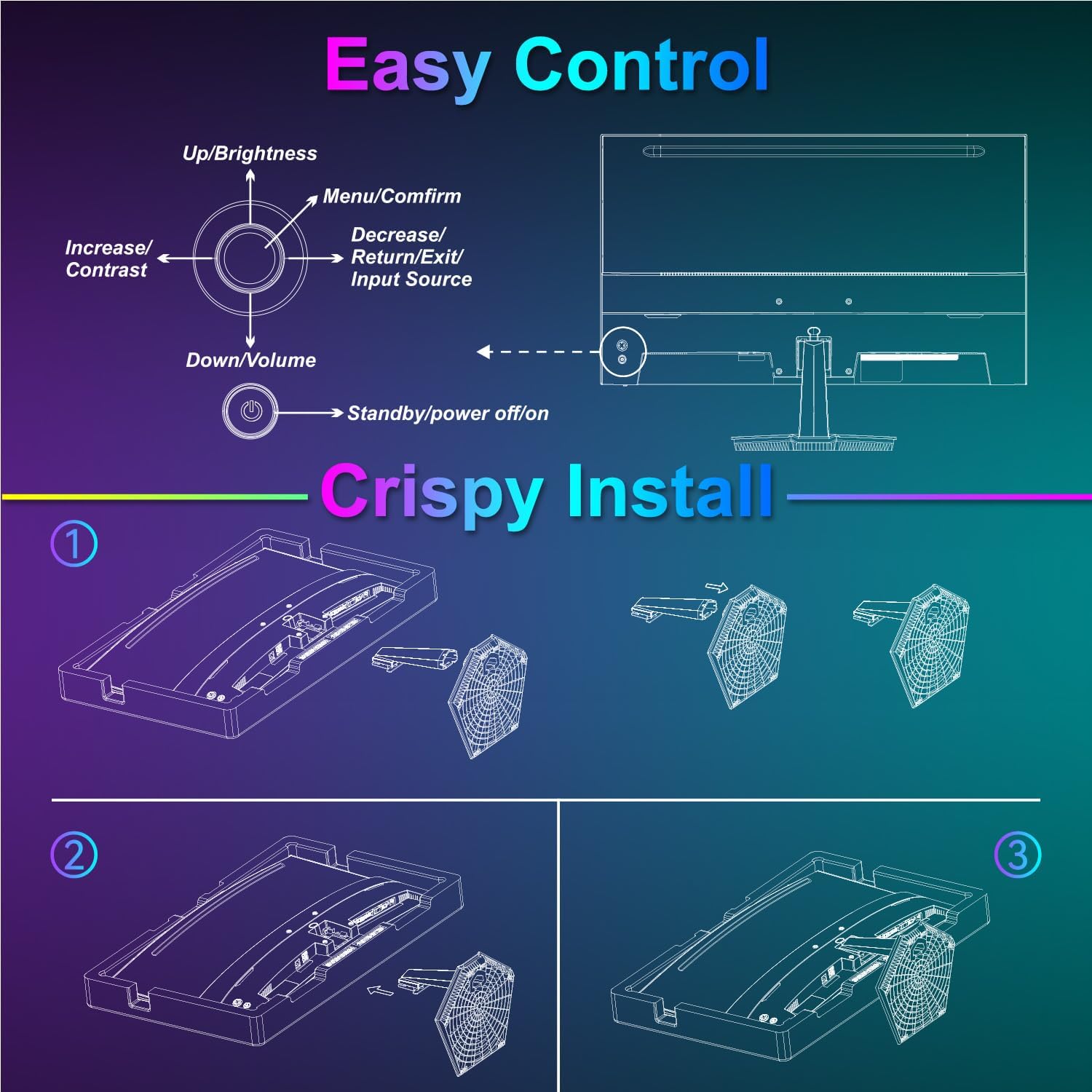
Image: Diagram illustrating the step-by-step assembly of the monitor stand.
4.2 Connecting to Devices
Connect your monitor to a computer or other video source using the appropriate cable.
- HDMI: Connect one end of the HDMI cable to the monitor's HDMI port and the other end to your device's HDMI output.
- USB Type-C: Connect one end of the USB Type-C cable to the monitor's USB Type-C port and the other end to your device's compatible USB Type-C output.
- Audio: If using external audio devices, connect them to the 3.5mm audio jack.

Image: Visual representation of various devices connecting to the monitor via HDMI and USB Type-C.
4.3 Power On/Off
Connect the power adapter to the monitor's DC IN port and then plug it into a power outlet. Press the power button located on the back of the monitor to turn it on or off.
5. Operating Instructions
5.1 OSD Menu Navigation
The On-Screen Display (OSD) menu is controlled using the five-way joystick on the back of the monitor. Press the joystick to open the menu, then move it up/down/left/right to navigate and select options.

Image: Diagram showing the five-way joystick and its functions for OSD menu navigation.
5.2 Display Settings
Adjust various display parameters to optimize your viewing experience.
- Brightness/Contrast: Adjust the overall luminance and contrast levels.
- Color Settings: Fine-tune color temperature, hue, and saturation.
- HDR: Enable or disable High Dynamic Range for enhanced contrast and color.
- Low Blue Light/Anti-Flicker: Reduce eye strain during prolonged use.
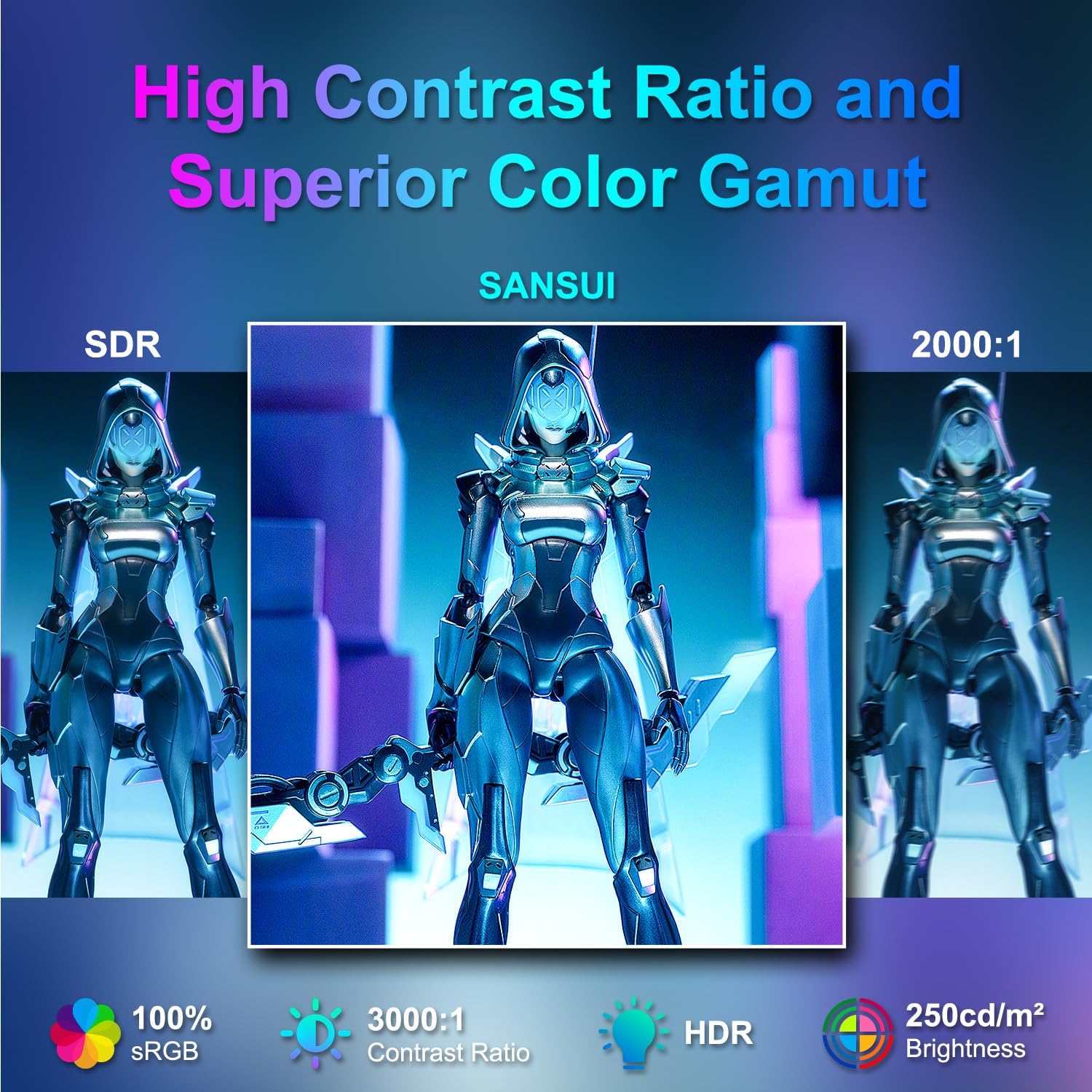
Image: Visual comparison demonstrating high contrast ratio and superior color gamut of the SANSUI monitor.

Image: Highlights of display features like 3000:1 contrast ratio, 100% sRGB, and 250 Nits brightness.

Image: Comparison of display quality with and without HDR enabled.

Image: Illustration of Low Blue Light and Flicker-Free technologies for reduced visual fatigue.
5.3 Gaming Features
The ES-24C1 monitor includes features optimized for gaming performance.
- 100Hz Refresh Rate: Provides smoother motion and reduced input lag.
- 1ms MPRT Response Time: Minimizes motion blur and ghosting.
- Adaptive Sync: Synchronizes the monitor's refresh rate with the GPU's frame rate to eliminate screen tearing and stuttering.
- Game Modes: Pre-set display modes optimized for different game genres (e.g., FPS, RTS, RPG).
- AI Crosshair: An on-screen crosshair overlay for improved aiming accuracy.
- Game Timer: An on-screen timer for tracking in-game events.

Image: Demonstrates the difference in smoothness between 60Hz, 75Hz, and 100Hz refresh rates, highlighting low blue light and Adaptive FreeSync.

Image: Illustrates the benefits of 100Hz refresh rate and 1ms MPRT response time in reducing screen tearing and improving fluidity.
5.4 Multi-Window Modes (PIP/PBP)
The monitor supports Picture-in-Picture (PIP) and Picture-by-Picture (PBP) modes, allowing you to view content from multiple input sources simultaneously.
- PBP (Picture-by-Picture): Divides the screen into two halves, displaying content from two different sources side-by-side.
- PIP (Picture-in-Picture): Displays content from a secondary source in a smaller window overlaid on the main display.

Image: Examples of Duplicated Mode, Second Screen Mode, and Single Display Screen Mode for enhanced productivity.
6. Maintenance
6.1 Cleaning
- Always unplug the monitor before cleaning.
- Use a soft, lint-free cloth lightly dampened with water or a mild, non-abrasive cleaner specifically designed for electronics.
- Do not spray cleaner directly onto the screen.
6.2 Care
- Avoid placing heavy objects on the monitor or its cables.
- Keep the monitor away from direct sunlight, heat sources, and extreme temperatures.
- Do not expose the monitor to strong magnetic fields.
7. Troubleshooting
If you encounter issues with your SANSUI ES-24C1 monitor, refer to the following common problems and solutions:
- No Power: Ensure the power adapter is securely connected to both the monitor and a working power outlet. Check if the power indicator light is on.
- No Signal: Verify that the video cable (HDMI or USB Type-C) is correctly connected to both the monitor and your device. Ensure the correct input source is selected in the OSD menu.
- Flickering Screen: Check the video cable for damage or loose connections. Try a different video cable or port. Ensure your graphics card drivers are up to date.
- Poor Image Quality: Adjust brightness, contrast, and color settings in the OSD menu. Ensure the display resolution and refresh rate are set correctly in your device's display settings.
- No Sound from Speakers: Check the volume settings on both the monitor and your connected device. Ensure the audio cable (if used) is properly connected.
8. Specifications
Detailed technical specifications for the SANSUI ES-24C1 24-inch Curved Monitor:
| Feature | Specification |
|---|---|
| Model Number | ES-24C1 |
| Screen Size | 24 inches |
| Panel Type | Curved (1500R) |
| Resolution | 1920 x 1080 (FHD) |
| Refresh Rate | 100Hz |
| Response Time | 1ms (MPRT) |
| Contrast Ratio | 3000:1 |
| Brightness | 250 Nits |
| Display Colors | 16.7 Million |
| Color Gamut | 100% sRGB |
| Viewing Angle | 178° (H/V) |
| Video Inputs | 1x HDMI 1.4, 1x USB Type-C |
| Audio Output | 1x 3.5mm Audio Jack |
| Speakers | 2x 2W Built-in Speakers |
| VESA Mount | 75 x 75mm |
| Tilt Adjustment | -5° to 15° |
| Product Dimensions | 21 x 38 x 49 inches |
| Item Weight | 7.78 pounds |

Image: Detailed dimensions and ergonomic features like 178° wide viewing angle and -5°~15° tilt.

Image: Visual representation of the 178° wide viewing angle.

Image: Tips for VESA mounting (75x75mm, M4*8mm screw size) and tilt adjustment.

Image: Rear view of the monitor detailing port locations and key specifications.
9. Warranty and Support
SANSUI provides a limited warranty for this product. For detailed warranty information, please refer to the warranty card included in your package or visit the official SANSUI website. For technical support or service inquiries, please contact SANSUI customer service.
Online Support: Visit the SANSUI Store on Amazon
10. Official Product Video
Watch the official product video for a visual guide to the SANSUI ES-24C1 monitor's features and benefits.
Video: SANSUI 24" 100Hz Curved Monitor USB C with Speakers. This video provides an overview of the monitor's design, key features, and connectivity options.


