
Introduction
This manual provides detailed instructions for the proper use and maintenance of your Nillkin CamShield Pro Magnetic Case for iPhone 16 Pro Max. Please read this manual thoroughly to ensure optimal performance and longevity of your product.
Product Overview
The Nillkin CamShield Pro Magnetic Case is designed to protect your iPhone 16 Pro Max while offering enhanced functionality. Key features include a sliding camera cover for privacy and lens protection, strong magnetic compatibility for MagSafe accessories, and robust shock-absorbent construction.
Key Features:
- Compatible Device: Specifically designed for iPhone 16 Pro Max / iPhone 16 Pro Max 5G (6.9 inches, 2024 New Release).
- Built-in Strong Magnetic Circle: Features 38 quadrupole magnets for 10x stronger magnetic adsorption without signal interference, ensuring compatibility with MagSafe accessories.
- Quick Aligned Charging: Facilitates faster and easier wireless charging with perfect magnetic alignment, enhancing user experience during gaming or video viewing.
- Slide Camera Cover Protection: A 0.2mm lifted bezel slide cover protects the camera from scratches and safeguards privacy. The cover is designed for easy sliding while remaining secure.
- Accurate Cutout & Anti-Scratch: Provides tactile buttons for responsive feedback and easy pressing. The matte back features an Oleophobic Coating to prevent fingerprints, watermarks, oil, and dust. Raised lips protect the screen effectively.
Compatibility

Figure 1: Compatibility chart indicating the case is designed specifically for the iPhone 16 Pro Max (6.9"). Please verify your phone model before installation.
Setup and Installation
- Clean Your Device: Ensure your iPhone 16 Pro Max is clean and free of dust or debris before installing the case.
- Align the Case: Gently place your iPhone into the case, aligning the buttons and ports with the corresponding cutouts on the case.
- Secure the Device: Press firmly around the edges of the phone to ensure it is fully seated and secured within the case.
Installation Video
Video 1: Official Nillkin video demonstrating the installation and features of the CamShield Pro case for iPhone 16 Pro Max.
Operating Instructions
Using the Slide Camera Cover:
To protect your camera lenses and privacy, slide the camera cover horizontally across the camera module. Ensure the cover clicks into place when fully open or closed. The cover is designed to slide easily but remain secure during normal use.
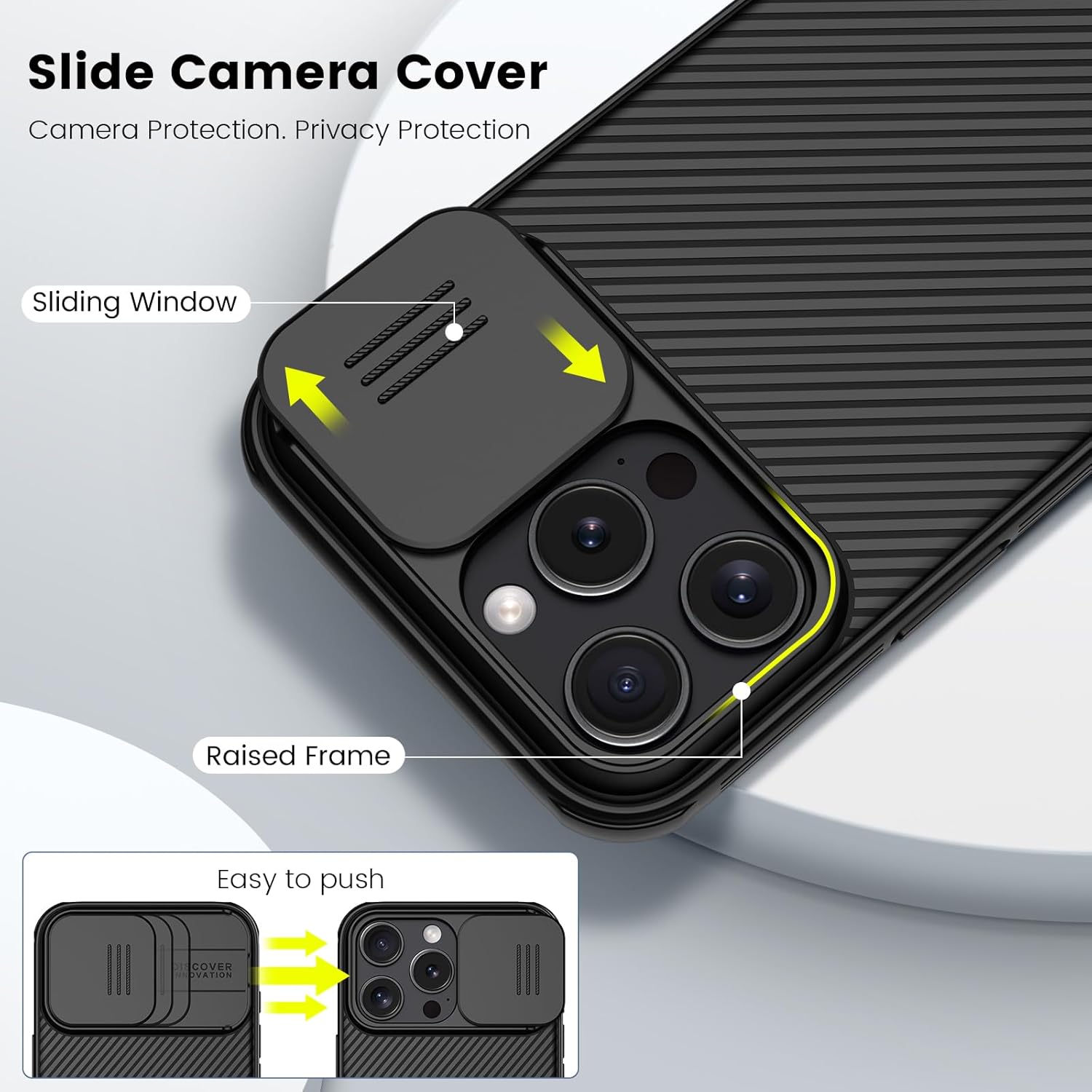
Figure 2: Detailed view of the slide camera cover mechanism, illustrating its movement and protective function.
MagSafe Compatibility:
The case features a built-in magnetic ring that is compatible with MagSafe chargers and accessories. Simply align your MagSafe accessory with the back of the case; the magnets will automatically snap it into place for secure attachment and efficient wireless charging.

Figure 3: The case's MagSafe compatibility shown with a MagSafe charger and a Nillkin wireless charging stand.
Button and Port Access:
The case is designed with precise cutouts for all buttons, speakers, and charging ports, ensuring full accessibility and tactile feedback without obstruction.

Figure 4: Illustration of precise cutouts for charging and buttons, along with non-slip bars and raised bezels for screen and camera.
Maintenance
- Cleaning: To clean the case, gently wipe it with a soft, damp cloth. Avoid using harsh chemicals or abrasive materials, as these may damage the case's finish.
- Storage: When not in use, store the case in a cool, dry place away from direct sunlight and extreme temperatures.
- Avoid Excessive Force: While the case is durable, avoid bending or twisting it excessively, as this could compromise its structural integrity.
Troubleshooting
- Camera Cover Sticking: If the slide camera cover feels stiff, ensure there is no debris in the sliding mechanism. Gently clean the area. Avoid forcing the cover.
- MagSafe Accessories Not Attaching Securely: Verify that the MagSafe accessory is properly aligned with the magnetic ring on the case. Ensure no foreign objects are between the case and the accessory.
- Case Not Fitting Correctly: Double-check that your phone model is indeed the iPhone 16 Pro Max (6.9 inches). This case is specifically designed for this model.
Specifications
| Brand | Nillkin |
| Model Number | AHJ-i 16 Pro Max |
| Compatible Phone Models | For iPhone 16 Pro Max / For iPhone 16 Pro Max 5G |
| Color | Magnetic Black |
| Material | Thermoplastic Polyurethane |
| Water Resistance Level | Not Water Resistant |
| Additional Features | Built-in Camera Protector, Magnetic, Shock-Absorbent, Slim Fit, Wireless Charging Compatible |
| Screen Size | 6.9 Inches |
| Item Dimensions | 5.91 x 3.15 x 0.59 inches |
Warranty and Support
This Nillkin product comes with a 30-day warranty from the date of purchase. This warranty covers manufacturing defects under normal use. It does not cover damage caused by misuse, accidents, or unauthorized modifications.
For technical support, warranty claims, or any inquiries regarding your Nillkin CamShield Pro Magnetic Case, please contact Nillkin customer support through their official website or the retailer where the product was purchased. Please have your purchase receipt and product model number (AHJ-i 16 Pro Max) available when contacting support.


