1. Introduction
Thank you for choosing the Cyboris KKM-001 Portable Karaoke Machine. This device combines a 15W Bluetooth speaker with two wireless microphones, offering a versatile audio experience for various occasions. Please read this manual thoroughly before use to ensure proper operation and to maximize your enjoyment of the product.
2. Package Contents
Please check the box for the following items:
- 1 x Cyboris KKM-001 Portable Karaoke Speaker
- 2 x Wireless Microphones
- 1 x Type-C Charging Cable
- 1 x User Manual (this document)
3. Product Overview
Familiarize yourself with the components and controls of your Cyboris KKM-001 Karaoke Machine.

Image: The Cyboris KKM-001 Portable Karaoke Machine in green, accompanied by two matching wireless microphones.
3.1 Speaker Controls and Ports

Image: A detailed diagram illustrating the control buttons and ports on the Cyboris KKM-001 speaker and its wireless microphone.
- Volume Down / Previous Track Button: Short press to decrease volume, long press for previous track.
- Volume Up / Next Track Button: Short press to increase volume, long press for next track.
- Power On/Off Knob: Rotate to turn the speaker on or off.
- Play/Pause / Mode Switching / Lights Button: Short press to play/pause, long press to switch modes (Bluetooth, AUX, TF Card), double press to turn lights on/off.
- AUX Audio Cable Jack: For connecting external audio devices via a 3.5mm AUX cable.
- TF Card Slot: For playing music directly from a TF (MicroSD) card.
- Type-C Charging Port: For charging the speaker's internal battery.
3.2 Microphone Controls
- Microphone/Reverb Volume + / Next Song Button: Short press to increase microphone volume or reverb, long press for next song (in music playback mode).
- Microphone/Reverb Volume - / Previous Song Button: Short press to decrease microphone volume or reverb, long press for previous song (in music playback mode).
- Power On/Off / Microphone Mute / Play/Pause Button: Long press to power on/off the microphone, short press to mute/unmute, double press to play/pause music.
- Original Sound Cancellation / Magic Sound Loop Switching Button: Short press to cancel original vocals from a song (karaoke mode), long press to cycle through voice change effects.
4. Setup
4.1 Charging the Device
Before first use, fully charge the speaker and both microphones.
- Connect the provided Type-C charging cable to the speaker's Type-C charging port and a standard USB power adapter (not included).
- Connect the Type-C charging cable to each microphone's charging port.
- The charging indicator light will show charging status (refer to product for specific light behavior).
- A full charge takes approximately 3 hours for the speaker and microphones.
4.2 Powering On and Pairing
- Speaker: Rotate the Power On/Off knob clockwise to turn on the speaker. A power-on prompt will sound.
- Microphones: Long press the Power On/Off button on each microphone to turn them on. They will automatically pair with the speaker. A successful connection will be indicated by a sound prompt.
4.3 Bluetooth Connection
To connect the karaoke machine to your smartphone or other Bluetooth-enabled device:
- Ensure the speaker is powered on and in Bluetooth mode (indicated by a voice prompt or light). If not, long press the Play/Pause / Mode Switching / Lights Button to cycle modes until Bluetooth mode is active.
- On your device, go to Bluetooth settings and search for available devices.
- Select "KKM-001" from the list.
- Once connected, a confirmation sound will play from the speaker. You can now stream audio from your device.
5. Operating Instructions
5.1 Speaker Operation
- Volume Adjustment: Use the Volume Up/Down buttons on the speaker.
- Track Control: Long press the Volume Up/Down buttons for next/previous track.
- Play/Pause: Short press the Play/Pause button.
- Mode Switching: Long press the Play/Pause button to switch between Bluetooth, AUX, and TF Card modes.
- Light Effects: Double press the Play/Pause button to turn the LED lights on or off.
5.2 Microphone Operation
- Microphone Volume/Reverb: Use the +/- buttons on the microphone.
- Mute/Unmute: Short press the Power On/Off button on the microphone.
- Voice Change Effects: Long press the Original Sound Cancellation / Magic Sound Loop Switching button to cycle through 6 sound modes: Original Sound, Male to Female, Female to Male, Magic Sound, Kid Sound, and Karaoke Mode.
- Original Sound Cancellation: Short press the Original Sound Cancellation button to reduce or remove vocals from a playing song, allowing you to sing along.

Image: Two children happily singing into the wireless microphones, demonstrating the dual microphone functionality of the Cyboris KKM-001.
5.3 Playback Modes
- Bluetooth Mode: Connect your device as described in Section 4.3.
- AUX Mode: Insert a 3.5mm audio cable into the AUX jack on the speaker and connect the other end to your audio source. The speaker will automatically switch to AUX mode or can be manually selected using the mode button.
- TF Card Mode: Insert a TF (MicroSD) card with MP3, WAV, FLAC, or APE audio files into the TF card slot. The speaker will automatically switch to TF Card mode and begin playback.
5.4 LED Lighting Effects
The speaker features vibrant LED lights that can sync with the rhythm of your music. Double press the Play/Pause button on the speaker to toggle the lights on or off.

Image: The Cyboris KKM-001 speaker showcasing its dynamic, colorful LED lighting effects.
6. Maintenance
- Clean the device with a soft, dry cloth. Do not use abrasive cleaners or solvents.
- Avoid exposing the device to extreme temperatures, direct sunlight, or high humidity.
- Store the device in a cool, dry place when not in use.
- Do not attempt to disassemble or repair the device yourself, as this will void the warranty.
7. Troubleshooting
| Problem | Possible Cause | Solution |
|---|---|---|
| No power | Battery is depleted. | Charge the speaker and microphones fully. |
| No sound from speaker | Volume is too low or muted. Incorrect input mode. | Increase volume. Ensure correct mode (Bluetooth, AUX, TF Card) is selected. |
| Microphone not working | Microphone is off or not paired. Battery is low. | Turn on microphone. Ensure it's paired. Charge microphone. |
| Echo or feedback (squealing) | Microphone too close to speaker. Microphone volume too high. | Increase distance between microphone and speaker. Reduce microphone volume or reverb. |
| Bluetooth connection unstable | Device too far from speaker. Interference. | Move device closer to speaker (within 18m). Avoid obstacles. Re-pair Bluetooth. |
8. Specifications
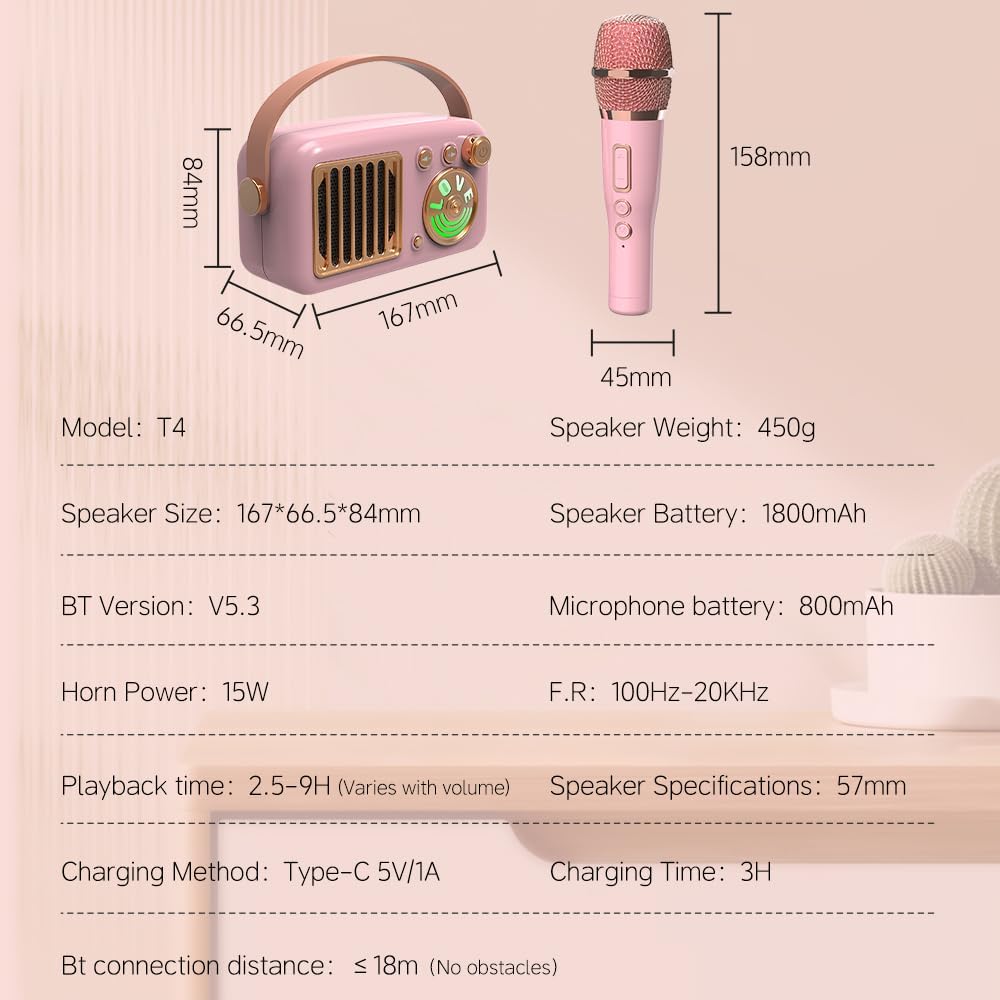
Image: A visual representation of the Cyboris KKM-001 speaker and microphone dimensions, along with key technical specifications.
| Model Number | KKM-001 |
| Speaker Dimensions (L x W x H) | 5.9 x 3.14 x 2.16 inches (167 x 66.5 x 84 mm) |
| Speaker Weight | 2.27 pounds (approx. 450g) |
| Horn Power | 15W |
| Speaker Battery | 1800mAh Lithium Ion (included) |
| Microphone Battery | 800mAh |
| Playback Time | 2.5 - 9 hours (varies with volume) |
| Charging Time | Approx. 3 hours |
| Charging Method | Type-C 5V/1A |
| Bluetooth Version | 5.3 |
| Bluetooth Connection Distance | Up to 18 meters (without obstacles) |
| Frequency Response | 100Hz - 20KHz |
| Audio Input | AUX, TF Card |
| Material | Metal, Plastic |
9. Safety Information
- Keep the device away from water and other liquids.
- Do not drop or subject the device to strong impacts.
- Use only the specified charging cable.
- Keep out of reach of small children to prevent choking hazards from small parts.
- Avoid prolonged listening at high volumes to prevent hearing damage.
10. Warranty and Support
The Cyboris KKM-001 Portable Karaoke Machine comes with a standard manufacturer's warranty. For specific warranty details, please refer to the warranty card included in your package or contact Cyboris customer support.
For technical support, troubleshooting assistance, or warranty claims, please contact the seller or visit the official Cyboris website.


