
TRIUMPHKEY 0758
TRIUMPHKEY Ergonomic Gaming Chair User Manual
Model: 0758
Introduction
Thank you for choosing the TRIUMPHKEY Ergonomic Gaming Chair. This manual provides detailed instructions for assembly, operation, maintenance, and troubleshooting to ensure you get the most out of your new chair. Please read this manual thoroughly before assembly and use, and keep it for future reference.
Safety Information
To ensure safe operation and prevent damage, please observe the following safety guidelines:
- Do not exceed the maximum weight capacity of 150 kg (330 lbs).
- Ensure all screws and bolts are securely tightened before use. Periodically check and re-tighten as necessary.
- Do not stand on the chair or use it as a step stool.
- Avoid placing heavy objects on the chair's backrest or armrests.
- Keep children and pets away from the chair during assembly.
- Use the chair on a flat, stable surface to prevent tipping.
- Do not expose the chair to direct sunlight or extreme temperatures for prolonged periods.
- When adjusting the chair, ensure no body parts or clothing are caught in moving mechanisms.
Package Contents
Before beginning assembly, please verify that all components are present and undamaged. If any parts are missing or damaged, please contact customer support.
- Backrest
- Seat Cushion
- Armrests (2)
- Five-Star Base
- Casters (5)
- Gas Lift Cylinder
- Gas Lift Cover
- Mechanism Plate
- Lumbar Massage Pillow (with USB cable)
- Headrest Pillow
- Retractable Footrest
- Hardware Kit (screws, washers, Allen key)
Setup and Assembly
Assembly typically takes 20-25 minutes. All parts are clearly labeled, and the manual provides detailed instructions. Follow these steps carefully:
- Attach Casters to Base: Insert the five casters into the holes at the end of each leg of the five-star base. Push firmly until they click into place.
- Install Gas Lift: Place the gas lift cylinder into the center hole of the five-star base. Cover it with the gas lift cover.
- Attach Mechanism Plate to Seat: Align the mechanism plate with the screw holes on the underside of the seat cushion. Secure it with the provided screws, ensuring the front of the mechanism faces the front of the seat.
- Attach Armrests to Seat: Secure the armrests to the sides of the seat cushion using the designated screws. Ensure they are oriented correctly.
- Connect Seat to Gas Lift: Carefully place the assembled seat cushion onto the gas lift cylinder, ensuring it is centered and stable.
- Attach Backrest to Seat: Align the backrest with the mounting brackets on the seat cushion. Secure it with the remaining screws.
- Install Pillows and Footrest: Attach the headrest pillow to the top of the backrest and the lumbar massage pillow to the lower back area using their straps. Slide the retractable footrest into its designated slot under the seat.

Image: Chair dimensions and recommended user height (150-190 cm) and maximum load capacity (150 kg).
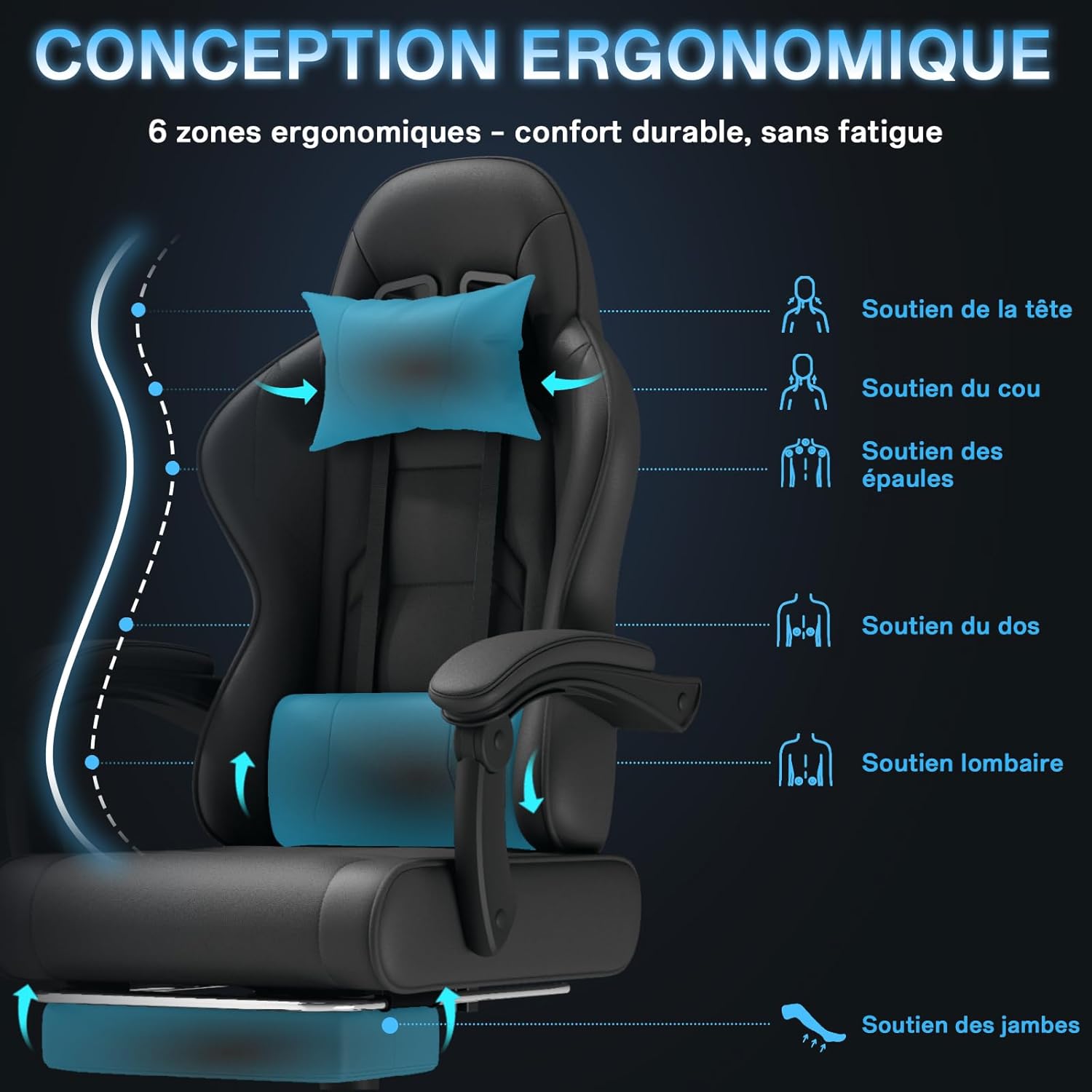
Image: Ergonomic design highlighting support for head, neck, shoulders, back, lumbar, and legs.
Operating Instructions
Your TRIUMPHKEY gaming chair offers multiple adjustment options for personalized comfort:
- Height Adjustment: Pull the lever located under the right side of the seat upwards to raise the chair. To lower the chair, pull the lever upwards while seated. Release the lever at the desired height.
- Backrest Recline: Pull the lever on the right side of the seat (near the backrest) upwards to unlock the recline mechanism. Lean back to your desired angle (between 90° and 145°), then release the lever to lock the backrest in place.
- Lumbar Massage Function: The lumbar pillow features a two-point vibration massage. Connect the USB cable from the lumbar pillow to any standard USB power source (e.g., computer, power bank, USB wall adapter) to activate the massage function.
- Retractable Footrest: Pull the footrest out from under the seat to extend it. Push it back in when not in use.
- Articulated Armrests: The armrests are designed to move with the recline of the backrest, providing continuous support whether you are in an upright working position or a reclined resting position.
- 360-Degree Swivel: The chair can rotate 360 degrees for easy movement and access to your surroundings.

Image: Adjustable backrest recline from 90° to 145° for various uses (work, gaming, nap).

Image: Detail of the electric lumbar massage pillow with two vibration points, powered via USB.

Image: Articulated armrests providing comfort in both working and resting positions.
Maintenance
Regular maintenance will prolong the life and appearance of your chair:
- Cleaning: Wipe the PU leather surfaces with a soft, damp cloth. For stubborn stains, use a mild soap solution and wipe dry immediately. Avoid harsh chemicals or abrasive cleaners.
- Hardware Check: Periodically check all screws and bolts to ensure they are tight. Re-tighten if necessary to maintain stability and prevent squeaking.
- Caster Care: Keep the casters clean by removing any hair or debris that may accumulate around them to ensure smooth rolling.
- Avoid Direct Sunlight: Prolonged exposure to direct sunlight can cause the PU leather to fade or crack.

Image: Seat cushion construction showing breathable PU material and high-density foam for durable comfort.
Troubleshooting
If you encounter any issues with your chair, refer to the following common problems and solutions:
| Problem | Possible Cause | Solution |
|---|---|---|
| Chair is unstable or wobbly. | Loose screws or uneven assembly. | Check and tighten all assembly screws. Ensure the chair is on a flat surface. |
| Chair does not adjust height. | Gas lift malfunction or lever not fully engaged. | Ensure the height adjustment lever is fully pulled. If the issue persists, the gas lift may need replacement. |
| Backrest does not recline or lock. | Recline lever not fully engaged or mechanism obstruction. | Ensure the recline lever is fully pulled to unlock. Check for any obstructions in the recline mechanism. |
| Chair makes squeaking noises. | Loose connections or lack of lubrication. | Tighten all screws. Apply a small amount of lubricant to moving parts if necessary. |
| Lumbar massage not working. | USB cable not connected or power source issue. | Ensure the USB cable is securely connected to a working power source. Try a different USB port or adapter. |
| Missing or damaged parts upon delivery. | Shipping damage or packaging error. | Immediately contact TRIUMPHKEY customer support with your order details and a description of the issue. |
Specifications
| Feature | Detail |
|---|---|
| Brand | TRIUMPHKEY |
| Model Number | 0758 |
| Color | Black |
| Product Dimensions (L x W x H) | 45 x 50 x 131 cm (17.7 x 19.7 x 51.6 inches) |
| Item Weight | 20.5 Kilograms (45.2 lbs) |
| Maximum Weight Recommendation | 150 Kilograms (330 lbs) |
| Applicable User Height | 150-190 cm (4'11" - 6'3") |
| Backrest Recline Angle | 90° to 145° |
| Special Features | Ergonomic Design, Headrest, Padded PU Leather, Adjustable Height, Adjustable Lumbar Support with Massage, Retractable Footrest, 360° Swivel |
| Recommended Uses | Computer, Reading, Video Gaming, Office Work |
Warranty and Support
TRIUMPHKEY provides a limited warranty for this product. Please refer to your purchase documentation for specific warranty terms and conditions. For any questions, missing parts, or technical support, please contact TRIUMPHKEY customer service through the retailer's platform or the official brand website. Our team is dedicated to providing prompt assistance.
Related documents0758


Ask a question about this manual
Ask about setup, troubleshooting, compatibility, parts, safety, or missing instructions. Manuals+ will review the question and use this page’s manual context to help answer it.