
Introduction
Thank you for choosing the LITFAD Floating TV Stand. This manual provides essential information for the safe assembly, installation, and maintenance of your new TV stand. Please read these instructions carefully before beginning assembly and retain them for future reference.
Safety Information
- Always follow the assembly instructions precisely. Incorrect assembly can lead to instability and potential injury.
- Ensure the wall chosen for mounting is structurally sound and capable of supporting the weight of the TV stand and its contents. Consult a professional if unsure.
- Use appropriate wall anchors for your specific wall type (drywall, wooden wall, plastered wall, solid wall).
- Do not overload the TV stand. Refer to the specifications for weight limits.
- Keep small parts and packaging materials away from children during assembly to prevent choking hazards.
- This product is designed for indoor use only.
Package Contents
Please verify that all components are present before beginning assembly. If any parts are missing or damaged, contact customer support.
- TV Console Unit (1 Piece)
- Assembly Hardware Kit (screws, wall anchors, etc.)
- Instruction Manual (this document)
Tools Required (Not Included)
- Phillips Head Screwdriver
- Drill (with appropriate drill bits for wall anchors)
- Level
- Measuring Tape
- Pencil
Setup and Assembly Instructions
It is recommended that two people assemble this unit. Clear a spacious area for assembly.
- Unpack Components: Carefully remove all parts from the packaging. Check against the package contents list.
- Identify Wall Type: Determine if your wall is drywall, wood, plastered, or solid. This will dictate the type of wall anchors and drilling required.
- Mark Mounting Position: Using a level and measuring tape, mark the desired height and horizontal position for the TV stand on the wall. Ensure it is level. The console can be installed at any height.
- Drill Pilot Holes: Drill pilot holes at the marked positions according to the size of your wall anchors. For drywall, use appropriate drywall anchors. For wood studs, drill pilot holes slightly smaller than the screw diameter.
- Install Mounting Hardware: Insert wall anchors into the drilled holes if required. Secure the mounting brackets (if separate) or the back panel of the TV stand directly to the wall using the provided screws. Ensure all screws are tightened securely.
- Attach TV Stand: Carefully lift the TV stand and align it with the wall mounting hardware. Secure the stand to the wall. Double-check that it is firmly attached and level.
- Install Doors: Attach the flip-down doors to the designated compartments using the provided hinges. Ensure they open and close smoothly.
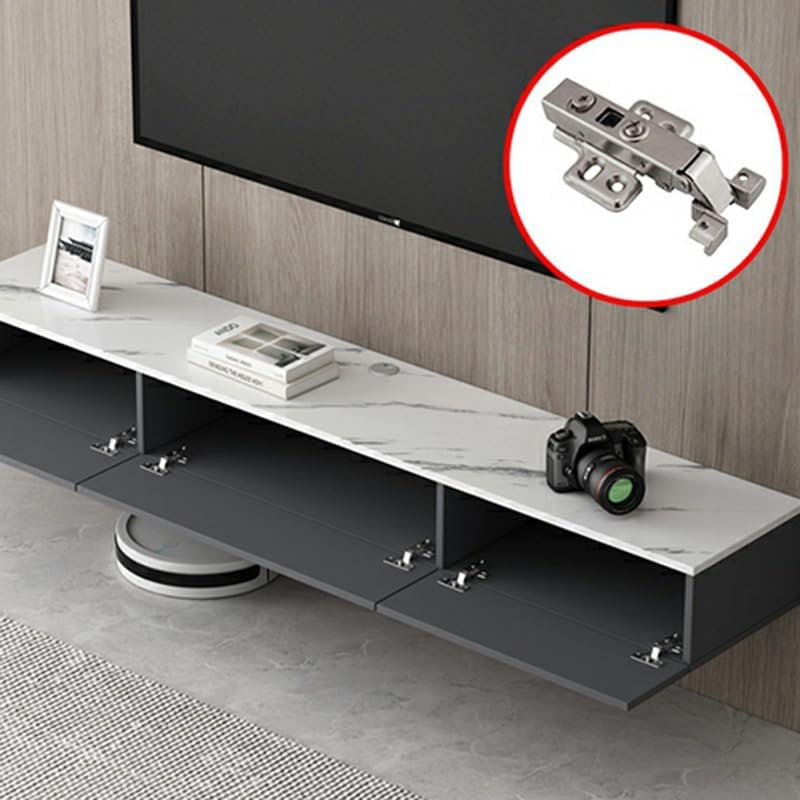
Figure 1: Interior view of the TV stand with flip-down doors open, showcasing the storage compartments and hinge mechanism.

Figure 2: Dimensional diagram of the LITFAD Floating TV Stand, illustrating its length, width, and height.
Usage Instructions
Once securely mounted, your LITFAD Floating TV Stand is ready for use.
- Placement: Place your television directly on the top surface of the stand. Ensure the TV base fits within the stand's dimensions and is centered for stability.
- Storage: Utilize the three flip-down compartments for organizing media accessories such as DVD players, DVRs, cable boxes, gaming consoles, routers, and remote controls.
- Cable Management: Route cables neatly behind the TV stand to maintain a clean appearance and prevent tripping hazards.
- Weight Distribution: Distribute weight evenly across the stand and within the compartments. Avoid placing excessively heavy items on one side.

Figure 3: The LITFAD Floating TV Stand in a typical living room setup, showcasing its wall-mounted design and use with a television and accessories.

Figure 4: Detailed view of the TV stand's top surface, highlighting its finish and capacity for decorative items or small electronics.
Maintenance
- Cleaning: Wipe the surface with a dry, soft cloth. Avoid abrasive cleaners or harsh chemicals, as they may damage the finish.
- Spills: Immediately wipe up any spills with a dry cloth to prevent moisture damage.
- Inspection: Periodically check all mounting screws and hardware to ensure they remain tight and secure. Retighten if necessary.
- Avoid Direct Sunlight: Prolonged exposure to direct sunlight may cause fading or discoloration over time.
Troubleshooting
| Problem | Possible Cause | Solution |
|---|---|---|
| Stand feels unstable after mounting. | Loose mounting screws or inappropriate wall anchors. | Ensure all mounting screws are fully tightened. Verify that the correct wall anchors were used for your wall type. If necessary, consult a professional for re-installation. |
| Doors do not close properly. | Hinges are misaligned or loose. | Check hinge alignment and tighten any loose screws on the hinges. Adjust hinges if they are adjustable. |
| Surface appears scratched or damaged. | Improper cleaning agents or sharp objects. | Use only a dry, soft cloth for cleaning. Avoid placing sharp or abrasive objects directly on the surface. For minor scratches, touch-up pens may be available from furniture stores. |
Specifications
| Brand: | LITFAD |
| Model: | LT1266293W-55"L |
| Dimensions (L x W x H): | 55" x 9" x 7.5" (140cm x 22cm x 19cm) |
| Material: | Manufactured Wood |
| Color: | White |
| Number of Cabinets: | 3 (with flip-down doors) |
| Mounting Type: | Wall Mounted |
| Suitable Wall Types: | Dry walls, Wooden walls, Plastered walls, Solid walls |
Warranty Information
Specific warranty details for the LITFAD Floating TV Stand are not provided in the product description. Please refer to your purchase documentation or contact LITFAD customer support for information regarding warranty coverage.
Customer Support
If you have any questions, require assistance with assembly, or need to report missing/damaged parts, please contact LITFAD customer service through the retailer where the product was purchased or visit the official LITFAD store page: