1. Introduction
This manual provides comprehensive instructions for the installation, operation, and maintenance of the NFLIXIN 9600-1T-00750GB Variable Frequency Drive (VFD). This device is designed to convert single-phase 220VAC input into three-phase 220VAC output, suitable for controlling 7.5KW (10HP) motors. Please read this manual thoroughly before installation and operation to ensure safe and efficient use of the VFD.
2. Safety Information
WARNING: Electrical shock hazard. Improper installation or operation can result in serious injury or death.
- Read the user's manual completely before installing or operating the VFD.
- Do not open the cover while the VFD is connected to power.
- Always disconnect the power supply and wait for at least 10 minutes after disconnecting power before performing any maintenance or inspection. This allows internal capacitors to discharge.
- Ensure proper grounding of the VFD and the motor.
- Only qualified personnel should perform installation, wiring, and maintenance.
- Verify that the input voltage matches the VFD's specifications (1PH 220VAC).
3. Product Overview
The NFLIXIN 9600-1T-00750GB VFD features a robust design with a clear digital display and intuitive control panel for easy operation and monitoring.

Figure 3.1: Front view of the VFD, showing the digital display, control buttons, and rotary knob.
The control panel includes a digital display for showing frequency, voltage, current, and other parameters. Buttons for 'RUN', 'STOP/RESET', 'PRG/ESC', 'M.F.K/REV', 'RD/WT', and navigation arrows, along with a rotary knob, allow for comprehensive control and parameter adjustment.
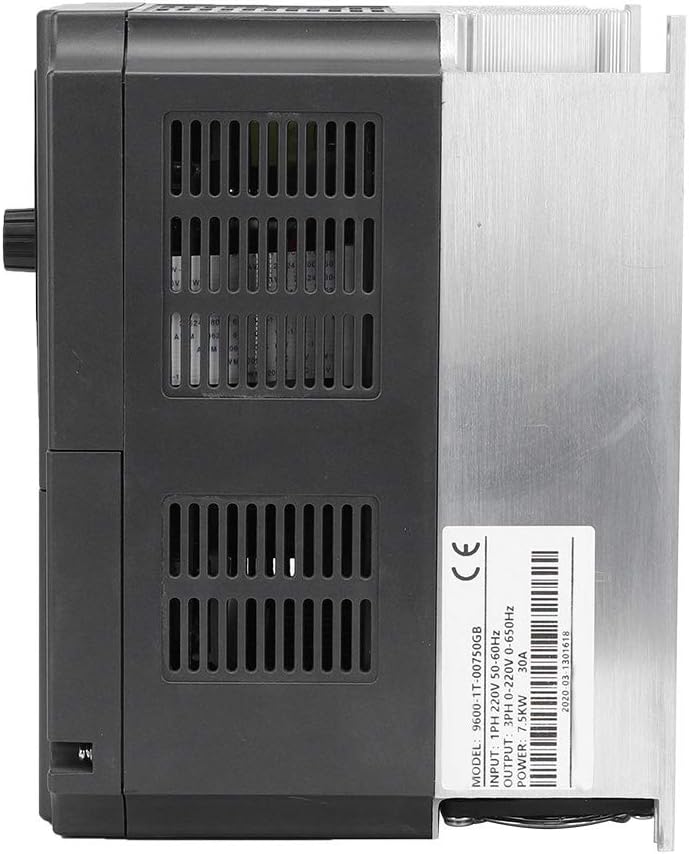
Figure 3.2: Side view of the VFD, highlighting the product label with model number, input/output specifications, and ventilation grilles.
The side of the unit features a product label detailing the model number (9600-1T-00750GB), input power (1PH 220V 50-60Hz), output power (3PH 0-220V 0-650Hz), power rating (7.5KW), and current (30A). Adequate ventilation is provided through grilles on the casing and a heatsink at the rear to ensure optimal operating temperature.
4. Specifications
| Parameter | Specification |
|---|---|
| Model | 9600-1T-00750GB |
| Input Power | 1-Phase 220VAC ± 15% 50/60Hz |
| Output Voltage | 3-Phase 0-220VAC |
| Output Frequency Range | 0-650Hz |
| Adapted Motor Power | 7.5 kW (10 HP) |
| Rated Current | 30 A |
| Control Modes | Open-loop Vector Control (SVC), Closed-loop Vector Control (FVC), V/F Control |
| Automatic Voltage Regulation (AVR) | Maintains constant output voltage despite grid fluctuations |
| Protection Functions | Overvoltage, Undervoltage, Current Limit, Overcurrent, Overload, Electronic Thermal Relay, Click Overheat, Overvoltage Stall, Data Protection, Low Frequency Warning |
| Protection Level | IP20 |
| Installation Method | Wall-mounted |
| Dimensions (L x W x H) | Approx. 220 x 172 x 150 mm (8.7 x 6.8 x 5.9 inches) |
| Installation Size | Approx. 205 x 138 mm (8.1 x 5.4 inches) |
| Weight | Approx. 2.94 kg |

Figure 4.1: VFD dimensions for installation planning.
5. Installation and Setup
Proper installation is critical for the safe and reliable operation of the VFD.
5.1 Mounting
- The VFD is designed for wall-mounted installation.
- Choose a location that is well-ventilated, free from direct sunlight, excessive dust, moisture, corrosive gases, and vibrations.
- Ensure sufficient clearance around the unit for proper airflow and heat dissipation. Refer to Figure 4.1 for dimensions.
5.2 Wiring
All wiring must be performed by a qualified electrician in accordance with local and national electrical codes.
- Input Power (L, N): Connect the single-phase 220VAC power supply to the designated input terminals.
- Output Power (U, V, W): Connect the three-phase motor to the VFD's output terminals.
- Grounding (PE): Ensure the VFD chassis and the motor frame are properly grounded to a common ground point.
- Use appropriate wire gauges for the input and output power connections based on the VFD's current rating (30A).
- Control terminals are available for external control signals (e.g., start/stop, speed reference, fault indication). Refer to the detailed wiring diagram in the full product manual for specific connections.

Figure 5.1: Rear view of the VFD, illustrating the heatsink and cooling fans for thermal management.
6. Operating Instructions
The VFD offers various control methods and functions to optimize motor performance.
6.1 Basic Operation
- Power On: After verifying all connections, apply power to the VFD. The digital display will illuminate.
- Parameter Setting: Use the 'PRG/ESC' button to enter the parameter setting mode. Navigate through parameters using the up/down arrows and adjust values with the rotary knob. Press 'RD/WT' to save changes.
- Start Motor: Press the 'RUN' button to start the motor. The motor will accelerate to the set frequency.
- Stop Motor: Press the 'STOP/RESET' button to stop the motor.
- Reverse Direction: Use the 'M.F.K/REV' button to change the motor's rotation direction, if configured.
6.2 Advanced Functions
- Control Modes: The VFD supports V/F control, open-loop vector control (SVC), and closed-loop vector control (FVC) for precise motor speed and torque regulation. Select the appropriate mode based on your application requirements.
- Integrated PID Controller: For applications requiring constant pressure, temperature, or tension, the built-in PID controller can be utilized for both open-loop and closed-loop control systems.
- Textile Oscillation Frequency Function: This specialized function is available for textile machinery applications.
- Synchronous Control & 0-Speed Braking: Features for applications like crane lifting, providing precise control and immediate braking capabilities.
7. Applications
The NFLIXIN 9600-1T-00750GB VFD is suitable for a wide range of industrial and commercial applications, including:
- Air compressor frequency conversion systems.
- Injection molding machine servo systems.
- Energy-saving renovation for central air conditioning systems.
- Energy-saving renovation for constant pressure water supply systems.
- General industrial energy-saving technical renovations.
8. Maintenance
Regular maintenance ensures the longevity and optimal performance of your VFD.
- Cleaning: Periodically clean the VFD's exterior and ventilation grilles to prevent dust accumulation, which can impede cooling. Use a soft, dry cloth. Do not use liquid cleaners.
- Inspection: Regularly inspect wiring connections for tightness and signs of wear or damage. Check for any unusual noises or odors during operation.
- Environment: Ensure the operating environment remains within the specified temperature and humidity ranges.
- Cooling Fans: Verify that the cooling fans are operating correctly and are not obstructed.
WARNING: Always disconnect power and wait for 10 minutes before performing any maintenance or inspection.
9. Troubleshooting
The VFD is equipped with various protection functions to ensure safe operation. If a fault occurs, the VFD will typically display an error code or warning.
| Symptom/Error | Possible Cause | Corrective Action |
|---|---|---|
| Overvoltage | Input voltage too high, regenerative braking, sudden load decrease. | Check input voltage, increase deceleration time, add braking resistor if necessary. |
| Undervoltage | Input voltage too low, power supply instability. | Check input voltage, ensure stable power supply. |
| Overcurrent | Motor overload, short circuit in output, rapid acceleration. | Check motor load, inspect output wiring, increase acceleration time. |
| Overload | Motor running above rated capacity for extended periods. | Reduce motor load, check motor parameters, ensure proper cooling. |
| Overheat | Insufficient ventilation, high ambient temperature, fan failure. | Ensure proper ventilation, clean heatsink/fans, check fan operation. |
| No Output/Motor Not Running | Incorrect wiring, parameter settings, external control signal issue. | Verify all wiring, check parameter settings, ensure 'RUN' command is active. |
For specific error codes and detailed troubleshooting steps, refer to the complete technical manual or contact customer support.
10. Warranty and Support
Information regarding warranty coverage and technical support for the NFLIXIN 9600-1T-00750GB VFD is typically provided with the product packaging or can be obtained by contacting the seller or manufacturer directly. Please retain your proof of purchase for warranty claims.
For technical assistance, parameter guidance, or troubleshooting beyond the scope of this manual, please reach out to the authorized service center or the point of purchase.


