
1. Introduction
Thank you for choosing the BrickSoul LED RC Light Kit. This kit is designed to enhance your Lego 10274 Ghostbusters ECTO-1 model, bringing it to life with dynamic and adjustable lighting. This manual provides detailed instructions for safe installation, operation, and maintenance of your light kit. Please read all instructions carefully before beginning the installation process.
Important Note: This product includes the LED light kit only. The Lego 10274 Ghostbusters ECTO-1 model is not included and must be purchased separately.

This image clearly states that the product being sold is an LED lighting kit designed for the Lego model, and the Lego building block set itself is not included with the purchase.
2. What's Included
Your BrickSoul LED RC Light Kit package contains the following components:
- LED RC Light Kit (various LED strips and individual lights)
- USB Power Cable
- Battery Box (for AAA batteries, not included)
- Remote Control
- Detailed Paper Instructions

This image presents the main components of the BrickSoul LED light kit: a reinforced USB power cable, a durable battery box, various lighting accessories, and high-quality LED lighting strips, all designed for stable and effective illumination.
3. Setup and Installation
The BrickSoul LED kit is designed for a straightforward, beginner-friendly setup. Follow the numbered step-by-step instructions provided in the included paper guide. You may also find video guides helpful for visual assistance.
3.1 Preparation
- Ensure your Lego 10274 Ghostbusters ECTO-1 model is fully assembled.
- Gather all components of the BrickSoul LED light kit.
- Prepare 3 AAA batteries (not included) for the battery box, if you plan to use battery power.
3.2 Installation Steps
- Carefully identify the specific areas on your Lego model where lights are to be installed, as indicated in the paper instructions.
- Gently remove the necessary Lego bricks to integrate the LED wires and lights. The kit is designed for a seamless fit, requiring minimal disassembly.
- Place the LED lights and strips into their designated positions. Ensure wires are neatly tucked away to avoid tangling and maintain the model's aesthetic.
- Connect the LED wires to the main circuit board or connectors as per the instructions.
- Reconnect the Lego bricks, ensuring no wires are pinched or damaged.
- Connect the power source: either the USB power cable to a compatible USB port (power bank, laptop, USB adapter) or insert 3 AAA batteries into the battery box and connect it to the light kit.
The kit is made from durable ABS plastic and copper wire, designed not to damage or loosen your model. It operates safely with a 3-5V input.

This image illustrates the significant visual improvement achieved by installing the BrickSoul LED light kit on the Lego 10274 Ghostbusters ECTO-1 model. The top image shows the model unlit, while the bottom image displays it fully illuminated, highlighting the added detail and dramatic effect.

A side-by-side comparison of the Lego ECTO-1 model, showing its appearance without lights and then with the BrickSoul LED kit installed. The lights integrate seamlessly, enhancing the model's details and overall display.

Multiple close-up shots highlight the intricate details of the BrickSoul LED lights on the Lego ECTO-1. These include bright headlights, functional taillights, and flashing roof lights, showcasing the kit's comprehensive illumination.

This diagram shows the versatile power supply options for the LED kit, including USB, power bank, and laptop connections, ensuring long endurance. It also indicates that detailed paper instructions are provided for convenient setup.
4. Operating Instructions
Your BrickSoul LED RC Light Kit features an upgraded remote control for convenient operation. This allows you to manage the lighting effects without directly interacting with the model.
4.1 Remote Control Functions
- Power On/Off: Use the designated button to turn the lights on or off.
- Mode Selection: Cycle through multiple flash modes and lighting patterns.
- Brightness Adjustment: Fine-tune the intensity of the lights to your preference.
Refer to the remote control diagram in your paper instructions for specific button layouts and functions.
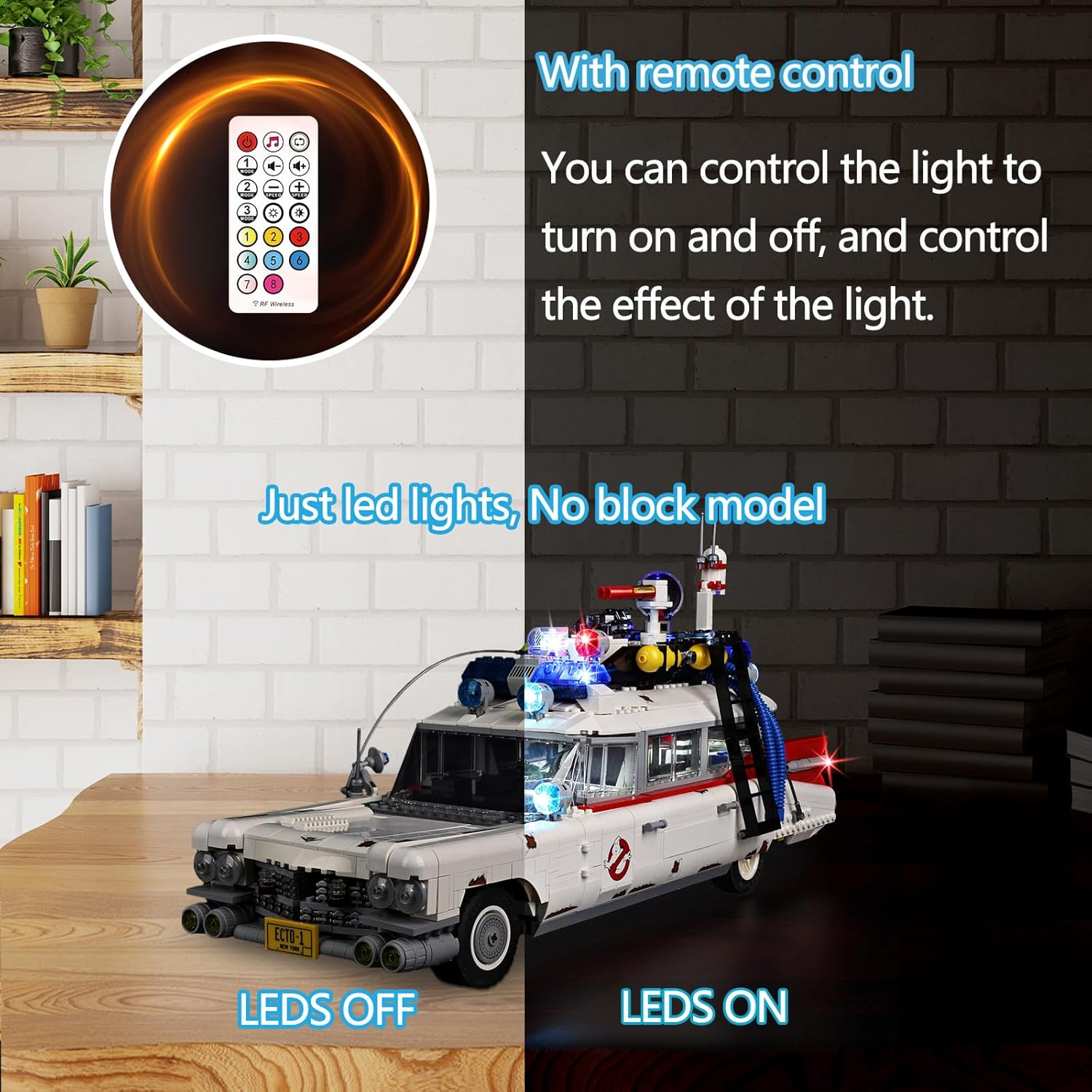
This image displays the included remote control, which allows users to power the lights on or off. The Lego ECTO-1 model is shown with its lights both deactivated and activated, demonstrating the remote's function.
5. Maintenance
Proper maintenance ensures the longevity and optimal performance of your BrickSoul LED RC Light Kit.
- Cleaning: Use a soft, dry cloth to gently wipe dust from the LED lights and wires. Avoid using liquids or abrasive cleaners.
- Wire Management: Periodically check that all wires are securely in place and not exposed to excessive tension or sharp edges.
- Battery Replacement: If using battery power, replace AAA batteries when lights dim or cease to function. Ensure correct polarity when inserting new batteries.
- Storage: When not in use for extended periods, disconnect the power source to conserve battery life or prevent accidental activation.
6. Troubleshooting
If you encounter issues with your light kit, please refer to the following common troubleshooting steps:
- Lights Not Turning On:
- Check the power source. Ensure the USB cable is properly connected or that the AAA batteries are fresh and correctly inserted into the battery box.
- Verify all wire connections are secure and not loose.
- Ensure the remote control has working batteries and is pointed towards the receiver.
- Some Lights Not Working:
- Inspect the specific non-working light or wire for any visible damage or loose connections.
- Gently re-seat any connectors that appear loose.
- Remote Control Not Responding:
- Replace the batteries in the remote control.
- Ensure there are no obstructions between the remote and the light kit's receiver.
If these steps do not resolve the issue, please contact BrickSoul customer support for further assistance.
7. Specifications
| Feature | Detail |
|---|---|
| Brand | BrickSoul |
| Compatible Model | Lego 10274 Ghostbusters ECTO-1 |
| Material | ABS Plastic, Copper Wire |
| Light Source Type | Light Emitting Diode (LED) |
| Power Source | USB Powered or Battery Powered (3x AAA batteries, not included) |
| Input Voltage | 3-5V |
| Number of Light Sources | Multiple LEDs |
| Bulb Features | Light Effects, Adjustable Brightness |
| Control Method | Remote Control |
| Item Weight | 10.8 ounces (approx. 0.31 kg) |
| Package Dimensions | 6.46 x 5.56 x 1.54 inches |
| Included Components | LED RC Light Kit |
8. Warranty and Support
BrickSoul offers a worry-free warranty for your LED RC Light Kit. If you experience any issues such as a bent connector or a broken wire, we provide quick and hassle-free replacements for accidental damage. Our dedicated support team is available to ensure a smooth and stress-free lighting experience.
For warranty claims or technical assistance, please contact BrickSoul customer support through the retailer's platform or our official website. Please have your purchase details ready when contacting support.
