
1. Introduction
This manual provides essential instructions for setting up, operating, and maintaining your HONOR 200 5G ELI-NX9 smartphone. Please read this guide thoroughly to ensure proper use and to maximize the device's capabilities. Keep this manual for future reference.
2. Safety Information
To prevent injury to yourself or others, and to avoid damage to your device, read all safety information before using the product. This includes:
- Do not expose the device to extreme temperatures or direct sunlight.
- Avoid using the device in wet or dusty environments.
- Use only HONOR-approved chargers and accessories.
- Do not attempt to disassemble or repair the device yourself.
- Observe all local laws and regulations regarding mobile phone use, especially while driving.
3. Device Overview
Familiarize yourself with the physical components of your HONOR 200 5G ELI-NX9.

Figure 3.1: Front and back view of the HONOR 200 5G ELI-NX9 smartphone. The front displays the large screen with a punch-hole camera, while the back features a distinctive camera module and the HONOR branding.

Figure 3.2: Rear view of the HONOR 200 5G ELI-NX9, highlighting the oval-shaped triple camera system and the textured Moonlight White finish.
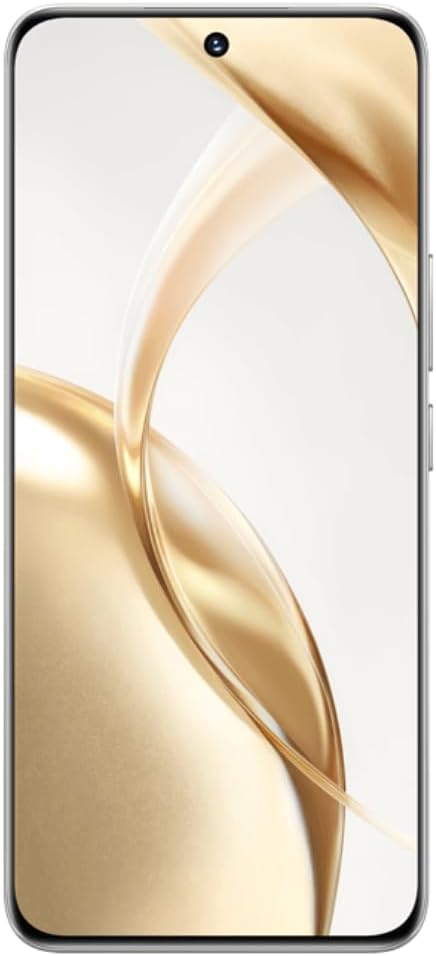
Figure 3.3: Front view of the HONOR 200 5G ELI-NX9, showcasing its large, curved display and the centered punch-hole front camera.

Figure 3.4: Side profile of the HONOR 200 5G ELI-NX9, illustrating the slim design and the placement of the power and volume buttons on the right edge.
3.1 Package Contents
Ensure your package contains the following items:
- HONOR 200 5G ELI-NX9 Smartphone
- USB Cable
- Quick Start Guide (this manual)
- SIM Eject Tool
- Warranty Card
- Power Adapter (may vary by region)
4. Setup
4.1 Inserting SIM Cards
The HONOR 200 5G ELI-NX9 supports Dual SIM functionality.
- Locate the SIM card tray on the side of your device.
- Insert the SIM eject tool into the small hole next to the tray and push gently until the tray pops out.
- Place your Nano-SIM cards into the designated slots on the tray, ensuring the gold contacts face down.
- Carefully reinsert the SIM tray into the device.
4.2 Powering On/Off
- To Power On: Press and hold the Power button (located on the right side) until the HONOR logo appears.
- To Power Off: Press and hold the Power button, then select "Power off" from the options on the screen.
- To Restart: Press and hold the Power button, then select "Restart" from the options.
4.3 Initial Device Configuration
Upon first power-on, follow the on-screen prompts to set up your device:
- Select your language and region.
- Connect to a Wi-Fi network.
- Accept the End User License Agreement.
- Sign in with your Google account or create a new one.
- Set up screen lock (PIN, pattern, password, fingerprint, face unlock).
- Restore data from a previous device (optional).
5. Operating Your Device
5.1 Basic Navigation
Your HONOR 200 5G ELI-NX9 uses a touch-sensitive display for interaction:
- Tap: Select an item or open an application.
- Swipe: Navigate through screens or lists.
- Pinch: Zoom in or out on images and web pages.
- Long Press: Access contextual menus or move icons.
5.2 Camera Functions
The device features a powerful camera system:
- Rear Cameras: 50 MP Main, 50 MP Telephoto, 12 MP Ultra-Wide/Macro.
- Front Camera: 50 MP for high-resolution selfies.
- AI Portrait Engine: Enhances facial features and applies various portrait effects.
- Night Mode: Optimizes photos in low-light conditions for clearer images.
- Video Recording: Supports 1080p video capture.
5.3 Display and Multimedia
Experience vibrant visuals on the 6.7-inch OLED display:
- Resolution: 1200 x 2664 pixels for sharp images and text.
- Color Depth: 1 Billion colors for rich and accurate reproduction.
- HDR Support: Enhanced contrast and color for compatible content (Netflix, Amazon HDR certified).
5.4 Performance and Battery
- Processor: Qualcomm Snapdragon 7 Gen 3 (4 nm) Octa-core for efficient multitasking and gaming.
- Memory: 12 GB RAM ensures smooth operation.
- Storage: 512 GB internal storage for apps, photos, and videos.
- Battery: 5200 mAh Silicon-Carbon battery provides extended usage.
- Fast Charging: Supports 100W fast charging.
6. Maintenance
6.1 Cleaning Your Device
To keep your device in optimal condition:
- Wipe the screen and body with a soft, lint-free cloth.
- Avoid using harsh chemicals, abrasive cleaners, or aerosol sprays.
- Do not expose the device to excessive moisture.
6.2 Software Updates
Regularly check for and install software updates to enhance performance, security, and introduce new features. Navigate to Settings > System & updates > Software update.
6.3 Battery Care
To prolong battery life:
- Avoid fully discharging the battery frequently.
- Do not leave the device charging for extended periods after it reaches 100%.
- Keep the device within recommended operating temperatures.
7. Troubleshooting
If you encounter issues with your device, try the following solutions:
7.1 Common Issues
- Device not turning on: Ensure the battery is charged. Connect to a charger for at least 10 minutes, then try powering on.
- Apps crashing or freezing: Close and reopen the app. Clear the app's cache (Settings > Apps > [App Name] > Storage > Clear cache). Restart the device.
- Network connectivity issues: Check if Airplane Mode is off. Restart the device. Reset network settings (Settings > System & updates > Reset > Reset network settings).
- Slow performance: Close unnecessary background apps. Clear storage space. Restart the device.
7.2 Factory Reset
If problems persist, you may need to perform a factory reset. Warning: This will erase all data on your device. Back up important data before proceeding.
- Go to Settings > System & updates > Reset > Reset phone.
- Confirm your decision and enter your screen lock password if prompted.
- The device will restart and restore to its factory settings.
8. Specifications
Key technical specifications for the HONOR 200 5G ELI-NX9:
| Brand | HONOR |
| Model | Honor 200 5G (ELI-NX9) |
| Operating System | Android 14 |
| Processor | Qualcomm Snapdragon 7 Gen 3 (4 nm), Octa-core (1x2.63 GHz, 4x2.4 GHz, 3x1.8 GHz) |
| RAM | 12 GB |
| Internal Storage | 512 GB |
| Display | 6.7 inches OLED, 1B colors, 1200 x 2664 pixels, 120Hz |
| Rear Camera | 50 MP (main), 50 MP (telephoto), 12 MP (ultrawide/macro) |
| Front Camera | 50 MP |
| Battery Capacity | 5200 mAh |
| Charging | 100W Fast Charging |
| SIM Support | Dual SIM |
| Cellular Technology | 5G |
| Item Model Number | Honor 200 5G |
| UPC | 6936520843787 |
| IMEI (Example) | 868420070415840 (Note: Actual IMEI is unique to each device) |

Figure 8.1: Example product label showing model (ELI-NX9), ROM/RAM, color, IMEI, and UPC. This information is unique to each device.
9. Warranty and Support
Your HONOR 200 5G ELI-NX9 comes with a limited warranty. Please refer to the separate warranty card included in your package for detailed terms and conditions.
For further assistance, technical support, or to find service centers, please visit the official HONOR website or contact their customer service in your region. Keep your proof of purchase for warranty claims.
Official HONOR Website: www.hihonor.com


