
1. Introduction
This manual provides instructions for the ZWP RC5001SR replacement remote control. This remote is designed to be fully compatible with various Marantz AV Surround Receiver models, offering a direct replacement for your original remote without the need for complex programming.
Compatible Marantz AV Surround Receiver Models:
- SR5001
- SR5002
- SR4001
- SR4002
- SR6001
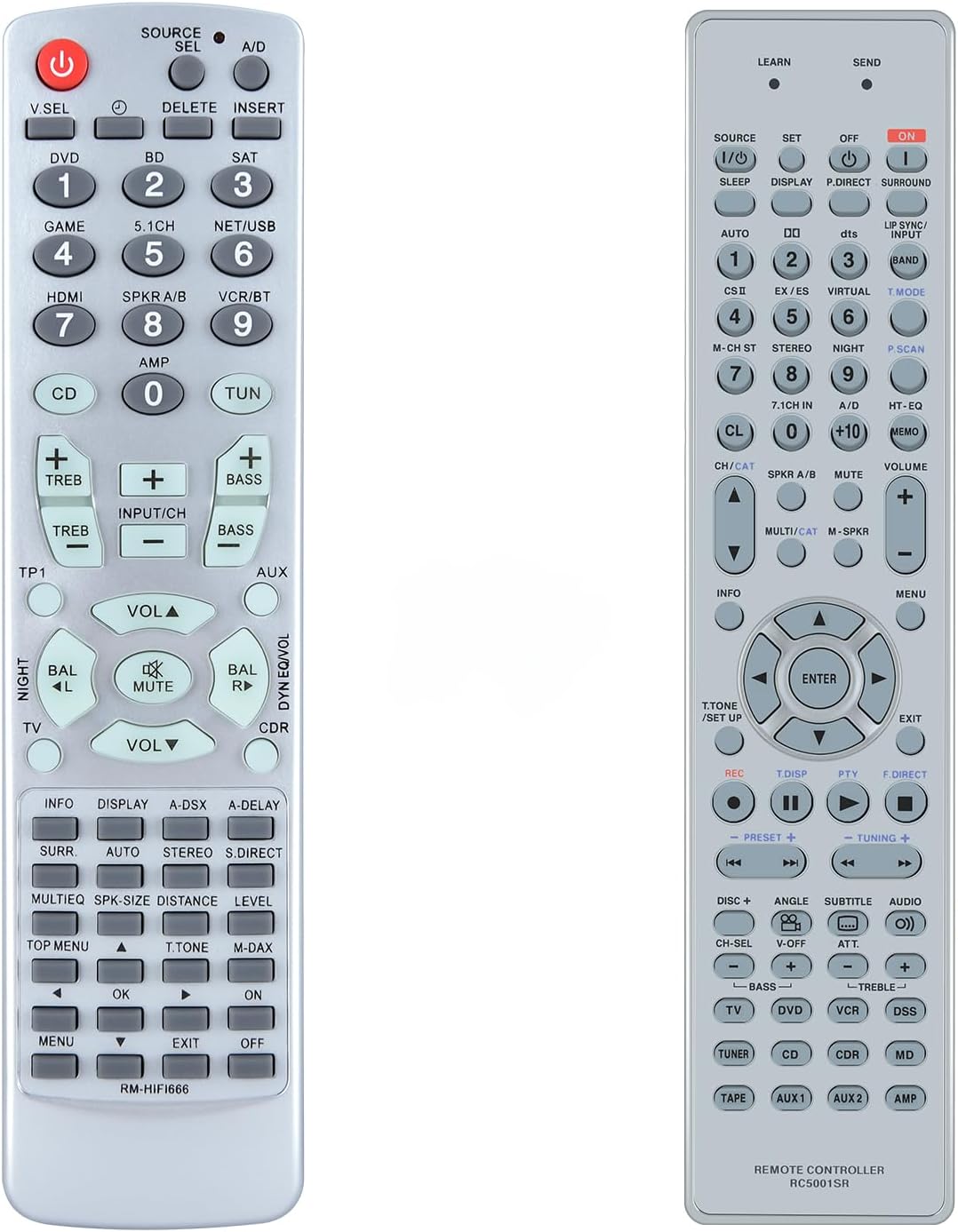
Front view of the ZWP RC5001SR replacement remote control, displaying all buttons and their labels. The remote is light gray with dark gray buttons.

A side-by-side comparison showing the ZWP RC5001SR replacement remote control on the left and a similar Marantz original remote control on the right, highlighting their functional equivalence.
2. Setup
The ZWP RC5001SR remote control is designed for immediate use with compatible Marantz AV Surround Receivers. No programming or pairing is required.
2.1 Battery Installation
To begin using your remote control, you will need to install two 1.5V AAA batteries (not included).
- Locate the battery compartment cover on the back of the remote control.
- Slide the cover downwards or press the latch and lift to open the compartment.
- Insert two AAA batteries, ensuring the positive (+) and negative (-) terminals align correctly with the markings inside the compartment.
- Replace the battery compartment cover by sliding it back into place until it clicks securely.

An illustration demonstrating how to install two 1.5V AAA batteries into the battery compartment of the ZWP RC5001SR remote control. Batteries are not included with the product.
2.2 Initial Use
Once batteries are installed, the remote control is ready to operate your compatible Marantz AV Surround Receiver. Point the remote directly at your receiver and press the desired function button.

The ZWP RC5001SR remote control shown next to a television, with text indicating 'No programming or pairing needed! work right out of box after putting batteries!', emphasizing its ease of use.
3. Operating Instructions
The ZWP RC5001SR remote control provides full functionality for your Marantz AV Surround Receiver. The button layout is designed to mirror the original remote for intuitive operation.
3.1 Basic Functions
- Power Button (U): Turns the receiver on or off.
- Source Select (V.SEL, DVD, BD, SAT, GAME, 5.1CH, NET/USB, HDMI, SPKR A/B, VCR/BT, CD, TUN, AUX): Selects the input source for your receiver.
- Volume Control (VOL▲, VOL▼): Adjusts the master volume level.
- Mute (MUTE): Temporarily silences the audio output.
- Number Buttons (0-9): Used for direct input selection or tuning.
3.2 Advanced Functions
The remote includes dedicated buttons for various AV receiver functions such as:
- Tone Controls (TREB+, TREB-, BASS+, BASS-): Adjusts treble and bass levels.
- Balance (BAL L, BAL R): Adjusts left and right channel balance.
- Navigation (▲, ▼, ◀, ▶, OK): For menu navigation and selection.
- Display (DISPLAY): Changes display modes on the receiver or connected screen.
- Surround Modes (SURR, AUTO, STEREO, S.DIRECT): Selects various audio processing modes.
- Menu (MENU, TOP MENU, EXIT): Accesses and exits receiver menus.

The ZWP RC5001SR remote control positioned next to a television screen displaying a streaming service interface, illustrating its intended use with home entertainment systems.
3.3 Ergonomics and Range
The remote control features an ergonomic design for comfortable handling and soft plastic buttons for a pleasant tactile experience. It utilizes infrared technology for reliable long-distance control, effective up to 10 meters (33 feet).

An image illustrating the long-distance control feature of the ZWP RC5001SR remote, showing it being used to control a television from a distance, with text stating 'Long distance precise control' up to 10 meters / 33 feet.

An image highlighting key features of the ZWP RC5001SR remote control: 'No Need to Set Up', 'Soft Plastic Button', and 'ABS Material', presented alongside the remote and a television screen.
4. Maintenance
4.1 Cleaning
To clean the remote control, use a soft, dry cloth. For stubborn dirt, lightly dampen the cloth with water or a mild, non-abrasive cleaner. Avoid using harsh chemicals or abrasive materials, as these can damage the remote's surface or buttons.
4.2 Battery Replacement
Replace batteries when the remote's performance diminishes or it stops responding. Always replace both AAA batteries at the same time with new ones. Do not mix old and new batteries, or different types of batteries.
4.3 Storage
Store the remote control in a cool, dry place away from direct sunlight and extreme temperatures. If the remote will not be used for an extended period, it is recommended to remove the batteries to prevent leakage.
5. Troubleshooting
If you encounter issues with your ZWP RC5001SR remote control, please refer to the following common problems and solutions:
- Remote is not responding:
- Check if the batteries are inserted correctly with the correct polarity (+/-).
- Replace the batteries with fresh 1.5V AAA batteries.
- Ensure there are no obstructions between the remote control and the Marantz AV receiver.
- Confirm that the remote is pointed directly at the receiver's infrared sensor.
- Limited range or intermittent response:
- Replace the batteries, as low battery power can affect range.
- Ensure the remote's infrared emitter and the receiver's sensor are clean and free from dust.
- Avoid strong light sources (like direct sunlight or bright fluorescent lights) that might interfere with the infrared signal.
- Specific buttons not working:
- This is rare for a direct replacement remote. First, try replacing the batteries.
- Ensure the button is not physically stuck or damaged.
- Verify that the function you are trying to use is supported by your specific Marantz receiver model.
6. Specifications
| Feature | Detail |
|---|---|
| Model Number | RC5001SR |
| Brand | ZWP |
| Compatibility | Marantz SR5001, SR5002, SR4001, SR4002, SR6001 AV Surround Receivers |
| Power Source | 2 x 1.5V AAA Batteries (not included) |
| Material | High-quality ABS |
| Special Feature | Ergonomic design, Soft Plastic Buttons |
| Color | Black |
| Item Weight | 2.4 ounces |
| Max Control Distance | Approximately 10 meters (33 feet) |

Images showing the front, side, and back views of the ZWP RC5001SR remote control with measurements indicating its length (8.26 inches), width (2.04 inches), and thickness (0.78 inches).
7. Warranty and Support
For any questions, concerns, or support regarding your ZWP RC5001SR replacement remote control, please contact the seller or manufacturer directly. Refer to your purchase documentation for specific contact information. We are committed to assisting you with any issues you may encounter.