
Introduction
This manual provides essential information for the safe and efficient operation, maintenance, and troubleshooting of your Jafända Air Purifier (Model: JF239). Please read this manual thoroughly before using the appliance and retain it for future reference.
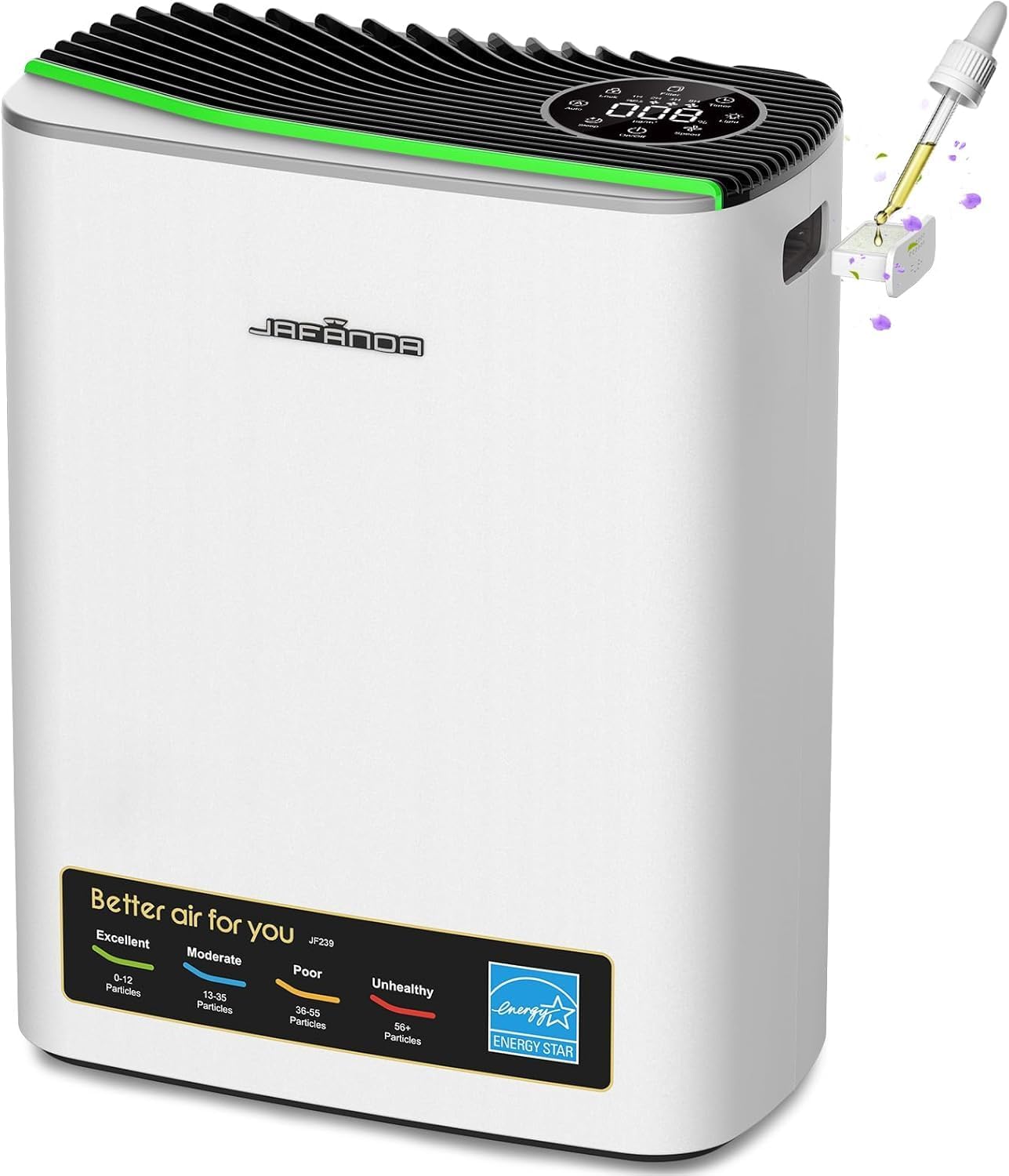
Figure 1: Jafända Air Purifier Model JF239. This image displays the sleek, silver design of the air purifier with its top control panel and front air quality indicator.
Safety Information
To reduce the risk of fire, electric shock, or injury, please observe the following safety precautions:
- Always unplug the air purifier before moving, cleaning, or performing any maintenance.
- Do not operate the appliance with a damaged cord or plug.
- Keep the power cord away from heated surfaces.
- Do not use the air purifier in wet or damp environments.
- Ensure proper ventilation around the unit; do not block air inlets or outlets.
- This appliance is not intended for use by persons (including children) with reduced physical, sensory, or mental capabilities, or lack of experience and knowledge, unless they have been given supervision or instruction concerning use of the appliance by a person responsible for their safety.
Product Overview
Key Features:
- Powerful Air Purification: Equipped with a True HEPA filter, effectively captures 99.97% of airborne particles, including dust, pollen, and pet dander.
- Quiet Operation: Ultra-quiet operation with a noise level as low as 20dB in sleep mode.
- Energy-Efficient Performance: Features a low-energy brushless DC motor, consuming up to 30% less energy than traditional AC motors.
- Aromatherapy Function: Allows for diffusing essential oils to create a relaxing atmosphere.
- Real-Time Air Quality Monitoring: 4-color LED air quality indicator provides real-time PM2.5 readings.
- Smart Connectivity: Compatible with 2.4GHz WiFi, Alexa, and the Jafanda App for remote control.
Components:
- Main Unit (Air Purifier)
- 3-in-1 Filtration System (Pre-filter, True HEPA filter, Activated Carbon filter)
- Power Adapter
- Aromatherapy Pad Tray

Figure 2: Diagram illustrating the Jafända Air Purifier's powerful 3-stage filtration system, including the Pre-Filter, True HEPA Filter, and Activated Carbon Filter.
Setup
1. Unboxing and Filter Preparation:
- Carefully remove the air purifier from its packaging.
- Locate the filter compartment, typically at the rear of the unit.
- Remove the back cover to access the filter.
- The filter comes sealed in a plastic bag for protection. Remove the filter from this plastic bag before use. Operating the unit with the plastic bag on the filter will prevent proper air purification and may damage the unit.
- Reinsert the filter into the compartment, ensuring it is seated correctly.
- Replace the back cover securely.
2. Placement:
Place the air purifier on a flat, stable surface. Ensure there is at least 6 inches (15 cm) of clear space around all sides of the unit, especially the air inlets and outlets, to allow for optimal airflow.

Figure 3: Illustration demonstrating optimal placement of the air purifier in various room settings to ensure effective air circulation and purification for areas up to 1100 sq. ft.
3. Power Connection:
Plug the power adapter into the designated port on the air purifier, then plug the other end into a standard electrical outlet (120V AC, 60Hz).
Operating Instructions
1. Power On/Off:
Tap the "On/Off" button on the top control panel to turn the air purifier on or off. The unit will typically start in Auto mode.

Figure 4: Close-up view of the air purifier's top control panel, showing the digital display for PM2.5 levels and the 4-color LED air quality indicator (Excellent, Moderate, Poor, Unhealthy).
2. Fan Speed Adjustment:
Press the "Speed" button to cycle through different fan speeds (Low, Medium, High) or select Auto mode. In Auto mode, the fan speed adjusts automatically based on the detected air quality.
3. Air Quality Indicator:
The 4-color LED light strip on the unit indicates the current air quality:
- Green: Excellent Air Quality (0-12 Particles)
- Blue: Moderate Air Quality (13-35 Particles)
- Yellow: Poor Air Quality (36-55 Particles)
- Red: Unhealthy Air Quality (56+ Particles)
4. Sleep Mode:
Activate Sleep Mode by pressing the "Sleep" button. In this mode, the fan operates at its lowest, quietest setting (20dB), and the display lights dim or turn off for undisturbed rest.

Figure 5: An image depicting the air purifier operating in its ultra-quiet sleep mode, designed for peaceful rest with minimal noise.
5. Aromatherapy Function:
To use the aromatherapy feature, pull out the small tray located on the side of the unit. Add a few drops of your preferred essential oil onto the aromatherapy pad. Slide the tray back into the unit. The fan will then diffuse the scent into the air.

Figure 6: This image highlights the aromatherapy diffuser feature, showing how essential oils can be added to the unit for a pleasant fragrance.
6. Smart App & Voice Control:
The Jafända Air Purifier is compatible with the Jafanda App, Alexa, and Google Home. Download the Jafanda App from your smartphone's app store and follow the in-app instructions to connect your device to your 2.4GHz WiFi network. Once connected, you can control the purifier remotely, adjust settings, and monitor air quality from your phone or via voice commands.

Figure 7: An image showcasing the smart home integration capabilities, illustrating control via the Jafanda App, Alexa, and Google Home.
Maintenance
1. Filter Replacement:
The filter life is approximately 4-6 months, depending on usage and air quality. The unit will indicate when the filter needs replacement. To replace the filter:
- Unplug the air purifier from the power outlet.
- Remove the back cover.
- Pull out the old filter using the tab.
- Dispose of the old filter responsibly.
- Unwrap the new filter from its plastic packaging.
- Insert the new filter into the compartment, ensuring the airflow arrows (if present) align with the unit's airflow direction.
- Replace the back cover.
- Plug in the air purifier. Reset the filter life indicator by pressing and holding the "Filter" button on the control panel for 3-5 seconds.
2. Cleaning:
- Wipe the exterior of the air purifier with a soft, dry cloth.
- Do not use abrasive cleaners or solvents.
- The pre-filter component of the 3-in-1 filter can be gently vacuumed to remove large dust particles between replacements, but the HEPA and activated carbon layers are not washable.
Troubleshooting
| Problem | Possible Cause | Solution |
|---|---|---|
| Unit does not turn on. | Not plugged in; power outage; filter not installed correctly. | Check power connection; ensure filter is unwrapped and correctly installed. |
| Poor air purification. | Filter is dirty or expired; air inlets/outlets blocked. | Replace filter; ensure clear space around the unit. |
| App/WiFi connectivity issues. | Incorrect WiFi password; 5GHz network used; router too far. | Ensure you are connecting to a 2.4GHz WiFi network; re-enter password; move unit closer to router. |
| Unusual noise. | Filter not installed correctly; foreign object inside. | Reinstall filter; check for and remove any obstructions. |
Specifications
| Attribute | Detail |
|---|---|
| Model Number | JF239 |
| Product Dimensions | 6.3 x 11.81 x 14.96 inches (11.73"D x 14.74"W x 6.22"H) |
| Item Weight | 7.05 Pounds |
| Coverage Area | Up to 1100 Square Feet |
| Wattage | 35 watts |
| Noise Level | As low as 20dB (Sleep Mode) |
| Filter Type | True HEPA, Activated Carbon, Pre-filter (3-in-1) |
| Connectivity | 2.4GHz WiFi, Compatible with Alexa & Google Home |
| Certifications | CARB Certified, EPA Certified, ETL Certified, Energy Star Certified, FCC Certified |
Warranty and Support
For warranty information, technical support, or customer service inquiries, please refer to the contact information provided on the product packaging or visit the official Jafända website. Keep your purchase receipt as proof of purchase for warranty claims.
