
Introduction
Thank you for choosing the Jafanda JF239 Air Purifier. This manual provides essential information for the safe and efficient operation, maintenance, and troubleshooting of your new air purifier. Please read this manual thoroughly before use and retain it for future reference.

Figure 1: Jafanda JF239 Air Purifier
Key Features
- True Activated Carbon Filter: Captures 99.97% of airborne particles, including dust, pollen, and pet dander, ensuring cleaner air.
- Ultra-Quiet Operation: Operates at a noise level as low as 20dB, ideal for bedrooms and nurseries, promoting undisturbed sleep.
- Energy-Efficient Performance: Features a low-energy Brushless DC motor, consuming up to 22% less energy than traditional AC motors.
- Clean Air & Aromatherapy Combo: Allows for customization of home fragrance with essential oils while purifying the air.
- LED Air Quality Indicator: A 4-color indicator with a PM2.5 Particle Sensor provides real-time air quality monitoring.
- Smart Home Integration: Compatible with Alexa App and Google Home for convenient control.

Figure 2: Air purification coverage for large spaces up to 1100 sq ft.

Figure 3: Ultra-Quiet Sleep Mode for undisturbed rest.
Setup
- Unpacking: Carefully remove the air purifier from its packaging. Ensure all packing materials are removed from the unit and around the filter.
- Filter Installation: Open the filter compartment (usually located at the back or side) and ensure the filter is correctly seated. Remove any plastic packaging from the filter before installation.
- Placement: Place the air purifier on a flat, stable surface, ensuring adequate clearance around all sides for optimal airflow. Avoid placing it directly against walls or furniture.
- Power Connection: Plug the power cord into a suitable electrical outlet.
- Adding Essential Oils (Optional): The JF239 features an essential oil compartment. To add essential oils:
- Locate the essential oil compartment on the side of the unit, marked with a 'PUSH' button.
- Press the 'PUSH' button to release the small tray.
- Carefully pull out the tray. Inside, you will find a small foam pad.
- Apply a few drops of your preferred essential oil onto the foam pad. Do not overfill to prevent overflow.
- Slide the tray back into the compartment until it clicks securely into place.
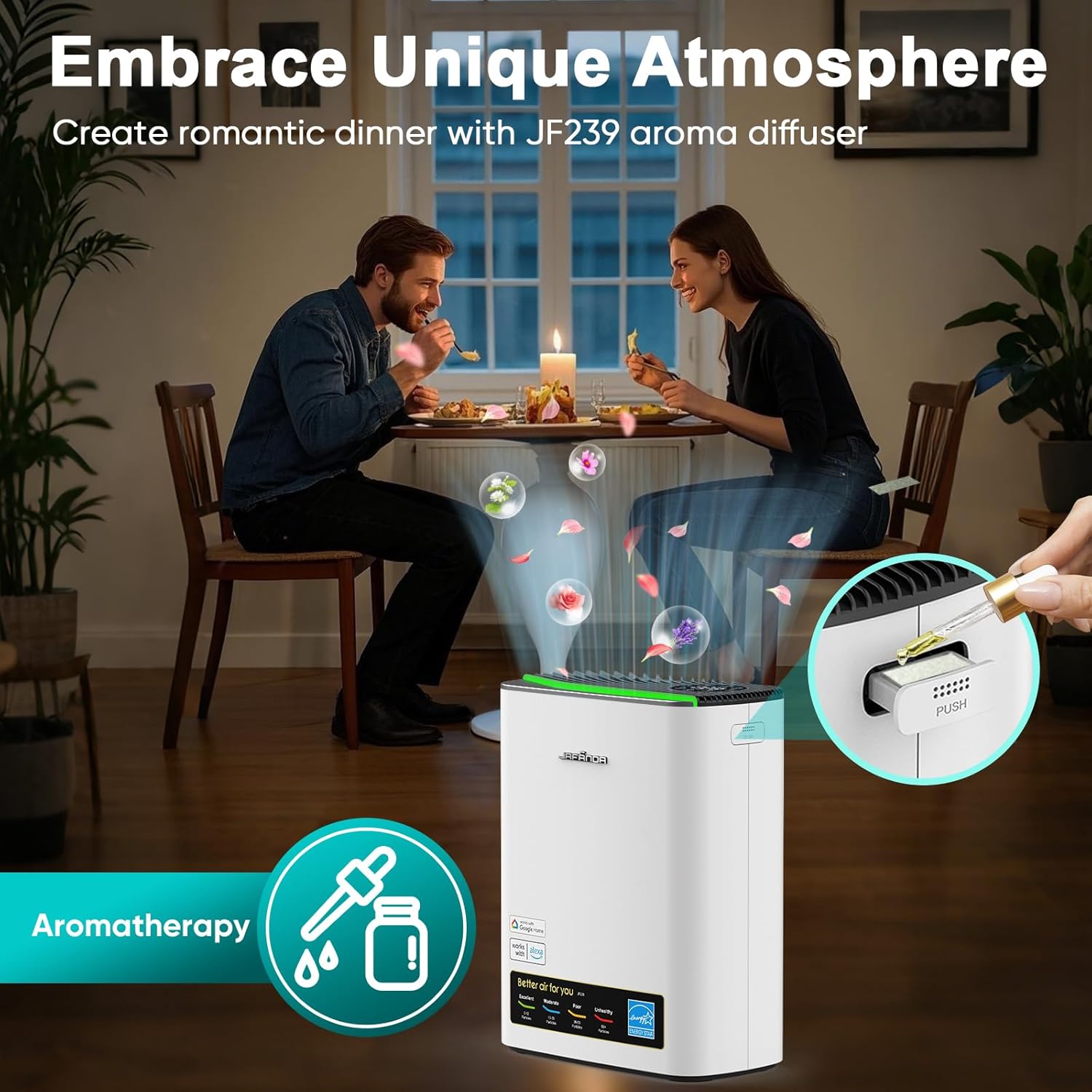
Figure 4: Adding essential oils to the aromatherapy compartment.
Operating Instructions
The Jafanda JF239 Air Purifier features an intuitive control panel and smart home integration for ease of use.
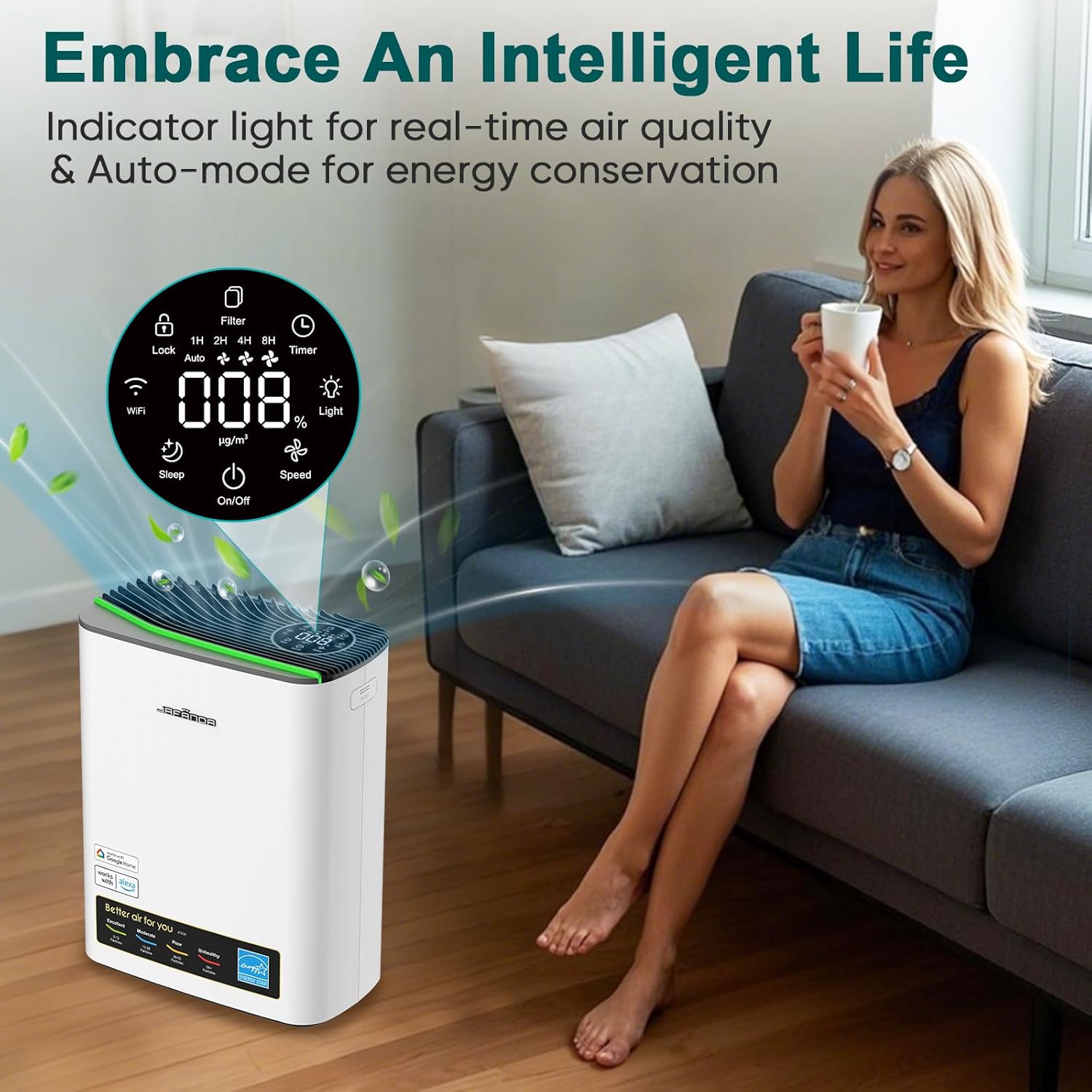
Figure 5: Control panel and PM2.5 display.
- Power On/Off: Press the power button on the control panel to turn the unit on or off.
- Fan Speed Adjustment: Cycle through available fan speeds (e.g., Low, Medium, High) by pressing the fan speed button.
- Sleep Mode: Activate sleep mode for ultra-quiet operation, ideal for nighttime use. The display lights may dim or turn off in this mode.
- Timer Function: Set the operating duration using the timer button. Available settings may include 1H, 2H, 4H, 8H.
- Child Lock: Engage the child lock feature to prevent accidental changes to settings. Refer to the control panel icons for activation/deactivation.
- PM2.5 Display and Air Quality Indicator: The LED display shows real-time PM2.5 levels. The 4-color indicator provides a quick visual reference for air quality:
- Green: Excellent (0-12 particles)
- Blue: Moderate (13-35 particles)
- Yellow: Poor (36-55 particles)
- Red: Unhealthy (56+ particles)
- Smart Home & App Control: Connect your air purifier to the Jafanda App, Alexa, or Google Home for remote control and advanced features. Ensure your device is connected to a 2.4GHz WiFi network.

Figure 6: Smart Home Integration for convenient control.
Maintenance
Regular maintenance ensures optimal performance and extends the lifespan of your air purifier.

Figure 7: Powerful 3-Stage Filtration System.
- Filter Replacement: The Jafanda JF239 uses a 3-stage filtration system (Pre-Filter, True HEPA Filter, Activated Carbon Filter). The filter life indicator on the control panel will alert you when it's time for replacement. Typically, filters should be replaced every 6-8 months, depending on usage and air quality. Refer to the product packaging or Jafanda website for compatible replacement filters.
- Cleaning the Unit: Regularly wipe the exterior of the air purifier with a soft, dry cloth. Do not use abrasive cleaners or solvents. Ensure the unit is unplugged before cleaning.
- Aromatherapy Pad: The foam pad in the essential oil compartment can be cleaned with mild soap and water, then thoroughly dried before re-use, or replaced if heavily soiled or worn.
Troubleshooting
If you encounter issues with your Jafanda JF239 Air Purifier, please refer to the following common solutions:
| Problem | Possible Cause | Solution |
|---|---|---|
| Unit does not turn on | Not plugged in; Power outage; Filter not installed correctly | Ensure power cord is securely plugged in; Check power supply; Reinstall filter correctly. |
| Poor airflow or purification | Blocked air intake/outlet; Dirty filter; Filter packaging not removed | Clear obstructions; Replace filter; Ensure all filter packaging is removed. |
| Unusual noise | Unit not on a flat surface; Foreign object inside; Filter not seated properly | Place on a stable, flat surface; Check for and remove any foreign objects (unplug first); Re-seat filter. |
| App/Smart Home connection issues | Incorrect Wi-Fi band; Network interference | Ensure 2.4GHz Wi-Fi is used; Restart router and air purifier; Re-attempt pairing. |
If the problem persists after attempting these solutions, please contact Jafanda customer support for further assistance.
Specifications
- Model Number: AMJF239-US-New-Grey
- Product Dimensions: 11.73"D x 6.22"W x 14.74"H (approx. 11.42 x 6.1 x 14.76 inches)
- Item Weight: 7.05 Pounds
- Color: Grey
- Floor Area Coverage: Up to 1100 Square Feet
- Certifications: CARB Certified, EPA Certified, ETL Certified, Energy Star Certified, FCC Certified
Warranty and Support
For warranty information, technical support, or to purchase replacement parts and filters, please visit the official Jafända website or contact their customer service team. You can also visit the Jafända Store on Amazon for more product details and support resources.


