
AJAZZ AK820 Max HE
AJAZZ AK820 MAX HE Gaming Keyboard User Manual
Model: AK820 Max HE | Brand: AJAZZ (Manufactured by MechLands)

Overview of the AJAZZ AK820 MAX HE Gaming Keyboard in black, featuring its 75% layout with a knob and screen.
Introduction
The AJAZZ AK820 MAX HE is an advanced Hall Effect Magnetic Gaming Keyboard designed for rapid response and customizable performance. It features adjustable actuation points, three connectivity modes (wired, 2.4GHz wireless, Bluetooth), a built-in TFT screen, and a durable gasket-mounted design. This manual provides essential information for setting up, operating, and maintaining your keyboard.
What's in the Box
- AJAZZ AK820 MAX HE Gaming Keyboard
- USB Cable (USB-A to USB-C)
- Keycap Puller
- Switch Puller
- User Manual (PDF available online)
Setup
Connectivity Modes
The AK820 MAX HE supports three versatile connectivity options:
- Wired Mode (USB-C): Connect the keyboard directly to your device using the provided USB-C cable. This mode also charges the internal battery.
- 2.4GHz Wireless Mode: For a stable and fast wireless connection, use the included 2.4GHz USB dongle.
- Bluetooth Mode: Connect wirelessly to compatible devices via Bluetooth.

Visual representation of the keyboard's three connectivity modes: Wired, 2.4GHz Wireless, and Bluetooth.
Switching Modes and OS
On the back panel of the keyboard, you will find switches to select your operating system (Windows or Mac) and your preferred connectivity mode (Bluetooth, USB, or 2.4G).


Left: The 2.4GHz USB dongle is conveniently stored underneath the keyboard. Right: Switches on the back panel for selecting Windows/Mac operating system and connectivity mode (Bluetooth, USB, 2.4G).
Initial Pairing (Bluetooth)
To pair via Bluetooth, slide the connectivity switch to 'BT'. The keyboard will enter pairing mode, indicated on the TFT screen. Select 'AJAZZ AK820 MAX' from your device's Bluetooth settings.
Operating Instructions
Magnetic Switches & Adjustable Actuation Point
The AK820 MAX HE features Hall Effect magnetic switches, allowing for rapid trigger capabilities and adjustable actuation points from 0.2mm to 2.5mm with 0.1mm precision. This enables ultra-fast response times and customizable key sensitivity for gaming.
- DKS (Dynamic Key Switching): Assign two functions to a single key based on press depth.
- MT (Magnetic Tactile): Customize tap/hold or release distance for dynamic functionality.
- TGL (Trigger-Lock): Adjust the time required to trigger a "hold down" action.

Detailed diagram of the Hall Magnetic Linear Switch and its operational parameters.

Explanation of Rapid Trigger (RT) features including DKS, MT, and TGL for quicker inputs and immediate repetition.
High Polling Rate
Experience ultra-fast response times with a 1K polling rate in USB-C & 2.4GHz modes, and 125Hz in Bluetooth mode, ensuring instant command execution.
0.85" TFT Display Screen & Multifunctional Knob
The integrated TFT screen displays essential information such as time, battery level, connectivity status, and can even show GIFs. The multifunctional knob allows for easy volume control and can be customized via the AJAZZ Driver software.
- FN + Knob: Enter the setting page. (Knob controls left/right direction, press to confirm).
- FN + B: Switch between animation and main page on the screen.
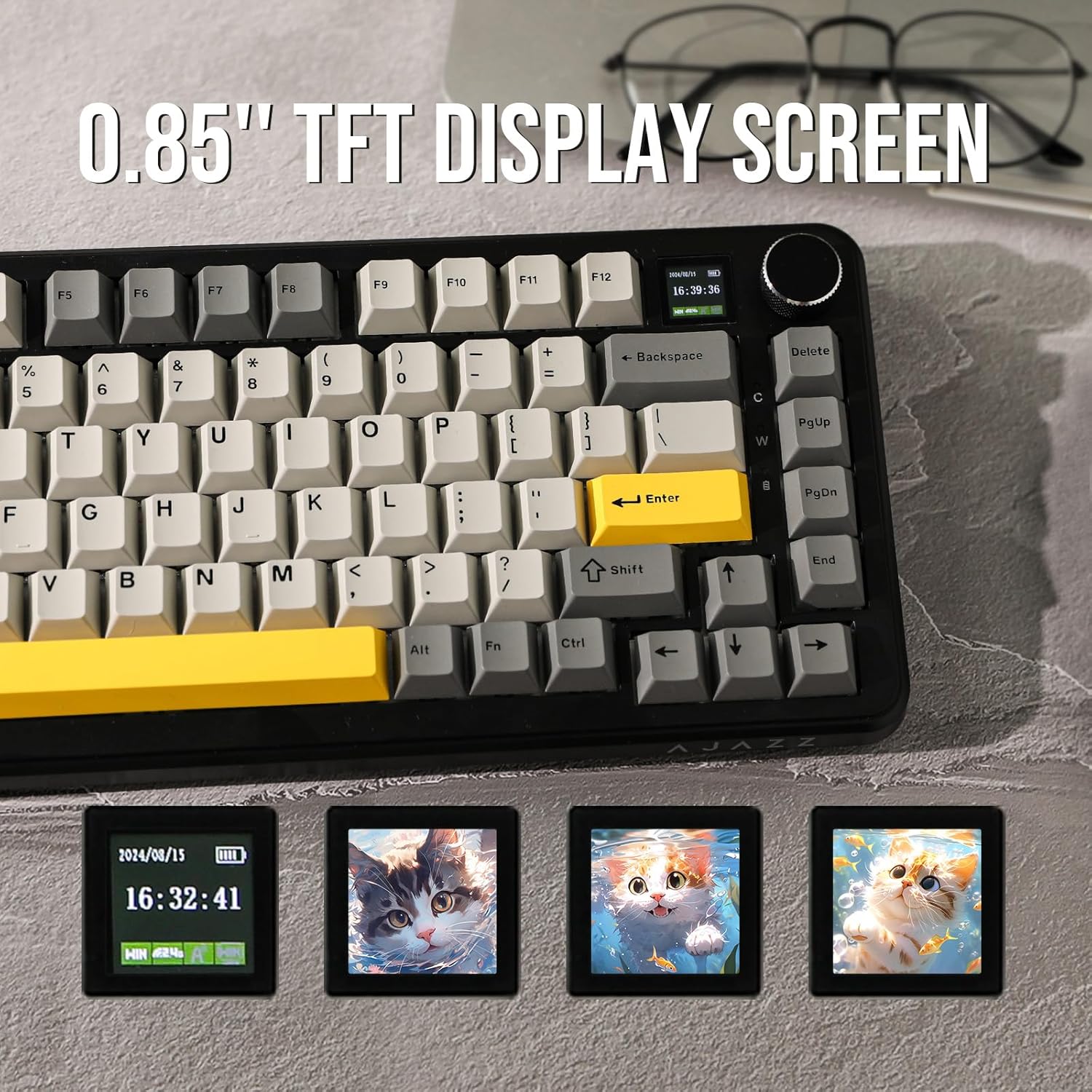
The 0.85" TFT display screen showing time, battery, and customizable GIFs.
RGB Backlight
The keyboard features vibrant RGB backlighting with various customizable effects. Use the following shortcuts to control the backlight:
- FN + \: Toggle backlight effects.
- FN + →: Toggle backlight colors.
- FN + X: Turn lights On/Off.

The keyboard illuminated with 16.8 million RGB backlight colors and effects.
Hot-Swappable PCB
The hot-swappable PCB allows for easy customization of your typing experience by switching between different magnetic switches (e.g., Kailh, Gateron). This feature is only compatible with magnetic switches.

Diagram illustrating the hot-swappable PCB, magnetic switch, 3-pin/5-pin switch socket, plate-mounted stabilizers, and south-facing LEDs.
Gasket-Mounted Structure
The internal structure features a GASKET gasket design and a PC plate, providing stability, sturdy typing feedback, and improved sound. Three layers of sound-enhancing materials (Poron foam, EVA foam, and silicone case pad) further enhance the typing experience.

Exploded view of the keyboard's gasket-mounted structure, highlighting its various layers for enhanced typing feel and sound.
PBT Keycaps
The keyboard comes with durable PBT keycaps, known for their resistance to shine and wear, ensuring a long-lasting premium feel.

Illustration of the PBT keycaps with Cherry Profile dimensions.
Software Programmable
Customize your keyboard's functions, macros, and lighting effects using the AJAZZ Driver software. Please note that software programming is currently only supported on Windows operating systems.
Screenshot of the AJAZZ Driver software interface for customizing keyboard settings.
Maintenance
To ensure the longevity and optimal performance of your AJAZZ AK820 MAX HE keyboard, follow these maintenance guidelines:
- Cleaning: Regularly clean the keycaps and the keyboard body with a soft, dry cloth. For deeper cleaning, use the provided keycap puller to remove keycaps and gently clean underneath with compressed air or a small brush.
- Switch Care: As the switches are hot-swappable, you can easily replace them if needed. Avoid excessive force when removing or inserting switches to prevent damage to the PCB sockets.
- Battery Care: To prolong battery life, avoid fully discharging the keyboard frequently. Charge it when the battery indicator on the TFT screen shows low power.
Troubleshooting
If you encounter issues with your keyboard, try the following solutions:
- Connectivity Issues:
- Ensure the correct mode (BT, USB, 2.4G) is selected on the back switch.
- For 2.4GHz, ensure the USB dongle is securely plugged into your device.
- For Bluetooth, ensure the keyboard is in pairing mode and your device's Bluetooth is enabled. Try re-pairing if necessary.
- If using wired mode, ensure the USB-C cable is properly connected to both the keyboard and your device.
- Backlight Not Working:
- Press FN + X to ensure the backlight is not turned off.
- Check battery level on the TFT screen; low battery can affect backlight performance.
- Keys Not Responding:
- Ensure the keyboard is properly connected in your chosen mode.
- If a specific key is not responding, try removing and re-inserting its magnetic switch.
- Check if the correct operating system mode (Win/Mac) is selected.
- Software Issues:
- Ensure you have downloaded the correct and latest version of the AJAZZ Driver software from the official website.
- Verify that your operating system is Windows, as the software is currently Windows-only.
For further assistance, refer to the official user manual or contact customer support.
Specifications
| Brand | MechLands (AJAZZ) |
| Model Number | AK820 Max HE |
| Product Dimensions | 13.11 x 5.63 x 0.81 inches |
| Item Weight | 3.52 ounces |
| Connectivity Technology | Bluetooth, 2.4GHz Wireless, USB-C |
| Number of Keys | 81 |
| Special Features | Magnetic Switch, Volume Roller, Rapid Trigger, Hall Effect, Hot-Swappable, TFT Screen |
| Keyboard Backlighting | RGB |
| Battery | 1 Lithium Ion battery (included) - 4000mAh |
| Compatible Devices | Laptop, PC, Gaming Console, Tablet, Smartphone |
The keyboard is equipped with a 4000mAh battery for extended wireless use.
Warranty and Support
For detailed warranty information, please refer to the documentation included with your purchase or visit the official MechLands/AJAZZ website. For additional support, you can refer to the comprehensive User Manual (PDF) provided by the manufacturer.
Related documentsAK820 Max HE


Ask a question about this manual
Ask about setup, troubleshooting, compatibility, parts, safety, or missing instructions. Manuals+ will review the question and use this page’s manual context to help answer it.